Overview
Formats texts. This element functions as a subelement of the text or a element and supports nesting.
Application Scope
Item | Description |
|---|---|
Applicable devices | Mobile phones, tablets, Vision products, and telematics devices |
Applicable regions | Global |
Attributes
The following attributes are supported.
Attribute | Type | Default Value | Mandatory | Description |
|---|---|---|---|---|
id | number | - | No | Unique ID. |
style | number | - | No | Style. |
class | number | - | No | Reference style. |
for | array | - | No | Loop that consists of an array. |
if | boolean | - | No | Indicates whether to add or remove the current tag. |
Styles
The styles listed in the following table are supported.
Style | Type | Default Value | Mandatory | Description |
|---|---|---|---|---|
color | color | rgba(0, 0, 0, 0.54) | No | Font color. |
font-size | number | 30px | No | Font size. |
font-style | normal | italic | normal | No | Font style. |
font-weight | lighter | 100 | 200 | 300 | 400 | 500 | 600 | 700 | 800 | 900 | normal | bold | bolder | normal | No | Font weight. The default value is normal. |
text-decoration | underline | line-through | none | none | No | Decoration used on text. |
font-family (1030+) | string | - | No | Font of strings in the element. Android's default fonts normal, sans-serif, serif, and monospace are supported (only for English strings). To customize fonts, please refer to font-face Style. |
Sample Code
<template>
  <div class="container">
    <div class="page-title-wrap">
      <text class="page-title">{{componentName}}</text>
    </div>

    <div class="item-container">
      <text class="item-title">As a child component of text</text>
      <text>
        <span>I am span,</span>
        <span style="color: #f76160">I am span,</span>
        <span style="color: #f76160;text-decoration: underline;">I am span,</span>
        <span style="color: #f76160;text-decoration: line-through;">I am span,</span>
        <span style="color: #f76160;font-style: italic;">I am span,</span>
        <span style="color: #f76160;font-weight: bold;">I am span,</span>
        <span style="color: #f76160;font-size: 50px;">I am span.</span>
        <span style="color: #f76160;font-family:serif;">I am span.</span>
      </text>

      <text class="item-title">As a child component of text:Style text</text>
      <text style="lines: 1; text-overflow: ellipsis; color: #09ba07;">
        <span>I am span,</span>
        <span style="color: #f76160">I am span,</span>
        <span style="color: #f76160;text-decoration: underline;">I am span,</span>
        <span style="color: #f76160;text-decoration: line-through;">I am span,</span>
        <span style="color: #f76160;font-style: italic;">I am span,</span>
        <span style="color: #f76160;font-weight: bold;">I am span,</span>
        <span style="color: #f76160;font-size: 50px;">I am span.</span>
      </text>

      <text class="item-title">As a child component of a</text>
      <a href="https://www.huawei.com/">
        <span>I am span,</span>
        <span style="color: #0faeff">I am span,</span>
        <span style="color: #0faeff;text-decoration: underline;">I am span,</span>
        <span style="color: #0faeff;text-decoration: line-through;">I am span,</span>
        <span style="color: #0faeff;font-style: italic;">I am span,</span>
        <span style="color: #0faeff;font-weight: bold;">I am span,</span>
        <span style="color: #0faeff;font-size: 50px;">I am span.</span>
        <span style="color: #0faeff;font-family:serif;">I am span.</span>
      </a>

      <text class="item-title">As a child component of a:Style a</text>
      <a href="https://www.huawei.com/" style="lines:1; text-overflow: ellipsis;color: #09ba07;">
        <span>I am span,</span>
        <span style="color: #0faeff">I am span,</span>
        <span style="color: #0faeff;text-decoration: underline;">I am span,</span>
        <span style="color: #0faeff;text-decoration: line-through;">I am span,</span>
        <span style="color: #0faeff;font-style: italic;">I am span,</span>
        <span style="color: #0faeff;font-weight: bold;">I am span,</span>
        <span style="color: #0faeff;font-size: 50px;">I am span.</span>
      </a>

      <text class="item-title">Span nesting: as a child component of text</text>
      <text>
        <span>
          <span>I am outer span,</span>
          <span style="color: #f76160;font-size: 60px;font-weight: bold;">I am inner span,</span>
          <span style="color: green;font-size: 40px;font-style: italic;">I am inner inner span;</span>
        </span>
        <span>
          I am outer span,
          <span style="color: #f76160;font-size: 60px;font-weight: bold;">
            I am inner span,
            <span style="color: green;font-size: 40px;font-style: italic;">I am inner inner span.</span>
          </span>
        </span>
      </text>

      <text class="item-title">Span nesting: as a child component of a</text>
      <a>
        <span>
          <span>I am outer span,</span>
          <span style="color: #f76160;font-size: 60px;font-weight: bold;">I am inner span,</span>
          <span style="color: green;font-size: 40px;font-style: italic;">I am inner inner span;</span>
        </span>
        <span>
          I am outer span,
          <span style="color: #f76160;font-size: 60px;font-weight: bold;">
            I am inner span,
            <span style="color: green;font-size: 40px;font-style: italic;">I am inner inner span.</span>
          </span>
        </span>
      </a>
    </div>
  </div>
</template>

<style>
    .container {
      flex: 1;
      flex-direction: column;
    }
    .page-title-wrap {
      padding-top: 50px;
      padding-bottom: 80px;
      justify-content: center;
    }
    .page-title {
      padding-top: 30px;
      padding-bottom: 30px;
      padding-left: 40px;
      padding-right: 40px;
      border-color: #bbbbbb;
      color: #bbbbbb;
      border-bottom-width: 2px;
    }
    .item-container {
      margin-bottom: 50px;
      margin-right: 60px;
      margin-left: 60px;
      flex-direction: column;
    }

    .item-title {
      padding-top: 50px;
      padding-bottom: 20px;
      color: #aaaaaa;
    }
</style>

<script>
    export default {
        data: {
            componentName: 'span'
        },
        onInit() {
            this.$page.setTitleBar({ text: 'span' })
        }
    }
</script>
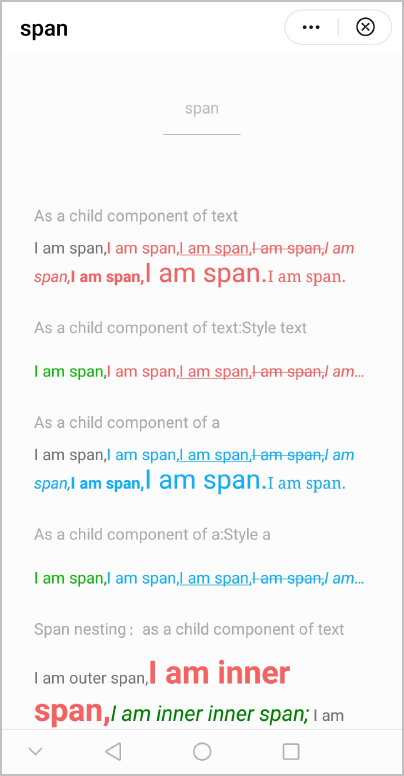
The following figure shows the final effect.