Intelligent Assistant
Chat with our virtual assistant to get answers promptly.
Add the following configuration to the features attribute in the manifest.json file:
- {"name": "system.clipboard"}
Add the following configuration to the script element on the page where the API will be called:
- import clipboard from '@system.clipboard'
Or
- var clipboard = require("@system.clipboard")
Item | Description |
|---|---|
Applicable devices | Mobile phones, tablets, Vision products, and telematics devices |
Applicable regions | Global |
API | Description |
|---|---|
Modifies content on the clipboard. | |
Reads content from the clipboard. |
Description
Modifies content on the clipboard.
OBJECT parameters
Parameter | Type | Mandatory | Description |
|---|---|---|---|
text | string | Yes | Content that needs to be placed on the clipboard. If an empty character string ('') is passed, the clipboard will be cleared. |
success | function | No | Callback upon success. |
fail | function | No | Callback upon failure. |
complete | function | No | Callback upon completion. |
Sample code
- clipboard.set({
- text: 'text'
- })
Description
Reads content from the clipboard.
OBJECT parameters
Parameter | Type | Mandatory | Description |
|---|---|---|---|
success | function | No | Callback upon success. |
fail | function | No | Callback upon failure. |
complete | function | No | Callback upon completion. |
Parameters returned by success
Parameter | Type | Description |
|---|---|---|
text | string | Content on the clipboard. |
Sample code
- clipboard.get({
- success:function(data){
- console.log("handling success: " + data.text);
- },
- fail: function(data, code) {
- console.log("handling fail, code=" + code);
- }
- })
- <template>
- <div class="container">
- <div class="item-container">
- <div class="item-content">
- <text class="txt" if="{{show}}">{{clipboard}}</text>
- </div>
- <div class="item-content txt-left">
- <text class="txt">setClipboardtxt: {{showSet}}</text>
- <text class="txt">getClipboardtxt: {{showGet}}</text>
- </div>
- <input type="button" class="btn" onclick="set" value="Set Clipboard" />
- <input type="button" class="btn" onclick="get" value="Get Clipboard" />
- </div>
- </div>
- </template>
- <style>
- .container{
- flex: 1;
- flex-direction: column;
- }
- .item-container {
- margin-bottom: 50px;
- margin-right: 60px;
- margin-left: 60px;
- flex-direction: column;
- }
- .item-content {
- flex-direction: column;
- padding: 30px;
- margin-bottom: 50px;
- align-items: center;
- justify-content: center;
- }
- .txt {
- padding-top: 15px;
- padding-bottom: 15px;
- }
- .txt-left {
- align-items: flex-start;
- }
- .btn {
- height: 80px;
- text-align: center;
- border-radius: 5px;
- margin-right: 60px;
- margin-left: 60px;
- margin-bottom: 50px;
- color: #ffffff;
- font-size: 30px;
- background-color: #0faeff;
- }
- </style>
- <script>
- import clipboard from '@system.clipboard'
- export default {
- data: {
- show: true,
- clipboard: 'quick app',
- showSet: '',
- showGet: ''
- },
- onInit() {
- this.$page.setTitleBar({ text: 'clipboard' })
- },
- set: function () {
- this.showSet = this.clipboard
- clipboard.set({
- text: this.clipboard,
- success: function () {
- console.info('set success--- ')
- },
- fail: function () {
- console.info('set fail--- ')
- },
- complete: function () {
- console.info('set complete ')
- }
- })
- },
- get: function () {
- var that = this
- clipboard.get({
- success: function (obj) {
- that.showGet = obj.text
- },
- fail: function () {
- console.info('get fail--- ')
- },
- complete: function () {
- console.info('get complete ')
- }
- })
- }
- }
- </script>
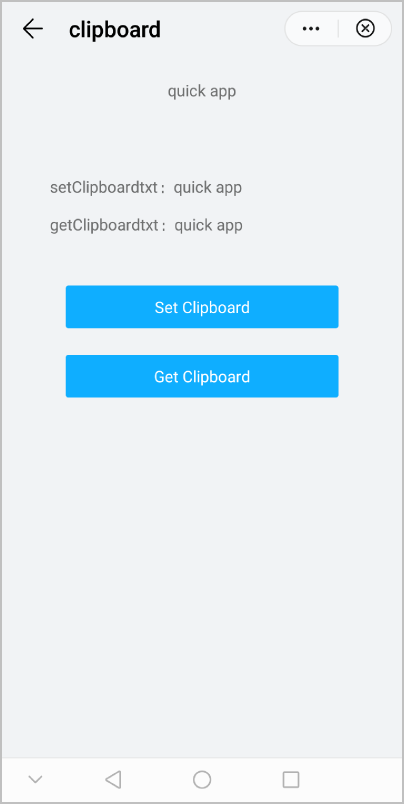
The following figure shows the final effect.