


Intelligent Assistant
Chat with our virtual assistant to get answers promptly.
Inserts scrolling text. By default, the text is displayed in a single line.
Item | Description |
|---|---|
Applicable devices | Mobile phones and tablets |
Applicable regions | Global |
None
In addition to general attributes, the attributes listed in the following table are supported.
Attribute | Type | Default Value | Mandatory | Description |
|---|---|---|---|---|
scrollamount | number | 6 | No | Amount of scrolling at each interval in pixels. |
loop | number | -1 | No | Number of times the marquee will scroll. If no value is specified, the default value –1 is used, indicating infinite. |
direction | string | left | No | Text scrolling direction. The options are left and right. |
In addition to common styles, the styles listed in the following table are supported.
Style | Type | Default Value | Mandatory | Description |
|---|---|---|---|---|
color | color | 0xde000000 | No | Font color. |
font-size | number | 37.5px | No | Font size. |
font-weight | lighter | 100 | 200 | 300 | 400 | 500 | 600 | 700 | 800 | 900 | normal | bold | bolder | normal | No | Font weight. The default value is normal. |
font-family | string | - | No | Font of strings in the element. Android's default fonts normal, sans-serif, serif, and monospace are supported (only for English strings). To customize fonts, please refer to font-face Style. |
In addition to common events, the events listed in the following table are supported.
Event | Parameter | Triggering Condition |
|---|---|---|
onbounce | - | The marquee scrolls to the end. |
onfinish | - | The number of marquee scrolling times reaches the value of the loop attribute. This event can be triggered only when the loop attribute is set to a positive value. |
onstart | - | The marquee starts to scroll. |
Method | Parameter | Description |
|---|---|---|
start | - | Starts to scroll the marquee. |
stop | - | Stops scrolling the marquee. |
- <template>
- <!-- There can only be one root node in the template -->
- <div class="container">
- <marquee id="bbb" loop="2" direction="right" style="font-weight:lighter; width:700px ;
- height:200px;font-family: normal ">huaweiWebsite</marquee>
- <marquee id="aaa" direction="left" scrollamount="30px"
- style="color : red; width:700px ; height:300px;font-family:network,local" onbounce="b" onfinish="f" onstart="s">
- huaweiWebsite
- </marquee>
- <div class="myDiv">
- <input type="button" value="start" onclick="start" />
- <input type="button" value="stop" onclick="stop" />
- </div>
- </div>
- </template>
- <style>
- .container {
- flex-direction: column;
- justify-content: center;
- align-content: center;
- align-items: center;
- }
- .myDiv {
- flex-direction: row;
- }
- #aaa {
- font-size: 37.5px;
- background-color: #00ffff;
- }
- @font-face {
- font-family: 'sampleA';
- src:
- /* Here is just an example of a local address. Do not use font files in your product.*/
- url('/Common/fonts/FZLTTHBJW.TTF'),
- /* Here is just an example of a local address. Do not use font files in your product.*/
- url('https://lfmemberdev.hwcloudtest.cn:9094/fastapp/download/FZCCHJW.TTF')
- }
- @font-face {
- font-family: 'local';
- /* Here is just an example of a local address. Do not use font files in your product.*/
- src: url('/Common/fonts/FZLTTHBJW.TTF');
- }
- @font-face {
- font-family: 'sample';
- src:
- /* Here is just an example of a local address. Do not use font files in your product.*/
- url('/Common/fonts/FZLTTHBJW.TTF'),
- /* Here is just an example of a local address. Do not use font files in your product.*/
- url('https://lfmemberdev.hwcloudtest.cn:9094/fastapp/download/FZCCHJW.TTF'),
- local(serif);
- }
- @font-face {
- font-family: 'system';
- src: local('serif');
- }
- @font-face {
- font-family: 'network';
- /* Here is just an example of a local address. Do not use font files in your product.*/
- src: url('https://lfmemberdev.hwcloudtest.cn:9094/fastapp/download/FZCCHJW.TTF');
- }
- </style>
- <script>
- module.exports = {
- onInit() {
- this.$page.setTitleBar({ text: 'marquee' })
- },
- onReady: function () {
- console.log('onReady ')
- },
- stop: function () {
- this.$element('aaa').stop()
- this.$element('bbb').stop()
- },
- start: function () {
- this.$element('aaa').start()
- this.$element('bbb').start()
- },
- b: function () {
- console.log('onBounce')
- },
- f: function () {
- console.log('onFinish')
- },
- s: function () {
- console.log('onStart')
- }
- }
- </script>
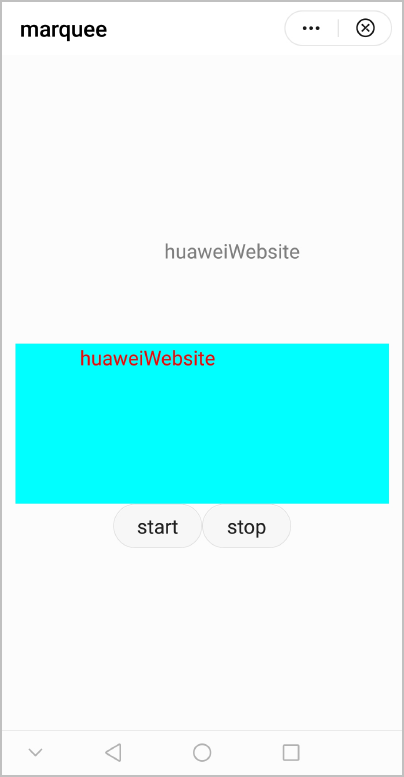
The following figure shows the final effect.
Version | Date | Description |
|---|---|---|
1050 | 2019-09-20 | Released the first version. |