Overview
Displays online HTML pages. The content is added following the useragent attribute of WebView. The content is in the following format: hap/<Platform version number>/<Vendor ID> <Platform app package name>/<Platform app version number> <App package name>/<App version number> (<Source>). The source here is the same as that in the result returned by the getInfo method of an app API.
The web element supports file download, which can be implemented using the API for opening web pages.
Application Scope
Item | Description |
|---|---|
Applicable devices | Mobile phones, tablets, Vision products, and telematics devices |
Applicable regions | Global |
Attributes
The web element supports the following attributes.
Name | Type | Default Value | Mandatory | Description |
|---|---|---|---|---|
src | string | - | No | URL of a web page that needs to be loaded. CAUTION: The positioning function is supported only by HTTPS websites. |
supportzoom (1070+) | boolean | false | No | Indicates whether a web page can be zoomed in or out on. CAUTION: If user-scalable is set to no for a web page, the web page does not support zooming. |
trustedurl (1020+) | array | - | No | Trusted URL, which can be a regular expression. The current value of src is used by default. CAUTION: Only the websites specified by trustedurl or src can support two-way communication with the framework. |
allowthirdpartycookies (1030+) | boolean | false | No | Indicates whether cookies can be delivered across domains. The default value is false. |
showloadingdialog (1070+) | boolean | true | No | Indicates whether to display the loading progress bar. |
useragent (1070+) | string | default | No | User agent of the web element. By default, the user agent of the quick app is used.
|
algorithmsforlayout (1070+) | string | narrowcolumn | No | Bottom-layer layout algorithm. This will trigger layout adjustment of a WebView.
|
wideviewport (1070+) | boolean | true | No | Indicates whether a WebView supports HTML meta tags for the viewport or the wide viewport.
|
overviewmodeinload (1070+) | boolean | false | No | Indicates whether a WebView loads pages in overview mode, that is, whether to zoom out on the content to make the content width shorter than the screen. This attribute is used when the content width is greater than the width of the WebView, for example, when the wide viewport is enabled. |
multiwindow (1070+) | boolean | false | No | Indicates whether the web element supports multi-window display. |
jumppolicy (1070+) | string | default | No | Multi-window opening policy.
|
openinbrowserurl (1070+) | array | - | No | Multi-window URL to be opened in the system browser. A regular expression can be configured. |
xrequestedwithpolicy (1070+) | number | 1 | No | Value of the x-requested-with header field in the HTTP/HTTPS request sent by the web element.
|
fullscreendirection (1070+) | string | landscape | No | Orientation of the web element in full-screen mode. The options are as follows:
|
initialscale (1077+) | number | - | No | Initial percentage of the content displayed in the web element, in %. If this attribute is set, wideviewport must be set to false. |
renamejsinterface (1077+) | string | - | No | Name of the API for the web element to communicate with HTML5. The default name is system. If an API named system already exists, modify this attribute to avoid API name conflicts. |
Since version 1090, the web element supports the capture attribute of the input tag on HTML5 pages.
The web element supports file upload. In 1040 and later versions, it allows users to directly launch the camera, video recording, and audio recording pages. To edit the HTML file to be redirected to, set the parameters of the input element in the HTML file, and call the HTML file through the src attribute of web.
- Switch to the camera page: Tap the input area. When options are displayed, you can either tap Take a photo to take photos or tap Image to select an image in any format specified by accept.
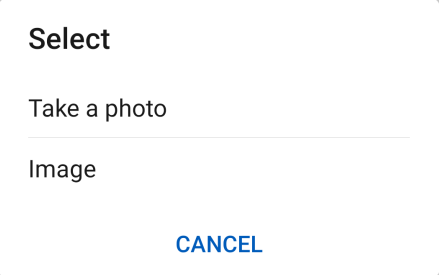
<input type="file" accept="image/*"/> // You can select any image file.
<input type="file" accept=".png,.gif,.jpeg"/>    // You can select an image in any of the specified formats.
<input type="file" accept="image/png,image/gif,image/jpeg"/>    // You can select an image in any of the specified formats.
- Switch to the video recording page: Tap the input area. When options are displayed, you can either tap Take a video to record a video or tap Video to select a video in any format specified by accept.
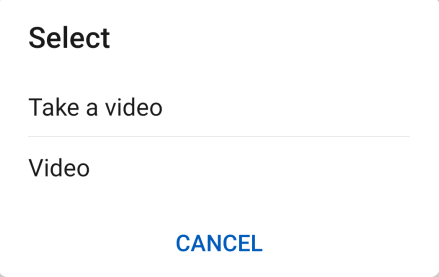
<input type="file" accept="image/*"/> // You can select any video file.
<input type="file" accept=".mp4"/>    // You can select a video in any of the specified formats.
- Switch to the audio recording page: Tap the input area. When options are displayed, you can either tap Make audio recording to record an audio or tap Audio to select an audio in any format specified by accept.
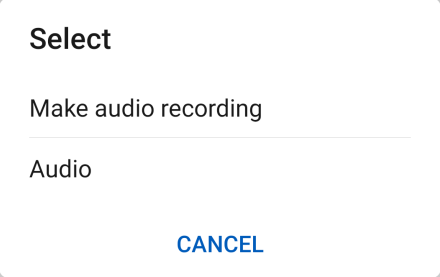
<input type="file" accept="audio/*"/> // You can select any audio file.
Events
The swipe event is not supported. In addition, versions earlier than 1040 do not support the click event. In addition to common events, the events listed in the following table are supported.
Event | Parameter | Triggering Condition |
|---|---|---|
pagestart | {url: urlString, canBack: true/false 1080+, canForward: true/false 1080+} | A web page starts to be loaded. |
pagefinish | {url: urlString, canBack: true/false, canForward: true/false} | A web page has been successfully loaded. |
titlereceive | {title: title} | A web page title is received. |
error | {errorMsg: errorMsg, url: urlString 1080+, canBack: true/false 1080+, canForward: true/false 1080+,errorType: typeInteger 1080+, code:codeInteger 1080+, description: descriptionString 1080+, isAuthorized: true/false 1080+} | An error occurs during web page loading or on the opened web page. |
message (1020+) | {message:messageString, url:urlString} | A message is received from a web page. |
progress (1070+) | {newProgress:newProgressString} | A web page loading progress changes. newProgress: current loading progress. The value ranges from 0 to 100. |
Events available to a web page
Event | Parameter | Triggering Condition |
|---|---|---|
system.onmessage(1020+) | string | A message from a quick app is received. |
New parameters returned in pagestart (1080+)
Parameter | Type | Description |
|---|---|---|
canBack | boolean | Indicates whether backward browse is supported. |
canForward | boolean | Indicates whether forward browse is supported. |
New parameters returned in error (1080+)
Parameter | Type | Description |
|---|---|---|
url | string | URL for accessing the current resource when the WebView fails to load the resource. |
canBack | boolean | Indicates whether backward browse is supported in the current WebView when an error occurs during resource loading by the WebView. |
canForward | boolean | Indicates whether forward browse is supported in the current WebView when an error occurs during resource loading by the WebView. |
errorType | integer | Type of the error that occurs when the WebView loads resources. The options are as follows:
|
code | integer | Error code returned when the WebView fails to load resources, for example, 404 or 500. |
description | string | Description of the message displayed when an error occurs during resource loading on the WebView. |
isAuthorized | boolean | Indicates whether the current abnormal domain name is authorized when the WebView fails to load resources. |
Methods
Method | Parameter | Description |
|---|---|---|
reload | - | Reloads a page. |
forward | - | Browses the previous page in the browse history. |
back | - | Browses the next page in the browse history. |
canForward | {callback: Function} | Determines whether forward browse is supported. |
canBack | {callback: Function} | Determines whether backward browse is supported. |
postMessage (1020+) | {message:messageString, } | Sends messages to a web page. |
Methods available to a web page (1020+)
Method | Parameter | Description |
|---|---|---|
system.postMessage | string | Message sent to a quick app. |
Parameters returned in canForward
Parameter | Type | Description |
|---|---|---|
canForward | boolean | Indicates whether forward browse is supported. |
Parameters returned by canBack
Parameter | Type | Description |
|---|---|---|
canBack | boolean | Indicates whether backward browse is supported. |
Since version 1030, the web element supports full-screen display. The back method can be used to exit the full-screen mode. If the web element of your quick app has the processing logic of the Back button (the Back button of the web element is called in canBack), your quick app does not need to process the Back button. Otherwise, add the Back button so that users can tap this button to exit full-screen mode. The sample code is as follows:
onBackPress() {
    this.$element('web').canBack({
        callback: function (e) {
            if (e) {
                this.$element('web').back();
            } else {
                router.back();
            }
        }.bind(this)
    });
    return true;
}
Sample Code
<template>
    <div class="container">
        <div class="titleBar">
<text class="titleBar-text" onclick="back">Back</text>>
            <text class="titleBar-text">
                {{title}}
            </text>
            <text class="titleBar-text" onclick="refresh">Refresh</text>>
        </div>
        <web class="web-page" src="{{websrc}}" trustedurl="{{list}}" onpagestart="onPageStart" onpagefinish="onPageFinish" ontitlereceive="onTitleReceive"
            onerror="onError" onmessage="onMessage" id="web"></web>
    </div>
</template>
<style>
    .container {
      flex-direction: column;
    }
    .titleBar {
        flex-direction: row;
        justify-content: space-between;
        padding: 10px;
        height: 100px;
        width: 100%;
        background-color: #a9a9a9;
    }
    .titleBar-text {
        lines: 1;
        text-overflow: ellipsis;
        font-size: 40px;
        color: #000000;
        align-content: center;
    }
    .web-page {
        width: 100%;
        height: 800px;
    }
</style>
<script>
    import router from "@system.router"
    import prompt from '@system.prompt'
    export default {
        data: {
            title: "",
            websrc: 'https://developer.huawei.com/consumer/cn/service/hms/fastapp.html',
            arrowRightShow: true,
            isRefreshing: false,
            list: [/.*/, "new RegExp('https?.*')"],
            // list: [/.*/],
            msg: ''
        },
        onInit() {
            this.$on('arrowLeft', this.arrowLeftIcon)
            this.$on('arrowRight', this.arrowRightIcon)
            console.info('websrc: ' + this.websrc)
        },
        onPageStart(e) {
            this.isRefreshing = false;
            console.info('pagestart: ' + e.url)
        },
        // Triggered upon each page switchover.
        onPageFinish(e) {
            // console.info('pagefinish: '+e.url, e.canBack, e.canForward)
            // Hide the icon on the right if backward browse is not supported.
            this.arrowRightShow = e.canForward;
        },
        onTitleReceive(e) {
            console.error('onTitleReceive', e.title);
            this.title = e.title;
        },
        onError() {
            console.info('pageError')
        },
        onMessage(e) {
            console.info('onmessage e = ' + e.message + ", url = " + e.url);
            this.msg = e.message;
            // prompt.showToast({
            //      message: e.message + ': ' + e.url
            // })
        },
        arrowLeftIcon() {
            this.isCanBack();
        },
        arrowRightIcon() {
            this.isCanForward();
        },
        isCanForward() {
            this.$element('web').canForward({
                callback: function (e) {
                    if (e) {
                        this.$element('web').forward();
                    }
                }.bind(this)
            })
        },
        isCanBack() {
            this.$element('web').canBack({
                callback: function (e) {
                    if (e) {
                        this.$element('web').back();
                    } else {
                        router.back();
                    }
                }.bind(this)
            })
        },
        back() {
            this.$dispatch("arrowLeft");
        },
        next() {
            this.$dispatch('arrowRight');
        },
        refresh: function (e) {
            this.$element('web').reload();
        },
        sendMessage: function () {
            this.$element('web').postMessage({ message: 'message to Web page' });
        }
    }
</script>
Version Change History
Version | Date | Description |
|---|---|---|
1090 | 2022-05-19 | Supported the capture attribute of the input tag on HTML5 pages. |
1080 | 2021-12-28 |
|
1070 | 2020-05-19 |
|
1040 | 2019-06-24 | Added the function of allowing users to choose an image, video, or audio file or launch the camera, video recording, or audio recording page through input on HTML5 pages. |
1030 | 2018-10-31 |
|
1020 | 2018-06-20 |
|
Tips
- Do not name methods in HTML5 page using click. Otherwise two-way communication will fail.
- In versions later than 1070, a new window can be opened in HTML, for example, by using window.open. New windows use the user agent configuration of the historical web page. For some earlier versions, the default user agent is used for new windows.
- If the web element cannot open the local HTML file, you can use the media.pickFile method to select the local HTML file and call router.push to open it.
[h2]FAQs
- Can I change the title of an HTML5 page?
- What can I do if the page cannot be scrolled after the HTML5 page is loaded using the web element?
- Why a web page cannot communicate with the framework after calling system.postMessage('xxx')?
- How do I determine whether an HTML5 page embedded in a web element is running in a quick app?
- A web element is embedded in my quick app. I use the code this.$element('web').postMessage({data.code }) to send an event to the HTML5 page through the web element. However, the HTML5 page does not receive the event. What do I do?
- A web page loaded by a web element involves payment using Alipay, which can launch the Alipay app earlier but now can only open the HTML5 page of Alipay. Why did that happen?
- An HTML5 web page is opened through a web component, and the target web page is redirected multiple times. If the page URL needs to be saved, can the quick app have a method to obtain it?
- What can I do if a cross-origin problem occurs when the web page is opened by the web element?