


Intelligent Assistant
Chat with our virtual assistant to get answers promptly.
Data processed by the quick app APIs may be read by other apps when being used on a PC. Therefore, you are not advised to store sensitive data through those APIs.
Add the following configuration to the features attribute in the manifest.json file:
{"name": "service.exchange"} Add the following configuration to the script element on the page where the API will be called:
import exchange from '@service.exchange'
Or
var exchange = require('@service.exchange') Item | Description |
|---|---|
Applicable devices | Mobile phones and tablets |
Applicable regions | Global |
Provides a method for data interaction between quick apps. A quick app can use this API to release data or obtain data from other quick apps. The data spaces for data exchange are as follows:
Global data supports only the set and get operations, not operations such as remove, clear, grantPermission, and revokePermission.
API | Description |
|---|---|
Reads data. | |
Releases data to a quick app. | |
Deletes data from a quick app. | |
Clears data from a quick app. | |
Assigns the data read permission to an app. By default, apps with the same signature as this app have the permission to read data. | |
Revokes the data read permission from an app. The data read permission cannot be revoked from apps with the same signature as this app. |
Description
Reads data.
OBJECT
Parameter | Type | Mandatory | Description |
|---|---|---|---|
package | string | No | Package name of the data publisher. This parameter is mandatory when scope is set to application but must be left empty when scope is set to global. |
sign | string | No | Data publisher signature encrypted using SHA-256. This parameter is mandatory when scope is set to application but must be left empty when scope is set to global. NOTE This signature is specified in the signatureDigests parameter returned when the pkg.getSignatureDigests API is called successfully. |
scope | string | No | Data publishing scope. The options are application and global. The default value is application. |
key | string | Yes | Data key. |
success | function | No | Callback upon success. |
fail | function | No | Callback upon failure. |
complete | function | No | Callback upon completion, regardless of whether the API call is successful or fails. |
Parameters returned by success
Parameter | Type | Description |
|---|---|---|
value | string | Data value. |
Result codes returned by fail
Result Code | Description |
|---|---|
202 | Invalid parameter. |
1000 | No permission. |
Sample code
exchange.get({
    package: 'com.example',
    sign: '7a12ec1d66233f20a20141035b1f7937',
    key: 'token',
    success: function(ret) {
        console.log(`handling success, value = ${ret.value}`)
    },
    fail: function(data, code) {
        console.log(`handling fail, code = ${code}`)
    }
}) Description
Releases data to a quick app.
OBJECT
Parameter | Type | Mandatory | Description |
|---|---|---|---|
key | string | Yes | Data key. |
value | string | Yes | Data value. |
scope | string | No | Data publishing scope. The options are application and global. The default value is application. |
success | function | No | Callback upon success. |
fail | function | No | Callback upon failure. |
complete | function | No | Callback upon completion, regardless of whether the API call is successful or fails. |
package (1080+) | string | No | Package name of the data publisher. This parameter is mandatory when scope is set to application and data needs to be modified for other apps. If scope is set to global, this parameter should be empty. |
sign (1080+) | string | No | SHA-256 signed by the data publisher. This parameter is mandatory when scope is set to application and data needs to be modified for other apps. If scope is set to global, this parameter should be empty. |
Result codes returned by fail
Result Code | Description |
|---|---|
202 | Invalid parameter. |
Sample code
exchange.set({
    package: 'com.fastapp.sample',
    sign: '6d3e6a3dcbdadb0aa94f64e33a36b01254cb6ef7e14be282d885cd95aeb952e0',
    key: 'token',
    value: '12347979',
    success: function() {
        console.log(`handling success`)
    },
    fail: function(data, code) {
        console.log(`handling fail, code = ${code}`)
    }
}) Description
Deletes data from a quick app.
OBJECT
Parameter | Type | Mandatory | Description |
|---|---|---|---|
key | string | Yes | Data key. |
success | function | No | Callback upon success. |
fail | function | No | Callback upon failure. |
complete | function | No | Callback upon completion, regardless of whether the API call is successful or fails. |
package (1080+) | string | No | Package name of the data publisher. This parameter is mandatory when data is deleted from other apps. |
sign(1080+) | string | No | SHA-256 signed by the data publisher. This parameter is mandatory when data is deleted from other apps. |
Sample code
exchange.remove({
    package: 'com.fastapp.sample',
    sign: '6d3e6a3dcbdadb0aa94f64e33a36b01254cb6ef7e14be282d885cd95aeb952e0',
    key: 'token',
    success: function(ret) {
        console.log(`handling success, value = ${ret.value}`)
    },
    fail: function(data, code) {
        console.log(`handling fail, code = ${code}`)
    }
}) Description
Clears data from a quick app.
OBJECT
Parameter | Type | Mandatory | Description |
|---|---|---|---|
success | function | No | Callback upon success. |
fail | function | No | Callback upon failure. |
complete | function | No | Callback upon completion, regardless of whether the API call is successful or fails. |
Sample code
exchange.clear({
    success: function() {
        console.log(`handling success`)
    },
    fail: function(data, code) {
        console.log(`handling fail, code = ${code}`)
    }
}) Description
Assigns the data read permission to an app. By default, apps with the same signature as this app have the permission to read data.
OBJECT
Parameter | Type | Mandatory | Description |
|---|---|---|---|
package | string | Yes | Package name of the app to be authorized. |
sign | string | Yes | Signature (SHA-256) of the app to be authorized. |
key | string | No | Data key. If this parameter is left empty, the data read permission on all keys is assigned. |
success | function | No | Callback upon success. |
fail | function | No | Callback upon failure. |
complete | function | No | Callback upon completion, regardless of whether the API call is successful or fails. |
writable(1080+) | boolean | No | Indicates whether data can be modified or deleted by an authorized app. The default value is false.
|
Result codes returned by fail
Result Code | Description |
|---|---|
202 | Invalid parameter. |
Sample code
exchange.grantPermission({
    package: 'com.fastapp.sample',
    sign: '6d3e6a3dcbdadb0aa94f64e33a36b01254cb6ef7e14be282d885cd95aeb952e0',
    writable: true,
    success: function() {
        console.log(`handling success`)
    },
    fail: function(data, code) {
        console.log(`handling fail, code = ${code}`)
    }
}) Description
Revokes the data read permission from an app. The data read permission cannot be revoked from apps with the same signature as this app.
OBJECT
Parameter | Type | Mandatory | Description |
|---|---|---|---|
package | string | Yes | Package name of the app whose data read permission is to be revoked. |
key | string | No | Data key. If this parameter is left empty, data read permission on all keys is revoked. |
success | function | No | Callback upon success. |
fail | function | No | Callback upon failure. |
complete | function | No | Callback upon completion, regardless of whether the API call is successful or fails. |
Result codes returned by fail
Result Code | Description |
|---|---|
202 | Invalid parameter. |
Sample code
exchange.revokePermission({
    package: 'com.example',
    success: function() {
        console.log(`handling success`)
    },
    fail: function(data, code) {
        console.log(`handling fail, code = ${code}`)
    }
}) <template>
<div class="container">
<div class="item-container">
<div class="item-content">
<div class="item-content-detail">
<text class="txt">key:</text>
<input class="input" placeholder=" please input key" value={{exchangeKey}} onchange="keyFn" />
</div>
<div class="item-content-detail">
<text class="txt">value:</text>
<input class="input" placeholder="please input value" value={{exchangeValue}} onchange="valueFn" />
</div>
</div>
<!-- Set data -->
<input type="button" class="btn" onclick="setAppExchange" value="setAppExchange" />
<input type="button" class="btn" onclick="setGlobalExchange" value="setGlobalExchange" />
<!-- Read data -->
<input type="button" class="btn" onclick="getAppExchange" value="getAppExchange key:{{exchangeKey}}" />
<input type="button" class="btn" onclick="getGlobalExchange" value="getGlobalExchange key:{{exchangeKey}}" />>
<!-- To grant authorization -->
<input type="button" class="btn" onclick="grantPermission" value="grantPermission" />
<input type="button" class="btn" onclick="revokePermission" value="revokePermission" />
<!-- Delete operation -->
<input type="button" class="btn" onclick="clearExchange" value="clearExchange" />
<input type="button" class="btn" onclick="removeExchange" value="removeExchange" />
</div>
</div>
</template>
<style>
.container{
flex: 1;
flex-direction: column;
}
.item-container {
margin-bottom: 50px;
margin-right: 60px;
margin-left: 60px;
flex-direction: column;
}
.item-content {
flex-direction: column;
background-color: #ffffff;
padding-left: 30px;
padding-right: 30px;
padding-top: 15px;
padding-bottom: 15px;
margin-bottom: 100px;
}
.item-content-detail {
align-items: center;
}
.input {
flex: 1;
font-size: 30px;
padding-left: 20px;
}
.txt {
width: 100px;
padding-top: 15px;
padding-bottom: 15px;
text-align: right;
}
.btn {
height: 80px;
text-align: center;
border-radius: 5px;
margin-right: 60px;
margin-left: 60px;
margin-bottom: 50px;
color: #ffffff;
font-size: 30px;
background-color: #0faeff;
}
</style>
<script>
import exchange from '@service.exchange'
import prompt from '@system.prompt'
export default {
data: {
exchangeKey: '',
exchangeValue: '',
},
onInit: function () {
this.$page.setTitleBar({ text: 'exchange' })
},
keyFn: function (e) {
this.exchangeKey = e.text
},
valueFn: function (e) {
this.exchangeValue = e.text
},
setAppExchange: function () {
var that = this
if (this.exchangeKey && this.exchangeValue) {
exchange.set({
key: this.exchangeKey,
value: this.exchangeValue,
scope: 'application',
success: function (ret) {
prompt.showToast({
message: '{key:' + that.exchangeKey + ',value:' + that.exchangeValue + '}',
})
console.log("message"+ that.exchangeKey + ',value:' + that.exchangeValue )
},
fail: function (erromsg, errocode) {
prompt.showToast({ message: 'set fail --- ' + errocode + ':' + erromsg })
console.info('set fail --- ' + errocode + ':' + erromsg)
},
complete: function () {
prompt.showToast({ message: 'set complete' })
console.info('set complete ')
}
})
} else {
prompt.showToast({
message: 'Please enter the key and value values'
})
}
},
setGlobalExchange: function () {
var that = this
if (this.exchangeKey && this.exchangeValue) {
exchange.set({
key: this.exchangeKey,
value: this.exchangeValue,
scope: 'global',
success: function (ret) {
prompt.showToast({
message: '{key:' + that.exchangeKey + ',value:' + that.exchangeValue + '}',
})
},
fail: function (erromsg, errocode) {
prompt.showToast({ message: 'set fail --- ' + errocode + ':' + erromsg })
console.info('set fail --- ' + errocode + ':' + erromsg)
},
complete: function () {
prompt.showToast({ message: 'set complete' })
console.info('set complete ')
}
})
} else {
prompt.showToast({
message: 'Please enter the key and value values'
})
}
},
getAppExchange: function () {
exchange.get({
package: 'com.fastapp.sample.global',
scope: 'application',
sign: '6d3e6a3dcbdadb0aa94f64e33a36b01254cb6ef7e14be282d885cd95aeb952e0',
key: this.exchangeKey,
success: function (ret) {
console.info('exchange.get(): ', JSON.stringify(ret))
prompt.showToast({
message: 'value: ' + ret,
})
},
fail: function (erromsg, errocode) {
prompt.showToast({ message: 'get fail --- ' + errocode + ':' + erromsg })
console.info('get fail --- ' + errocode + ':' + erromsg)
},
complete: function () {
console.info('get complete ')
}
})
},
getGlobalExchange: function () {
var that = this
exchange.get({
package: '',
sign: '',
scope: 'global',
key: this.exchangeKey,
success: function (ret) {
console.info('storage.get(): ', JSON.stringify(ret))
that.storageShow = ret
prompt.showToast({
message: 'value: ' + ret,
})
},
fail: function (erromsg, errocode) {
prompt.showToast({ message: 'get fail --- ' + errocode + ':' + erromsg })
console.info('get fail --- ' + errocode + ':' + erromsg)
},
complete: function () {
console.info('get complete ')
}
})
},
grantPermission: function () {
exchange.grantPermission({
package: 'com.exchang.demo',
sign: '6f65a2a4fbb1941436f2bfeb23b1c0c4003f30de2b9c4d31a4d188b1de7d0893',
key: this.exchangeKey,
success: function (ret) {
console.info('exchange.grantPermission(): ', JSON.stringify(ret))
prompt.showToast({
message: 'value: ' + ret,
})
},
fail: function (erromsg, errocode) {
prompt.showToast({ message: 'grantPermission fail --- ' + errocode + ':' + erromsg })
console.info('grantPermission fail --- ' + errocode + ':' + erromsg)
},
complete: function () {
console.info('grantPermission complete ')
}
})
},
revokePermission: function () {
exchange.revokePermission({
package: 'com.fastapp.sample.global',
key: this.exchangeKey,
success: function (ret) {
console.info('exchange.revokePermission(): ', JSON.stringify(ret))
prompt.showToast({
message: 'value: ' + ret,
})
},
fail: function (erromsg, errocode) {
prompt.showToast({ message: 'revokePermission fail --- ' + errocode + ':' + erromsg })
console.info('revokePermission fail --- ' + errocode + ':' + erromsg)
},
complete: function () {
console.info('revokePermission complete ')
}
})
},
clearExchange: function () {
exchange.clear({
success: function () {
prompt.showToast({
message: 'success',
})
},
fail: function (erromsg, errocode) {
prompt.showToast({ message: 'clear fail --- ' + errocode + ':' + erromsg })
console.info('clear fail --- ' + errocode + ':' + erromsg)
},
complete: function () {
prompt.showToast({ message: 'clear complete' })
console.info('clear complete ')
}
})
},
removeExchange: function () {
if (this.exchangeKey) {
exchange.remove({
key: this.exchangeKey,
success: function () {
prompt.showToast({
message: 'success',
})
},
fail: function (erromsg, errocode) {
prompt.showToast({ message: 'get fail --- ' + errocode + ':' + erromsg })
console.info('get fail --- ' + errocode + ':' + erromsg)
},
complete: function () {
console.info('get complete ')
}
})
} else {
prompt.showToast({ message: 'key is null' })
}
}
}
</script>
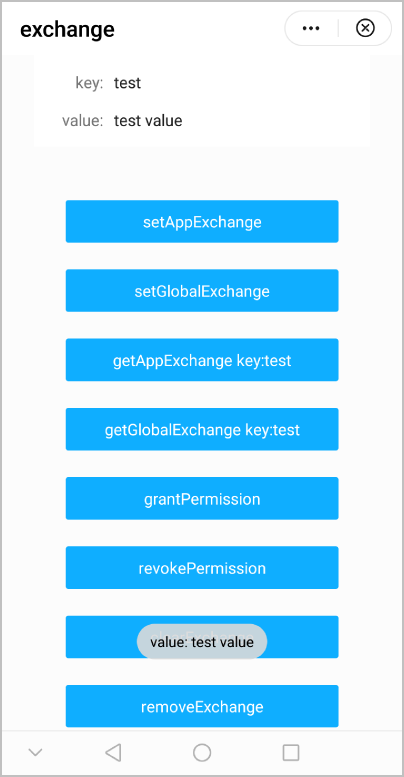
The following figure shows the final effect.
Version | Date | Description |
|---|---|---|
1080 | 2021-12-28 | Added the function of allowing authorized apps to write and delete data through the exchange APIs. |
1050 | 2019-09-20 | First official release. |