Add HMS API Policy
To cut down on time and effort spent integrating your app with HMS Core, HMS Toolkit supports two sets of functionalities with one set of code. The Add HMS API policy automatically converts GMS APIs to XMS APIs and dynamically determines whether XMS code calls GMS APIs or HMS APIs based on the route settings defined in Route Initialization Policy in the Add HMS API Scenario.
XMS APIs consist of GMS APIs, HMS APIs, and routing services, masking the differences between GMS and HMS.
Class in GMS:
public class G {
    ...
    public void show() {
        ...
    }
    ...
}
Equivalent class in HMS:
public class H {
    ...
    public void display() {
        ...
    }
    ...
}
The Add HMS API policy generates class X as follows:
public class X {
    private G gInstance;
    private H hInstance;
    public X(G g, H h) {
        this.gInstance = g;
        this.hInstance = h;
    }
    public G getGInstance() { return gInstance; }
    public H getHInstance() { return hInstance; }
    ...
    public void show() {
        if (isHms()) { // Route, which can be set in GlobalEnvSetting.java.
            ((H)this.getHInstance()).display();
        } else {
            ((G)this.getGInstance()).show();
        }
    }
    ...
}
GMS APIs in an app are automatically converted to XMS APIs. Example:
Code for calling GMS APIs:
...
G inst = ...;
inst.show()
...
After the Add HMS API policy works, GMS APIs are replaced with XMS APIs:
...
X inst = ...; // Replace the class with an XMS class.
inst.show() // Call the show method in XMS to call GMS APIs or HMS APIs based on the route settings.
...
You can determine whether to call GMS APIs or HMS APIs based on the route settings.

For APIs that cannot be automatically converted, manually convert them by referring to Convertor Manual Conversion Guide.
Basic Principles of the XClassLoader Solution
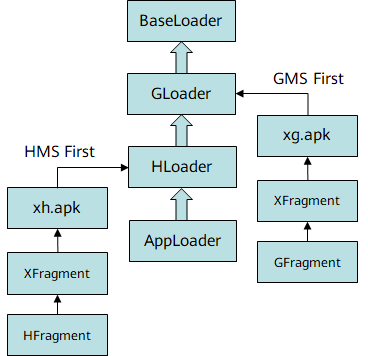
When the Add HMS API policy is used, the XClassLoader solution is provided to solve the problem that some APIs cannot be converted in combination mode. This solution is used to reduce the workload of manually modifying resources. In this mode, the tool generates a built-in xmsaux module in the xmsadapter module. The xmsaux module contains the xg, xh, and xapi modules and the XClassLoader code.
Class in GMS:
public class GFragment extends Fragment {
    ...
    public G methodA() {
        ...
    }
    ...
}
Equivalent class in HMS:
public class HFragment extends Fragment {
    ...
    public H methodA() {
        ...
    }
    ...
}
In the Add HMS API policy, subclass X corresponding to G in GMS is generated in the xg module.
public class XFragment extends GFragment {
    ...
    public X methodA() {
        super.methodA();
        ...
    }
    ...
}
Subclass X corresponding to H in HMS is generated in the xh module.
public class XFragment extends HFragment {
    ...
    public X methodA() {
        super.methodA();
        ...
    }
    ...
}
Subclass X that only gets involved in compilation is generated in the xapi module.
public class XFragment extends Fragment {
    ...
    public X methodA() {
        throw new java.lang.RuntimeException("Stub");
    }
    ...
}
Based on the parent-delegation model for Java class loaders, we have implemented XMS APIs inherited from HMS APIs and GMS APIs respectively, by packaging xg.apk and xh.apk through the customized gradle script in the xmsaux/scripts directory. XClassLoader is used to implement dynamic loading during APK running, and therefore determine whether to call HMS APIs or GMS APIs based on the route configuration.
Reference for Manual Conversion of Serialization and Deserialization Under the Convertor Add HMS API Policy
Add HMS API does not support automatic conversion of serialization and deserialization. You need to manually implement conversion based on serialization and deserialization tools and service code logic.
Add build dependencies to the app-level build.gradle file.
- Add build dependencies to the app-level build.gradle file.
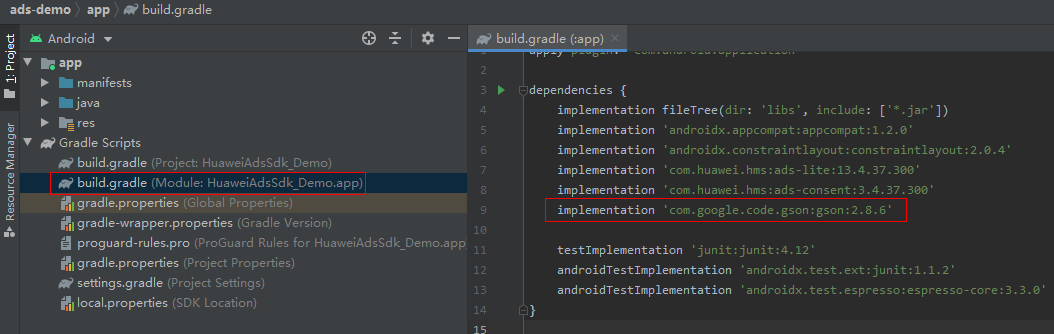
dependencies { implementation 'com.google.code.gson:gson:2.8.6' } - After completing the preceding configuration, click the synchronization icon on the toolbar to synchronize the build.gradle file.


If an error occurs, check the network connection and the configuration in the build.gradle file.
Refer to the following solution based on the Gson tool to quickly implement the conversion.
- Implement the serialization API JsonSerializer by overriding the serialization method:
public class DataSerializer<T> implements JsonSerializer<T> { private Gson gson = new Gson(); @Override public JsonElement serialize(T src, Type typeOfSrc, JsonSerializationContext context) { if (src instanceof ArrayList) { List list = new ArrayList(); ArrayList al = (ArrayList)src; for (int i = 0; i < al.size(); i++) { if (GlobalEnvSetting.isHms()) { list.add(gson.toJson(((XGettable)al.get(i)).getHInstance())); } else { list.add(gson.toJson(((XGettable)al.get(i)).getGInstance())); } } return context.serialize(list); } else { if (GlobalEnvSetting.isHms()) { return context.serialize(((XGettable)src).getHInstance()); } else { return context.serialize(((XGettable)src).getGInstance()); } } } } - Implement the deserialization API JsonDeserializer by overriding the deserialization method:
public class DataDeserializer<T> implements JsonDeserializer<T> { Class xClass; // xms class Class gClass; // gms class corresponding to the xms class Class hClass; // hms class corresponding to the xms class Gson gson = new Gson(); public DataDeserializer(Class xClass, Class gClass, Class hClass) { this.xClass = xClass; this.gClass = gClass; this.hClass = hClass; } @Override public T deserialize(JsonElement json, Type typeOfT, JsonDeserializationContext context) throws JsonParseException { if (json.isJsonArray()) { Object gObj = null; Object hObj = null; List list = new ArrayList<>(); JsonArray jsonArray = json.getAsJsonArray(); for (JsonElement element : jsonArray) { if (GlobalEnvSetting.isHms()) { gObj = gson.fromJson(element, hClass); } else { hObj = gson.fromJson(element, gClass); } try { Constructor constructor = xClass.getConstructor(gClass, hClass); list.add(constructor.newInstance(gObj, hObj)); } catch (NoSuchMethodException e) { e.printStackTrace(); } catch (IllegalAccessException e) { e.printStackTrace(); } catch (InstantiationException e) { e.printStackTrace(); } catch (InvocationTargetException e) { e.printStackTrace(); } } return (T) list; } else { Object gObj = null; Object hObj = null; if (org.xms.g.utils.GlobalEnvSetting.isHms()) { hObj = gson.fromJson(json, hClass); } else { gObj = gson.fromJson(json, gClass); } try { Constructor constructor = xClass.getConstructor(gClass, hClass); return (T) constructor.newInstance(gObj, hObj); } catch (NoSuchMethodException e) { e.printStackTrace(); } catch (IllegalAccessException e) { e.printStackTrace(); } catch (InstantiationException e) { e.printStackTrace(); } catch (InvocationTargetException e) { e.printStackTrace(); } return null; } } } - Register the XMS API, GMS API, and HMS API classes to be serialized with Gson as follows:
private static Gson gson = new GsonBuilder().registerTypeAdapter(ArrayList.class,
        new DataDeserializer<ArrayList>(DetectedActivity.class,
            com.google.android.gms.location.DetectedActivity.class,
            com.huawei.hms.location.ActivityIdentificationData.class))
        .registerTypeAdapter(ArrayList.class, new DataSerializer<ArrayList>()).create();
Register the DataDeserializer and DataSerializer classes with Gson.
ArrayList is the operation object type. Pass the XMS API, GMS API, and HMS API classes corresponding to the ArrayList element.
- Modify the code.
GMS API code before modification:
Type listType = new TypeToken<ArrayList<DetectedActivity>>() {}.getType();
ArrayList<DetectedActivity> detectedActivities = new Gson().fromJson(jsonArray, listType);
Code after modification (replace new Gson with gson):
Type listType = new TypeToken<ArrayList<DetectedActivity>>() {}.getType();
ArrayList<DetectedActivity> detectedActivities = gson.fromJson(jsonArray, listType);
Route Initialization Policy in the Add HMS API Scenario
During conversion, you need to determine whether HMS or GMS is preferred. In addition, you need to call the GlobalEnvSetting.init(Context ctx, XmsLog.XmsLogInterface logImpl) method in the project to check whether HMS or GMS is available in the current environment.
In addition to the init method, the GlobalEnvSetting.useHms and GlobalEnvSetting.useGms methods are also provided. The methods can be called at any time during the running process to forcibly select the HMS or GMS route (if HMS or GMS is available in the current environment).
The following describes how to use the init method.
[h2]When to Use: Calling the init Method at the Program Entry Before the Service Code Is Executed
- Implement a class inherited from android.app.Application and override the onCreate method:
public class MyApp extends Application { @Override public void onCreate() { super.onCreate(); GlobalEnvSetting.init(this, null); } } - Modify the application name attribute in AndroidManifest.xml to make it point to the Application class defined in 1.
<application android:name=".MyApp" </application>- If the Application class already exists in the app code, you only need to add GlobalEnvSetting.init(this, null) to onCreate.
- If you want to integrate Map Kit or Push Kit into your app using the ClassLoader in init mode, please refer to Configuring the ClassLoader in Map Kit Manual Conversion Guide or Configuring the ClassLoader in Push Kit Manual Conversion Guide.
[h2]Introduction to init(Context ctx, XmsLog.XmsLogInterface logImpl)
- ctx: context
- logImpl
- If set to null, the log is recorded into Android logcat.
- Implement XmsLog.XmsLogInterface() to record the log content into the specified log system:
GlobalEnvSetting.init(context, new XmsLog.XmsLogInterface() {
    @Override
    public void d(String TAG, String logStr) {
        System.out.println("debug:" + TAG + ":" + logStr); // do debug log in your own log system
    }
    @Override
    public void d(String TAG, String logStr, Throwable tr) {
        System.out.println("debug:" + TAG + ":" + logStr); // do debug log in your own log system
    }
    @Override
    public void i(String TAG, String logStr) {
        System.out.println("info:" + TAG + ":" + logStr); // do info log in your own log system
    }
    @Override
    public void i(String TAG, String logStr, Throwable tr) {
        System.out.println("info:" + TAG + ":" + logStr); // do info log in your own log system
    }
    @Override
    public void w(String TAG, String logStr) {
        System.out.println("warn:" + TAG + ":" + logStr); // do warning log in your own log system
    }
    @Override
    public void w(String TAG, String logStr, Throwable tr) {
        System.out.println("warn:" + TAG + ":" + logStr); // do warning log in your own log system
    }
    @Override
    public void e(String TAG, String logStr) {
        System.err.println("error:" + TAG + ":" + logStr); // do error log in your own log system
    }
    @Override
    public void e(String TAG, String logStr, Throwable tr) {
        System.err.println("debug:" + TAG + ":" + logStr); // do error log in your own log system
        // Process tr as required.
    }});
[h2]Log Content
- You can print the data to the log file, Android logcat, or IDE console.
- Log format: [XmsLog][TagName]|[ClassName][MethodName][line] | message | [log time GMT+8]
Example: [XmsLog][1]|[org.xms.g.utils.Utils][getOrCreateInstance][448] | instance : null | [2020-01-07 17:42:10]
- Content: For all routes of XMS methods, the method names and parameter names are printed, while the detailed object information or user data will not be printed. You can refer to the XMS code logs.
public org.xms.g.tasks.Task<org.xms.g.awareness.snapshot.DetectedActivityResponse> getDetectedActivity() {
    com.google.android.gms.tasks.TaskgReturn = null;
    com.huawei.hmf.tasks.TaskhReturn = null;
    if(org.xms.g.utils.GlobalEnvSetting.isHms()) {
        org.xms.g.utils.XmsLog.d("XMSRouter", "((com.huawei.hms.kit.awareness.CaptureClient)this.getHInstance()).getBehavior()");
        hReturn = ((com.huawei.hms.kit.awareness.CaptureClient)this.getHInstance()).getBehavior();
    } else {
        org.xms.g.utils.XmsLog.d("XMSRouter", "((com.google.android.gms.awareness.SnapshotClient)this.getGInstance()).getDetectedActivity()");
        gReturn = ((com.google.android.gms.awareness.SnapshotClient)this.getGInstance()).getDetectedActivity();
    }
    if (gReturn == null && hReturn == null) {
        return null;
    }
    return new org.xms.g.tasks.Task.XImpl(gReturn, hReturn);
}
public Object getGInstance() {
    if (gInstance == null) {
        org.xms.g.utils.XmsLog.d("1", "gInstanceisnull");
    } else {
        org.xms.g.utils.XmsLog.d("2", "gInstance:" + gInstance.getClass().getName());
    }
    return gInstance;
}
Alternatively, call org.xms.g.utils.XmsLog.d(String TAG, String logStr) to customize TAG and logStr.
- Log levels:
public static final int LOG_LEVEL_DEBUG = 0;   // Used for tool development (not recommended).
public static final int LOG_LEVEL_INFO = 1;   // Used for tool development (not recommended).
public static final int LOG_LEVEL_WARN = 2;   // Default log level.
public static final int LOG_LEVEL_ERROR = 3; // Error log.
public static final int LOG_LEVEL_CLOSE = 4; // Disable the log function.
- To open INFO- and DEBUG-level logs:
The INFO- and DEBUG-level logs are used for tool development. You are not advised to open them when using XMS code, as the project performance may be affected.
In some special cases when the problem may be related to XMS, and the INFO- and DEBUG-level logs need to be opened, you can open the XmsLog.java file, modify logLevel, and enable DEBUG_ENABLE.private static int logLevel = LOG_LEVEL_INFO; // Generally, the INFO-level log is enough, or you can change the value to LOG_LEVEL_DEBUG if required. private static final boolean DEBUG_ENABLE = true;
After the problem has been located, restore to the original configuration to avoid affecting the project performance.

Log printing will occupy I/O resources. The DEBUG-level log will print all routing code, so it is recommended only during the test stage. At the release stage, the WARN- or ERROR-level log is recommended.
GMS API Version Required for Each Kit
Kit | GMS Dependency | Benchmarking GMS Version | Scenario | HMS Dependency |
|---|---|---|---|---|
Account Kit | implementation 'com.google.android.gms:play-services-auth:17.0.0' | 17.0.0 | To HMS API | implementation 'com.huawei.hms:hwid:6.0.1.300' |
Add HMS API | implementation 'com.huawei.hms:hwid:6.0.1.300' implementation 'com.google.android.gms:play-services-base:17.1.0' implementation 'com.google.android.gms:play-services-basement:17.1.0' implementation 'com.google.android.gms:play-services-auth-api-phone:17.3.0' | |||
implementation 'com.google.android.gms:play-services-auth:18.0.0' | 18.0.0 | To HMS API | implementation 'com.huawei.hms:hwid:6.0.1.300' | |
Add HMS API | implementation 'com.huawei.hms:hwid:6.0.1.300' implementation 'com.google.android.gms:play-services-base:17.1.0' implementation 'com.google.android.gms:play-services-basement:17.1.0' implementation 'com.google.android.gms:play-services-auth-base:17.1.0' implementation 'com.google.android.gms:play-services-auth-api-phone:17.4.0' | |||
Push Kit | implementation 'com.google.firebase:firebase-core:17.0.0' | 17.0.0 | To HMS API | implementation 'com.huawei.hms:hianalytics:6.1.0.300' |
Add HMS API | implementation 'com.google.android.gms:play-services-basement:17.1.0' implementation 'com.google.android.gms:play-services-base:17.1.0' implementation 'com.google.android.gms:play-services-gcm:17.0.0' implementation 'com.huawei.hms:hianalytics:6.1.0.300' | |||
implementation 'com.google.firebase:firebase-messaging:20.0.1' | 20.0.1 | To HMS API | implementation 'com.huawei.hms:hianalytics:6.1.0.300' implementation 'com.huawei.hms:push:5.3.0.304' | |
Add HMS API | implementation 'com.google.android.gms:play-services-basement:17.1.0' implementation 'com.google.android.gms:play-services-base:17.1.0' implementation 'com.google.android.gms:play-services-gcm:17.0.0' implementation 'com.huawei.hms:hianalytics:6.1.0.300' implementation 'com.huawei.hms:push:5.3.0.304' | |||
implementation 'com.google.firebase:firebase-messaging:20.2.0' | 20.2.0 | To HMS API | implementation 'com.huawei.hms:hianalytics:6.1.0.300' implementation 'com.huawei.hms:push:5.3.0.304' | |
Add HMS API | implementation 'com.google.android.gms:play-services-basement:17.1.0' implementation 'com.google.android.gms:play-services-base:17.1.0' implementation 'com.google.android.gms:play-services-gcm:17.0.0' implementation 'com.huawei.hms:hianalytics:6.1.0.300' implementation 'com.huawei.hms:push:5.3.0.304' | |||
Ads Kit | implementation 'com.google.android.gms:play-services-ads:18.3.0' | 18.3.0 | To HMS API | implementation 'com.huawei.hms:ads-lite:13.4.34.301' implementation 'com.huawei.hms:ads-identifier:3.4.34.301' implementation 'com.huawei.hms:ads-installreferrer:3.4.34.301' |
Add HMS API | implementation 'com.huawei.hms:ads-lite:13.4.34.301' implementation 'com.huawei.hms:ads-identifier:3.4.34.301' implementation 'com.huawei.hms:ads-installreferrer:3.4.34.301' implementation 'com.huawei.hms:hianalytics:6.1.0.300' implementation 'com.google.android.gms:play-services-basement:17.1.0' implementation 'com.google.android.gms:play-services-base:17.1.0' implementation 'com.android.installreferrer:installreferrer:1.0' | |||
implementation 'com.google.android.gms:play-services-ads:19.1.0' | 19.1.0 | To HMS API | implementation 'com.huawei.hms:ads-lite:13.4.34.301' implementation 'com.huawei.hms:ads-identifier:3.4.34.301' implementation 'com.huawei.hms:ads-installreferrer:3.4.34.301' | |
Add HMS API | implementation 'com.huawei.hms:ads-lite:13.4.34.301' implementation 'com.huawei.hms:ads-identifier:3.4.34.301' implementation 'com.huawei.hms:ads-installreferrer:3.4.34.301' implementation 'com.huawei.hms:hianalytics:6.1.0.300' implementation 'com.google.android.gms:play-services-basement:17.1.0' implementation 'com.google.android.gms:play-services-base:17.1.0' implementation 'com.android.installreferrer:installreferrer:1.0' | |||
Analytics Kit | implementation 'com.google.firebase:firebase-analytics:17.2.1' | 17.2.1 | To HMS API | implementation 'com.huawei.hms:hianalytics:6.1.0.300' |
Add HMS API | implementation 'com.huawei.hms:hianalytics:6.1.0.300' implementation 'com.google.android.gms:play-services-base:17.1.0' implementation 'com.google.android.gms:play-services-basement:17.1.0' implementation 'com.google.android.gms:play-services-analytics:17.0.0' | |||
implementation 'com.google.firebase:firebase-analytics:17.4.3' | 17.4.3 | To HMS API | implementation 'com.huawei.hms:hianalytics:6.1.0.300' | |
Add HMS API | implementation 'com.huawei.hms:hianalytics:6.1.0.300' implementation 'com.google.android.gms:play-services-base:17.1.0' implementation 'com.google.android.gms:play-services-basement:17.1.0' implementation 'com.google.android.gms:play-services-analytics:17.0.0' | |||
implementation 'com.google.firebase:firebase-analytics:18.0.0' | 18.0.0 | To HMS API | implementation 'com.huawei.hms:hianalytics:6.1.0.300' | |
Add HMS API | implementation 'com.huawei.hms:hianalytics:6.1.0.300' implementation 'com.google.android.gms:play-services-base:17.1.0' implementation 'com.google.android.gms:play-services-basement:17.1.0' implementation 'com.google.android.gms:play-services-analytics:17.0.0' | |||
Location Kit | implementation 'com.google.android.gms:play-services-location:17.0.0' | 17.0.0 | To HMS API | implementation 'com.huawei.hms:location:6.0.0.302' |
Add HMS API | implementation 'com.google.android.gms:play-services-basement:17.1.0' implementation 'com.google.android.gms:play-services-base:17.1.0' implementation 'com.huawei.hms:location:6.0.0.302' | |||
Site Kit | implementation 'com.google.android.libraries.places:places:2.3.0' | No version restriction | To HMS API | implementation 'com.huawei.hms:site:5.3.0.300' |
implementation 'com.google.android.libraries.places:places-compat:2.3.0' | No version restriction | To HMS API | implementation 'com.huawei.hms:site:5.3.0.300' | |
Map Kit | implementation 'com.google.android.gms:play-services-maps:17.0.0' | 17.0.0 | To HMS API | implementation 'com.google.android.material:material:1.0.0-rc01' implementation 'com.huawei.hms:maps:5.3.0.301' |
Add HMS API | implementation 'com.huawei.hms:maps:5.3.0.301' implementation 'com.huawei.hms:location:6.0.0.302' implementation 'com.google.android.gms:play-services-location:17.0.0' implementation 'com.google.android.material:material:1.0.0-rc01' implementation 'com.google.android.gms:play-services-base:17.1.0' implementation 'com.google.android.gms:play-services-basement:17.1.0' | |||
Game Service | implementation 'com.google.android.gms:play-services-games:18.0.1' | 18.0.1 | To HMS API | implementation 'com.huawei.hms:base:5.1.0.300' implementation 'com.huawei.hms:hwid:6.0.1.300' implementation 'com.huawei.hms:game:5.0.4.301' |
Add HMS API | implementation 'com.huawei.hms:base:5.1.0.300' implementation 'com.huawei.hms:hwid:6.0.1.300' implementation 'com.huawei.hms:game:5.0.4.301' implementation 'com.google.android.gms:play-services-base:17.1.0' implementation 'com.google.android.gms:play-services-basement:17.1.0' | |||
implementation 'com.google.android.gms:play-services-games:19.0.0' | 19.0.0 | To HMS API | implementation 'com.huawei.hms:base:5.1.0.300' implementation 'com.huawei.hms:hwid:6.0.1.300' implementation 'com.huawei.hms:game:5.0.4.301' | |
Add HMS API | implementation 'com.huawei.hms:base:5.1.0.300' implementation 'com.huawei.hms:hwid:6.0.1.300' implementation 'com.huawei.hms:game:5.0.4.301' implementation 'com.google.android.gms:play-services-base:17.1.0' implementation 'com.google.android.gms:play-services-basement:17.1.0' | |||
Drive Kit | implementation 'com.google.apis:google-api-services-drive:v3-rev188-1.25.0' | 1.25.0 | To HMS API | implementation 'com.huawei.hms:drive:5.0.0.300' implementation 'com.huawei.hms:hwid:6.0.1.300' implementation 'com.huawei.hms:push:5.3.0.304' |
Wallet Kit | implementation 'com.google.android.gms:play-services-wallet:18.0.0' | 18.0.0 | To HMS API | implementation 'com.huawei.hms:wallet:4.0.4.301' |
Add HMS API | implementation 'com.google.android.gms:play-services-basement:17.1.0' implementation 'com.google.android.gms:play-services-base:17.1.0' implementation 'com.google.android.gms:play-services-auth:18.0.0' implementation 'com.google.android.gms:play-services-auth-base:17.1.0' implementation 'com.google.android.gms:play-services-location:17.0.0' implementation 'com.google.android.gms:play-services-auth-api-phone:17.4.0' implementation 'com.huawei.hms:location:6.0.0.302' implementation 'com.huawei.hms:wallet:4.0.4.301' implementation 'com.huawei.hms:identity:5.3.0.300' implementation 'com.huawei.hms:hwid:6.0.1.300' implementation 'com.huawei.hms:maps:5.3.0.301' | |||
Health Kit | implementation 'com.google.android.gms:play-services-fitness:18.0.0' | 18.0.0 | To HMS API | implementation 'com.huawei.hms:hihealth-base:5.1.0.300' |
Add HMS API | implementation 'com.huawei.hms:hihealth-base:5.1.0.300' implementation 'com.google.android.gms:play-services-base:17.1.0' implementation 'com.google.android.gms:play-services-basement:17.1.0' | |||
ML Kit | implementation 'com.google.android.gms:play-services-vision:19.0.0' | 19.0.0 | To HMS API | implementation 'com.huawei.hms:ml-computer-vision-cloud:2.0.3.300' implementation 'com.huawei.hms:scan:2.1.0.300' |
Add HMS API | implementation 'com.huawei.hms:ml-computer-vision-cloud:2.0.3.300' implementation 'com.huawei.hms:scan:2.1.0.300' implementation 'com.google.android.gms:play-services-base:17.1.0' implementation 'com.google.android.gms:play-services-basement:17.1.0' | |||
implementation 'com.google.android.gms:play-services-vision:20.0.0' | 20.0.0 | To HMS API | implementation 'com.huawei.hms:ml-computer-vision-cloud:2.0.3.300' implementation 'com.huawei.hms:scan:2.1.0.300' | |
Add HMS API | implementation 'com.huawei.hms:ml-computer-vision-cloud:2.0.3.300' implementation 'com.huawei.hms:scan:2.1.0.300' implementation 'com.google.android.gms:play-services-base:17.1.0' implementation 'com.google.android.gms:play-services-basement:17.1.0' | |||
implementation 'com.google.firebase:firebase-ml-vision:24.0.1' | 24.0.1 | To HMS API | implementation 'com.huawei.hms:ml-computer-vision-cloud:2.0.3.300' implementation 'com.huawei.hms:scan:2.1.0.300' | |
Add HMS API | implementation 'com.google.android.gms:play-services-auth:18.0.0' implementation 'com.google.android.gms:play-services-auth-api-phone:17.4.0' implementation 'com.google.android.gms:play-services-auth-base:17.1.0' implementation 'com.google.android.gms:play-services-base:17.1.0' implementation 'com.google.android.gms:play-services-basement:17.1.0' implementation 'com.huawei.hms:hwid:6.0.1.300' implementation 'com.huawei.hms:ml-computer-vision-cloud:2.0.3.300' implementation 'com.huawei.hms:scan:2.1.0.300' implementation 'com.google.firebase:firebase-ml-natural-language:22.0.0' implementation 'com.google.firebase:firebase-ml-natural-language-translate:22.0.0' implementation 'com.google.firebase:firebase-ml-model-interpreter:22.0.1' | |||
implementation 'com.google.firebase:firebase-ml-vision-image-label-model:19.0.0' | 19.0.0 | Both | implementation 'com.huawei.hms:ml-computer-vision-image-classification-model:1.0.3.300' | |
implementation 'com.google.firebase:firebase-ml-vision-face-model:19.0.0' | 19.0.0 | Both | implementation 'com.huawei.hms:ml-computer-vision-face-recognition-model:1.0.3.300' | |
implementation 'com.google.firebase:firebase-ml-vision-object-detection-model:19.0.2' | 19.0.2 | Both | implementation 'com.huawei.hms:ml-computer-vision-object-detection-model:1.0.3.300' | |
Awareness Kit | implementation 'com.google.android.gms:play-services-awareness:17.1.0' | 17.1.0 | To HMS API | implementation 'com.huawei.hms:awareness:1.0.8.300' |
Add HMS API | implementation 'com.google.android.gms:play-services-base:17.1.0' implementation 'com.google.android.gms:play-services-basement:17.1.0' implementation 'com.huawei.hms:awareness:1.0.8.300' implementation 'com.huawei.hms:location:6.0.0.302' | |||
Scan Kit | implementation 'com.google.firebase:firebase-ml-vision-barcode-model:16.0.1' | 16.0.1 | Both | implementation 'com.huawei.hms:scan:2.1.0.300' implementation 'com.huawei.hms:scanplus:1.3.1.300' |
Nearby Service | implementation 'com.google.android.gms:play-services-nearby:17.0.0' | 17.0.0 | To HMS API | implementation 'com.huawei.hms:nearby:5.3.0.300' |
Add HMS API | implementation 'com.huawei.hms:nearby:5.3.0.300' implementation 'com.google.android.gms:play-services-basement:17.1.0' implementation 'com.google.android.gms:play-services-tasks:17.0.0' implementation 'com.google.android.gms:play-services-base:17.1.0' | |||
Safety Detect | implementation 'com.google.android.gms:play-services-safetynet:17.0.0' | 17.0.0 | To HMS API | implementation 'com.huawei.hms:safetydetect:6.1.0.300' implementation 'com.huawei.hms:base:6.0.1.302' |
Add HMS API | implementation 'com.google.android.gms:play-services-basement:17.1.0' implementation 'com.google.android.gms:play-services-tasks:17.0.0' implementation 'com.google.android.gms:play-services-base:17.1.0' implementation 'com.huawei.hms:base:6.0.1.302' implementation 'com.huawei.hms:safetydetect:6.1.0.300' | |||
Dynamic Tag Manager | implementation 'com.google.android.gms:play-services-analytics:17.0.0' | 17.0.0 | To HMS API | implementation 'com.huawei.hms:dtm-api:5.3.0.300' |
FIDO | implementation 'com.google.android.gms:play-services-fido:18.1.0' | 18.1.0 | To HMS API | implementation 'com.huawei.hms:fido-fido2:5.2.0.300' implementation 'com.huawei.hms:base:6.0.1.302' |
Add HMS API | implementation 'com.google.android.gms:play-services-basement:17.1.0' implementation 'com.google.android.gms:play-services-tasks:17.0.0' implementation 'com.google.android.gms:play-services-base:17.1.0' implementation 'com.huawei.hms:base:6.0.1.302' implementation 'com.huawei.hms:fido-fido2:5.2.0.300' | |||
Identity Kit | implementation 'com.google.android.gms:play-services-identity:17.0.0' | 17.0.0 | To HMS API | implementation 'com.huawei.hms:identity:5.3.0.300' |
Add HMS API | implementation 'com.huawei.hms:identity:5.3.0.300' implementation 'com.google.android.gms:play-services-basement:17.1.0' implementation 'com.google.android.gms:play-services-tasks:17.0.0' implementation 'com.google.android.gms:play-services-base:17.1.0' | |||
Panorama Kit | implementation 'com.google.android.gms:play-services-panorama:17.0.0' | 17.0.0 | To HMS API | implementation 'com.huawei.hms:panorama:5.0.2.304' |
Add HMS API | implementation 'com.huawei.hms:panorama:5.0.2.304' implementation 'com.google.android.gms:play-services-base:17.1.0' implementation 'com.google.android.gms:play-services-basement:17.1.0' | |||
HMS Core | implementation 'com.google.android.gms:play-services-tasks:17.0.0' | 17.0.0 | To HMS API | implementation 'com.huawei.hms:base:6.0.1.302' |
Add HMS API | implementation 'com.huawei.hms:base:6.0.1.302' implementation 'com.google.android.gms:play-services-basement:17.1.0' | |||
implementation 'com.google.android.gms:play-services-basement:17.1.0' | 17.1.0 | Both | implementation 'com.huawei.hms:base:6.0.1.302' | |
implementation 'com.google.android.gms:play-services-base:17.1.0' | 17.1.0 | Both | implementation 'com.huawei.hms:base:6.0.1.302' | |
In-App Purchases | implementation 'com.android.billingclient:billing:2.1.0' | 2.1.0 | To HMS API | implementation 'com.huawei.hms:iap:5.3.0.300' |
implementation 'com.android.billingclient:billing-ktx:2.1.0' | 2.1.0 | To HMS API | implementation 'com.huawei.hms:iap:5.3.0.300' | |
Remote Configuration | implementation 'com.google.firebase:firebase-config:19.1.3' | 19.1.3 | To HMS API | implementation 'com.huawei.agconnect:agconnect-remoteconfig:1.4.2.301 |
Add HMS API | implementation 'com.google.android.gms:play-services-base:17.1.0' implementation 'com.google.android.gms:play-services-basement:17.1.0' implementation 'com.huawei.hms:base:6.0.1.302' implementation 'com.huawei.agconnect:agconnect-remoteconfig:1.4.2.301' | |||
Crash | implementation 'com.google.firebase :firebase-crashlytics:17.0.0-beta02' | 17.0.0-beta02 | To HMS API | implementation 'com.huawei.agconnect:agconnect-crash:1.4.2.301' |
Add HMS API | implementation 'com.google.android.gms:play-services-base:17.1.0' implementation 'com.google.android.gms:play-services-basement:17.1.0' implementation 'com.huawei.hms:base:6.0.1.302' implementation 'com.huawei.agconnect:agconnect-crash:1.4.2.301' | |||
Cloud Functions | implementation 'com.google.firebase:firebase-functions:19.0.2' | 19.0.2 | To HMS API | implementation 'com.huawei.agconnect:agconnect-function:1.4.2.301' |
Add HMS API | implementation 'com.google.android.gms:play-services-base:17.1.0' implementation 'com.google.android.gms:play-services-basement:17.1.0' implementation 'com.huawei.hms:base:6.0.1.302' implementation 'com.huawei.agconnect:agconnect-function:1.4.2.301' | |||
App Linking | implementation 'com.google.firebase:firebase-dynamic-links:19.1.0' | 19.1.0 | To HMS API | implementation 'com.huawei.agconnect:agconnect-applinking:1.4.2.301' |
Add HMS API | implementation 'com.google.android.gms:play-services-base:17.1.0' implementation 'com.google.android.gms:play-services-basement:17.1.0' implementation 'com.huawei.hms:base:6.0.1.302' implementation 'com.huawei.agconnect:agconnect-applinking:1.4.2.301' | |||
Auth Service | implementation 'com.google.firebase:firebase-auth:19.3.0' | 19.3.0 | To HMS API | implementation 'com.huawei.agconnect:agconnect-auth:1.4.2.301' |
Add HMS API | implementation 'com.google.android.gms:play-services-base:17.1.0' implementation 'com.google.android.gms:play-services-basement:17.1.0' implementation 'com.huawei.hms:base:6.0.1.302' implementation 'com.huawei.agconnect:agconnect-auth:1.4.2.301' | |||
App Messaging | implementation 'com.google.firebase:firebase-inappmessaging-display:19.0.7' & implementation 'com.google.firebase:firebase-inappmessaging:19.0.7' | 19.0.7 | To HMS API | implementation 'com.huawei.agconnect:agconnect-appmessaging:1.4.2.301' |
Add HMS API | implementation 'com.google.android.gms:play-services-base:17.1.0' implementation 'com.google.android.gms:play-services-base:17.1.0' implementation 'com.google.android.gms:play-services-tasks:17.0.0' implementation 'com.google.firebase:firebase-inappmessaging-display:19.0.7' implementation 'com.google.firebase:firebase-inappmessaging:19.0.7' implementation 'com.huawei.agconnect:agconnect-appmessaging:1.4.2.301' implementation 'com.huawei.hms:base:6.0.1.302' | |||
Cloud Storage | implementation 'com.google.firebase:firebase-storage:19.1.1' | 19.1.1 | To HMS API | implementation 'com.huawei.agconnect:agconnect-storage:1.3.1.100' |
Add HMS API | implementation 'com.google.android.gms:play-services-base:17.1.0' implementation 'com.google.android.gms:play-services-basement:17.1.0' implementation 'com.google.android.gms:play-services-gcm:17.0.0' implementation 'com.huawei.agconnect:agconnect-storage:1.3.1.100' | |||
APM | implementation 'com.google.firebase:firebase-perf:19.0.7' | 19.0.7 | To HMS API | implementation 'com.huawei.agconnect:agconnect-apms:1.5.1.303' |
Add HMS API | implementation 'com.google.android.gms:play-services-base:17.1.0' implementation 'com.google.android.gms:play-services-basement:17.1.0' implementation 'com.huawei.agconnect:agconnect-apms:1.5.1.303' | |||
implementation 'com.google.firebase:perf-plugin:1.3.1.300' | 1.3.1.300 | Both | implementation 'com.huawei.agconnect:agconnect-apms-plugin:1.5.1.300' |
[h2]Procedure
- Go to HMS > Convertor > New Conversion and create a conversion project. Select a conversion policy as required. If you select Add HMS API, you can generate a variant project of the XMS (GMS or HMS). The following figure uses Add HMS API (HMS API First) as an example.
- To generate a variant project of the XMS (GMS), select Generate code for creating app dependent only on GMS SDK.
- To generate a variant project of the XMS (HMS), select Generate code for creating app dependent only on HMS SDK.
- To generate a variant project of the XMS (GMS&HMS), select both of the preceding options.
- Add a flavor dimension.
For example, the original code flavor in build.gradle at the app level is described as follows:
flavorDimensions "foo"
productFlavors {
    fooflavora {
        dimension "foo"
        // ...
    }
    fooflavorb {
        dimension "foo"
       //  ...
    }
}
Convertor automatically introduces a new flavor dimension file productFlavor.gradle and adds a flavor dimension xadaptor to the file.
flavorDimensions "xadaptor" productFlavors { xmsgh { dimension "xadaptor" versionNameSuffix "-xmsgh" } xmsg { dimension "xadaptor" versionNameSuffix "-xmsg" } xmsh { dimension "xadaptor" versionNameSuffix "-xmsh" } } - Add xadaptor to the original flavor.
flavorDimensions "foo", "xadaptor"
productFlavors {
    fooflavora {
        dimension "foo"
        // ...
    }
    fooflavorb {
        dimension "foo"
        //  ...
    }
}

dependencies {
    implementation GMSA
    api GMSB
    // ...
}
Convertor automatically identifies the original GMS dependencies of the project, adds HMS dependencies, and adds variants for the GMS dependencies.dependencies { xmsgImplementation GMSA xmsghImplementation GMSA xmshImplementation GMSA xmsgApi GMSB xmsghApi GMSB xmshApi GMSB xmsgImplementation HMSA xmsghImplementation HMSA xmshImplementation HMSA xmsgApi HMSB xmsghApi HMSB xmshApi HMSB // ... } - Build required variants in Android Studio.
- Through variants
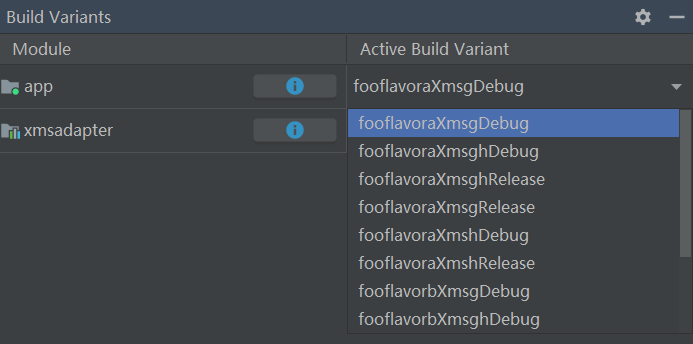
After a successful synchronization, go to Android Studio > Build Variants. Then select and assemble the required variants. Example:
- To assemble variants calling GMS only, select and assemble build variants containing ...Xmsg... in their names.
- To assemble variants calling HMS only, select and assemble build variants containing ...Xmsh... in their names.
- To assemble variants calling GMS and HMS, select and assemble build variants containing ...Xmsgh... in their names.
- Through Gradle tasks
Alternatively, find the assemble task in the Gradle bar. If the variant name is buildvariantname, the corresponding task is named assemble[buildvariantname].
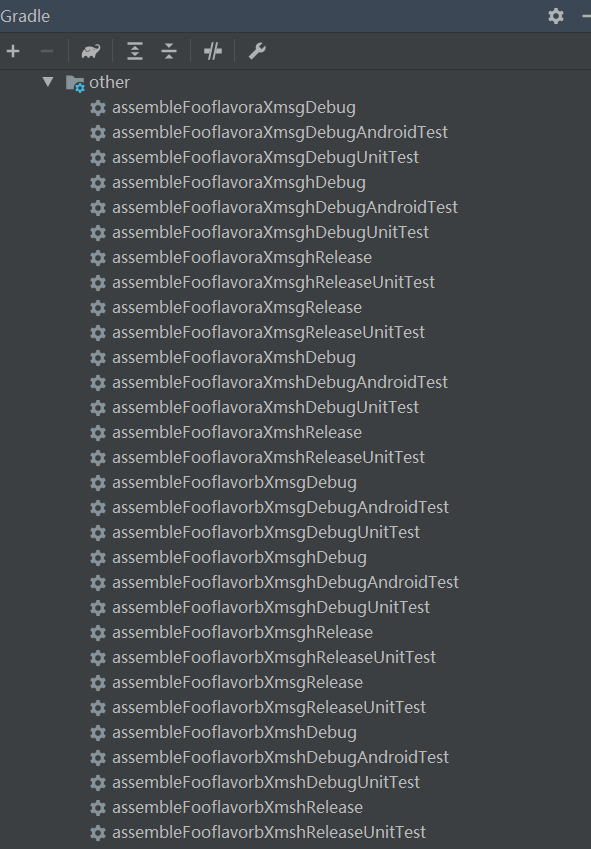
The installation task is install[buildvariantname].
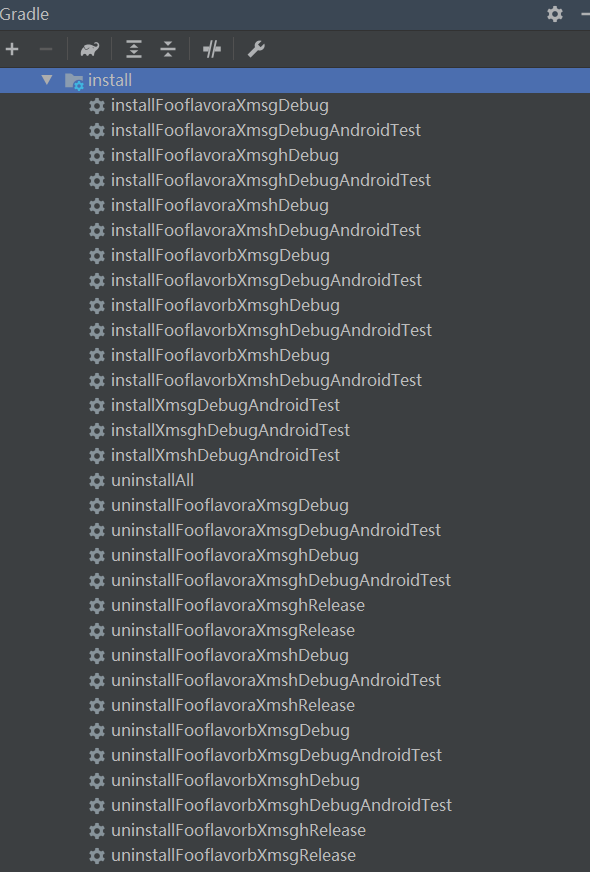
- Through variants
- Assemble required variants in the Continuous Integration (CI) system.
To assemble variants based on XMS (GMS/HMS) or XMS (GMS&HMS), you only need to execute the corresponding assemble tasks. That is, execute the gradle assemble[buildvariantname] task, which is similar to that in Through Gradle tasks.


To package apps with only GMS or HMS or avoid some building and running errors, you need to process the GMS or HMS data configurations in files such as build.gradle and AndroidManifest.xml, for example, apply plugin, meta-data, and intent-filter.
Error Codes
Error Code | Value | Description | Solution |
|---|---|---|---|
ERROR_GRS_FAIL | 10001 | Failed to access the GRS service. | Ensure that the network connection is normal. Use a browser or the Check connection function of the Android Studio IDE to check whether https://grs.dbankcloud.com/grs/1.0/devecostudio/router can be properly accessed. |
ERROR_GET_APPID_ERROR | 60002 | The app list in AppGallery Connect is empty. | Create an app in AppGallery Connect. |
ERROR_GET_SHA256_RETURN_NO_CERT_FINGERPRINTS_KEY | 60012 | The certFingerprints parameter of the API for obtaining the app secret is left empty. | The possible cause is that the fingerprint of the current certificate is not configured in AppGallery Connect. You can configure the environment to automatically set the fingerprint. |
ERROR_GET_REGION_RETURN_ERROR | 60015 | The location query API returns result code 200, but the location information is empty. | The possible cause is that the data storage location is not set in AppGallery Connect. You need to manually set the data storage location. |
ERROR_GET_USER_TEAM_EMPTY | 60017 | The API for obtaining team information returns result code 200, but the team information is empty. | The possible cause is that the identity is not verified. Perform identity verification by referring to Registration and Verification. |
ERROR_TEST_TASKS_CREATED_TODAY_HAS_REACHED_THE_UPPER_LIMIT | 40008 | The number of test tasks created today has reached the maximum. | You can continue to create tasks the next day. |
RANGE_TO_LONG_ERROR | 70003 | Failed to plan the path because the straight distance between the start and end locations exceeds 100 km. | Select the start or end location and try again. |
START_WEBSOCKET_ERROR | 70004 | Failed to start WebSocket. | Restart Android Studio and try again. |