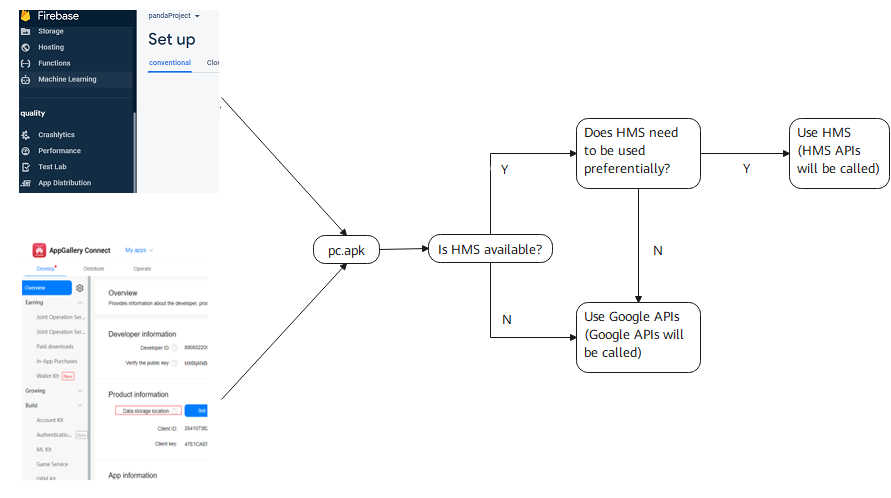
Preparations
To enable your app to support Push Kit, perform the following operations and obtain a token:
Configure app information in AppGallery Connect, obtain a token using the onNewToken method, and verify that the function is successfully added. For details, please refer to Preparations.
deleteInstanceId()
Google API | Add HMS API | To HMS API |
|---|---|---|
FirebaseInstanceId.getInstance().deleteInstanceId(); | deleteInstanceInstanceId(getInstance(getApplicationContext())) Note: If the method throws a new exception ApiException, deleteInstanceId has failed. In this case, you need to process by yourself. | HmsInstanceId.getInstance(getApplicationContext()).deleteAAID() NOTE: If the method throws a new exception ApiException, deleteInstanceId has failed. In this case, you need to process by yourself. The original IOException has been deleted. |
Reference for the deleteInstanceInstanceId method: (For the getInstance method, please refer to getInstance().)
public static void deleteInstanceInstanceId(org.xms.f.iid.FirebaseInstanceId instance) throws ApiException, IOException {
    if (org.xms.g.utils.GlobalEnvSetting.isHms()) {
        ((com.huawei.hms.aaid.HmsInstanceId) instance.getHInstance()).deleteAAID();
    }else {
        ((com.google.firebase.iid.FirebaseInstanceId) instance.getGInstance()).deleteInstanceId();
    }
}
deleteToken(String var1, String var2)
Google API | Add HMS API | To HMS API |
|---|---|---|
FirebaseInstanceId.getInstance().deleteToken(getString(R.string.gcm_defaultSenderId), FirebaseMessaging.INSTANCE_ID_SCOPE); | deleteInstanceToken(instance, projectId) Note: If the method throws a new exception ApiException, deleteToken has failed. In this case, you need to process by yourself. | HmsInstanceId.getInstance(getApplicationContext()).deleteToken(projectId) Note: If the method throws a new exception ApiException, deleteToken has failed. In this case, you need to process by yourself. The original IOException has been deleted. |
Take the deleteInstanceToken method as an example. In the following sample code, you need to transfer the project ID of the sender. Sign in to AppGallery Connect, select My projects. In the navigation tree on the left, choose Project settings. On the page that is displayed, obtain the project ID.
public static void deleteInstanceToken(org.xms.f.iid.FirebaseInstanceId instance, projectId)throws ApiException, IOException {
    if (org.xms.g.utils.GlobalEnvSetting.isHms()) {
        ((com.huawei.hms.aaid.HmsInstanceId) instance.getHInstance()).deleteToken(projectId);
    } else {
        ((com.google.firebase.iid.FirebaseInstanceId)instance.getGInstance()).deleteToken(senderIdOrAppId,
                          com.google.firebase.messaging.FirebaseMessaging.INSTANCE_ID_SCOPE);
    }
}
getInstance()
Google API | Add HMS API | To HMS API |
|---|---|---|
FirebaseMessaging.getInstance() | org.xms.f.messaging.FirebaseMessaging.getInstance(getApplicationContext()) | HmsMessaging.getInstance(getApplicationContext()) |
FirebaseInstanceId.getInstance() | org.xms.f.iid.FirebaseInstanceId.getInstance(getApplicationContext()) | HmsInstanceId.getInstance(getApplicationContext()) |
org.xms.f.messaging.FirebaseMessaging.getInstance method and org.xms.f.iid.FirebaseInstanceId.getInstance reference (getApplicationContext is obtained from Activity):
public static org.xms.f.iid.FirebaseInstanceId getInstance(android.content.Context context) {
    com.google.firebase.iid.FirebaseInstanceId gReturn = null;
    com.huawei.hms.aaid.HmsInstanceId hReturn = null;
    if (org.xms.g.utils.GlobalEnvSetting.isHms()) {
        hReturn = com.huawei.hms.aaid.HmsInstanceId.getInstance(context);
    } else {
        gReturn = com.google.firebase.iid.FirebaseInstanceId.getInstance();
    }
    return new org.xms.f.iid.FirebaseInstanceId(gReturn, hReturn);
}
public static synchronized org.xms.f.messaging.FirebaseMessaging getInstance(android.content.Context context) {
    com.google.firebase.messaging.FirebaseMessaging gReturn = null;
    com.huawei.hms.push.HmsMessaging hReturn = null;
    if (org.xms.g.utils.GlobalEnvSetting.isHms()) {
        hReturn = com.huawei.hms.push.HmsMessaging.getInstance(context);
    } else {
        gReturn = com.google.firebase.messaging.FirebaseMessaging.getInstance();
    }
    return new org.xms.f.messaging.FirebaseMessaging(gReturn, hReturn);
}
getToken(String var1, String var2)
Google API | Add HMS API | To HMS API |
|---|---|---|
FirebaseInstanceId.getInstance().getToken(getString(R.string.gcm_defaultSenderId), FirebaseMessaging.INSTANCE_ID_SCOPE); | getInstanceToken(instance,projectId) Note: If the method throws a new exception ApiException, getToken has failed. In this case, you need to process by yourself. | HmsInstanceId.getInstance(getApplicationContext()).getToken(projectId) Note: If the method throws a new exception ApiException, getToken has failed. In this case, you need to process by yourself. The original IOException has been deleted. |
Take the getInstanceToken method as an example. In the following sample code, you need to transfer the project ID of the sender. Sign in to AppGallery Connect, select My projects. In the navigation tree on the left, choose Project settings. On the page that is displayed, obtain the project ID.
public static String getInstanceToken(org.xms.f.iid.FirebaseInstanceId instance, String projectId)throws com.huawei.hms.common.ApiException, java.io.IOException {
    if (org.xms.g.utils.GlobalEnvSetting.isHms()) {
        return ((com.huawei.hms.aaid.HmsInstanceId) instance.getHInstance()).getToken(projectId);
    } else {
        return ((com.google.firebase.iid.FirebaseInstanceId) instance.getGInstance()).getToken(senderIdOrAppId,
                                      com.google.firebase.messaging.FirebaseMessaging.INSTANCE_ID_SCOPE);
    }
}
new RemoteMessage.Builder(String builder)
Google API | Add HMS API | To HMS API |
|---|---|---|
new RemoteMessage.Builder(senderId +"@fcm.googleapis.com") | new RemoteMessage.Builder(getBuilderConsString()) | new RemoteMessage.Builder("push.hcm.upstream") |
getBuilderConsString method reference:
public static String getBuilderConsString() {
    if (org.xms.g.utils.GlobalEnvSetting.isHms()) {
        return "push.hcm.upstream";
    } else {
        // For the GMS channel, senderId of the FCM is returned.
        return "61611129127" +"@fcm.googleapis.com";
    }
}
Preferentially Using HMS for Determination
If you want users to preferentially use HMS (in the Add HMS API scenario; ignore this option in the To HMS API scenario), set as follows:
GlobalEnvSetting.useHms();
// HMS is available only when true is returned for both isHmsAvailable and isEmui.
if (isHmsAvailable(getApplicationContext()) &&isEmui()) {
    GlobalEnvSetting.useHms();
}
public static boolean isHmsAvailable(android.content.Context context) {
    return Arrays
         .asList(com.huawei.hms.api.ConnectionResult.SUCCESS, com.huawei.hms.api.ConnectionResult.SERVICE_UPDATING,
             com.huawei.hms.api.ConnectionResult.SERVICE_VERSION_UPDATE_REQUIRED)
         .contains(HuaweiApiAvailability.getInstance().isHuaweiMobileServicesAvailable(context));
 }
public static boolean isEmui() {
    try {
        Class<?> clazz = Class.forName("android.os.SystemProperties");
        Method method = clazz.getDeclaredMethod("getInt", String.class, int.class);
        return (Integer) method.invoke(clazz, "ro.build.hw_emui_api_level", 0) > HwBuildEx.VersionCodes.EMUI_4_1;
    } catch (ClassNotFoundException | NoSuchMethodException | IllegalAccessException | IllegalArgumentException | InvocationTargetException | ClassCastException e) {
        return false;
    }
}
Receiving Messages
You can perform the operation described here to implement the processing of results in the following scenarios: HMS receiving notification or data messages, sending release messages, obtaining tokens, and sending exceptions.
Add the following content to the manifest file (if the content already exists, you do not need to add it):
<service android:name=".DemoHmsMessageService"
            android:exported="false">
            <intent-filter>
            <action android:name="com.huawei.push.action.MESSAGING_EVENT"/>
            </intent-filter>
 </service>
The new class DemoHmsMessageService inherits com.huawei.hms.push.HmsMessageService.
Copy the code in the existing FirebaseMessagingService subclass to the new class, change the RemoteMessage package to com.huawei.hms.push.RemoteMessage, and change the RemoteMessage.Notification package to com.huawei.hms.push.RemoteMessage.Notification.
RemoteMessage API mapping:
Google API | HMS API |
|---|---|
Map<String,String> data = remoteMessaged.getData() | Map<String,String> data = remoteMessaged.getDataOfMap() |
int priority = remoteMessaged.getOriginalPriority() | int priority = remoteMessaged.getOriginalUrgency() |
int priority = remoteMessaged.getPriority() | int priority = remoteMessaged.getUrgency() |
RemoteMessage.Notification mapping:
Google API | HMS API |
|---|---|
boolean isDefaultLight = notification.getDefaultLightSettings() | boolean isDefaultLight = notification.isDefaultLight() |
boolean isDefaultSound= notification.getDefaultSound() | boolean isDefaultSound= notification.isDefaultSound() |
boolean isDefaultVibrate= notification.getDefaultVibrateSettings() | boolean isDefaultVibrate= notification.isDefaultVibrate() |
int badgeNumber= notification.getNotificationCount() | int badgeNumber= notification.getBadgeNumber() |
int importance= notification.getNotificationPriority() | int importance= notification.getImportance() |
boolean isAutoCancel = notification.getSticky() | boolean isAutoCancel = notification.isAutoCancel() |
long[] vibrateConfigs = notification.getVibrateTimings() | long[] vibrateConfigs = notification.getVibrateConfig() |

In the Add HMS API policy, the conversion of the FirebaseMessagingService subclass in the original code needs to adapt to HmsMessageService. You can configure the ClassLoader (simple, only configuration file modification is required) or manually add code of the HmsMessageService subclass (complex, heavy manual conversion workload) to implement the compatibility of Google APIs and HMS.
Currently, the ClassLoader solution does not support the plug-in or hot fix framework in projects, and does not support ClassLoader customization. If your app has such requirements, manually write the code.
For more information about the ClassLoader solution, please refer to Basic Principles of the XClassLoader Solution.
[h2]Configuring the ClassLoader
Currently, the ClassLoader does not support Add HMS API conversion in Library mode. Select the App mode when using the tool for conversion.
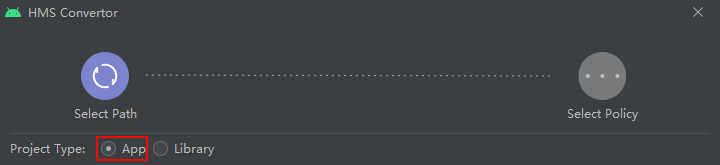

After automatic conversion, manually convert APIs in dummy state in all files through Conversion.
- Modify the project-related configuration files.
- If Generate code for creating app dependent only on GMS SDK is selected and the single xmsg flavor variant is enabled, modify the reference configuration in the project-level settings.gradle file as follows:
include ':xmsadapter:xmsaux', 'xmsadapter:xmsaux:xg', 'xmsadapter:xmsaux:xapi'
If Generate code for creating app dependent only on HMS SDK is selected and the single xmsh flavor variant is enabled, modify the reference configuration in the project-level settings.gradle file as follows:include ':xmsadapter:xmsaux', 'xmsadapter:xmsaux:xh', 'xmsadapter:xmsaux:xapi'
If any of the preceding modes is selected and the single xmsgh flavor variant is enabled, modify the reference configuration in the project-level settings.gradle file as follows:include ':xmsadapter:xmsaux', 'xmsadapter:xmsaux:xg', 'xmsadapter:xmsaux:xh', 'xmsadapter:xmsaux:xapi'
For details about the flavor variants, please refer to Using Convertor to Generate Multiple Variant APKs.
- In the dependencies {} section of the project-level build.gradle file, set the Gradle plug-in version to 3.5.0 or later.
buildscript { dependencies { classpath 'com.android.tools.build:gradle:3.5.0' } } - In the project-level gradle/wrapper/gradle-wrapper.properties file, set the Gradle version to 5.4.1 or later.
distributionUrl=https\://services.gradle.org/distributions/gradle-5.4.1-all.zip
- For a multi-module project, add the following configuration to the gradle.properties file in the project-level directory:
android.enableD8=false
android.enableD8.desugaring=false
- Call the init method at the program entry to initialize the program.
- Implement a program entry class that inherits android.app.Application in the app and override the onCreate method in the class.
public class MyApp extends Application { @Override public void onCreate() { super.onCreate(); GlobalEnvSetting.init(this,null); XLoader.init(this); } } - Modify the application name attribute in the app-level src/main/AndroidManifest.xml file and add the new application subclass in the first entry.
<application
    android:name=".MyApp"
</application>
- Implement a program entry class that inherits android.app.Application in the app and override the onCreate method in the class.
- Handle the exception.
- If a rescanning is performed, you will see the message shown in the following figure. In this case, back up and remove the xh, xg, and xmsaux folders from the xmsadapter folder. After the rescanning is complete, restore the backup to the xmsadapter folder.
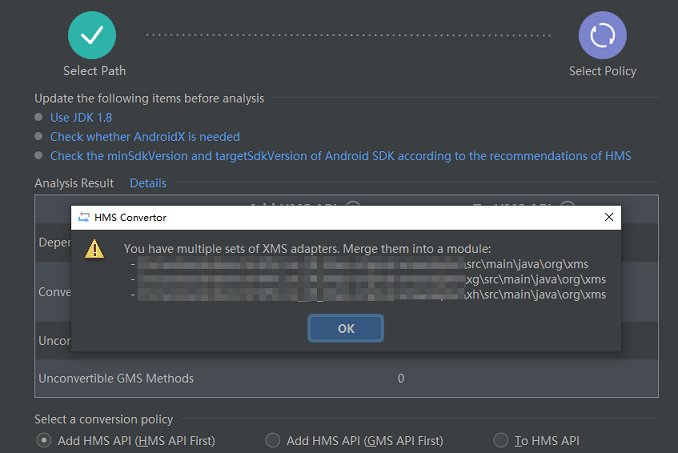
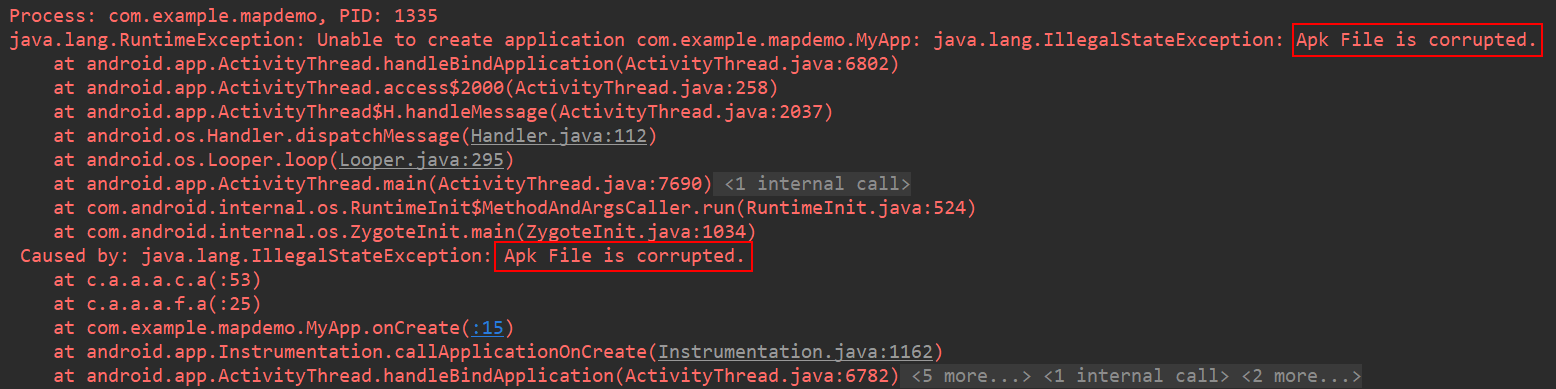
- To ensure your app security, Huawei provides the security verification function for the xg.apk and xh.apk resource files in the assets directory of the APK. If the error message "Apk File is corrupted" is displayed during the running process, the resource files have been tampered with or damaged. Clean and rebuild the entire project before APK packaging.
- If the following error message is displayed when your app is running on an Android device of an earlier version,
Add the following configuration to app/build.gradle:
android {
    defaultConfig {
        multiDexEnabled false
    }
}
- If a rescanning is performed, you will see the message shown in the following figure. In this case, back up and remove the xh, xg, and xmsaux folders from the xmsadapter folder. After the rescanning is complete, restore the backup to the xmsadapter folder.

[h2]Adding a FirebaseMessagingService Subclass
//FirebaseMessagingServiceDemo.java
import com.google.firebase.messaging.FirebaseMessagingService;
import com.google.firebase.messaging.RemoteMessage;
public class FirebaseMessagingServiceDemo extends FirebaseMessagingService {
    @Override
    public void onMessageReceived(RemoteMessage remoteMessage) {
        //...
    }
    @Override
    public void onNewToken(String token) {
        //...
    }
    @Override
    public void onMessageSent(String s) {
        //...
    }
    @Override
    public void onSendError(String s, Exception e) {
       //...
    }
    @Override
    public void onDeletedMessages() {
       //...
    }
    @Override
    public void onDestroy() {
        super.onDestroy();
        //...
    }
} //HmsMessagingServiceDemo.java
import com.huawei.hms.push.HmsMessageService;
import com.huawei.hms.push.RemoteMessage;
public class HmsMessagingServiceDemo extends HmsMessageService {
@Override
public void onMessageReceived(RemoteMessage remoteMessage) {
//...
}
@Override
public void onNewToken(String token) {
//...
}
@Override
public void onMessageSent(String s) {
//...
}
@Override
public void onSendError(String s, Exception e) {
//...
}
@Override
public void onDeletedMessages() {
//...
}
@Override
public void onDestroy() {
super.onDestroy();
//...
}
} 

Saving and Using a Token
To save or use the obtained token, you can call the getToken(String var1,String var2) method and use onNewToken in the HmsMessageService or FirebaseMessagingService class to obtain the token.

When saving the token, distinguish between the Google API token from the HMS token.
Sending Data or Notification Messages
If you want your app to send data or notification messages of HMS Core, please refer to the API description.
Differentiated methods for sending HMS messages and Google API messages:
if (org.xms.g.utils.GlobalEnvSetting.isHms()) {
        // Send messages through the HMS channel.
} else {
        // Send messages through the GMS channel.
}
Subscribing to a Topic
Before subscribing to a topic, set a data storage location. Otherwise, the subscription will fail. For details, please refer to Data Processing Location.