Service Process
The process of using MultiProcessor in asynchronous mode is as follows.
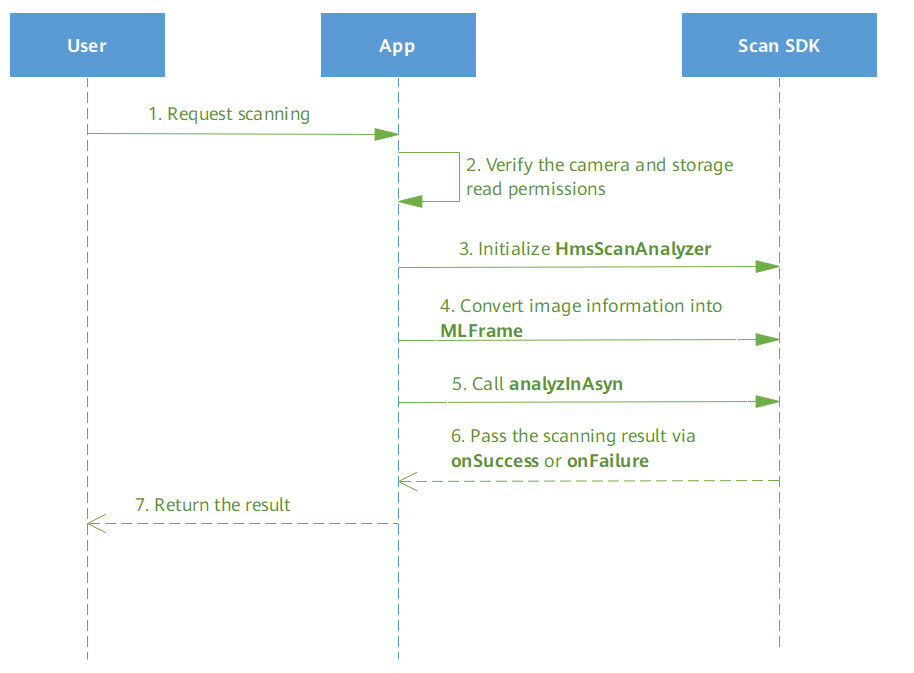
- A user launches an app and sends a request of scanning a barcode.
- The app checks whether it has the camera access and file read permissions.
- If the app has the permissions, HmsScanAnalyzer will be initialized.
- The app converts image information into MLFrame.
- The app calls the asynchronous scanning API analyzInAsyn of HmsScanAnalyzer.
- The HMS Core Scan SDK calls back the onSuccess or onFailure API of the app to send the scanning result.
- The app encapsulates the scanning result and sends it to the user.
Development Process
- (Optional) Initialize the HmsScanAnalyzerOptions object and set the supported barcode format.
setHmsScanTypes() is an optional parameter. Set it as needed.
setHmsScanTypes(): Sets your desired barcode formats. Scan Kit with only a few barcode formats supported will scan faster. All formats supported by Scan Kit will be scanned by default.Java // QRCODE_SCAN_TYPE and DATAMATRIX_SCAN_TYPE are set for the barcode format, indicating that Scan Kit will support only the QR code and DataMatrix code. HmsScanAnalyzerOptions options = new HmsScanAnalyzerOptions.Creator().setHmsScanTypes(HmsScan.QRCODE_SCAN_TYPE,HmsScan.DATAMATRIX_SCAN_TYPE).create();Kotlin // QRCODE_SCAN_TYPE and DATAMATRIX_SCAN_TYPE are set for the barcode format, indicating that Scan Kit will support only the QR code and DataMatrix code. val options = HmsScanAnalyzerOptions.Creator().setHmsScanTypes(HmsScan.QRCODE_SCAN_TYPE,HmsScan.DATAMATRIX_SCAN_TYPE).create() - Initialize the HmsScanAnalyzer object. If you do not have specific barcode formats to set, set options to null here.
Java
HmsScanAnalyzer barcodeDetector = new HmsScanAnalyzer(options);
Kotlin val barcodeDetector = HmsScanAnalyzer(options) - Convert image information into MLFrame, which is the image information class encapsulated by ML Kit.
Java
MLFrame image = MLFrame.fromBitmap(bitmap);
Kotlin val image = MLFrame.fromBitmap(bitmap) - Call the analyzInAsyn API of HmsScanAnalyzer to initiate a scanning request and subscribe to the scanning result event. The scanning result is a data structure containing HmsScan. For details about HmsScan, please refer to Parsing Barcodes.
Java
barcodeDetector.analyzInAsyn(image).addOnSuccessListener(new OnSuccessListener<List<HmsScan>>() {
    @Override
    public void onSuccess(List<HmsScan> hmsScans) {
        if (hmsScans != null && hmsScans.size() > 0) {
            // Display the scanning result.
            ...
        }
    }
}).addOnFailureListener(new OnFailureListener() {
    @Override
    public void onFailure(Exception e) {
        String TAG = "AsyncError";
        Log.w(TAG, e);
    }
});
Kotlin barcodeDetector.analyzInAsyn(image).addOnSuccessListener(OnSuccessListener { if (hmsScans != null && it.size > 0) { // Display the scanning result. ... } }).addOnFailureListener(OnFailureListener { val TAG = "asyncError" Log.w(TAG, it) })