The Map SDK allows you to cluster markers to effectively manage them on the map at different zoom levels. When a user zooms in on the map to a high level, all markers are displayed on the map. When the user zooms out, the markers are clustered on the map for orderly display.
Adding Markers to a Cluster
Call HWMapJsSDK.HWMarkerCluster(map, markers, options) to add markers to a cluster.
var map;
var markers = [];
var markerCluster;

var locations =  [
    {lat: 51.5145160, lng: -0.1270060},
    { lat : 51.5064490, lng : -0.1244260 },
    { lat : 51.5097080, lng : -0.1200450 },
    { lat : 51.5090680, lng : -0.1421420 },
    { lat : 51.4976080, lng : -0.1456320 },
    { lat : 51.5061590, lng : -0.140280 },
    { lat : 51.5047420, lng : -0.1470490 },
    { lat : 51.5126760, lng : -0.1189760 },
    { lat : 51.5108480, lng : -0.1208480 }
];

function initMap() {
    var mapOptions = {};
    mapOptions.center = {lat : 51.4976080, lng : -0.1456320 };
    mapOptions.zoom = 13;

    map = new HWMapJsSDK.HWMap(document.getElementById('map'), mapOptions);
    generateMarkers(locations);

    // Initialize marker clustering.
    markerCluster = new HWMapJsSDK.HWMarkerCluster(map, markers);
}

// Initialize markers in batches.
function generateMarkers(locations) {
    for (let i = 0; i < locations.length; i++) {
        var opts = {
            position: locations[i]
        };

        markers.push(new HWMapJsSDK.HWMarker(opts));
    }
}
Figures below show the marker clustering effect implemented by the sample code above at different zoom levels.
| Figure 1 High zoom level  | Figure 2 Medium zoom level  | Figure 3 Low zoom level  |
Customizing the Icon of Clustered Markers
Customize the icon of clustered markers based on the number of markers to be clustered. When calling HWMapJsSDK.HWMarkerCluster(map, markers, options), set the quantityUrls attribute in MarkerClusterIconOption.
markerCluster = new HWMapJsSDK.HWMarkerCluster(map, markers, {
    icon: {
        scale: 1,
        anchor: [1, 1],
        opacity: 1,
        // Set a custom icon for clustered markers.
        quantityUrls: [
            // When 2 to 4 markers are clustered, the icon of the clustered markers is m1.png.
            {num:0, url:'https://xxx/m1.png'},
            // When 5 to 14 markers are clustered, the icon of the clustered markers is m2.png.
            {num:5, url:'https://xxx/m2.png'},
            // When more than 15 markers are clustered, the icon of the clustered markers is m3.png.
            {num:15, url:'https://xxx/m3.png'}
        ]
    }
}); 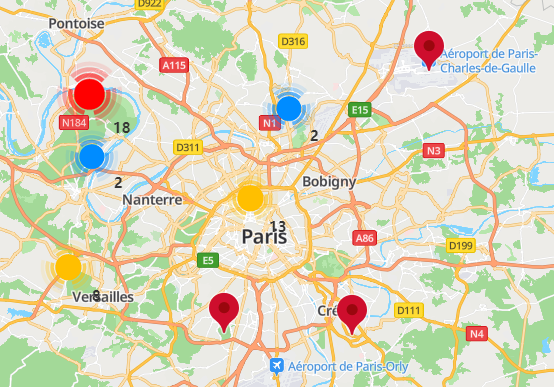
If num does not start from 0 (for example, num starts from 15) when the quantityUrls attribute is used, the default icon will be used as the icon of the clustered markers when 2 to 14 markers are clustered.
const quantityUrls = [
// The value of num starts from a number other than 0, for example, 15. When 2 to 14 markers are clustered, the default icon will be used as the icon of the clustered markers.
// When 15 to 99 markers are clustered, the icon of clustered markers is pic2.png.
{ num: 15, url: "https://xxx/pic2.png" },
// When 100 or more markers are clustered, the icon of the clustered markers is pic3.png.
{ num: 100, url: "https://xxx/pic3.png" }
]
Customizing the Marker Cluster Style
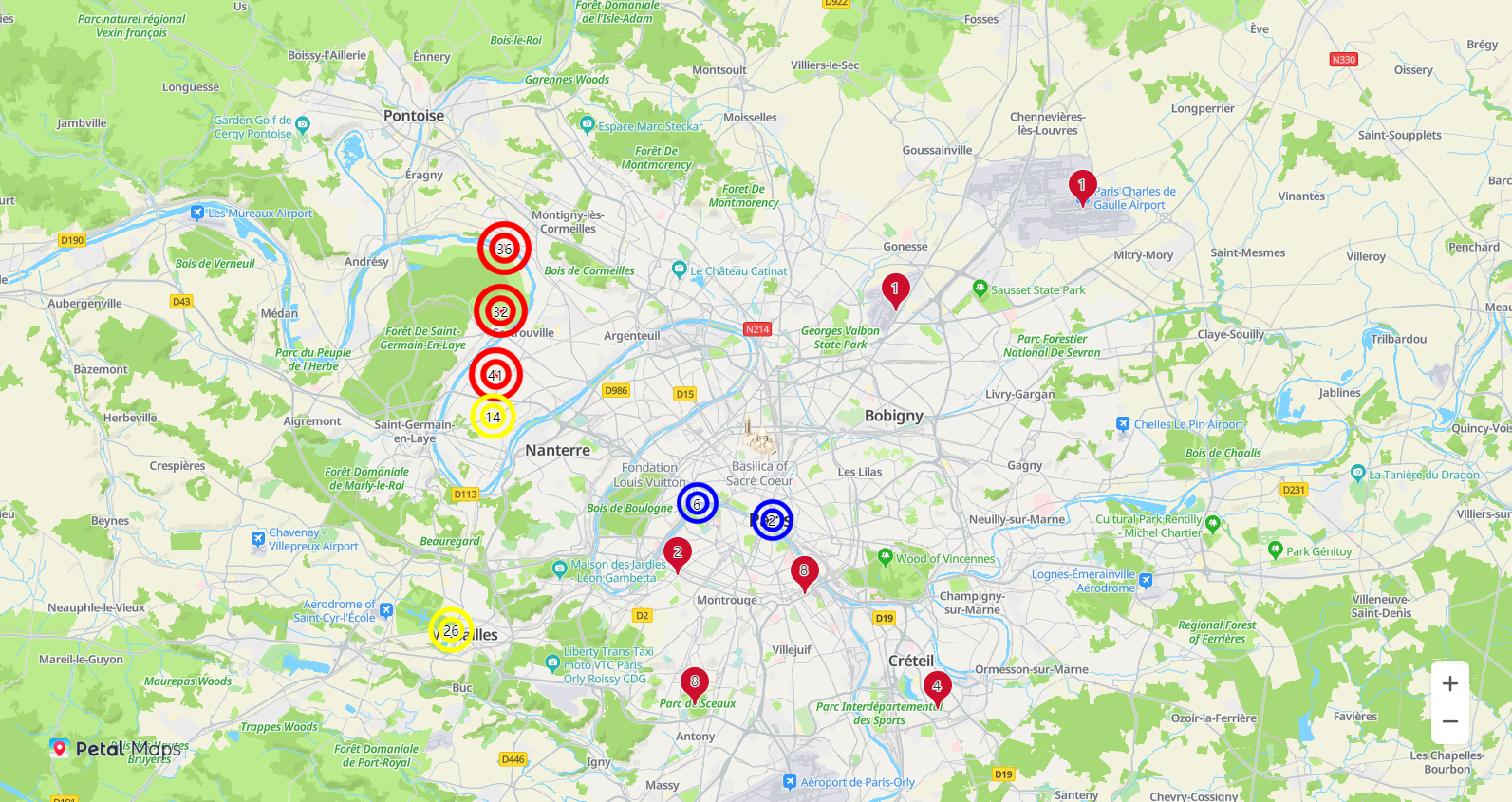
To customize the marker cluster style, such as the marker cluster icon and text, customize the renderClusterMarker method in MarkerClusterOptions when calling HWMapJsSDK.HWMarkerCluster(map, markers, options).
var locations = [
    {
        label: {text:'1', strokeColor:'white', strokeWeight:2},
        position: {lat: 49.871532, lng: 2.331602},
        // Customize attributes.
        properties: {symbol: 1},
    },
    {
        label: {text:'2', strokeColor:'white', strokeWeight:2},
        position: {lat: 48.8638045, lng: 2.2978623},
        properties: {symbol: 2},
    },
    {
        label: {text:'3', strokeColor:'white', strokeWeight:2},
        position: {lat: 48.80434, lng: 2.12041},
        properties: {symbol: 3},
    },
    {
        label: {text:'4', strokeColor:'white', strokeWeight:2},
        position: {lat: 48.80404, lng: 2.12041},
        properties: {symbol: 4},
    },
    ......
];
let markers = [];
// Initialize markers in batches.
function generateMarkers(MarkersNum) {
    for (var i = 0; i < MarkersNum; i++) {
        var opts = {
            position: locations[i].position,
            properties: locations[i].properties,
            label: locations[i].label,
        };
        markers.push(new HWMapJsSDK.HWMarker(opts));
    }
}
// Customize the marker cluster style.
markerCluster = new HWMapJsSDK.HWMarkerCluster(map, markers, {
    renderClusterMarker(markers) {
        let symbolAccount = 0;
        let icon = {
            url: '',
            anchor: [0.5, 0.5],
            anchorUnit: 'fraction',
        };
        let label = {
            text: '',
            color: '#000',
            strokeColor: 'white',
            strokeWeight: 2
        };
        markers.map(item=>{
            // Obtain custom attributes of the source markers.
            let symbolVal = item.getProperties().symbol;
            symbolAccount += (symbolVal&&typeof(symbolVal) === 'number' ? symbolVal : 0);
        })
        label.text = symbolAccount.toString()
            if(symbolAccount <= 10) {
                icon.url = './images/round_marker1.png';
            } else if(symbolAccount < 30 && symbolAccount > 10) {
                icon.url = './images/round_marker2.png';
            } else {
                icon.url = './images/round_marker3.png';
            }
        return {
            label,
            icon
        }
    },
}); 
Listening for Marker Cluster Events
The following table describes marker cluster events supported by HWMarkerCluster. For details, please refer to HWMarkerCluster Events.
| Event | Description |
|---|---|
| click | Click on the marker cluster. |
| mouseOut | Mouse pointer moving out of the marker cluster. |
| mouseOver | Mouse pointer moving over the marker cluster. |
The following sample code is to listen for marker cluster tap events. To set this listener, call the addListener('click', callback) method of the HWMarkerCluster object.
function handleClick() {
      alert("On markerCluster Click!");
}
markerCluster.addListener('click', handleClick);