Push Kit allows you to use HTTPS to access its server and send uplink messages and downlink messages. This section describes the downlink messaging.
The following figure shows the downlink messaging.
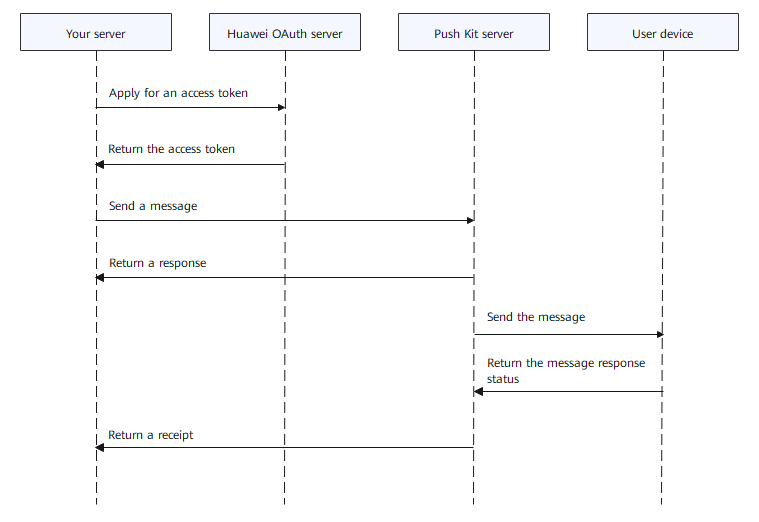
- Obtain an access token. For details, please refer to Client Credentials.
- Call the downlink messaging API to send a message. For details about the message body, please refer to Sending Downlink Messages. For details about result codes, please refer to Result Codes.
URL for calling the API using HTTPS POST:
POST https://push-api.cloud.huawei.com/v1/[clientid]/messages:send

Replace the value of [clientid] with the client ID of your app, which can be obtained from the Project settings page.
Request header example:
Content-Type: application/json; charset=UTF-8
Authorization: Bearer CF3Xl2XV6****************************************Nm3WccUIaDg==

- The value of the Authorization parameter in the request header is an access token.
- If the access token is manually obtained, for example, by running the curl command or using Postman, remember to restore the escape character \/ to / in the JSON character string so that the obtained access token is correct. To obtain a correct access token during code execution, you can use any third-party library to parse the JSON string.
Notification message body example:{ "validate_only": false, "message": { "android": { "notification": { "title": "test title", "body": "test body", "click_action": { "type": 3 } } }, "token": ["pushtoken1"] } }Data message body example:{ "validate_only": false, "message": { "data": "{'param1':'value1','param2':'value2'}", "token": ["pushtoken1"] } } - Your app server receives a message receipt. For details, please refer to Message Receipt.

