


Intelligent Assistant
Chat with our virtual assistant to get answers promptly.
Documents from this version have been archived, and will not continue to be maintained. Please use the latest version.
You can add a button to your app. When a user taps the button, a WebView page is displayed, and your server sends a JWE to the Huawei server through an intent to obtain and display the pass claiming result.
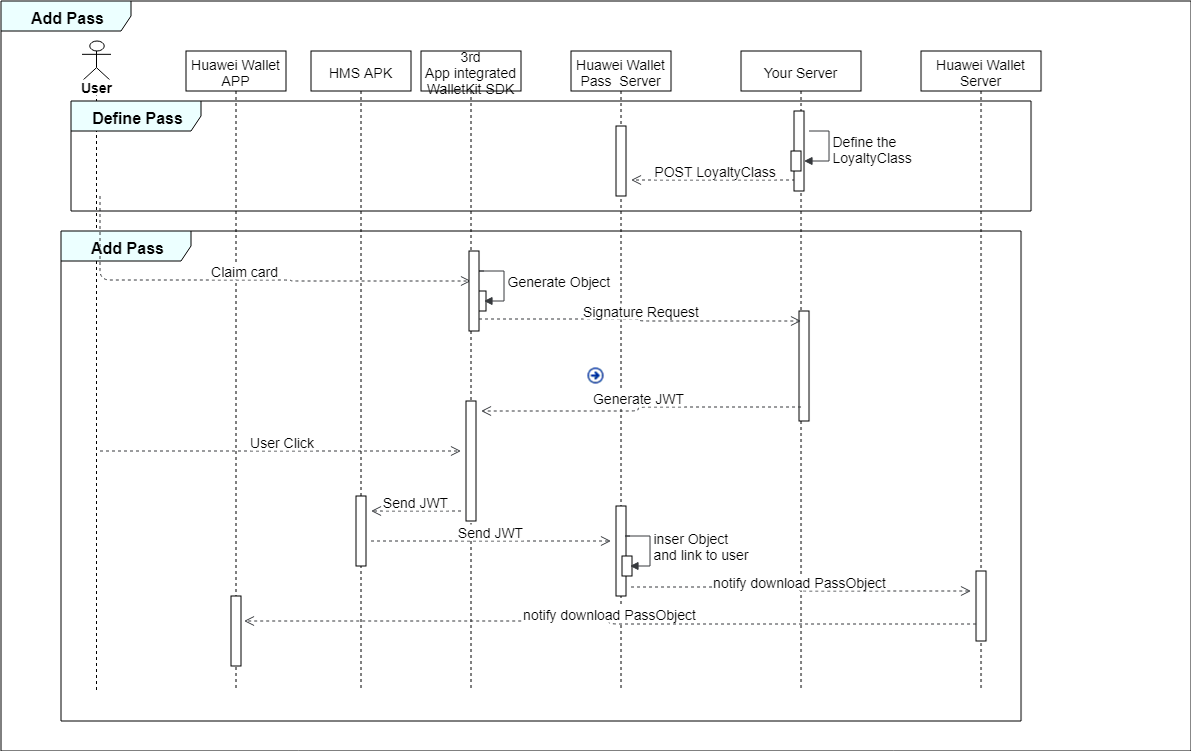
The procedure is as follows:
1. Define a template and push it to the Huawei server through the REST API.
2. Add a button to your app.
3. Generate an instance and send it as a JWE to the Huawei server when a user taps the button.
Define a template of common merchant information about all passes. The following uses loyalty cards of a merchant as an example.
- HwWalletObject hwWalletObject = new HwWalletObject();
- hwWalletObject.setPassVersion("10.0");
- hwWalletObject.setOrganizationName("xxx");
- hwWalletObject.setPassStyleIdentifier("Loyalty001"); // Template ID, which is unique.
- hwWalletObject.setPassTypeIdentifier("hwpass.loyalty.merchant"); // Service ID specified during service registration.
- hwWalletObject.setWebServiceURL("https://www.xxx.com"); // Callback URL used when a user claims a loyalty card.
- Fields fields = new Fields();
- fields.setCountryCode("CN");
- // Geofence information.
- List<Location> locationList = new ArrayList<>();
- Location location = new Location();
- location.setLongitude("11x.0679603815");
- location.setLatitude("2x.6592051284");
- locationList.add(location);
- fields.setLocationList(locationList);
- List<CommonFields> commonFields = new ArrayList<>();
- CommonFields cardImage = new CommonFields();
- cardImage.setKey("backgroundImage");
- cardImage.setValue("https://www.xxx.com/.../cardImage.png"); // URI of the background image of a loyalty card issued by the merchant.
- commonFields.add(cardImage);
- CommonFields logo = new CommonFields();
- logo.setKey("logo");
- logo.setValue("https://www.xxx.com/.../logo.png"); // URI of the merchant's logo.
- commonFields.add(logo);
- // Merchant name. The following provides sample code for defining merchant names in multiple languages. You can specify a random string here, for example, merchantNameI18N, for obtaining the merchant name in the corresponding language from the value of Localized.
- CommonFields merchantName = new CommonFields();
- merchantName.setKey("merchantName");
- merchantName.setValue("Some merchant name");
- merchantName.setLocalizedValue("merchantNameI18N");
- commonFields.add(merchantName);
- // Loyalty card name.
- CommonFields name = new CommonFields();
- name.setKey("name");
- name.setValue("Loyalty Card");
- commonFields.add(name);
- fields.setCommonFields(commonFields);
- List<AppendFields> appendFields = new ArrayList<>();
- AppendFields nearbyLocations = new AppendFields();
- nearbyLocations.setKey("nearbyLocations");
- nearbyLocations.setValue("https://www.xxx.com/.../nearbyLocation.html"); // URI of the page listing nearby stores of the merchant.
- nearbyLocations.setLabel("Nearby Locations");
- appendFields.add(nearbyLocations);
- AppendFields website = new AppendFields();
- website.setKey("website");
- website.setValue("https://www.xxx.com/.../merchantMainPage.html"); // URI of the merchant's main page.
- website.setLabel("Website");
- appendFields.add(website);
- AppendFields hotline = new AppendFields();
- hotline.setKey("hotline");
- hotline.setValue("400820XXXX"); // Merchant's hotline.
- hotline.setLabel("Hotline");
- appendFields.add(hotline);
- fields.setAppendFields(appendFields);
- List<ValueObject> imageList = new ArrayList<>();
- ValueObject imagePic = new ValueObject();
- imagePic.setValue("https://www.xxx.com/.../banner.png"); // Promotion image.
- imageList.add(imagePic);
- fields.setImageList(imageList);
- List<Localized> localizedList = new ArrayList<>();
- // Merchant name in Chinese, which can be obtained based on the previously specified string merchantNameI18N.
- Localized merchantNameChinese = new Localized();
- merchantNameChinese.setKey("merchantNameI18N");
- merchantNameChinese.setLanguage("zh-CN");
- merchantNameChinese.setValue("Merchant name in Chinese");
- localizedList.add(merchantNameChinese);
- // Merchant name in English, which can be obtained based on the previously specified string merchantNameI18N.
- Localized merchantNameEnglish = new Localized();
- merchantNameEnglish.setKey("merchantNameI18N");
- merchantNameEnglish.setLanguage("en-GB");
- merchantNameEnglish.setValue("Merchant name in English");
- localizedList.add(merchantNameEnglish);
- fields.setLocalized(localizedList);
- hwWalletObject.setFields(fields);
Push the template to the Huawei server through the following REST API using POST:
- POST
- https://{walletkit_server_url}/hmspass/v1/loyalty/model
Note: You need to replace {walletkit_server_url} in the preceding URL based on the region to which the server belongs. For privacy considerations, data of a region is kept within the region. It is recommended that you push the JWE to all of the following regions.For details, please refer to Wallet Server Address.
China | passentrust-drcn.wallet.hicloud.com |
Russia | passentrust-drru.wallet.hicloud.com |
Asia, Africa, and Latin America | passentrust-dra.wallet.hicloud.com |
Europe | passentrust-dre.wallet.hicloud.com |
The code for pushing hwWalletObject to the Huawei server is as follows:
- boolean validateClass = HwWalletObjectUtil.validateHwWalletObjectClass(hwWalletObject);
- if (validateClass) {
- // post hwWalletObject to Huawei server
- WalletBuildService walletBuildService = new WalletBuildServiceImpl();
- HwWalletObject loyaltyClass = walletBuildService.postHwWalletClassToWalletServer("loyalty/model", hwWalletObject);
- }
Add a button to your app. A tap on the button will start an activity via the ACTION_VIEW intent. You can add either of the following URIs to the button:
- hms://www.huawei.com/payapp/{jwt_content}
Or
- https://{walletkit_website_url}/walletkit/consumer/pass/save?jwt={jwe_content}
Note: The former URI only applies to mobile phones with HMS Core (APK) installed. When the button is tapped, a page specified by HMS Core (APK) will be displayed, guiding the user to claim the card. The latter URI does not have such a restriction. It allows the user to claim the card by using a browser or the HUAWEI Wallet app that is installed on the user device.
Generate an instance of a user's personalized information when a user taps the Add to HUAWEI Wallet button.
- HwWalletObject hwWalletObject = new HwWalletObject();
- hwWalletObject.setSerialNumber("854687156"); // Instance ID unique to the associated template.
- hwWalletObject.setPassStyleIdentifier("Loyalty001"); // Template ID, which is unique.
- hwWalletObject.setPassTypeIdentifier("hwpass.loyalty.merchant"); // Service ID specified during service registration.
- hwWalletObject.setOrganizationPassId("1231")
- Fields fields = new Fields();
- // Loyalty card status, which cannot be specified for an expired loyalty card.
- Status status = new Status();
- status.setState("active");
- status.setEffectTime("2019-11-11T00:00:00.000Z");
- status.setExpireTime("2029-11-10T23:59:59.999Z");
- fields.setStatus(status);
- // Template IDs and instance IDs of coupons associated with the loyalty card.
- List<LinkedPassId> relatedPassIds = new ArrayList<>();
- LinkedPassId linkedCoupon = new LinkedPassId();
- linkedCoupon.setTypeId("Coupon template id");
- linkedCoupon.setId("Coupon instance id");
- relatedPassIds.add(linkedCoupon);
- fields.setRelatedPassIds(relatedPassIdss);
- // Barcode or QR code.
- BarCode barCode = new BarCode();
- barCode.setText("Refresh every ten minutes");
- barCode.setType("codabar"); // codabar or qrCode
- barCode.setValue("829383819844342342");
- fields.setBarCode(barCode);
- List<CommonFields> commonFields = new ArrayList<>();
- // Member name. The following provides sample code for defining member names in multiple languages.
- CommonFields accountName = new CommonFields();
- accountName.setKey("accountName");
- accountName.setValue("Member name");
- accountName.setLocalizedValue("accountName18N");
- commonFields.add(accountName);
- // Loyalty card number.
- CommonFields cardNumber = new CommonFields();
- cardNumber.setKey("cardNumber");
- cardNumber.setValue("4527809736");
- commonFields.add(cardNumber);
- fields.setCommonFields(commonFields);
- List<AppendFields> appendFields = new ArrayList<>();
- // Loyalty points.
- AppendFields points = new AppendFields();
- points.setKey("points");
- points.setLabel("Points");
- points.setValue("1299");
- appendFields.add(points);
- AppendFields balance = new AppendFields();
- balance.setKey("balance");
- balance.setValue("$19");
- balance.setLabel("Balance");
- appendFields.add(balance);
- // Loyalty level.
- AppendFields level = new AppendFields();
- level.setKey("level");
- level.setValue("Gloden");
- level.setLabel("Level");
- appendFields.add(level);
- fields.setAppendFields(appendFields);
- List<Localized> localizedList = new ArrayList<>();
- // Member name in Chinese.
- Localized accountNameChinese = new Localized();
- accountNameChinese.setKey("accountName18N");
- accountNameChinese.setLanguage("zh-CN");
- accountNameChinese.setValue("Member name in Chinese");
- localizedList.add(accountNameChinese);
- // Member name in English.
- Localized accountNameEnglish = new Localized();
- accountNameEnglish.setKey("accountName18N");
- accountNameEnglish.setLanguage("en-GB");
- accountNameEnglish.setValue("Member name in English");
- localizedList.add(accountNameEnglish);
- fields.setImageList(localizedList);
- hwWalletObject.setFields(fields);
Convert the generated instance to a JWE, which consists of five parts:
Part 1: header
Part 2: RSA-encrypted session key, which is generated using the RSA public key provided by Huawei server
Part 3: initialization vector (IV), a string of 12 bytes
Part 4: HwWalletObject, which is encrypted and compressed using the AES-GCM method based on the session key (serving as the symmetric key) and the IV (serving as the encryption vector)
Part 5: signature, which is generated by signing the previous four parts using your JWE private key, which is obtained from HUAWEI Developers through an application process
Each part is Base64-encoded.
Note: It is recommended that you change the session key and IV each time.
Note: Classes CommonUtil, RandomUtils, and JweUtil are referenced but not implemented in the following code. For their definitions, please refer to Server Sample Code.
- // The app ID registered in AppGallery Connect.
- String appId = "Replace with your app ID";
- // Create a loyalty card instance and link it to a user.
- String newInstanceJson = CommonUtil.readWalletObject("LoyaltyInstance.json");
- JSONObject newInstanceJsonObject = JSONObject.parseObject(newInstanceJson);
- newInstanceJsonObject.put("iss", appId);
- // Generate a session key to encrypt payload data. A session key is a string of random hex numbers.
- String sessionKey = RandomUtils.generateSecureRandomFactor(16);
- System.out.println("sessionKey: " + sessionKey);
- // The public key provided by Huawei, which is used to encrypt the session key.
- String sessionKeyPublicKey =
- "MIIBojANBgkqhkiG9w0BAQEFAAOCAY8AMIIBigKCAYEAgBJB4usbO33Xg5vhJqfHJsMZj44f7rxpjRuPhGy37bUBjSLXN+dS6HpxnZwSVJCtmiydjl3Inq3Mzu4SCGxfb9RIjqRRfHA7ab5p3JnJVQfTEHMHy8XcABl6EPYIJMh26kztPOKU2Mkn6yhRaCurhVUD3n9bD8omiNrR4rg442AJlNamA7vgKs65AoqBuU4NBkGHg0VWWpEHCUx/xyX6hIwqc1aD7P2f62ZHsKpNZBOek/riWhaVx3dTAa9ZS+Av3IGLOZiplhYIow9f8dlWyqs8nff9FZoJO03QhXLvOORT+lPAkW6gFzaoeMaGb40HakkZn3uvlAEKrKrtR0rZEok+N1hnboaAu8oaKK0rF1W6iNrXcFrO0rcrCsFTVF8qCa/1dFmIXwUd2M6cUzT9W0YkNyb6ZBbwEhjwBL4DNW4JfeF2Dzj0eZYlSuYV7e7e1e+XEO8lwPLAiy4bEFAWCaeuDVIhbIoBaU6xHNVQoyzct98gaOYxE4mVDqAUVmhfAgMBAAE=";
- // The private key you obtained during service application in AppGallery Connect.
- String jweSignPrivateKey = "Replace with your private key.";
- // Generate a JWE.
- String jweStrByInstanceIds = JweUtil.generateJwe(sessionKey, jweSignPrivateKey,newInstanceJsonObject.toJSONString(), sessionKeyPublicKey);
Send the encoded JWE to the Huawei server through an intent.
Note: The JWE must be encoded using URLEncoder.encode(jweStrByInstanceIds, StandardCharsets.UTF_8.toString()).
- Intent intent = new Intent(Intent.ACTION_VIEW);
- intent.setData(Uri.parse("hms://www.huawei.com/payapp/{" + jwe_content + "}"));
- try {
- startActivityForResult(intent, requestCode)
- } catch (ActivityNotFoundException e) {
- ...
- }
- Or
- Intent intent = new Intent(Intent.ACTION_VIEW);
- intent.setData(Uri.parse("https://{walletkit_website_url}/walletkit/consumer/pass/save?jwt={" + jwe_content + "}"));
- try {
- startActivityForResult(intent, requestCode)
- } catch (ActivityNotFoundException e) {
- ...
- }