


Intelligent Assistant
Chat with our virtual assistant to get answers promptly.
Documents from this version have been archived, and will not continue to be maintained. Please use the latest version.
1. Fake user identification based on the real-time risk analysis engine: The API collects related data in the authorized scope and upload it to the real-time risk analysis engine to check whether the current user is a fake one.
2. Fake user verification based on verification codes: If a user is a suspicious one or risky one, a verification code is sent to the user for secondary verification.
This API can help your app prevent batch registration, credential stuffing attacks, activity bonus hunting, and content crawling.
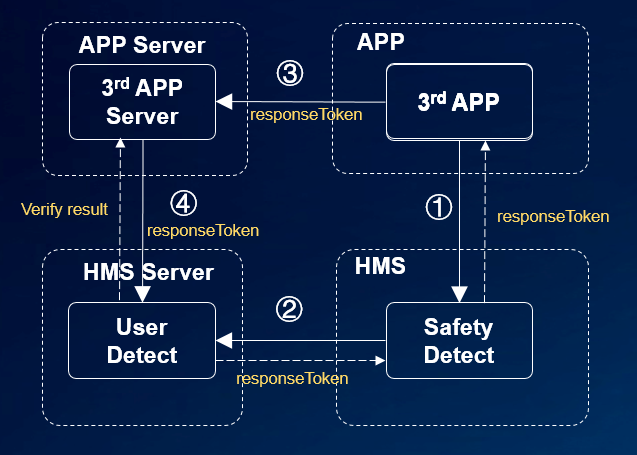
(1) Your app integrates the HMS SDK to call HMS Core Safety Detect.
(2) Safety Detect evaluates risks in the device environment. If the risk level is medium or high, Safety Detect requires captcha and returns a response token to your app.
(3) Your app sends the response token to the app server.
(4) The app server sends the response token to the Safety Detect server to request the detection results.
For details, please refer to Development Procedure.
To call the UserDetect API, perform the following steps:
1. Call the userDetection() method of the UserDetect API to initiate a fake user detection request. The API will return a responsetoken.
2. Send the response token to your app server, and call the cloud API of HMS Core on your server to obtain the fake user detection result.
The UserDetect API provides the behavior detection capability. To use the capability, you can call the initUserDetect() API to initialize fake user detection. The sample code is as follows:
- // Replace related parameters with your activity or context.
- SafetyDetectClient client = SafetyDetect.getClient(MainActivity.this);
- client.initUserDetect().addOnSuccessListener(new OnSuccessListener<Void>() {
- @Override
- public void onSuccess(Void v) {
- // Communication with the service was successful.
- }
- }).addOnFailureListener(new OnFailureListener() {
- @Override
- public void onFailure(Exception e) {
- // An error occurred during communication with the service.
- }
- });
To initiate a detection request, you need to call the userDetection method. Generally, this method is triggered when a user touches a UI control (such as a button). To call the userDetection method, perform the following steps:
1. Transfer the applied appId as the input parameter of the method.
2. Add the OnSuccessListener and OnFailureListener instances as listeners.
3. Override onSuccess and onFailure to process the result.
The sample code for calling this method is as follows:
- public void onClick(View v) {
- SafetyDetectClient client = SafetyDetect.getClient(getActivity());
- String appId = "your_app_id";
- client.userDetection(appId)
- .addOnSuccessListener(new OnSuccessListener<UserDetectResponse>() {
- @Override
- public void onSuccess(UserDetectResponse userDetectResponse) {
- // Indicates communication with the service was successful.
- String responseToken = userDetectResponse.getResponseToken();
- if (!responseToken.isEmpty()) {
- // Send the response token to your app server, and call the cloud API of HMS Core on your server to obtain the fake user detection result.
- }
- }
- })
- .addOnFailureListener(new OnFailureListener() {
- @Override
- public void onFailure(Exception e) {
- // There was an error communicating with the service.
- String errorMsg;
- if (e instanceof ApiException) {
- // An error with the HMS API contains some additional details.
- // You can use the apiException.getStatusCode() method to get the status code.
- ApiException apiException = (ApiException) e;
- errorMsg = SafetyDetectStatusCodes.getStatusCodeString(apiException.getStatusCode()) + ": "
- + apiException.getMessage();
- } else {
- // Unknown type of error has occurred.
- errorMsg = e.getMessage();
- }
- Log.i(TAG, "User detection fail. Error info: " + errorMsg);
- }
- });
- }
If the onSuccess() method is executed in the UserDetect API, the user has completed human-machine identification detection. However, you still need to verify the response token of the user on the background server.
Perform the following steps on the server:
1. Obtain an access token.
2. Call the cloud-side API to obtain the detection result.
The procedure is as follows:
Obtain an access token. For details, please refer to Open Platform Authentication.
Call the cloud-side API to obtain the detection result. The following is a request example: For details about the Server API, please refer to the Server API reference.
- POST https://hirms.cloud.huawei.com/rms/v1/userRisks/verify?appId=123456 HTTP/1.1
- Content-Type: application/json;charset=utf-8
- {
- "accessToken":"AAWWHI94sgUR2RU5_P1ZptUiwLq7W8XWJO2LxaAPuXw4_HOJFXnBlN-q5_3bwlxVW_SHeDPx_s5bWW-9DjtWZsvcm9CwXe1FHJg0u-D2pcQPcb3sTxDTJeiwEb9WBPl_9w",
- "response":"1_55d74c04eab36a0a018bb7a879a6f49f072b023690cba936"
- }
You can call the shutdownUserDetect() API to disable UserDetect and release resources. The sample code is as follows:
- // Replace related parameters with your activity or context.
- SafetyDetectClient client = SafetyDetect.getClient(MainActivity.this);
- client.shutdownUserDetect().addOnSuccessListener(new OnSuccessListener<Void>() {
- @Override
- public void onSuccess(Void v) {
- // Communication with the service was successful.
- }
- }).addOnFailureListener(new OnFailureListener() {
- @Override
- public void onFailure(Exception e) {
- // An error occurred during communication with the service.
- }
- });
19800: DETECT FAIL
Detection failed. It is recommended that the UserDetect API be called again.
19002: NETWORK_ERROR
The network is not connected. It is recommended that the UserDetect API be called again when the network is connected.
For details about the request API, please refer to the API reference.
For details, click SafetyDetect-UserDetect-Sample.zip to download the sample code.