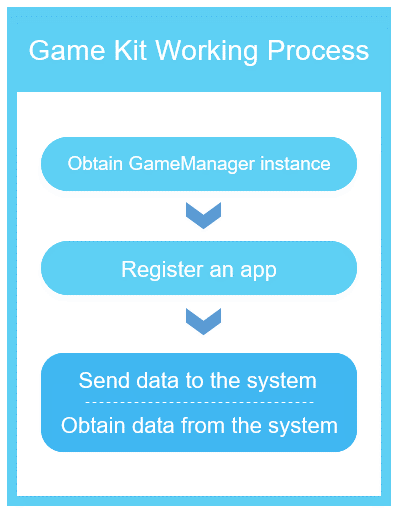
HUAWEI Game Kit provides APIs to help you quickly implement the interaction between the game app and the system, by sending game data to the system and obtaining device status information from the system.
HUAWEI Game Kit optimizes gameplay experience, by letting your app interact with the system to apply different resource allocation strategies based on the game scene and system running status.
- private GameManager mGameKit = GameManager.getGameManager();
Register your app with the device in either of the following ways.
If you need to listen to device information changes through callback:
- private GameCallBack gameSdkCallBack = new GameCallBack() {
- @Override
- public void onPhoneInfoUpdated(String info) {
- Log.i(TAG, "onPhoneInfoUpdated: " + info);
- }
- };
- boolean isSuccess = mGameKit.registerGame(packageName, gameSdkCallBack);
If you do not need to listen to device information changes through callback:
- boolean isSuccess = mGameKit.registerGame(packageName, null);
- JSONObject jsonObject = new JSONObject();
- try {
- jsonObject.put("MessageType", 3);
- jsonObject.put("SceneID", 1);
- jsonObject.put("Description", "Game Start");
- jsonObject.put("ImportantLevel", 2);
- jsonObject.put("Status", 1);
- jsonObject.put("RecommendFps", 60);
- jsonObject.put("KeyThread", "net|6001");
- String message = jsonObject.toString();
- mGameKit.updateGameAppInfo(message);
- } catch (JSONException e) {
- // Process exception
- }
- String phoneInfo = mGameKit.getPhoneInfo();
To listen to device information changes through callback, please refer to section 3.2.2.
To change the callback API, call registerGame(). After the callback API is changed, the previously registered listener does not take effect.
Self-check the app before release.
Run the automatic check by referring to Self-check Before Release, and modify your app based on the check report.
Read the release guidelines.
Before releasing your app, read the following for the guidelines and FAQs you may need to know:
HUAWEI AppGallery Review Guidelines
Submit a release application.
Supplement your app information in AppGallery Connect and submit an application for releasing the app. For details, see Releasing an App.
The SDK needs to be loaded to your app when you build and package the app.
It works only when requested.
When the SDK is running, the system permission is not invoked.
The SDK uses the app ID, package name, and API call status of your app for continuous improvement of HUAWEI Game Kit.
The SDK does not collect user data.
The Game Kit SDK does not collect personal data.
Feature description:
1. HUAWEI Game Kit allows game apps to provide elaborative scenes, configurations, and network information for the phone system, and enables the system to send feedback on status information.
2. HUAWEI Game Kit helps realize close and in-depth collaboration between the app and the phone, as well as improve gameplay experience even with restricted system resources.