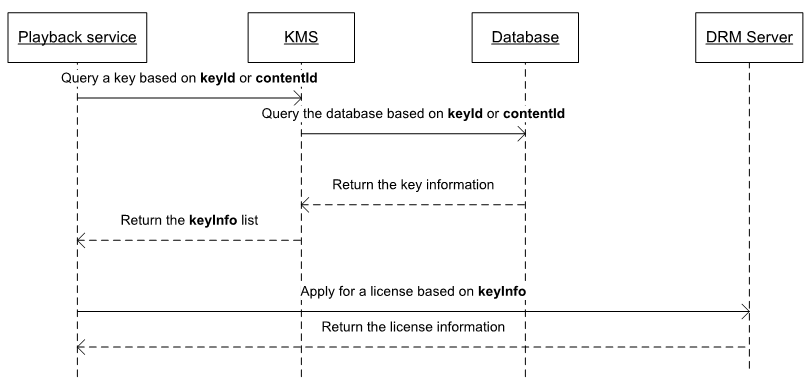
You can download the WisePlay DRM Server API specifications from the WisePlay DRM page in AppGallery Connect. For details about how to access this page, please refer to Configuring App Information in AppGallery Connect.
You can query keyInfo from the KMS by keyid, ContentID, psshbox, and drmtype.
The KMS API is implemented as follows:
1. Define a queryKeyInfo API using SpringMVC. For details about the API definition, please refer to the sample in the KMS API specifications.
- @RequestMapping(value = "/queryKeyInfo")
- @ResponseBody
- public BaseRsp queryKeyInfo(@RequestBody QueryKeyInfoReq request) {
- return queryKeyInfoService.service(request);
- }
2. Query the content encryption key information stored in the database based on keyid, ContentID, or psshbox.
- public QueryKeyInfoRsp doService(QueryKeyInfoReq req) throws KMSException {
- LOG.info("Start to query key info");
- QueryKeyInfoRsp rsp = new QueryKeyInfoRsp();
- rsp.setRetCode(KMSResultCode.SUCCESS);
- if (StringUtils.isNotBlank(req.getKeyId())) {
- queryKeyInfoByKeyId(req.getKeyId(), rsp);
- } else if (StringUtils.isNotBlank(req.getContentId())) {
- queryKeyInfoByContentId(req.getContentId(), rsp);
- } else if (StringUtils.isNotBlank(req.getPsshBox())) {
- queryKeyInfoByPsshData(req.getPsshBox(), rsp);
- }
- LOG.info("End to query key info");
- return rsp;
- }
3. Return the content encryption key and content information to the external system.
Note: In the sample code, only the content encryption key information can be queried. If pagination query or exact query is required, the code needs to be further developed and optimized.
MultiDRM Routing Capabilities
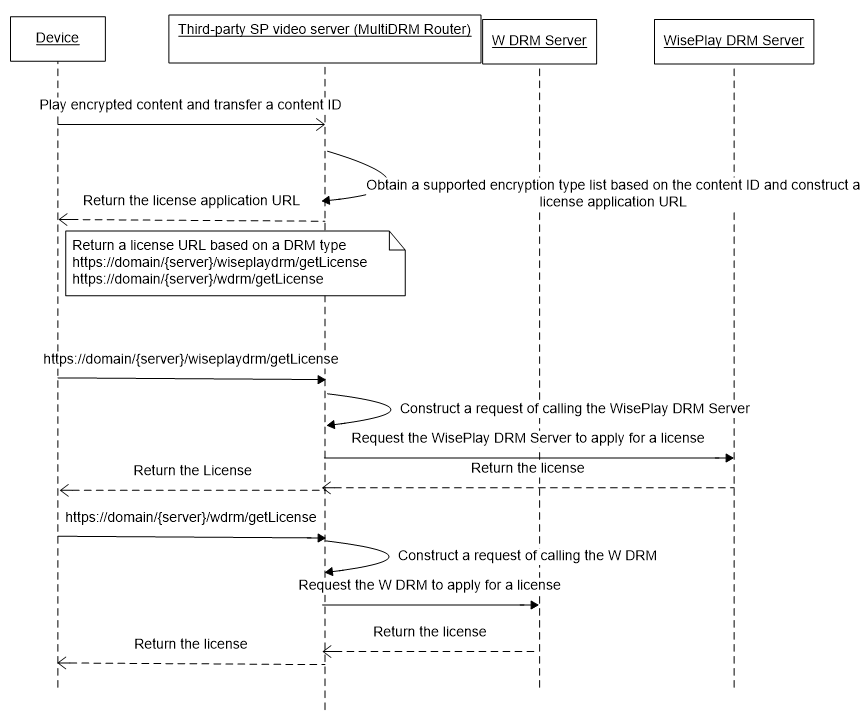
With MultiDRM routing capabilities, SP video servers route requests sent by devices that support different DRMs to their DRM servers to obtain licenses. Then the SP video servers use the DRMs of the devices to parse the licenses for playing content encrypted by the DRMs. The SP video servers send the license application URLs to the device based on the DRM types contained in the getLicense requests sent by the devices. The devices select correct license application URLs based on the license application URLs returned by the servers and the DRM capabilities of the devices, and use the URLs to apply for licenses.
The MultiDRM routing capabilities enable the SP video servers to connect to multiple DRM servers so that the devices that have exclusive DRMs can play content encrypted by DRMs. A license obtaining request is routed to a DRM server during license obtaining.
Implementation Principle of MultiDRM Routing
The MultiDRM Router constructs different license application URLs based on the information about the devices sending requests and the content encryption type (ChinaDRM2.0 or W DRM) and returns the URLs to the devices. The following figure shows the main process. (The interaction process between the device and the SP server is for reference only. The SP can customize implementation logic to determine the DRM server to which the request is routed based on the DRM type used by the device.)
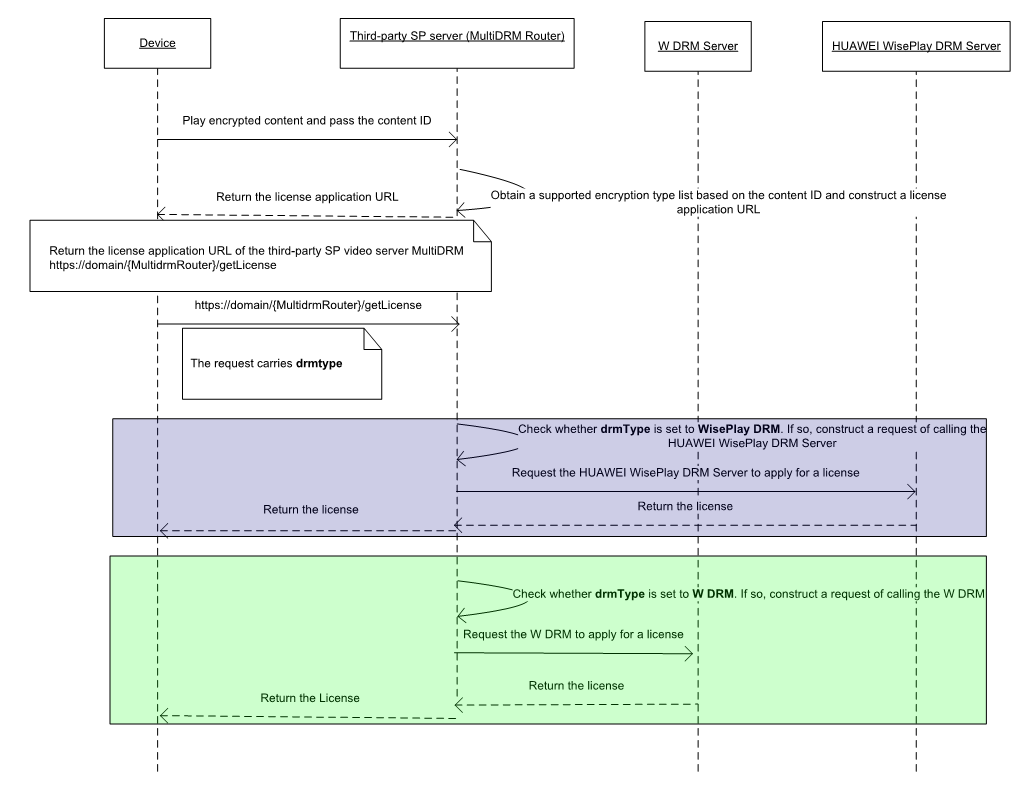
If a content item can be encrypted using multiple DRMs, the MultiDRM Router can return multiple license application URLs at the same time. Then a device selects a URL to apply for a license based on its own DRM. Alternatively, the device can report the supported DRM. The MultiDRM Router selects a license application URL based on the parameter (DRM type) reported by the device and returns the URL to the device. The following figure shows the automatic routing by the MultiDRM Router based on the DRM type.
MultiDRM Routing Capability Development
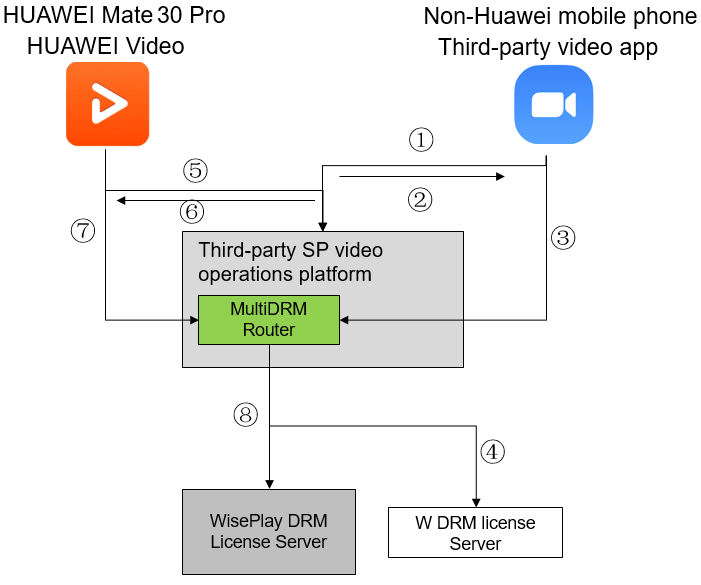
The process is as follows:
The SP requests a third-party video operations platform to play specified video.
The third-party video operations platform returns the playback URL and address for calling getLicense based on the request source. The address for calling getLicense is the address of the W DRM License Server.
The SP obtains the license based on the URL returned by the third-party video operations platform.
The MultiDRM Router of the third-party video operations platform routes the license request to the W DRM License Server to obtain the license.
The SP requests the third-party video operations platform to play specified video.
The third-party video operations platform returns the playback URL and address for calling getLicense based on the DRM type supported for playback. The address for calling getLicense is the address of the WisePlay DRM License Server.
The SP obtains the license based on the URL returned by the third-party video operations platform.
The MultiDRM Router of the third-party video operations platform routes the license request to WisePlay DRM License Server to obtain the license.
Interconnecting with the W License Server to Apply for a License
The MultiDRM Router provides the https://domain/multidrm/wdrm/getLicense API for devices to obtain licenses from the W License Server. An existing system that supports the W DRM should support the W license application. The process is as follows:
To play encrypted content, a device that supports the W DRM requests a license application URL.
The video operations platform points to the domain name service of the MultiDRM Router and returns the license URL https://domain/multidrm/wdrm/getLicense.
The video app uses the returned license URL (https://domain/multidrm/wdrm/getLicense) to obtain the license.
The MultiDRM Router constructs a request object for calling the W DRM License Server based on the transferred URL to obtain the license.
Interconnecting with WisePlay DRM License Server to Apply for a License
The MultiDRM Router connects to the WisePlay DRM License Server to apply for licenses. Huawei provides the getLicense API for obtaining a content license. Implementation process:
To play encrypted content, a device that supports ChinaDRM2.0 requests a license application URL.
The video operations platform points to the domain name service of the MultiDRM Router and returns the license URL https://domain/multidrm/chinadrm/getLicense.
The video app uses the returned license URL (https://domain/multidrm/chinadrm/getLicense) to obtain the license.
The MultiDRM Router constructs a request object for calling the WisePlay DRM License Server based on the transferred URL and sends the request to the WisePlay DRM License Server.