目录
- Version Change History
- Introduction
- Workflows
- AppGallery Connect API
- About Accounts and Permissions
- Managing Your Developer Account
- Managing the Team Account
- Roles and Permissions
- Topping Up
- Setting a Spending Notification
- Viewing Account Spending Details
- Creating a Project
- Managing Data Processing Locations
- Creating a HarmonyOS App
- Creating an Atomic Service
- Viewing App Information
- Managing Huawei Open Capabilities
- Overview
- Using the Free Quota of a Paid Service
- Checking the Free Quota Usage
- Upgrading a Service Bundle to the Pay-As-You-Go Plan
- Downgrading a Service Bundle to the Free Plan
- Checking the Plan List
- Overview
- Registering a Device
- Deleting a Device
- FAQs
- Overview
- Requesting a Debug Certificate
- Requesting a Release Certificate
- Requesting an In-House Release Certificate
- Requesting an Enterprise App Re-signing Certificate
- Requesting a Binary Certificate
- Configuring a Public Key Fingerprint
- FAQs
- Overview
- Requesting ACL Permissions
- Overview
- Requesting a Debug Profile
- Requesting a Release Profile
- Requesting an In-House Release Profile
- Overview
- Registering an Emulator Debug Credential
- Overview
- Configuring a Privacy Statement (for a HarmonyOS App)
- Configuring a Privacy Statement (for an Atomic Service)
- Configuring a User Agreement
- FAQs
- Overview
- Service Introduction
- Obtaining Authorization from the Server
- Upload Management API
- Obtaining the File Upload URL
- Uploading a File
- Initializing Chunk Information
- Obtaining Chunk Upload URLs
- Uploading a Chunk
- Merging Chunks
- CommonUrlInfo
- ConnectRet
- FilePartComposeInfo
- FilePartInfo
- FilePartUploadInfo
- Result Codes
- Provisioning API Guide
- Requesting a Certificate
- Querying a Certificate
- Deleting Certificates
- Adding Devices in Batches
- Querying the Device List
- Deleting Devices
- Requesting a Profile
- Querying the Profile List
- Modifying Devices Bound to a Profile
- Deleting a Profile
- AddDeviceInfo
- AddDeviceResult
- CertInfo
- ConnectRet
- DeviceInfo
- ProvisionInfo
- Result Codes
- Languages
- Country/Region Codes
- App/Game Categories
- App Rating
- Obtaining the Public Key for Signature Verification
- Price Conversion Rules
- App File Restrictions
- Release Guidelines
- Making Preparations
- Uploading Your Package
- Configuring Supported Devices
- Configuring Localized Information (App Name and Icon)
- Configuring an App Category and Tags
- Configuring Service Information
- Selecting a Package to Be Released
- Configuring Release Countries/Regions
- Configuring Localized Information (Introduction, Features, and Assets)
- Configuring In-App Purchase Items and In-App Products
- Configuring Content Rating
- Configuring a Privacy Description
- Configuring a Privacy Statement
- Configuring Privacy Tag Information
- Configuring Copyright Information
- Configuring Information for the Reviewer
- Setting the Release Time
- Submitting the App for Review
- Release Guidelines
- Making Preparations
- Uploading Your Package
- Configuring Supported Devices
- Configuring Localized Information (Name and Icon)
- Configuring an App Category and Tags
- Configuring Service Information
- Selecting a Package Version
- Configuring Release Countries/Regions
- Configuring Localized Information (Introduction, Features, and Assets)
- Configuring In-App Purchase Items
- Configuring Content Rating
- Configuring a Privacy Description
- Configuring a Privacy Statement
- Configuring Privacy Tag Information
- Configuring AI Function Declaration
- Configuring Copyright Information
- Configuring Publication Approval Information
- Configuring an In-App Product
- Configuring the Information for Reviewers
- Scheduling the Release
- Submitting the App for Review
- Release Guidelines
- Making Preparations
- Uploading Your Package
- Configuring Supported Devices
- Configuring Localized Information (Atomic Service Name and Icon)
- Configuring an Atomic Service Category, Tags, and Qualifications
- Configuring Service Information
- Selecting a Package to Be Released
- Configuring Localized Information (Introduction and Features)
- Configuring In-App Purchase Items and In-App Products
- Configuring Content Rating
- Configuring a Privacy Description
- Configuring a Privacy Statement
- Configuring AI Function Declaration
- Configuring Information for the Reviewer
- Setting the Release Time
- Submitting the Atomic Service for Review
- Releasing an In-House App
- Sending a Review Reminder or Canceling Review
- FAQs
- Updating App Information
- Updating a Version
- Rolling Back an App
- Releasing an App by Phase
- Removing an App or Atomic Service
- Deleting an App or Atomic Service
- Viewing the Version History
- Interaction Center
- Technical Support
- Asset Specifications
- Package Parsing Error Codes
- Version Update Error Codes
- Service Overview
- Enabling the Merchant Service
- Enabling the In-App Purchases (HarmonyOS NEXT) API
- Activating the In-App Purchases Service and Configuring Event Notifications
- Creating a Key
- Downloading a Key
- Revoking a Key
- Querying a Public Key
- Prerequisites
- Non-subscriptions
- Auto-renewable Subscriptions
- Importing Products in Batches
- Prerequisites
- Non-subscriptions
- Auto-renewable Subscriptions
- Non-subscriptions
- Auto-renewable Subscriptions
- Modifying Products in Batches
- Common Errors
- Prerequisites
- Activating a Product
- Deactivating a Product
- Prerequisites
- Deleting a Product
- Restoring a Product
- Conversion Rules
- Optimization Rules
- Prerequisites
- Adding a Subscription Group
- Overview
- Prerequisites
- Creating an App
- Setting the App Price
- Submitting for Review
- Analyzing Data
- Financial Settlement
- Services & Support
- AppGallery Introduction
- Categorization
- Overview
- 1. App Information
- 2. App Security
- 3. App Functions
- 4. App Content
- 5. App Ads
- 6. App Payment
- 7. User Privacy
- 8. Minor Protection
- 9. Intellectual Property Rights
- 10. App Qualifications
- 11. Developers' Behavior
- Overview
- 1. Atomic Service Information
- 2. Atomic Service Security
- 3. Atomic Service Features
- 4. Atomic Service Content
- 5. Atomic Service Ads
- 6. Atomic Service Payments
- 7. User Privacy
- 8. Minor Protection
- 9. Intellectual Property Rights
- 10. Atomic Service Qualifications
- 11. Developers' Behavior
- Business License and Certificate Review Requirements for Apps
- Business License and Certificate Review Requirements for Atomic Services
- Application Age Rating Standard
- Guidelines for Handling HUAWEI AppGallery Infringement Complaints
- App Review FAQs
- Atomic Service Review FAQs
- Overview
- Where Can I Upload Certificates?
- FAQs About ICP Filing
- FAQs About Computer Software Copyright Certificates
- FAQs About the Security Assessment Report
- FAQs About the Network Culture Business License
- FAQs About the Medical Institution Practice License
- FAQs About the Surveying and Mapping Qualification Certificate
- FAQs About Internet Information Service Algorithm Filing
- FAQs About the Human Resource Service License and Organization Filing
- FAQs About Labeling Content Generated by Artificial Intelligence
- Template of Authorization Relationship Description
- FAQs About Age Rating Questionnaire
- Overview
- I. Non-compliant Personal Information Collection
- II. Personal Information Collection Beyond the Necessary Scope
- III. Non-compliant Use of Personal Information
- IV. Targeted Push Notifications and Precision Advertising
- V. Non-compliant Permission Requests
- VI. Automatic Launch and Secondary Launch
- VII. Download and Distribution
- VIII. Non-compliant Access to Personal Information
- IX. FAQs Related to Account Deletion
- X. True and Valid Information Provided by Developers
- FAQs About In-App Auto-Renewable Services
- Description for Tablet-like Devices
- APK Firmware and Resolution Specifications
- AppGallery Privacy Tag Service Description
- AppGallery Connect Agreement Signing Guide
- AppGallery Connect Service and Agreement
- HUAWEI AppGallery Connect Distribution Service Agreement For Paid Apps
- Agreement on Use of Huawei APIs
- Privacy and security in Huawei AppGallery Connect
- AppGallery Connect Data Processing Addendum
- Data Processing Information
- Subprocessor of Huawei Software Technologies Co., Ltd.
- Aspeigel SE's Sub-processors
- HUAWEI Services (Hong Kong) Co., Limited's Sub-processors
- AppGallery Connect Data Center Location
- HUAWEI AppGallery Connect Service Agreement
- HUAWEI Analytics Service Agreement
- HUAWEI Analytics Data Protection Agreement
- HUAWEI Push Service Agreement
- HUAWEI Map Service Agreement
- HUAWEI Nearby Service Agreement
- HUAWEI Health Kit Service Agreement
- HUAWEI Wallet Kit Service Agreement
- HUAWEI ML Kit Service Agreement
- HUAWEI Dynamic Tag Manager Service Agreement
- HUAWEI Prediction Service Agreement
- HUAWEI AppGallery Connect Paid Service Agreement
- HUAWEI Location Service Agreement
- HUAWEI AppGallery Connect Privacy Notice
- HUAWEI Developers Basic Service Agreement
- Huawei AppGallery Connect App Signing Service Agreement
- Statement About Referral Program and Privacy
- General Terms and Conditions for AppGallery Referral Program
- HUAWEI WisePlay DRM Service Agreement
- Business Connect Service Agreement
- HUAWEI Video Editor Kit Service Agreement
- HUAWEI SignPal Kit Service Agreement
- Business Introduction
- Applications Management Guide
- Content Copyright Dispute Operation Guide
- Content Removal Guide
- Online Signing Guide
- Joint Operation Partner Guide
- AppTouch Supplement to HUAWEI AppGallery Connect Distribution Service Agreement For Paid Apps
- Introduction to the AppTouch VIP Service
- Channel Promotion Operation Guide
- Report Operation Guide
- Application Access Guide
- VIP Service Access Guide
- InTouch Project
- AppTouch FAQ
- InTouch FAQ
- Service Introduction
- UI Design Specifications
- Overview
- Getting Started
- Overall Process
- Workspace
- About Accounts and Permissions
- Managing Your Developer Account
- Managing the Team Account
- Roles and Permissions
- About Projects and Apps
- Creating a Project
- Creating a HarmonyOS App or Atomic Service
- Creating an Android App
- Creating a Quick App
- Creating an iOS App
- Creating a Web App
- Data Processing Location
- Data Processing Location Policies
- Viewing App Basic Information
- FAQs
- Overview
- (Optional) Configuring the App Signing Certificate Fingerprint
- Integrating Services
- Debugging an API
- Overview
- Requesting a Debug Certificate
- Registering a Debugging Device
- Requesting a Debug Profile
- Overview
- Sandbox Testing
- Cloud Testing
- Cloud Debugging
- Integration Check
- Open Testing
- Early Access for Games
- Overview
- Requesting a Release Certificate
- Requesting a Release Profile
- Releasing a HarmonyOS App
- Releasing an Atomic Service
- Releasing an App (APK)
- Releasing an App (RPK)
- Releasing an App (App Bundle)
- Pre-orders
- Releasing a Multi-APK App That Supports One Device Type
- Configuring GMS/HMS Restrictions in the Multi-APK Version Release Scenario
- Package Parsing Error Codes (HarmonyOS)
- Package Parsing Error Codes (Non-HarmonyOS)
- FAQs
- Updating the Details of a Released App
- Releasing an App Update
- Releasing an App by Phase
- Version Update Errors (HarmonyOS)
- Sending a Review Reminder or Canceling Review
- Removing an App from Sale
- Rolling Back an App
- Deleting an App
- Transferring Non-HarmonyOS Apps
- Viewing App Credit Records
- Viewing Version History of an App
- Home Page of App Analytics
- Distribution Reports
- Operations Reports
- Quality Reports
- Analytics FAQs
- Comments
- Developer's Message
- Managing Gifts
- Creating an In-App Product
- Modifying an In-App Product
- Setting Automatic Price Updates
- Activating or Deactivating an In-App Product
- Deleting or Restoring an In-App Product
- Managing Subscription Groups
- Managing Product Marketing
- Currency Conversion Rules
- FAQs
- Interaction Center
- Technical Support
- Supported Countries/Regions, Languages, and Currencies for Product Management
- AppGallery Connect Service White Paper
- Specifications for App Visual Assets
- Google File Conversion Tool
1. What is content generated by artificial intelligence (AI)?
According to Article 3 of the Labeling Measures for Content Generated by Artificial Intelligence, content generated by AI refers to information, such as text, images, audio files, videos, and virtual scenes, that are generated or synthesized using AI technologies.
2. What types of labels are used for content generated by AI?
According to Article 3 of the Labeling Measures for Content Generated by Artificial Intelligence, labels for content generated by AI include explicit labels and implicit labels. An explicit label is added directly to the content generated by AI or the interaction UI in the form of text, audio, graphics, or others, which can be clearly perceived by users. In contrast, an implicit label is added to the AI-generated content file data by using technical measures, and is not easily noticeable to users.
3. In what scenarios should the content generated by AI be labeled?
According to Article 17 of the Provisions on the Administration of Deep Synthesis of Internet-based Information Service, deep synthesis service providers must apply prominent labels (in suitable positions or areas) to AI-generated or AI-edited content when the services may cause public confusion or misunderstanding. Such deep synthesis services include:
(1) Text generation or editing that simulates natural persons, such as intelligent dialogue and intelligent writing;
(2) Voice generation or editing, such as human voice synthesis, voice mimicry, or modifications that significantly change personal identity features;
(3) Human-related image and video generation or editing, such as face generation, face replacement, face manipulation, pose manipulation, or modifications that significantly change personal identity features;
(4) Generation or editing services such as immersive virtual scenes; and
(5) Other services that generate or significantly change information content or functions.
For deep synthesis services beyond the above categories, the deep synthesis service providers shall offer the prominent labeling function and remind deep synthesis service users that prominent labeling is available.
4. Why is it necessary to add explicit labels to the content generated by AI?
According to Article 4 of the Labeling Measures for Content Generated by Artificial Intelligence, if the generation service falls under the scope defined in the first paragraph of Article 17 of the Provisions on the Administration of Deep Synthesis of Internet-based Information Service, service providers must apply explicit labels to the content generated by AI with the following requirements met:
(1) Add a label, such as a textual notice or general symbol, at the beginning, end, or middle (at a suitable position) of the text, or display a prominent label on the interaction UI or around the text.
(2) Add a label, such as a voice prompt or rhythmic audio cue, at the beginning, end, or middle (at a suitable position) of the audio, or display a prominent label on the interaction UI.
(3) Add a prominent label at a suitable position of the image.
(4) Add a prominent label on the initial video frame, at a suitable position around the video playback area, on the end frame, or at a suitable position during the middle of the video.
(5) When presenting a virtual scene, add a prominent label at a suitable position on the initial frame or during the virtual scene service.
(6) In other content generation and synthesis service scenarios, add prominent labels based on the app characteristics.
When offering functions such as downloading, copying, and exporting the content generated by AI, service providers shall ensure that the files contain explicit labels that meet the requirements.
5. What are the specific methods for adding explicit labels to content generated by AI?
(1) Text
a. An explicit label for text content can appear as a text notice or badge.
b. A textual explicit label shall contain the following elements:
i. AI element: The label must contain "artificial intelligence" or "AI" to signal that AI technologies were used; and
ii. Generation/Synthesis element: The label must contain "generated" and/or "synthesized" to clarify how the content was produced.
c. A badge-style explicit label should contain "AI".
d. Explicit labels for text content shall appear at one or more of the following positions:
i. At the beginning of the text;
ii. At the end of the text; and/or
iii. At an appropriate position in the middle of the text.
e. The font and color of the explicit label shall be clear and legible.

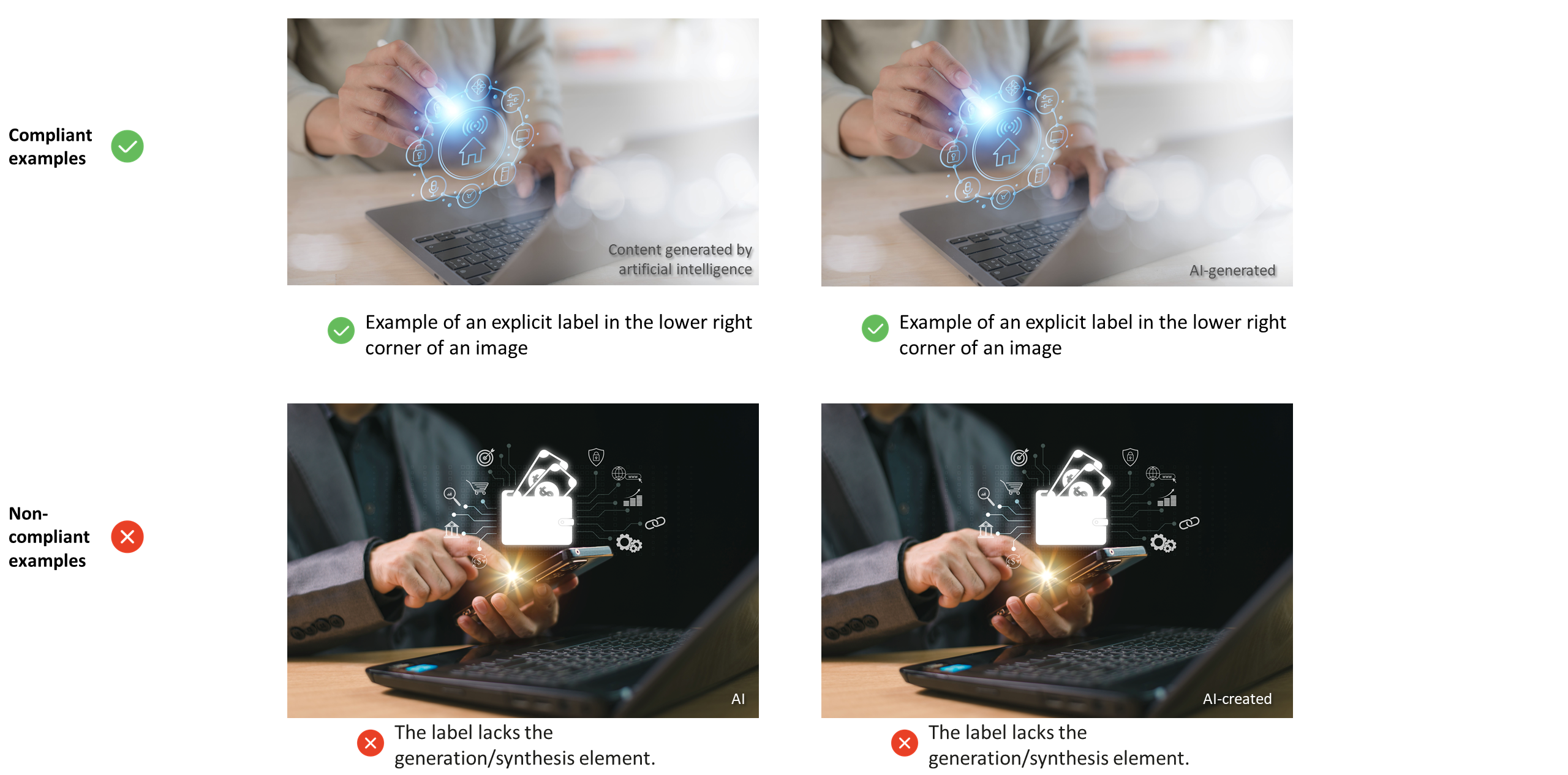
(2) Image
a. An explicit label for image content shall appear as a text notice.
b. An explicit label for image content shall contain the following elements:
i. AI element: The label must contain "artificial intelligence" or "AI" to signal that AI technologies were used; and
ii. Generation/Synthesis element: The label must contain "generated" and/or "synthesized" to clarify how the content was produced.
c. An explicit label for image content shall be placed at the edge or corner of the image.
d. The font of the explicit label shall be clear and legible.
e. The height of the label text shall be no less than 5% of the shortest edge of the image.
Note: For a non-rectangular image, the "shortest edge" refers to the shortest side of a bounding rectangle that fully contains the image.
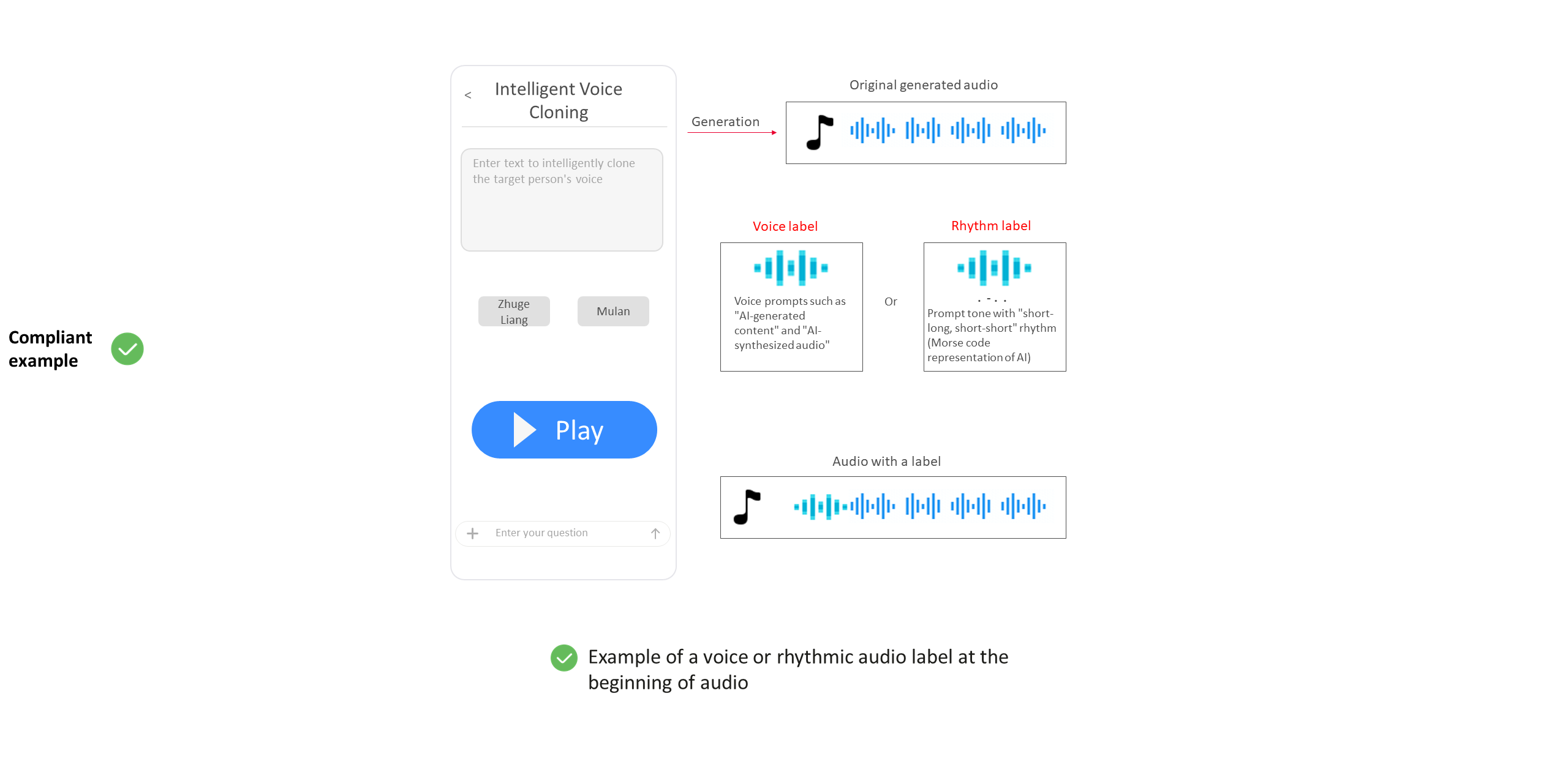
(3) Audio
a. An explicit label for audio content shall appear as a voice label or rhythmic audio label.
b. A voice label shall contain the following elements:
i. AI element: The label must contain "artificial intelligence" or "AI" to signal that AI technologies were used; and
ii. Generation/Synthesis element: The label must contain "generated" and/or "synthesized" to clarify how the content was produced.
c. The rhythmic audio label must use "short-long, short-short" rhythm.
Note 1: The "short-long, short-short" rhythm corresponds to the Morse code representation of "AI".
d. Explicit labels for audio content shall appear at one or more of the following positions:
i. At the beginning of the audio;
ii. At the end of the audio; and/or
iii. At an appropriate position in the middle of the audio.
Note 2: The "beginning of the audio" refers to the segment before the start of the AI-generated audio content. The "end of the audio" refers to the segment after the AI-generated audio content ends.
Note 3: In high-frequency audio interaction scenarios, such as intelligent voice assistant, intelligent customer service, and intelligent navigation, the "beginning" and "end" of audio refer to the beginning and end of an interaction round.
e. The voice label shall be delivered in a normal speaking speed.
Note 4: The normal English speaking speed ranges from 100 to 140 words per minute.
f. The rhythmic audio label shall be clear and easily recognizable.
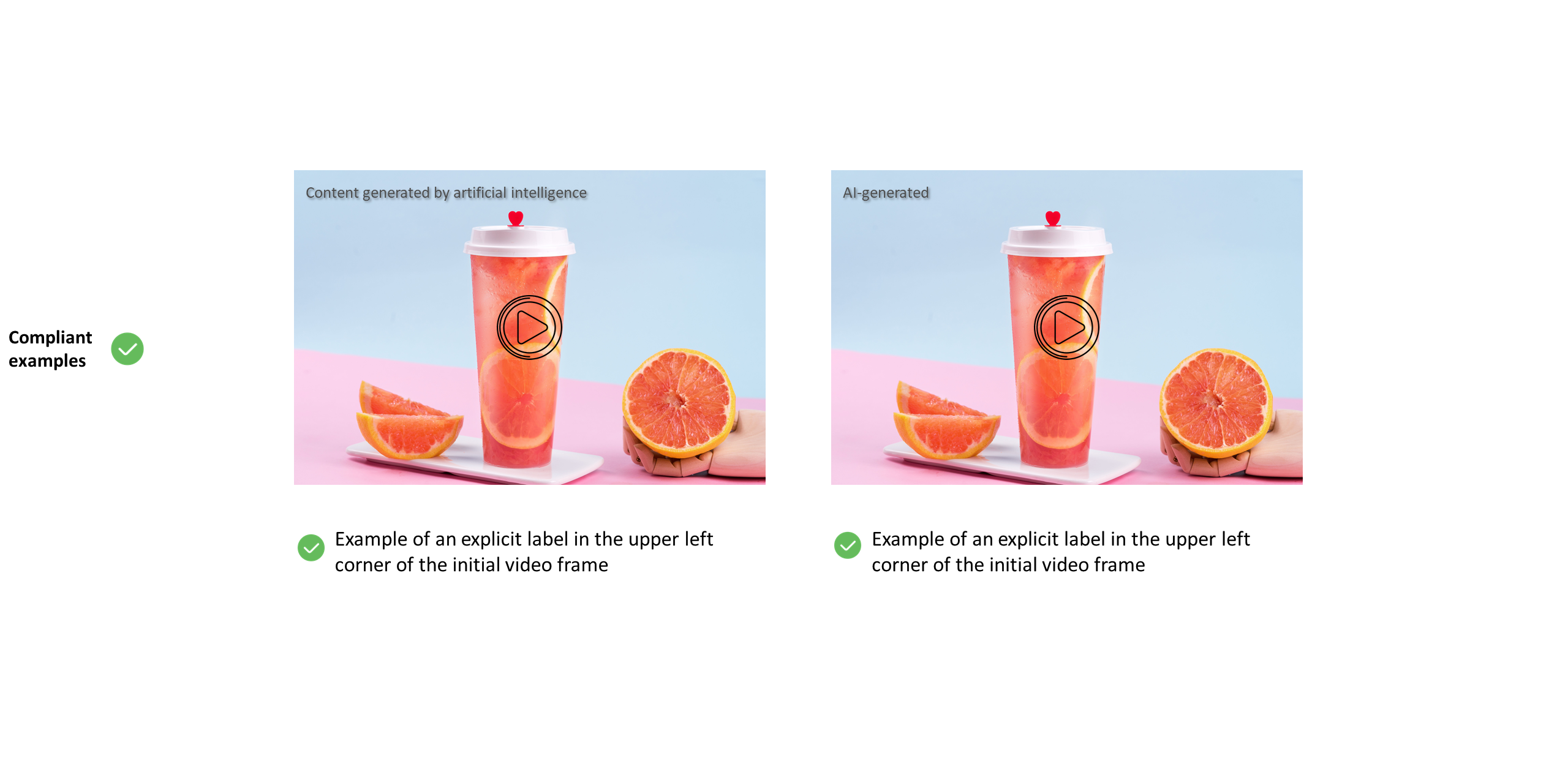
(4) Video
a. An explicit label for video content shall appear as a text notice.
b. An explicit label for video content shall contain the following elements:
i. AI element: The label must contain "artificial intelligence" or "AI" to signal that AI technologies were used; and
ii. Generation/Synthesis element: The label must contain "generated" and/or "synthesized" to clarify how the content was produced.
c. An explicit label for video content shall appear on the initial frame, on the end frame, or at a suitable position within the middle of the video.
d. An explicit label for video content shall be placed at the edge or corner of the video frame.
e. The font of the explicit label shall be clear and legible.
f. The height of the label text shall be no less than 5% of the shortest edge of the video frame.
g. An explicit label for video content shall remain visible for a minimum of 2 seconds at the normal video playback speed.
(5) Virtual scene
a. An explicit label for a virtual scene shall appear as a text notice.
b. An explicit label for a virtual scene shall contain the following elements:
i. AI element: The label must contain "artificial intelligence" or "AI" to signal that AI technologies were used; and
ii. Generation/Synthesis element: The label must contain "generated" and/or "synthesized" to clarify how the content was produced.
c. An explicit label for a virtual scene shall be positioned on the initial frame or at an appropriate position during the virtual scene service.
d. The explicit label on the initial frame of a virtual scene shall be placed at the edge or corner of the frame.
e. The font of the explicit label shall be clear and legible.
f. The height of the label text shall be no less than 5% of the shortest edge of the virtual scene frame.
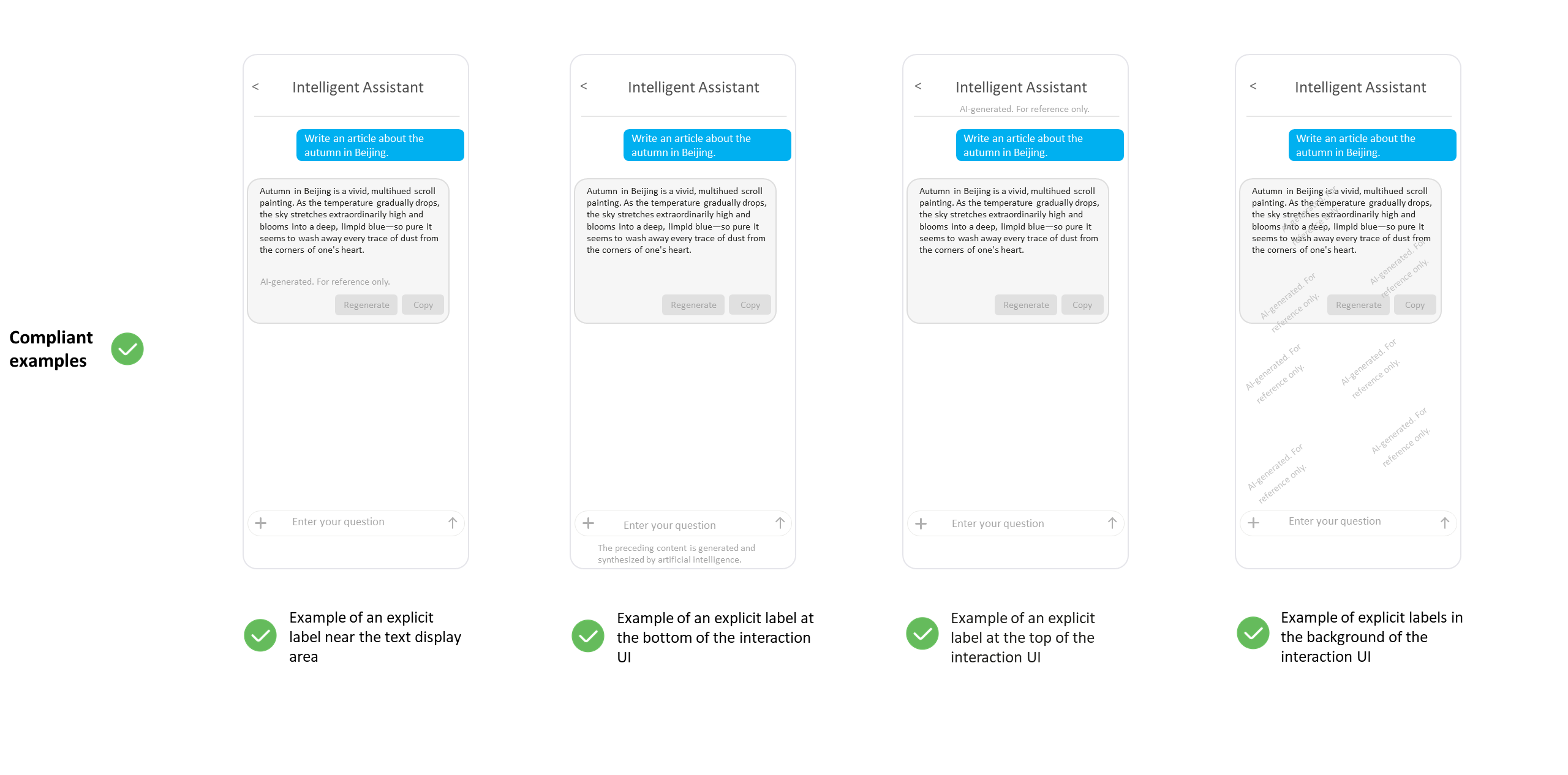
(6) Interaction UI
a. An explicit label on an interaction UI shall appear as a text notice.
b. An explicit label on an interaction UI shall contain the following elements:
i. AI element: The label must contain "artificial intelligence" or "AI" to signal that AI technologies were used; and
ii. Generation/Synthesis element: The label must contain "generated" and/or "synthesized" to clarify how the content was produced.
c. Explicit labels on an interaction UI shall be displayed using one or more of the following methods:
i. Display the notice continuously near the content; and/or
ii. Display the notice continuously at an appropriate position, such as the top, bottom, or background of the interaction UI.
d. The font and color of the explicit label shall be clear and legible.
6. Why is it necessary to add implicit labels to the file metadata of content generated by AI? What is file metadata?
(1) According to Article 5 of the Labeling Measures for Content Generated by Artificial Intelligence, service providers shall add implicit labels to the file metadata of content generated by AI in line with Article 16 of the Provisions on the Administration of Deep Synthesis of Internet-based Information Service (deep synthesis service providers shall take technical measures to add labels that do not interfere with user experience to the content generated or edited by using their services, and shall retain log information in accordance with laws, administrative regulations, and relevant national standards).
(2) File metadata refers to descriptive information embedded in the file header using a specific encoding format. It is used to record details such as the source, attributes, intended use, and copyright status of the file.
Tips:
If your app does not provide the function of exporting or downloading AI-generated content files (such as text, audio, image, and video files), then file metadata and implicit labels of content generated by AI are not involved. Therefore, you are not required to provide the statement on implicit labels in file metadata or screenshots showing that implicit labels have been added to the file metadata.
7. What are the specific methods for adding implicit labels to the file metadata of content generated by AI?
(1) An implicit label shall contain the following elements:
a. Generation label: attribute information indicating whether the content is generated or synthesized by AI;
b. Generation service provider: name or code of the service provider;
c. Content production ID: unique content ID assigned by the generation service provider;
d. Content propagation service provider: name or code of the service provider; and
e. Content propagation ID: unique content ID assigned by the content propagation service provider.
(2) The format of implicit labels added into file metadata must comply with the requirements specified in Appendix E.zip. For more information, please refer to the Labeling Method for Content Generated by Artificial Intelligence and the Notice on Releasing Six Cybersecurity Standard Practice Guides, Including "Labeling Method for Content Generated by Artificial Intelligence—Implicit Labels in File Metadata—Text Files".
(3) Only one implicit label shall be retained in the metadata of each AI-generated content file.
Tips:
If your app does not provide the function of exporting or downloading AI-generated content files (such as text, audio, image, and video files), then file metadata and implicit labels of content generated by AI are not involved. Therefore, you are not required to provide the statement on implicit labels in file metadata or screenshots showing that implicit labels have been added to the file metadata.
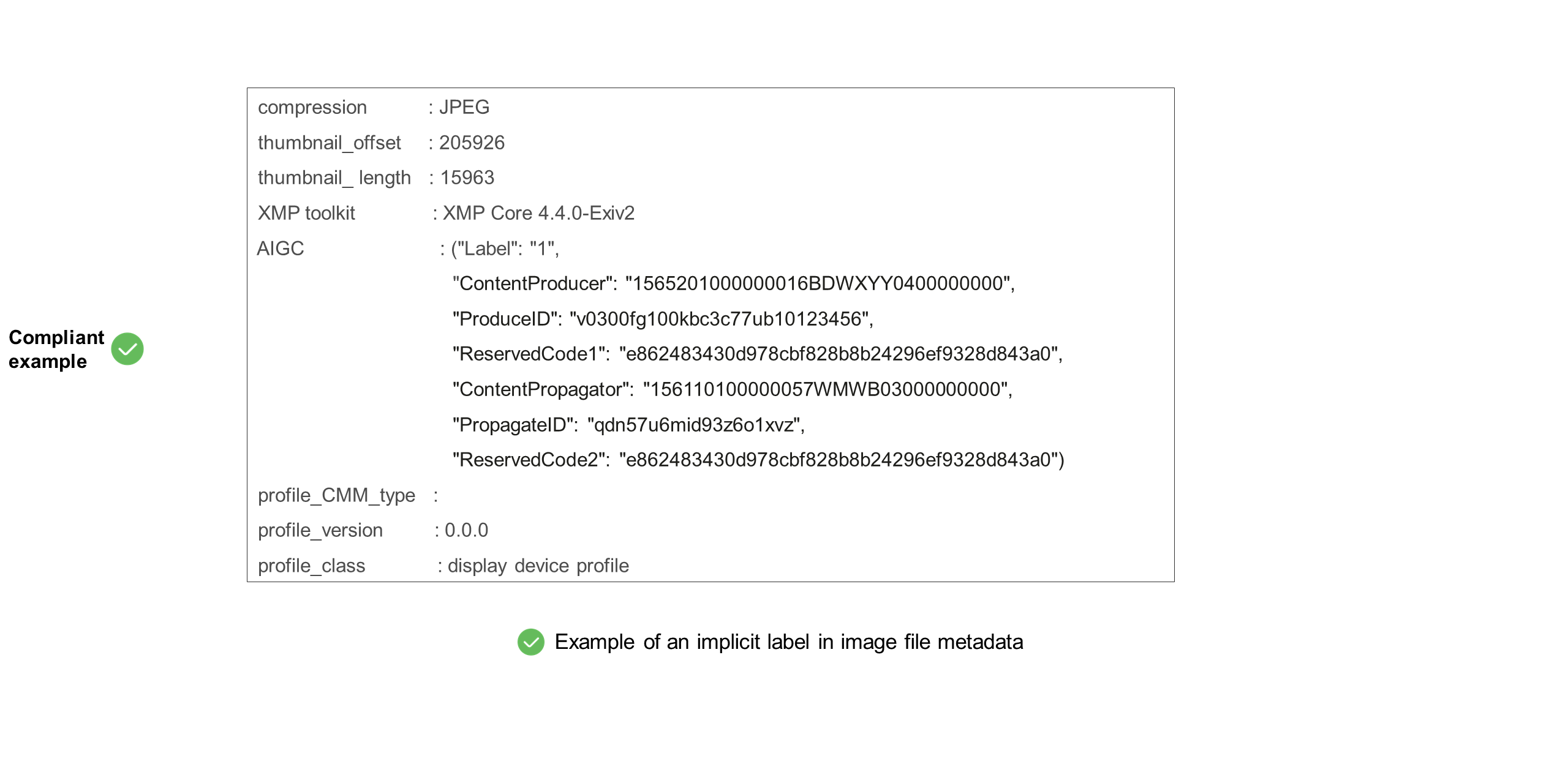
8. Why must materials related to the labeling of content generated by AI be submitted?
According to Article 7 of the Labeling Measures for Content Generated by Artificial Intelligence, when releasing an app or reviewing its eligibility for release, the Internet app distribution platform shall require the Internet app service provider to declare whether AI-generated content services are offered. If such services are provided, the Internet app distribution platform is obligated to verify the materials related to the labeling of the AI-generated content.
9. What are the required documents related to the labeling of content generated by AI?
(1) Statement on implicit labels in file metadata. For the template, see the Statement on Implicit Labels in Metadata of AI-Generated Content Files.zip;
(2) Screenshots showing that explicit labels have been added to the AI-generated content in the app; and
(3) Screenshots showing that implicit labels have been added to the file metadata of the AI-generated content in the app.
Tips:
If your app does not provide the function of exporting or downloading AI-generated content files (such as text, audio, image, and video files), then file metadata and implicit labels of content generated by AI are not involved. Therefore, you are not required to provide the statement on implicit labels in file metadata or screenshots showing that implicit labels have been added to the file metadata.