目录
- Version Change History
- Introduction
- Workflows
- AppGallery Connect API
- About Accounts and Permissions
- Managing Your Developer Account
- Managing the Team Account
- Roles and Permissions
- Topping Up
- Setting a Spending Notification
- Viewing Account Spending Details
- Creating a Project
- Managing Data Processing Locations
- Creating a HarmonyOS App
- Creating an Atomic Service
- Viewing App Information
- Managing Huawei Open Capabilities
- Overview
- Using the Free Quota of a Paid Service
- Checking the Free Quota Usage
- Upgrading a Service Bundle to the Pay-As-You-Go Plan
- Downgrading a Service Bundle to the Free Plan
- Checking the Plan List
- Overview
- Registering a Device
- Deleting a Device
- FAQs
- Overview
- Requesting a Debug Certificate
- Requesting a Release Certificate
- Requesting an In-House Release Certificate
- Requesting an Enterprise App Re-signing Certificate
- Requesting a Binary Certificate
- Configuring a Public Key Fingerprint
- FAQs
- Overview
- Requesting ACL Permissions
- Overview
- Requesting a Debug Profile
- Requesting a Release Profile
- Requesting an In-House Release Profile
- Overview
- Registering an Emulator Debug Credential
- Overview
- Configuring a Privacy Statement (for a HarmonyOS App)
- Configuring a Privacy Statement (for an Atomic Service)
- Configuring a User Agreement
- FAQs
- Overview
- Service Introduction
- Obtaining Authorization from the Server
- Upload Management API
- Obtaining the File Upload URL
- Uploading a File
- Initializing Chunk Information
- Obtaining Chunk Upload URLs
- Uploading a Chunk
- Merging Chunks
- CommonUrlInfo
- ConnectRet
- FilePartComposeInfo
- FilePartInfo
- FilePartUploadInfo
- Result Codes
- Provisioning API Guide
- Requesting a Certificate
- Querying a Certificate
- Deleting Certificates
- Adding Devices in Batches
- Querying the Device List
- Deleting Devices
- Requesting a Profile
- Querying the Profile List
- Modifying Devices Bound to a Profile
- Deleting a Profile
- AddDeviceInfo
- AddDeviceResult
- CertInfo
- ConnectRet
- DeviceInfo
- ProvisionInfo
- Result Codes
- Languages
- Country/Region Codes
- App/Game Categories
- App Rating
- Obtaining the Public Key for Signature Verification
- Price Conversion Rules
- App File Restrictions
- Release Guidelines
- Making Preparations
- Uploading Your Package
- Configuring Supported Devices
- Configuring Localized Information (App Name and Icon)
- Configuring an App Category and Tags
- Configuring Service Information
- Selecting a Package to Be Released
- Configuring Release Countries/Regions
- Configuring Localized Information (Introduction, Features, and Assets)
- Configuring In-App Purchase Items and In-App Products
- Configuring Content Rating
- Configuring a Privacy Description
- Configuring a Privacy Statement
- Configuring Privacy Tag Information
- Configuring Copyright Information
- Configuring Information for the Reviewer
- Setting the Release Time
- Submitting the App for Review
- Release Guidelines
- Making Preparations
- Uploading Your Package
- Configuring Supported Devices
- Configuring Localized Information (Name and Icon)
- Configuring an App Category and Tags
- Configuring Service Information
- Selecting a Package Version
- Configuring Release Countries/Regions
- Configuring Localized Information (Introduction, Features, and Assets)
- Configuring In-App Purchase Items
- Configuring Content Rating
- Configuring a Privacy Description
- Configuring a Privacy Statement
- Configuring Privacy Tag Information
- Configuring AI Function Declaration
- Configuring Copyright Information
- Configuring Publication Approval Information
- Configuring an In-App Product
- Configuring the Information for Reviewers
- Scheduling the Release
- Submitting the App for Review
- Release Guidelines
- Making Preparations
- Uploading Your Package
- Configuring Supported Devices
- Configuring Localized Information (Atomic Service Name and Icon)
- Configuring an Atomic Service Category, Tags, and Qualifications
- Configuring Service Information
- Selecting a Package to Be Released
- Configuring Localized Information (Introduction and Features)
- Configuring In-App Purchase Items and In-App Products
- Configuring Content Rating
- Configuring a Privacy Description
- Configuring a Privacy Statement
- Configuring AI Function Declaration
- Configuring Information for the Reviewer
- Setting the Release Time
- Submitting the Atomic Service for Review
- Releasing an In-House App
- Sending a Review Reminder or Canceling Review
- FAQs
- Updating App Information
- Updating a Version
- Rolling Back an App
- Releasing an App by Phase
- Removing an App or Atomic Service
- Deleting an App or Atomic Service
- Viewing the Version History
- Interaction Center
- Technical Support
- Asset Specifications
- Package Parsing Error Codes
- Version Update Error Codes
- Service Overview
- Enabling the Merchant Service
- Enabling the In-App Purchases (HarmonyOS NEXT) API
- Activating the In-App Purchases Service and Configuring Event Notifications
- Creating a Key
- Downloading a Key
- Revoking a Key
- Querying a Public Key
- Prerequisites
- Non-subscriptions
- Auto-renewable Subscriptions
- Importing Products in Batches
- Prerequisites
- Non-subscriptions
- Auto-renewable Subscriptions
- Non-subscriptions
- Auto-renewable Subscriptions
- Modifying Products in Batches
- Common Errors
- Prerequisites
- Activating a Product
- Deactivating a Product
- Prerequisites
- Deleting a Product
- Restoring a Product
- Conversion Rules
- Optimization Rules
- Prerequisites
- Adding a Subscription Group
- Overview
- Prerequisites
- Creating an App
- Setting the App Price
- Submitting for Review
- Analyzing Data
- Financial Settlement
- Services & Support
- AppGallery Introduction
- Categorization
- Overview
- 1. App Information
- 2. App Security
- 3. App Functions
- 4. App Content
- 5. App Ads
- 6. App Payment
- 7. User Privacy
- 8. Minor Protection
- 9. Intellectual Property Rights
- 10. App Qualifications
- 11. Developers' Behavior
- Overview
- 1. Atomic Service Information
- 2. Atomic Service Security
- 3. Atomic Service Features
- 4. Atomic Service Content
- 5. Atomic Service Ads
- 6. Atomic Service Payments
- 7. User Privacy
- 8. Minor Protection
- 9. Intellectual Property Rights
- 10. Atomic Service Qualifications
- 11. Developers' Behavior
- Business License and Certificate Review Requirements for Apps
- Business License and Certificate Review Requirements for Atomic Services
- Application Age Rating Standard
- Guidelines for Handling HUAWEI AppGallery Infringement Complaints
- App Review FAQs
- Atomic Service Review FAQs
- Overview
- Where Can I Upload Certificates?
- FAQs About ICP Filing
- FAQs About Computer Software Copyright Certificates
- FAQs About the Security Assessment Report
- FAQs About the Network Culture Business License
- FAQs About the Medical Institution Practice License
- FAQs About the Surveying and Mapping Qualification Certificate
- FAQs About Internet Information Service Algorithm Filing
- FAQs About the Human Resource Service License and Organization Filing
- FAQs About Labeling Content Generated by Artificial Intelligence
- Template of Authorization Relationship Description
- FAQs About Age Rating Questionnaire
- Overview
- I. Non-compliant Personal Information Collection
- II. Personal Information Collection Beyond the Necessary Scope
- III. Non-compliant Use of Personal Information
- IV. Targeted Push Notifications and Precision Advertising
- V. Non-compliant Permission Requests
- VI. Automatic Launch and Secondary Launch
- VII. Download and Distribution
- VIII. Non-compliant Access to Personal Information
- IX. FAQs Related to Account Deletion
- X. True and Valid Information Provided by Developers
- FAQs About In-App Auto-Renewable Services
- Description for Tablet-like Devices
- APK Firmware and Resolution Specifications
- AppGallery Privacy Tag Service Description
- AppGallery Connect Agreement Signing Guide
- AppGallery Connect Service and Agreement
- HUAWEI AppGallery Connect Distribution Service Agreement For Paid Apps
- Agreement on Use of Huawei APIs
- Privacy and security in Huawei AppGallery Connect
- AppGallery Connect Data Processing Addendum
- Data Processing Information
- Subprocessor of Huawei Software Technologies Co., Ltd.
- Aspeigel SE's Sub-processors
- HUAWEI Services (Hong Kong) Co., Limited's Sub-processors
- AppGallery Connect Data Center Location
- HUAWEI AppGallery Connect Service Agreement
- HUAWEI Analytics Service Agreement
- HUAWEI Analytics Data Protection Agreement
- HUAWEI Push Service Agreement
- HUAWEI Map Service Agreement
- HUAWEI Nearby Service Agreement
- HUAWEI Health Kit Service Agreement
- HUAWEI Wallet Kit Service Agreement
- HUAWEI ML Kit Service Agreement
- HUAWEI Dynamic Tag Manager Service Agreement
- HUAWEI Prediction Service Agreement
- HUAWEI AppGallery Connect Paid Service Agreement
- HUAWEI Location Service Agreement
- HUAWEI AppGallery Connect Privacy Notice
- HUAWEI Developers Basic Service Agreement
- Huawei AppGallery Connect App Signing Service Agreement
- Statement About Referral Program and Privacy
- General Terms and Conditions for AppGallery Referral Program
- HUAWEI WisePlay DRM Service Agreement
- Business Connect Service Agreement
- HUAWEI Video Editor Kit Service Agreement
- HUAWEI SignPal Kit Service Agreement
- Business Introduction
- Applications Management Guide
- Content Copyright Dispute Operation Guide
- Content Removal Guide
- Online Signing Guide
- Joint Operation Partner Guide
- AppTouch Supplement to HUAWEI AppGallery Connect Distribution Service Agreement For Paid Apps
- Introduction to the AppTouch VIP Service
- Channel Promotion Operation Guide
- Report Operation Guide
- Application Access Guide
- VIP Service Access Guide
- InTouch Project
- AppTouch FAQ
- InTouch FAQ
- Service Introduction
- UI Design Specifications
- Overview
- Getting Started
- Overall Process
- Workspace
- About Accounts and Permissions
- Managing Your Developer Account
- Managing the Team Account
- Roles and Permissions
- About Projects and Apps
- Creating a Project
- Creating a HarmonyOS App or Atomic Service
- Creating an Android App
- Creating a Quick App
- Creating an iOS App
- Creating a Web App
- Data Processing Location
- Data Processing Location Policies
- Viewing App Basic Information
- FAQs
- Overview
- (Optional) Configuring the App Signing Certificate Fingerprint
- Integrating Services
- Debugging an API
- Overview
- Requesting a Debug Certificate
- Registering a Debugging Device
- Requesting a Debug Profile
- Overview
- Sandbox Testing
- Cloud Testing
- Cloud Debugging
- Integration Check
- Open Testing
- Early Access for Games
- Overview
- Requesting a Release Certificate
- Requesting a Release Profile
- Releasing a HarmonyOS App
- Releasing an Atomic Service
- Releasing an App (APK)
- Releasing an App (RPK)
- Releasing an App (App Bundle)
- Pre-orders
- Releasing a Multi-APK App That Supports One Device Type
- Configuring GMS/HMS Restrictions in the Multi-APK Version Release Scenario
- Package Parsing Error Codes (HarmonyOS)
- Package Parsing Error Codes (Non-HarmonyOS)
- FAQs
- Updating the Details of a Released App
- Releasing an App Update
- Releasing an App by Phase
- Version Update Errors (HarmonyOS)
- Sending a Review Reminder or Canceling Review
- Removing an App from Sale
- Rolling Back an App
- Deleting an App
- Transferring Non-HarmonyOS Apps
- Viewing App Credit Records
- Viewing Version History of an App
- Home Page of App Analytics
- Distribution Reports
- Operations Reports
- Quality Reports
- Analytics FAQs
- Comments
- Developer's Message
- Managing Gifts
- Creating an In-App Product
- Modifying an In-App Product
- Setting Automatic Price Updates
- Activating or Deactivating an In-App Product
- Deleting or Restoring an In-App Product
- Managing Subscription Groups
- Managing Product Marketing
- Currency Conversion Rules
- FAQs
- Interaction Center
- Technical Support
- Supported Countries/Regions, Languages, and Currencies for Product Management
- AppGallery Connect Service White Paper
- Specifications for App Visual Assets
- Google File Conversion Tool
1. Before a user activates an auto-renewable service, the agreement must be prominently displayed on the product purchase or subscription payment screen. The service can only be activated after obtaining the user's explicit consent.
Before renewal, key information must be fully and prominently disclosed to users and ensure that the fees charged for the auto-renewable service align with the pricing communicated and promised to them.
Key information includes the payment amount at activation, services available after payment, renewal cycle, cancellation process, renewal price, notification method and timing before renewal, and fee collection time.
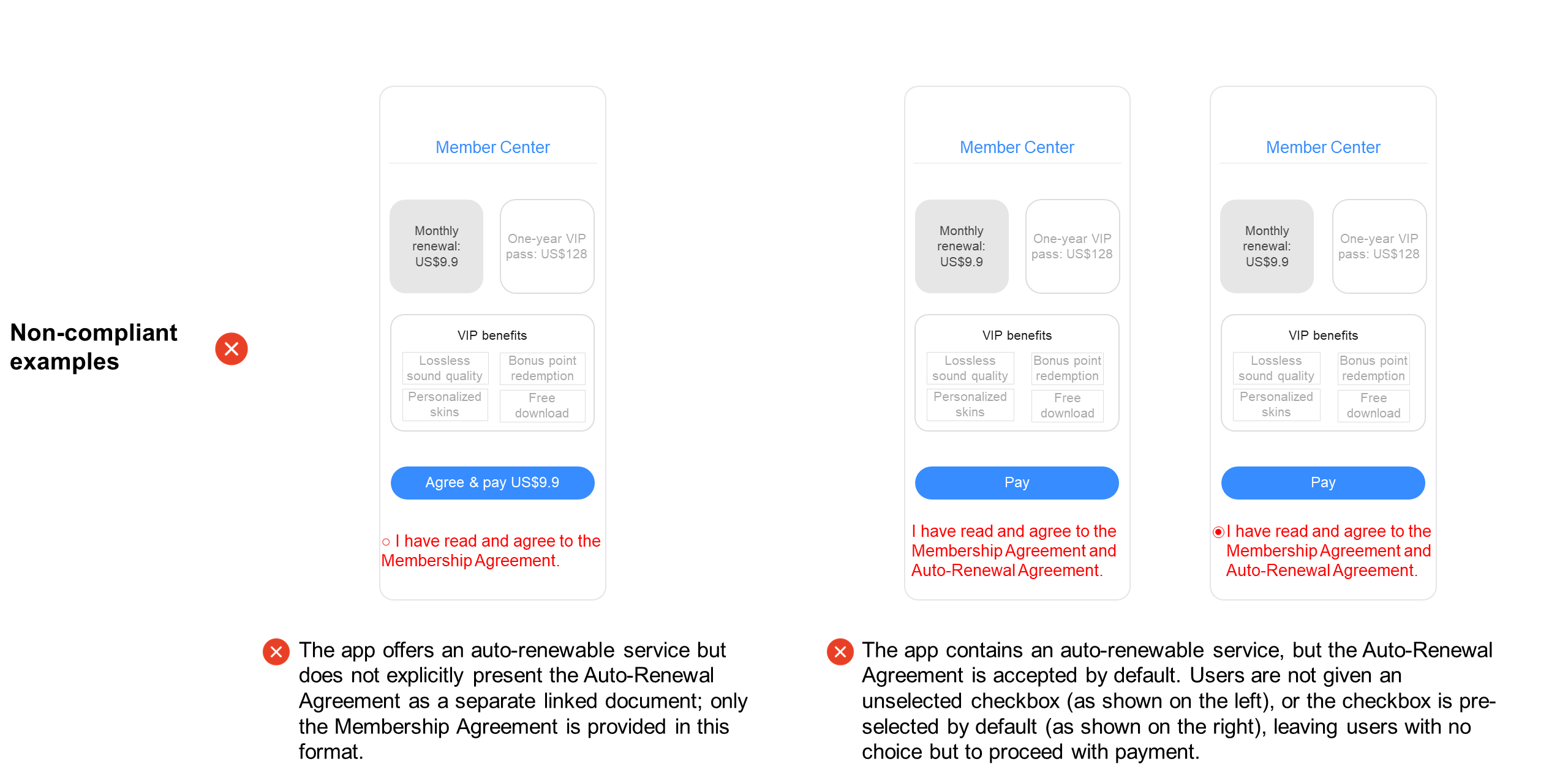
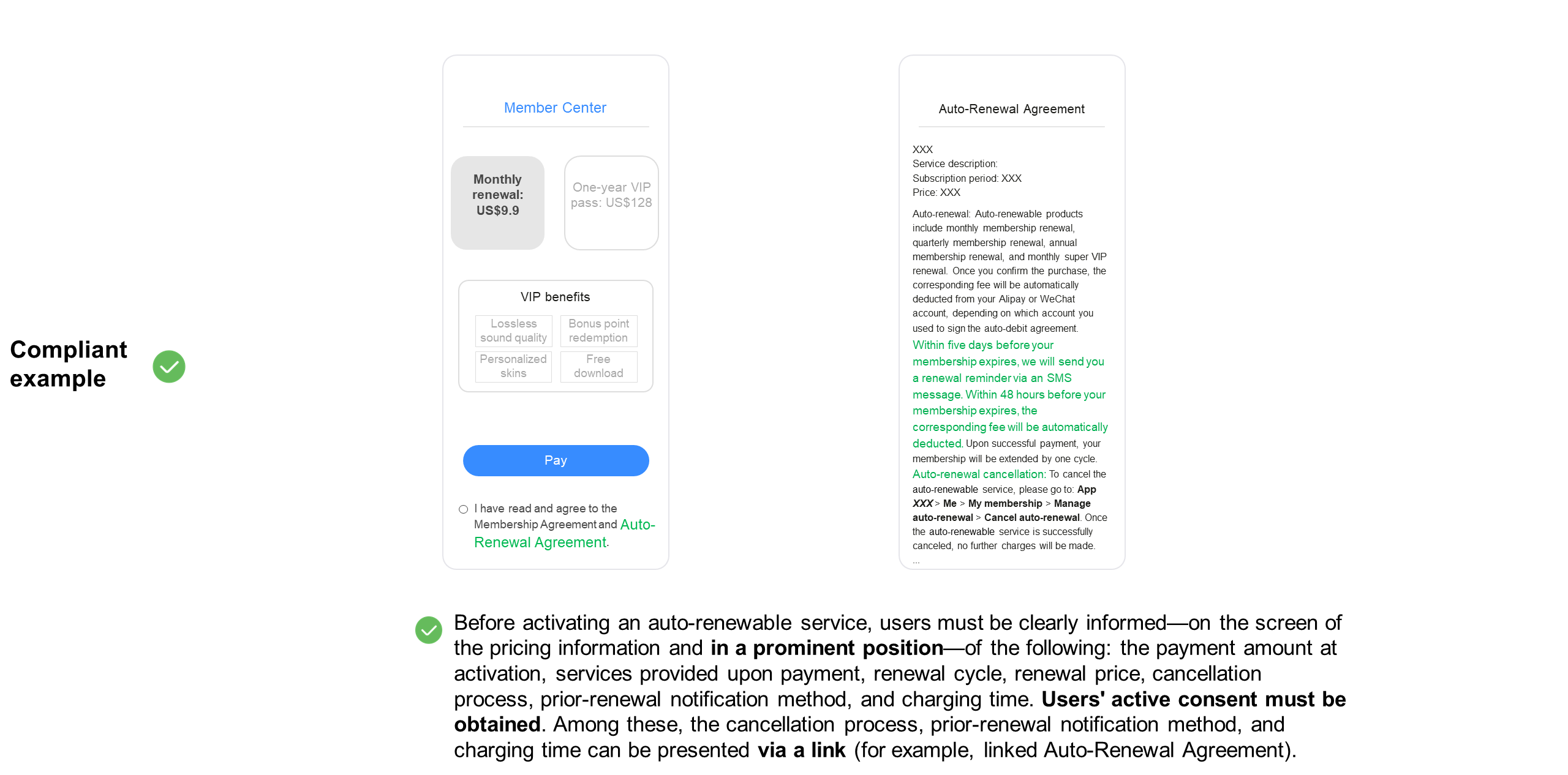
2. Users must not be forced or misled into activating services through malicious redirections, deceptive images, or misleading videos.
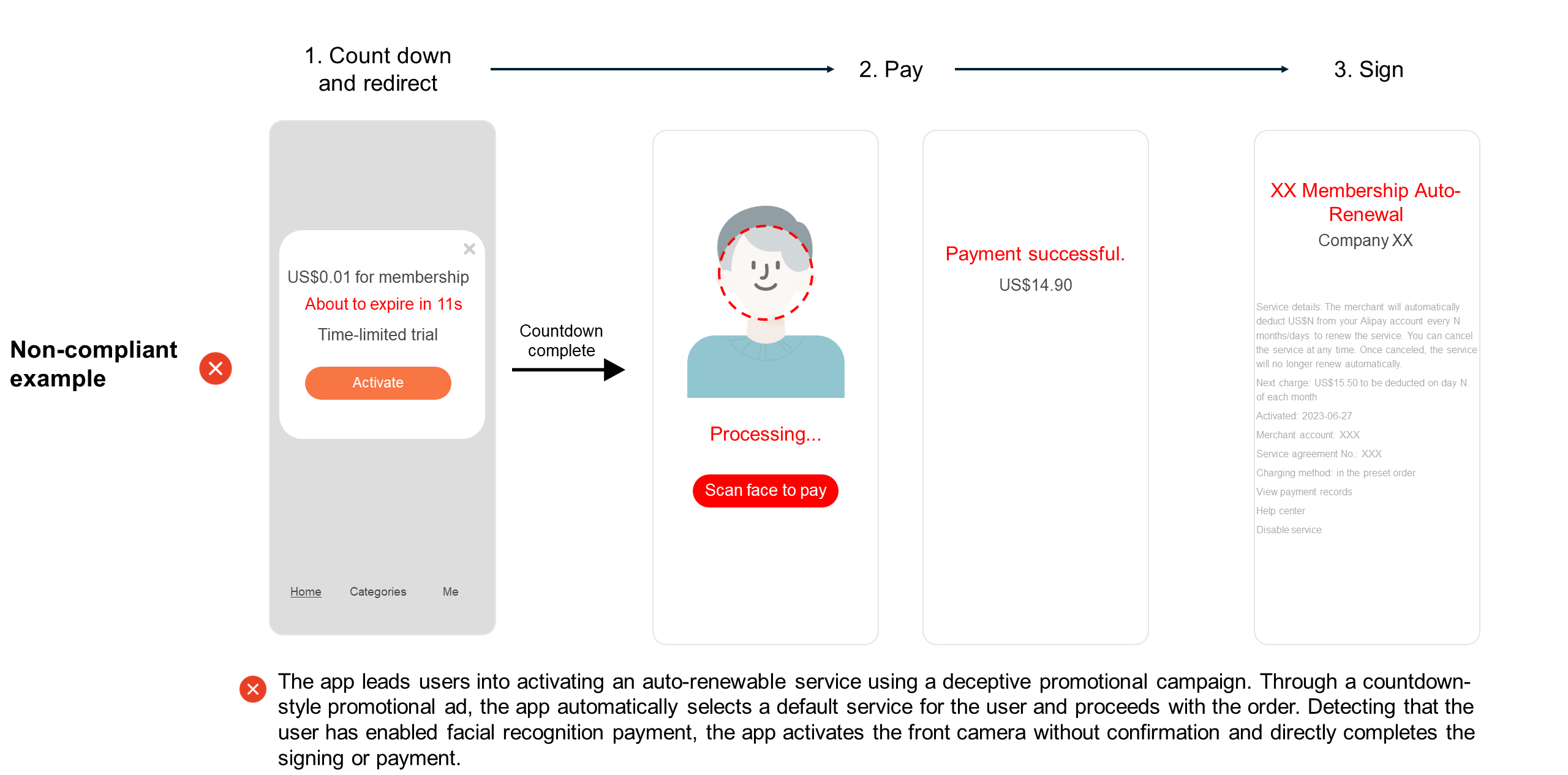
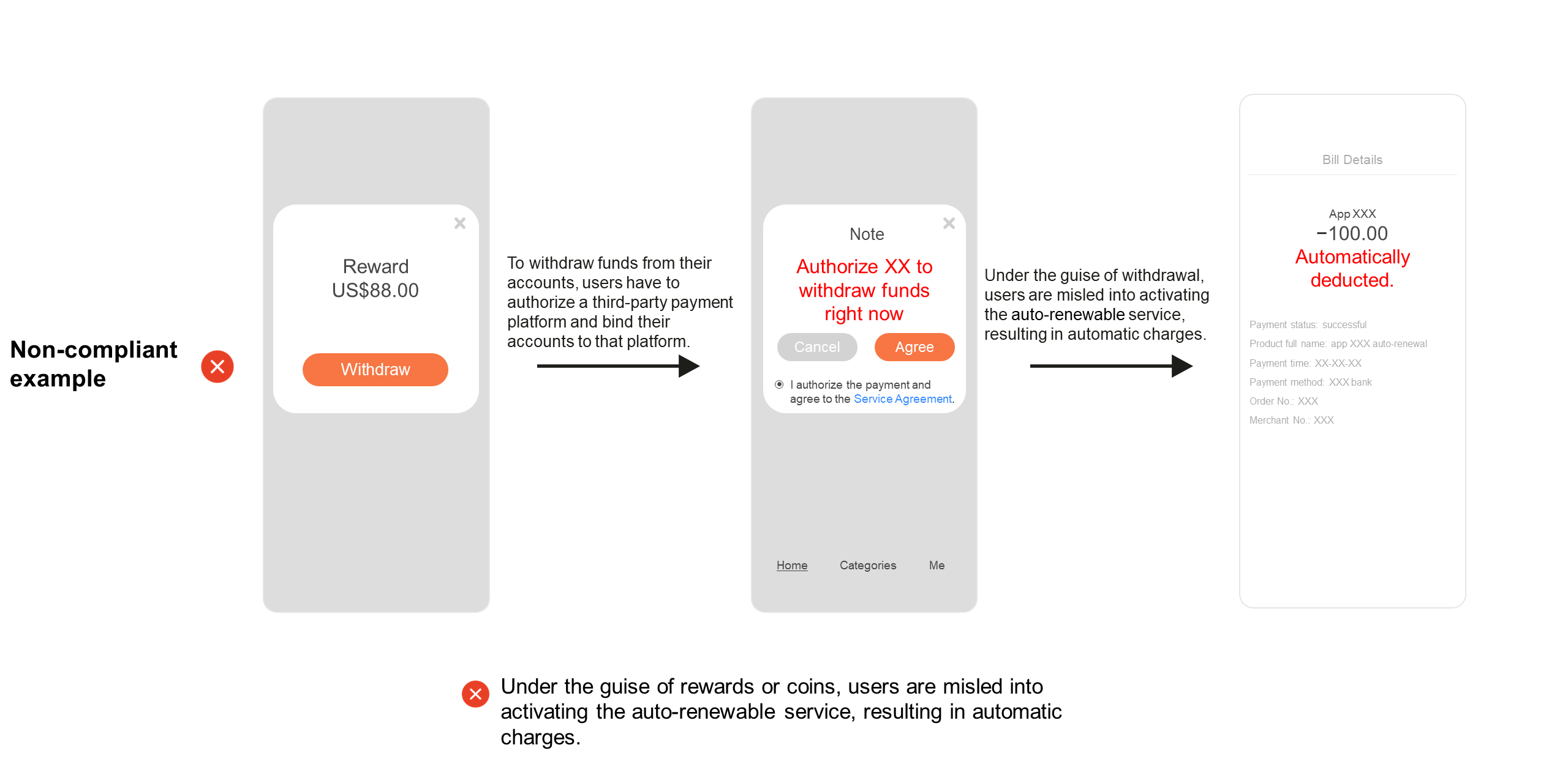
3. Key information about auto-renewal must be clearly displayed.
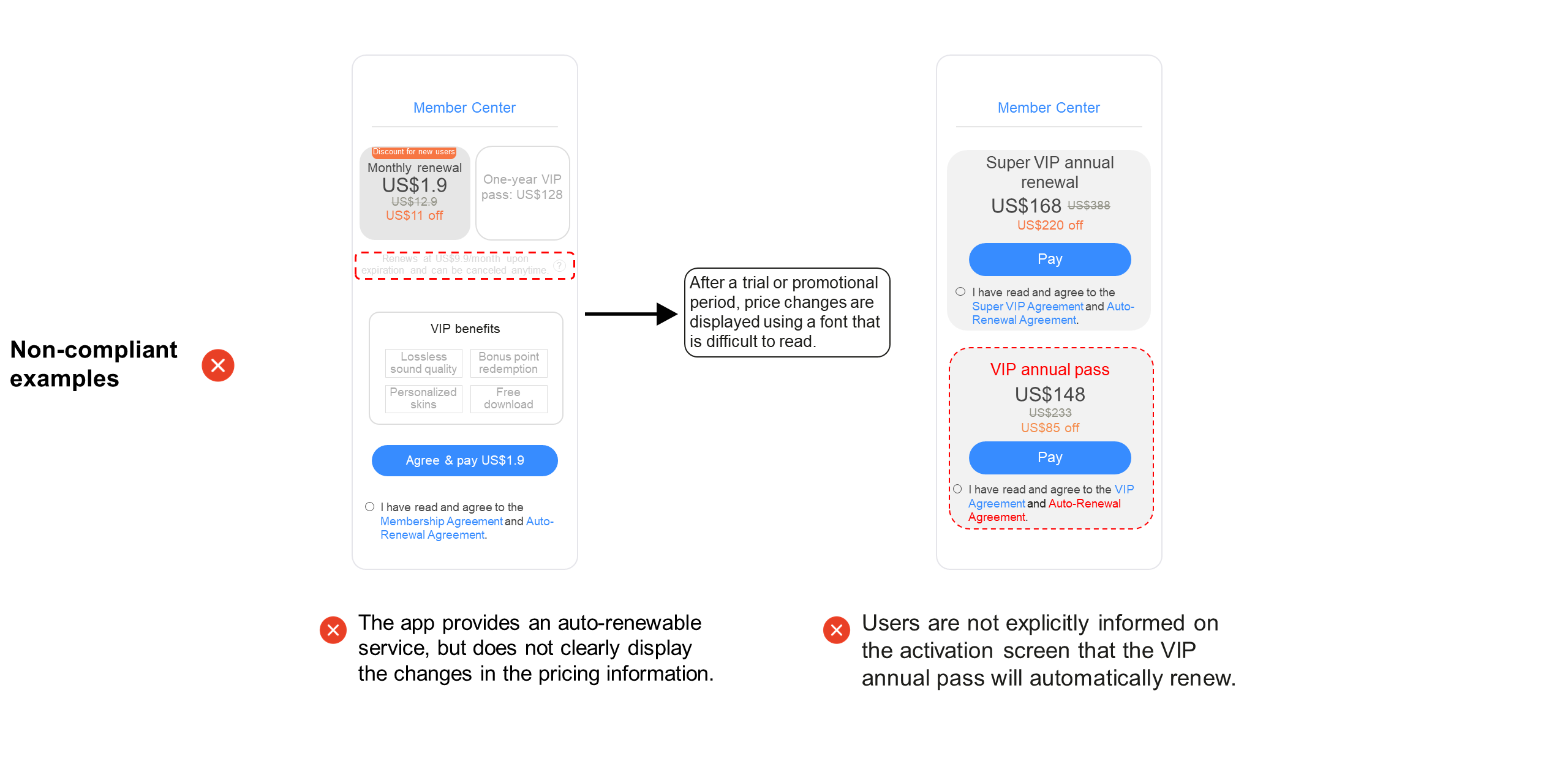
(1) Pricing information must be clearly presented. If the price changes after a trial or promotional offer, it must be prominently and transparently communicated to users in a simple and easy-to-understand manner.
(2) The renewal method must be clearly presented. On the activation screen, users must be explicitly informed that the service automatically renews.
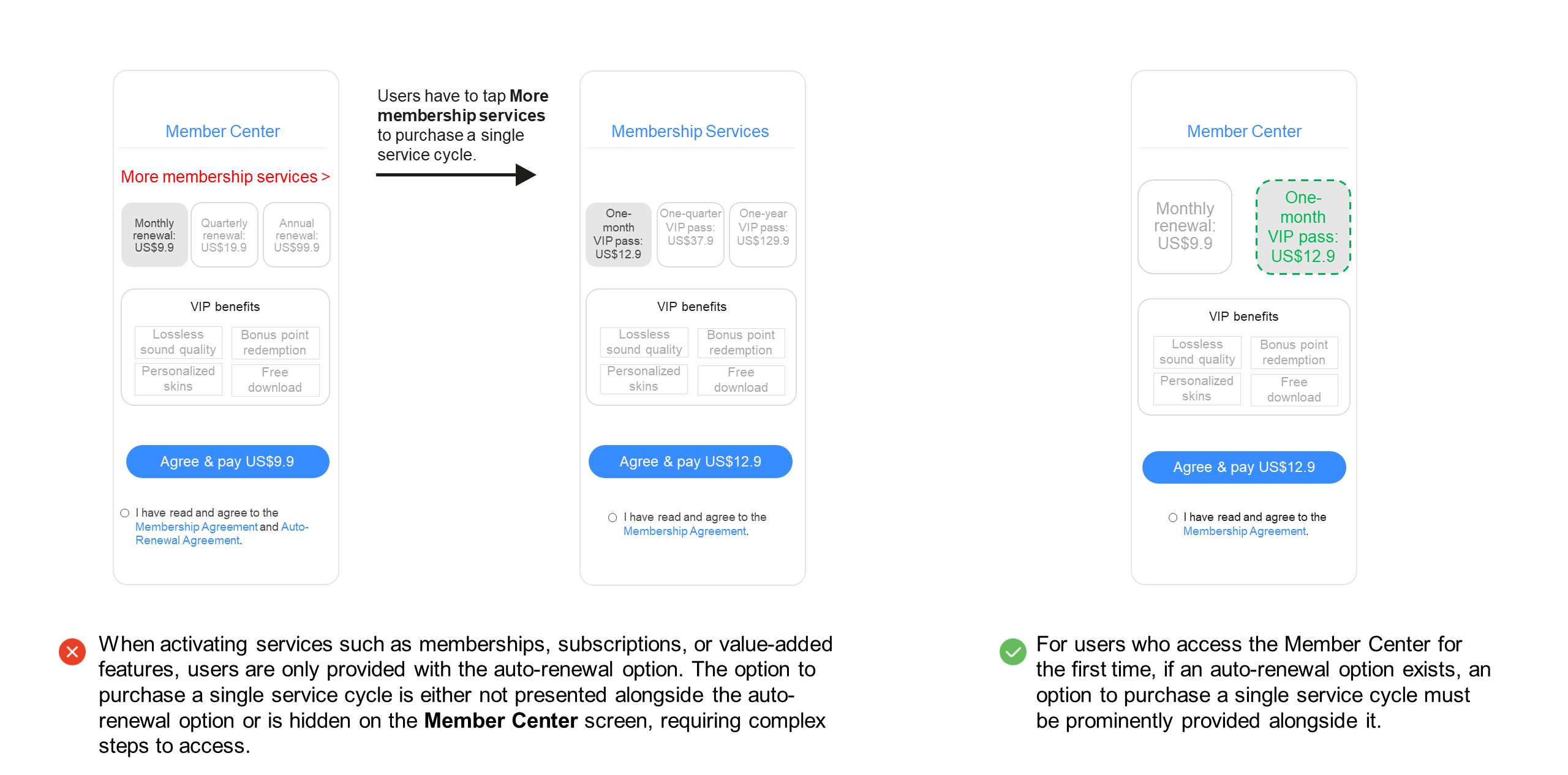
4. A one-time activation option must be provided for users when they activate an auto-renewable service.
Note: This rule does not apply to services that provide continuous storage of user data, such as personal cloud storage.
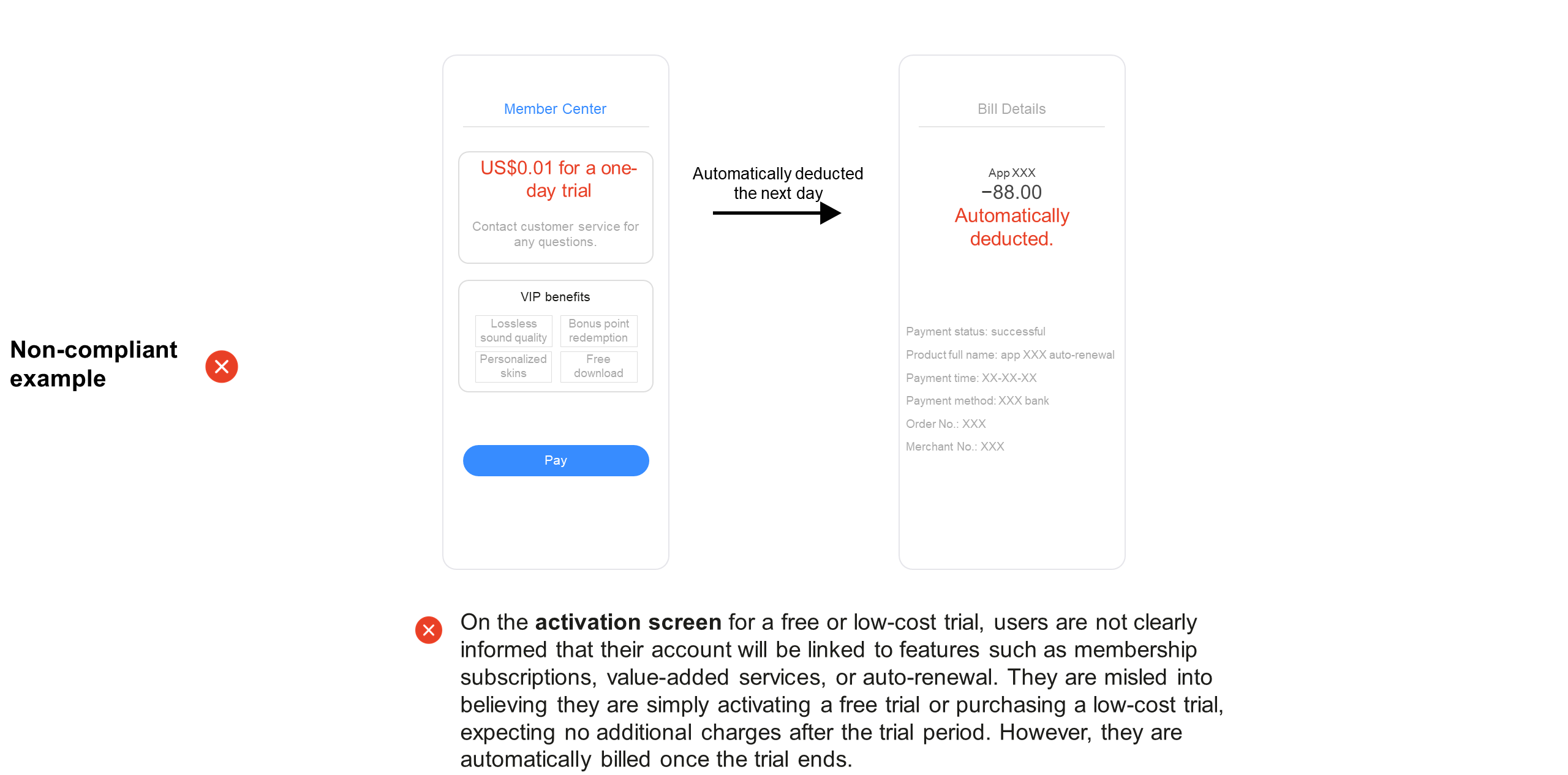
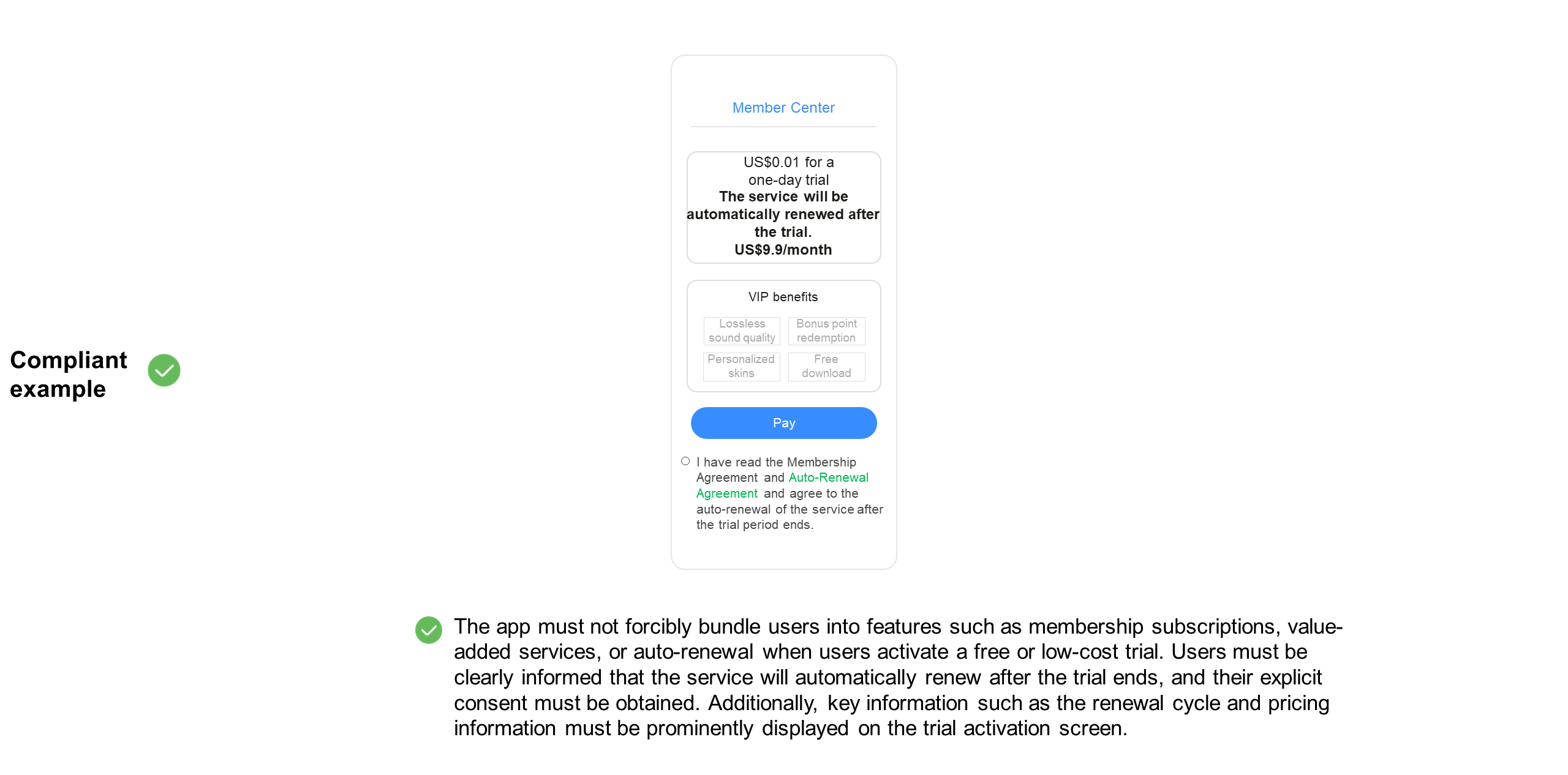
5. If a free or low-cost trial is offered, auto-renewable services can be activated only with the user's explicit consent. If the price changes after the promotional period ends, it must be clearly and prominently communicated to users in a simple and transparent manner before service activation.
Note: A free trial refers to a service activation where no payment is required from the user.
6. Comply with the specifications during the service period.
(1) The services users obtain must match the explicitly disclosed details. If any changes occur during the service period, users must be informed in advance. If a user explicitly refuses to accept the changes, their concerns should be addressed through negotiation or other appropriate means.
(2) The app must provide an auto-renewal management screen displaying all purchased services that remain active. This screen should include details such as the service content, renewal date, and renewal fee.
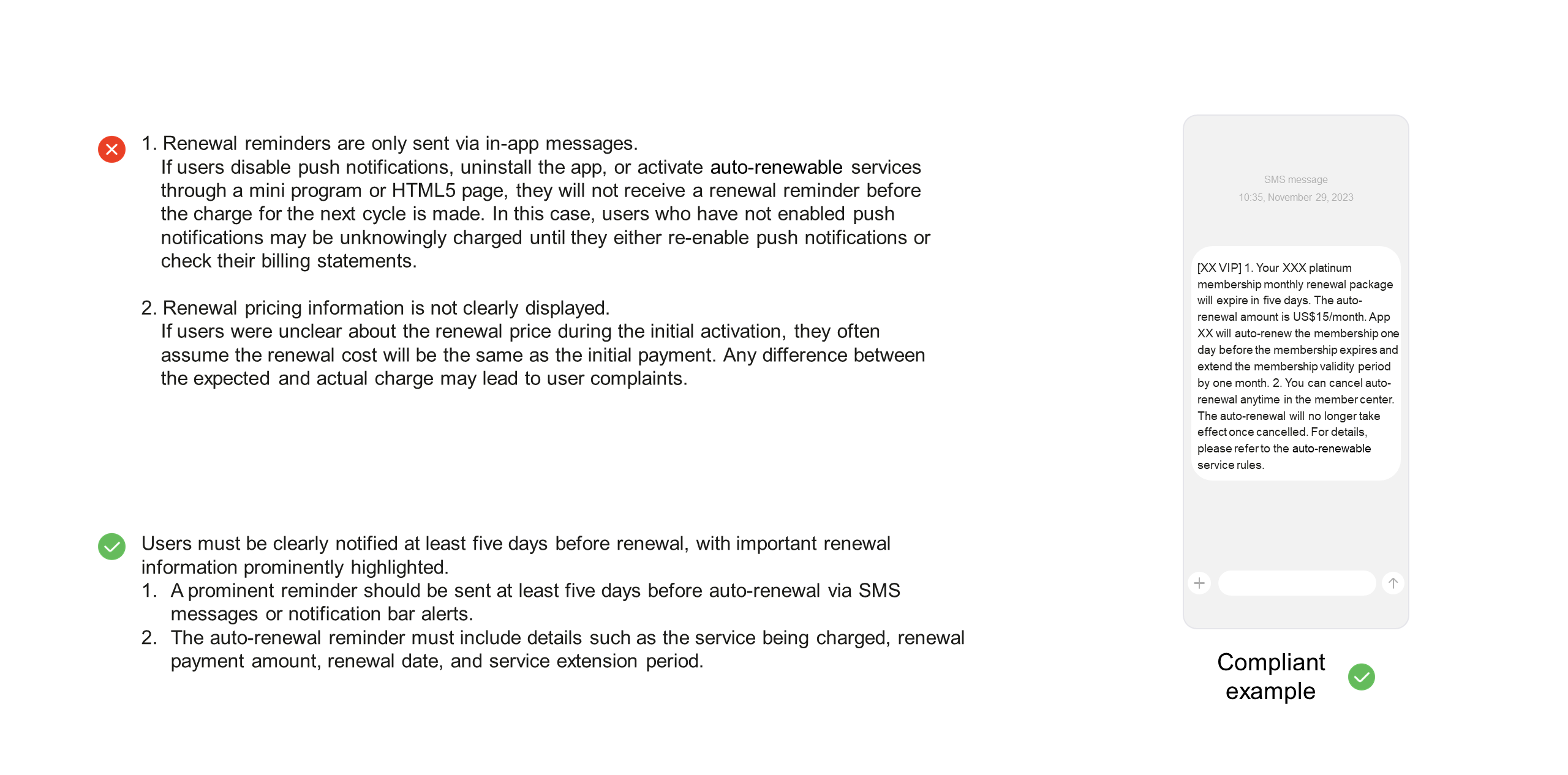
7. Users must be notified of the renewal in a prominent manner five days before the renewal date. Key renewal details must also be clearly presented.
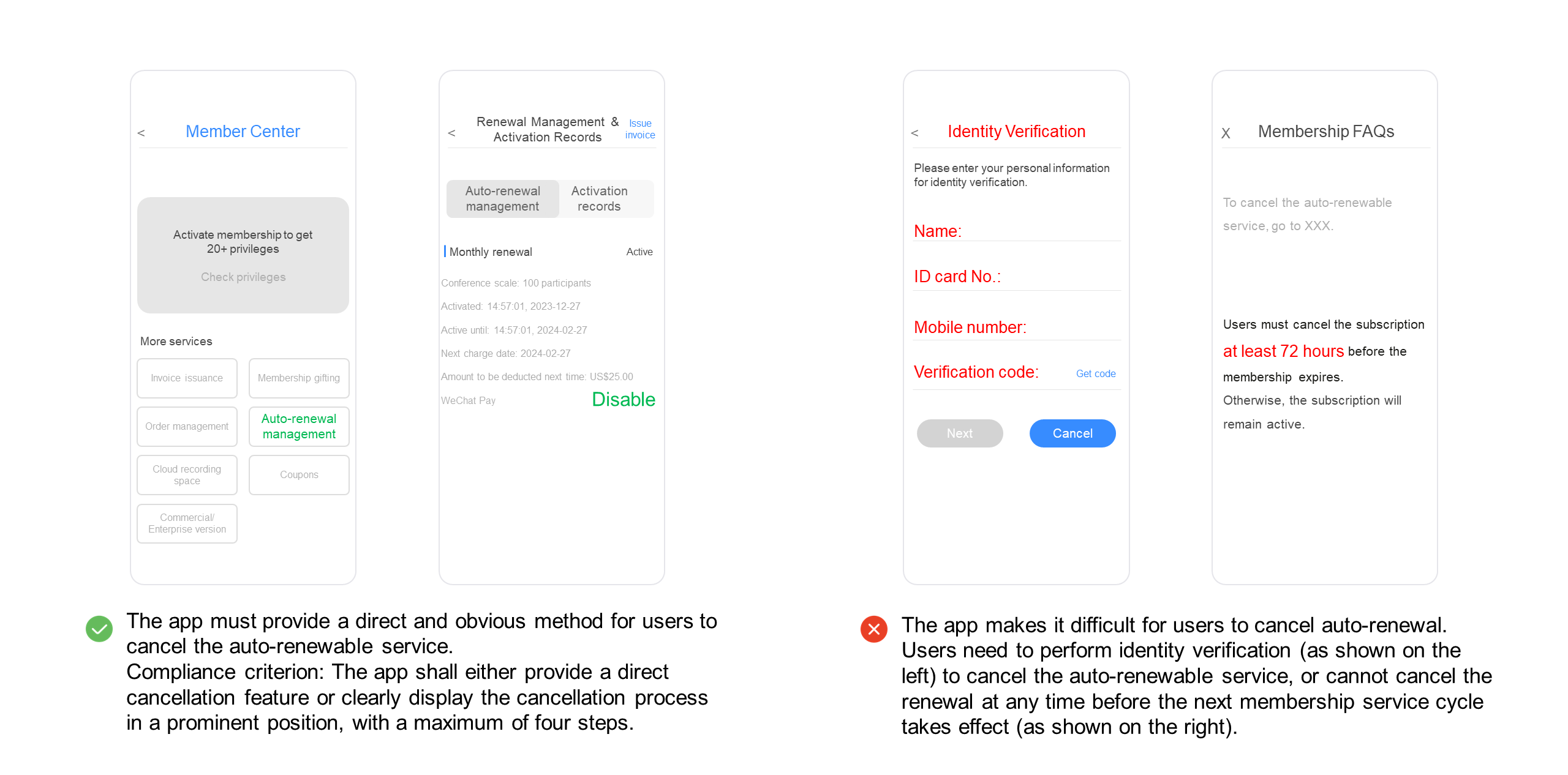
8. The process for canceling auto-renewal should be simple and convenient, without unreasonable conditions.
(1) The cancellation process must be straightforward and free from unreasonable requirements, such as demanding additional authentication beyond what was required for service usage.
(2) Users must be able to cancel at any time before the new service period begins. Service providers should not reject cancellation requests with an excuse of insufficient remaining time in the current period.
(3) If a unified account system is used and multiple products under the same entity provide separate auto-renewable services, each product must offer an independent cancellation option.
(4) If a product provides auto-renewable services across different platforms (such as an app or a mini program), users must be given a convenient way to cancel. They should not be required to download an app to cancel the services.
(5) If an account to be deleted contains auto-renewable services, the user must be clearly informed and guided through the cancellation process.