目录
- Version Change History
- Introduction
- Workflows
- AppGallery Connect API
- About Accounts and Permissions
- Managing Your Developer Account
- Managing the Team Account
- Roles and Permissions
- Topping Up
- Setting a Spending Notification
- Viewing Account Spending Details
- Creating a Project
- Managing Data Processing Locations
- Creating a HarmonyOS App
- Creating an Atomic Service
- Viewing App Information
- Managing Huawei Open Capabilities
- Overview
- Using the Free Quota of a Paid Service
- Checking the Free Quota Usage
- Upgrading a Service Bundle to the Pay-As-You-Go Plan
- Downgrading a Service Bundle to the Free Plan
- Checking the Plan List
- Overview
- Registering a Device
- Deleting a Device
- FAQs
- Overview
- Requesting a Debug Certificate
- Requesting a Release Certificate
- Requesting an In-House Release Certificate
- Requesting an Enterprise App Re-signing Certificate
- Requesting a Binary Certificate
- Configuring a Public Key Fingerprint
- FAQs
- Overview
- Requesting ACL Permissions
- Overview
- Requesting a Debug Profile
- Requesting a Release Profile
- Requesting an In-House Release Profile
- Overview
- Registering an Emulator Debug Credential
- Overview
- Configuring a Privacy Statement (for a HarmonyOS App)
- Configuring a Privacy Statement (for an Atomic Service)
- Configuring a User Agreement
- FAQs
- Overview
- Service Introduction
- Obtaining Authorization from the Server
- Upload Management API
- Obtaining the File Upload URL
- Uploading a File
- Initializing Chunk Information
- Obtaining Chunk Upload URLs
- Uploading a Chunk
- Merging Chunks
- CommonUrlInfo
- ConnectRet
- FilePartComposeInfo
- FilePartInfo
- FilePartUploadInfo
- Result Codes
- Provisioning API Guide
- Requesting a Certificate
- Querying a Certificate
- Deleting Certificates
- Adding Devices in Batches
- Querying the Device List
- Deleting Devices
- Requesting a Profile
- Querying the Profile List
- Modifying Devices Bound to a Profile
- Deleting a Profile
- AddDeviceInfo
- AddDeviceResult
- CertInfo
- ConnectRet
- DeviceInfo
- ProvisionInfo
- Result Codes
- Languages
- Country/Region Codes
- App/Game Categories
- App Rating
- Obtaining the Public Key for Signature Verification
- Price Conversion Rules
- App File Restrictions
- Release Guidelines
- Making Preparations
- Uploading Your Package
- Configuring Supported Devices
- Configuring Localized Information (App Name and Icon)
- Configuring an App Category and Tags
- Configuring Service Information
- Selecting a Package to Be Released
- Configuring Release Countries/Regions
- Configuring Localized Information (Introduction, Features, and Assets)
- Configuring In-App Purchase Items and In-App Products
- Configuring Content Rating
- Configuring a Privacy Description
- Configuring a Privacy Statement
- Configuring Privacy Tag Information
- Configuring Copyright Information
- Configuring Information for the Reviewer
- Setting the Release Time
- Submitting the App for Review
- Release Guidelines
- Making Preparations
- Uploading Your Package
- Configuring Supported Devices
- Configuring Localized Information (Name and Icon)
- Configuring an App Category and Tags
- Configuring Service Information
- Selecting a Package Version
- Configuring Release Countries/Regions
- Configuring Localized Information (Introduction, Features, and Assets)
- Configuring In-App Purchase Items
- Configuring Content Rating
- Configuring a Privacy Description
- Configuring a Privacy Statement
- Configuring Privacy Tag Information
- Configuring AI Function Declaration
- Configuring Copyright Information
- Configuring Publication Approval Information
- Configuring an In-App Product
- Configuring the Information for Reviewers
- Scheduling the Release
- Submitting the App for Review
- Release Guidelines
- Making Preparations
- Uploading Your Package
- Configuring Supported Devices
- Configuring Localized Information (Atomic Service Name and Icon)
- Configuring an Atomic Service Category, Tags, and Qualifications
- Configuring Service Information
- Selecting a Package to Be Released
- Configuring Localized Information (Introduction and Features)
- Configuring In-App Purchase Items and In-App Products
- Configuring Content Rating
- Configuring a Privacy Description
- Configuring a Privacy Statement
- Configuring AI Function Declaration
- Configuring Information for the Reviewer
- Setting the Release Time
- Submitting the Atomic Service for Review
- Releasing an In-House App
- Sending a Review Reminder or Canceling Review
- FAQs
- Updating App Information
- Updating a Version
- Rolling Back an App
- Releasing an App by Phase
- Removing an App or Atomic Service
- Deleting an App or Atomic Service
- Viewing the Version History
- Interaction Center
- Technical Support
- Asset Specifications
- Package Parsing Error Codes
- Version Update Error Codes
- Service Overview
- Enabling the Merchant Service
- Enabling the In-App Purchases (HarmonyOS NEXT) API
- Activating the In-App Purchases Service and Configuring Event Notifications
- Creating a Key
- Downloading a Key
- Revoking a Key
- Querying a Public Key
- Prerequisites
- Non-subscriptions
- Auto-renewable Subscriptions
- Importing Products in Batches
- Prerequisites
- Non-subscriptions
- Auto-renewable Subscriptions
- Non-subscriptions
- Auto-renewable Subscriptions
- Modifying Products in Batches
- Common Errors
- Prerequisites
- Activating a Product
- Deactivating a Product
- Prerequisites
- Deleting a Product
- Restoring a Product
- Conversion Rules
- Optimization Rules
- Prerequisites
- Adding a Subscription Group
- Overview
- Prerequisites
- Creating an App
- Setting the App Price
- Submitting for Review
- Analyzing Data
- Financial Settlement
- Services & Support
- AppGallery Introduction
- Categorization
- Overview
- 1. App Information
- 2. App Security
- 3. App Functions
- 4. App Content
- 5. App Ads
- 6. App Payment
- 7. User Privacy
- 8. Minor Protection
- 9. Intellectual Property Rights
- 10. App Qualifications
- 11. Developers' Behavior
- Overview
- 1. Atomic Service Information
- 2. Atomic Service Security
- 3. Atomic Service Features
- 4. Atomic Service Content
- 5. Atomic Service Ads
- 6. Atomic Service Payments
- 7. User Privacy
- 8. Minor Protection
- 9. Intellectual Property Rights
- 10. Atomic Service Qualifications
- 11. Developers' Behavior
- Business License and Certificate Review Requirements for Apps
- Business License and Certificate Review Requirements for Atomic Services
- Application Age Rating Standard
- Guidelines for Handling HUAWEI AppGallery Infringement Complaints
- App Review FAQs
- Atomic Service Review FAQs
- Overview
- Where Can I Upload Certificates?
- FAQs About ICP Filing
- FAQs About Computer Software Copyright Certificates
- FAQs About the Security Assessment Report
- FAQs About the Network Culture Business License
- FAQs About the Medical Institution Practice License
- FAQs About the Surveying and Mapping Qualification Certificate
- FAQs About Internet Information Service Algorithm Filing
- FAQs About the Human Resource Service License and Organization Filing
- FAQs About Labeling Content Generated by Artificial Intelligence
- Template of Authorization Relationship Description
- FAQs About Age Rating Questionnaire
- Overview
- I. Non-compliant Personal Information Collection
- II. Personal Information Collection Beyond the Necessary Scope
- III. Non-compliant Use of Personal Information
- IV. Targeted Push Notifications and Precision Advertising
- V. Non-compliant Permission Requests
- VI. Automatic Launch and Secondary Launch
- VII. Download and Distribution
- VIII. Non-compliant Access to Personal Information
- IX. FAQs Related to Account Deletion
- X. True and Valid Information Provided by Developers
- FAQs About In-App Auto-Renewable Services
- Description for Tablet-like Devices
- APK Firmware and Resolution Specifications
- AppGallery Privacy Tag Service Description
- AppGallery Connect Agreement Signing Guide
- AppGallery Connect Service and Agreement
- HUAWEI AppGallery Connect Distribution Service Agreement For Paid Apps
- Agreement on Use of Huawei APIs
- Privacy and security in Huawei AppGallery Connect
- AppGallery Connect Data Processing Addendum
- Data Processing Information
- Subprocessor of Huawei Software Technologies Co., Ltd.
- Aspeigel SE's Sub-processors
- HUAWEI Services (Hong Kong) Co., Limited's Sub-processors
- AppGallery Connect Data Center Location
- HUAWEI AppGallery Connect Service Agreement
- HUAWEI Analytics Service Agreement
- HUAWEI Analytics Data Protection Agreement
- HUAWEI Push Service Agreement
- HUAWEI Map Service Agreement
- HUAWEI Nearby Service Agreement
- HUAWEI Health Kit Service Agreement
- HUAWEI Wallet Kit Service Agreement
- HUAWEI ML Kit Service Agreement
- HUAWEI Dynamic Tag Manager Service Agreement
- HUAWEI Prediction Service Agreement
- HUAWEI AppGallery Connect Paid Service Agreement
- HUAWEI Location Service Agreement
- HUAWEI AppGallery Connect Privacy Notice
- HUAWEI Developers Basic Service Agreement
- Huawei AppGallery Connect App Signing Service Agreement
- Statement About Referral Program and Privacy
- General Terms and Conditions for AppGallery Referral Program
- HUAWEI WisePlay DRM Service Agreement
- Business Connect Service Agreement
- HUAWEI Video Editor Kit Service Agreement
- HUAWEI SignPal Kit Service Agreement
- Business Introduction
- Applications Management Guide
- Content Copyright Dispute Operation Guide
- Content Removal Guide
- Online Signing Guide
- Joint Operation Partner Guide
- AppTouch Supplement to HUAWEI AppGallery Connect Distribution Service Agreement For Paid Apps
- Introduction to the AppTouch VIP Service
- Channel Promotion Operation Guide
- Report Operation Guide
- Application Access Guide
- VIP Service Access Guide
- InTouch Project
- AppTouch FAQ
- InTouch FAQ
- Service Introduction
- UI Design Specifications
- Overview
- Getting Started
- Overall Process
- Workspace
- About Accounts and Permissions
- Managing Your Developer Account
- Managing the Team Account
- Roles and Permissions
- About Projects and Apps
- Creating a Project
- Creating a HarmonyOS App or Atomic Service
- Creating an Android App
- Creating a Quick App
- Creating an iOS App
- Creating a Web App
- Data Processing Location
- Data Processing Location Policies
- Viewing App Basic Information
- FAQs
- Overview
- (Optional) Configuring the App Signing Certificate Fingerprint
- Integrating Services
- Debugging an API
- Overview
- Requesting a Debug Certificate
- Registering a Debugging Device
- Requesting a Debug Profile
- Overview
- Sandbox Testing
- Cloud Testing
- Cloud Debugging
- Integration Check
- Open Testing
- Early Access for Games
- Overview
- Requesting a Release Certificate
- Requesting a Release Profile
- Releasing a HarmonyOS App
- Releasing an Atomic Service
- Releasing an App (APK)
- Releasing an App (RPK)
- Releasing an App (App Bundle)
- Pre-orders
- Releasing a Multi-APK App That Supports One Device Type
- Configuring GMS/HMS Restrictions in the Multi-APK Version Release Scenario
- Package Parsing Error Codes (HarmonyOS)
- Package Parsing Error Codes (Non-HarmonyOS)
- FAQs
- Updating the Details of a Released App
- Releasing an App Update
- Releasing an App by Phase
- Version Update Errors (HarmonyOS)
- Sending a Review Reminder or Canceling Review
- Removing an App from Sale
- Rolling Back an App
- Deleting an App
- Transferring Non-HarmonyOS Apps
- Viewing App Credit Records
- Viewing Version History of an App
- Home Page of App Analytics
- Distribution Reports
- Operations Reports
- Quality Reports
- Analytics FAQs
- Comments
- Developer's Message
- Managing Gifts
- Creating an In-App Product
- Modifying an In-App Product
- Setting Automatic Price Updates
- Activating or Deactivating an In-App Product
- Deleting or Restoring an In-App Product
- Managing Subscription Groups
- Managing Product Marketing
- Currency Conversion Rules
- FAQs
- Interaction Center
- Technical Support
- Supported Countries/Regions, Languages, and Currencies for Product Management
- AppGallery Connect Service White Paper
- Specifications for App Visual Assets
- Google File Conversion Tool
[Q1] How long does the review process for my atomic service take before it can be released on AppGallery?
The atomic service review generally takes 1 to 3 working days. If your atomic service fails the review, we will let you know through an email, and you can make adjustments before resubmitting for review. If your atomic service needs to be released before a specific deadline for a campaign or other requirements, please reserve sufficient time for review and adjustments. Plan your release schedule in advance. If your atomic service suffers a critical fault and requires an urgent fix, you can submit a request for expedited review. To do so, describe the reason in detail in the interaction center, and our team will arrange the review as soon as possible.
[Q2] What are the common reasons for the rejection or removal of my atomic service?
1. Your atomic service has feature malfunctions/incomplete features, such as white screen on launch, blank content display, display issues in dark mode, no response to taps, runtime crashes, and errors.
2. Your atomic service does not comply with design specifications. Issues may include icons mismatched against the template, incorrect corner radius, rounded corners of service widgets, and non-compliant safe margins. For details about the design specifications, please refer to Atomic Service Design and Atomic Service UX Standards.
3. Your atomic service icon does not comply with design specifications. For example, the icon size fails to meet the standard (512 px × 512 px); the outer ring style does not align with the eyelash icon template, or the inner circle is incomplete or non-standalone; no transparent icon background is configured; or the outer decorative line of the atomic service icon is black or white in HSB values. For details, please refer to the procedure for generating atomic service icons with a tool and atomic service icon design specifications.
4. Your atomic service has privacy compliance issues, for example, failing to prominently prompt users to read the privacy policy on first launch, involving targeted push but not providing an opt-out option, lacking clear labeling of targeted push on the main feature UI, or requesting permission prematurely.
5. Your atomic service lacks uniqueness or practical value. For example, it may merely provide a list of information, duplicate the phone system's built-in features, fail to let users clearly know its core features and value, or deliver outdated content when it features news and information. (For details, please refer to question 11.)
6. Your atomic service lacks differentiation. Examples include providing features and using icons, UI layouts, interaction patterns, information sources, content categories, and typography that are almost identical to those of other atomic services. (For details, please refer to question 12.)
[Q3] What are the requirements for information about my atomic service?
Atomic service information includes, but is not limited to, its name, icon, description (a brief introduction and new features), category, supported languages, content rating, developer information, and privacy details (privacy policy, permission explanations, among others).
1. Your atomic service information must not contain any illegal or non-compliant content, such as vulgar, pornographic, gambling-related, or drug-related content.
2. Your atomic service information must align with the actual content of your atomic service.
3. If your atomic service information contains third-party brand content, authorization must be obtained in advance to avoid user confusion or claims for damages arising from intellectual property infringement.
4. Your atomic service name must be unique. The name must not be a broad, generic, or non-distinctive term or a trending search term that may distort search results or mislead users. Prohibited terms include, but are not limited to, trademarks, popular app names or aliases, buzz words, industry terms, occupation-related terms, category words, or feature descriptions. In addition, avoid keyword stuffing within the name. Examples of non-compliant names include "Phone Location", "Flashlight", "Calendar", or "Video Editing, Watermark Removal, and Image Retouching".
5. Your atomic service name must not contain placeholders, garbled characters, emojis, or special characters, including asterisks (*), ampersands (&), hyphens (-), and parentheses.
For details about the relevant review requirements, please refer to 1. Atomic Service Information in the Atomic Service Review Guidelines.
[Q4] Why does a message appear during the submission of my atomic service for review, indicating that the name can be modified a maximum of twice, and I have reached the limit for this year and can no longer make any modifications?
To better protect developer rights and interests and improve user experience, AppGallery has set a limit on how many times an atomic service name can be modified. An atomic service name can be modified up to twice per calendar year, and unused quota cannot be carried over. If the quota has been used up, no further modifications can be submitted.
If you need to modify the name after exhausting your quota, you must provide proof documents such as trademark certificates and explain the reason for the modification. Please modify the name with caution. If you have any questions, please contact us via the interaction center.
[Q5] What are common issues related to the features of my atomic service?
- Your atomic service widget may fail to launch, or show a white screen or display "hello world" upon launch.
Tips:
Ensure that the entry package of your atomic service exists and contains compliant content that meets the release requirements. It is recommended that you migrate part or all of the feature package content to the entry package, and delete the feature package with redundant content after migration.
- Display issues occur in dark mode, such as unreadable text in your atomic service.
Tips:
Ensure that your atomic service widget is compatible with the dark mode to prevent display issues when users switch between the light and dark modes, and make sure the content is easily readable and identifiable.
- Your atomic service contains issues such as unresponsive feature modules, runtime crashes, errors, incomplete module development, empty content in modules, incomplete UI display, and white screens.
Tips:
If your atomic service requires special configurations or environments, please specify the necessary resources or information when it is submitted for review.
For details about the relevant review requirements, please refer to Atomic Service Features in the Atomic Service Review Guidelines.
You can also go to the interaction center for more consultations if the issue persists.
[Q6] What are common issues related to privacy compliance in my atomic service?
1. Your atomic service does not prominently prompt users to read the privacy policy upon first launch.
2. Your atomic service implements targeted push or precision marketing without providing an opt-out or rejection option, or without clear labeling on the main feature UI with terms like "Recommended", "For you", "Personalized", "Tagged", or "You may like".
3. Your atomic service requests sensitive permissions from users before displaying the related products or services during its first use.
4. The developer name and atomic service name in the privacy policy do not match the information displayed on AppGallery.
For details about the relevant review requirements, please refer to 7. User Privacy in the Atomic Service Review Guidelines.
[Q7] Where can I modify the privacy policy URL submitted in AppGallery Connect for my atomic service?
Go to AppGallery Connect, click My apps, find your target atomic service, go to Distribute > Release app > Version information, and enter your privacy policy URL.
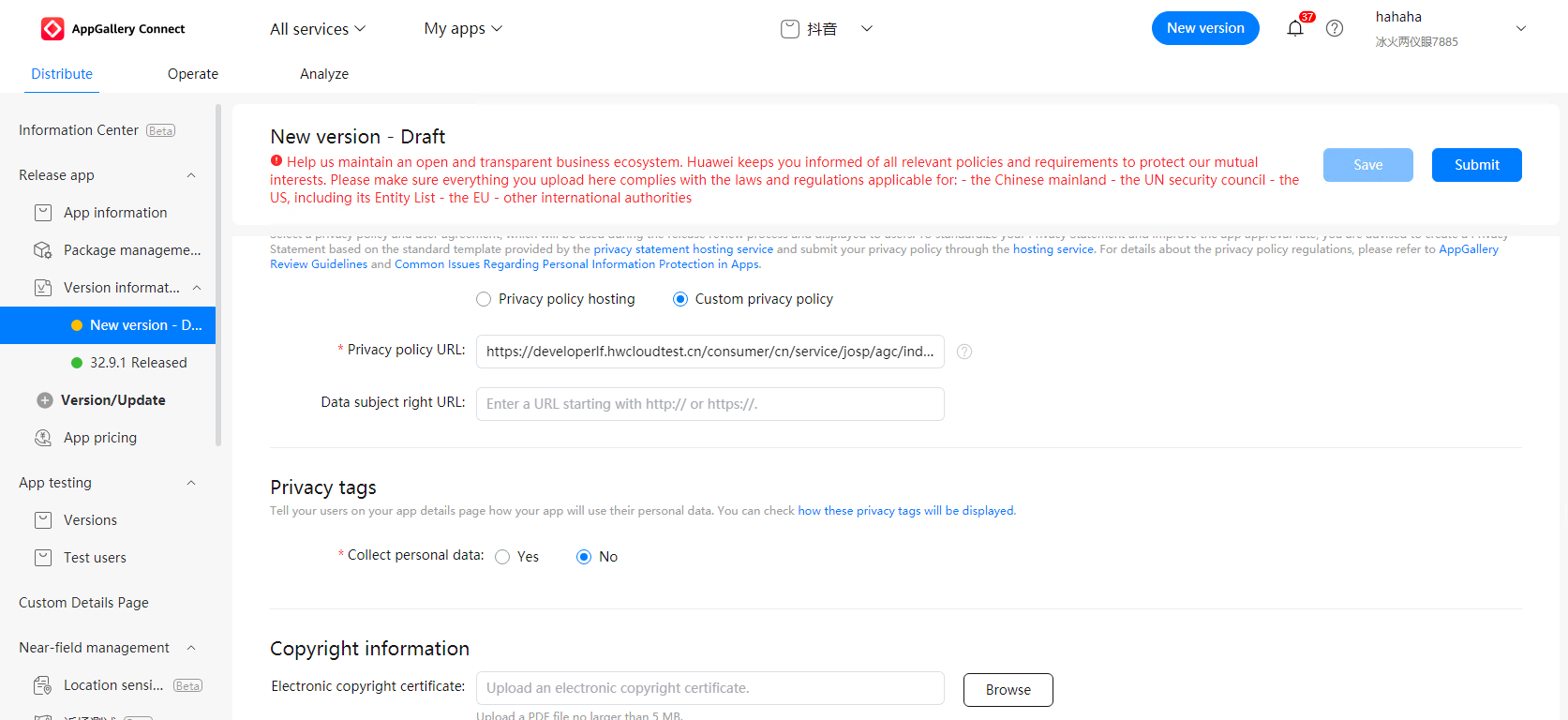
[Q8] If my atomic service does not collect users' personal information, do I still need to provide a privacy policy?
According to the Personal Information Protection Law, before processing personal information, the processors must notify individuals of relevant matters truthfully, accurately, and completely in a prominent manner and using clear and easy-to-understand language. Therefore, atomic services that collect personal information must promptly provide a privacy policy and make it easily accessible and savable for users.
If your atomic service does not collect personal information, please indicate this within the atomic service and in the privacy policy submitted in AppGallery Connect in the form of a URL.
[Q9]If my company operates both an atomic service and an app for the same business, can they share the same privacy policy?
If you operate an atomic service and an app for the same business, and their features and the types of personal information collected are identical, then the atomic service and app can share the same privacy policy. However, if the atomic service and app differ in their features or the types of personal information collected, you must create a separate privacy policy containing personal information processing rules for the atomic service. The privacy policy of your atomic service should be consistent with how it collects and processes personal information at runtime.
[Q10] Why is my atomic service considered lacking in uniqueness and practical value?
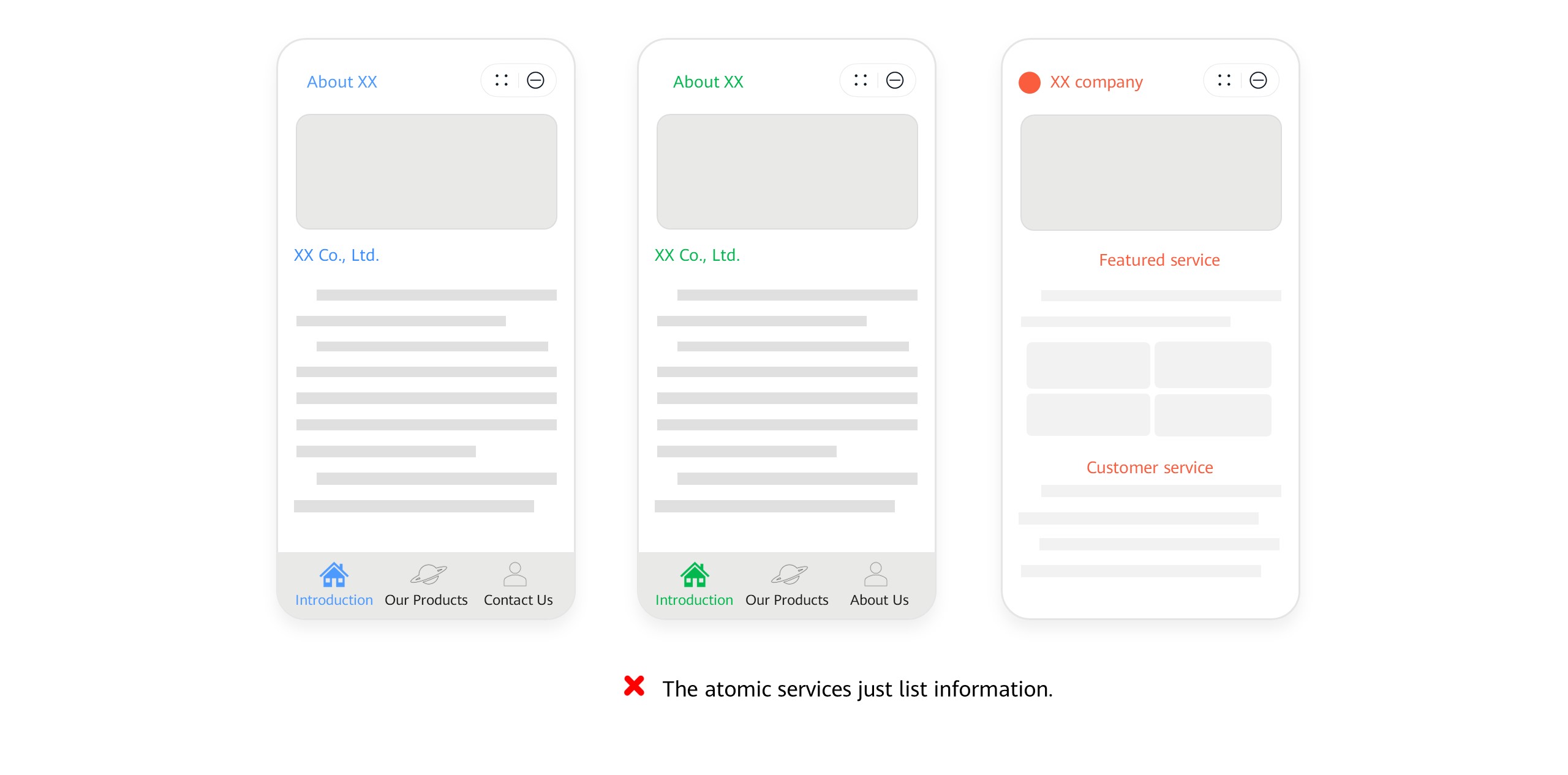
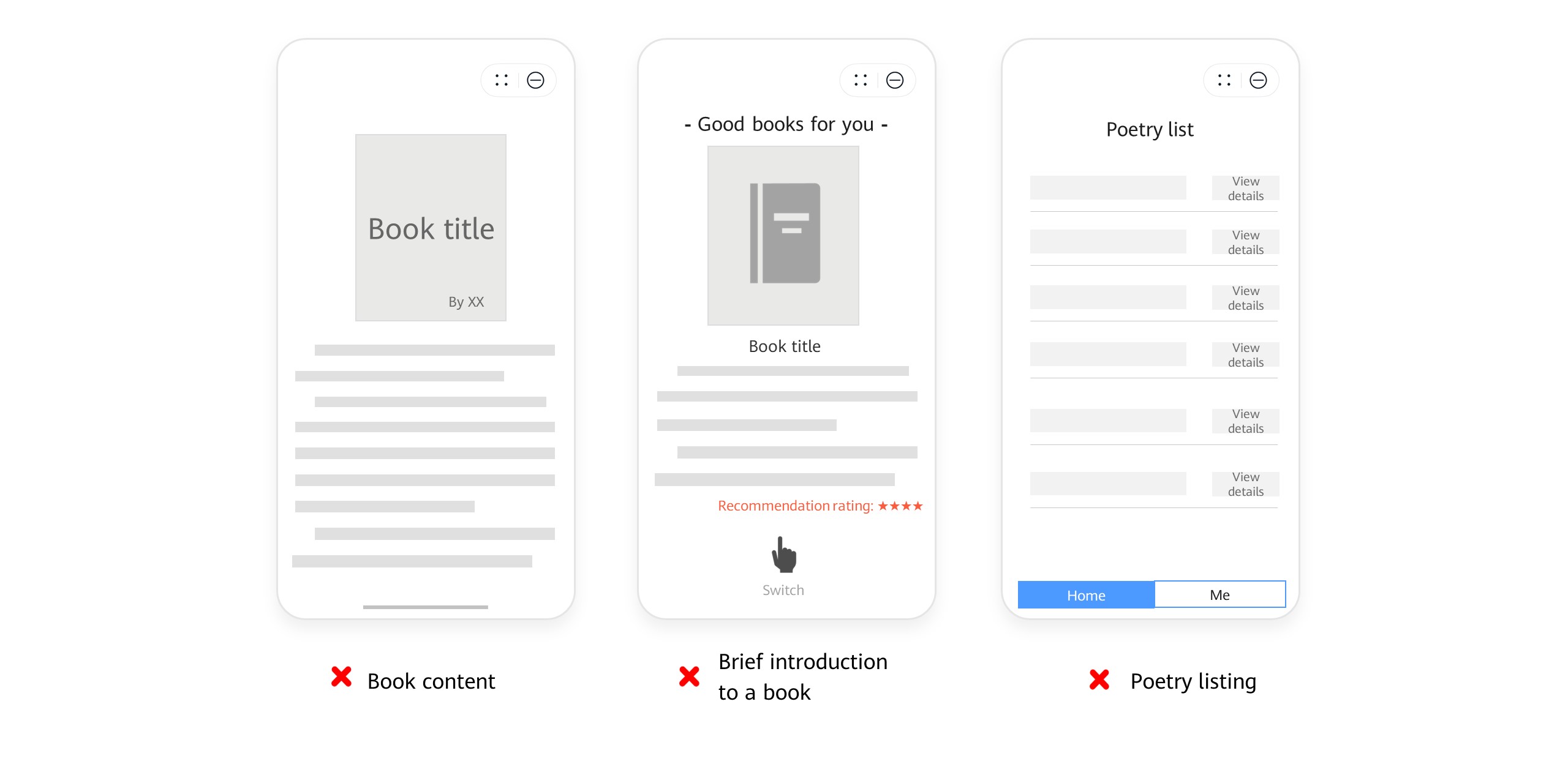
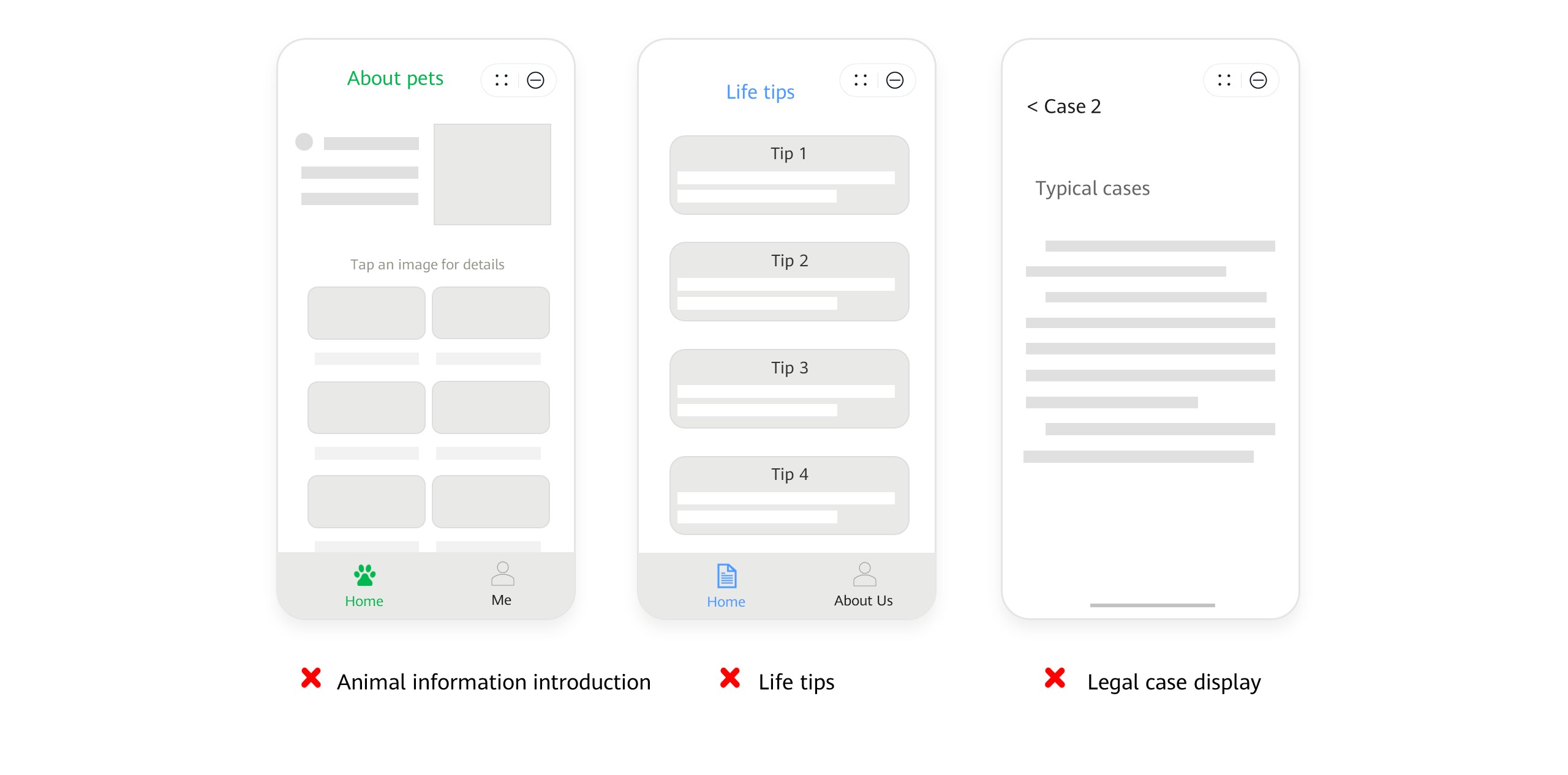
1. Your atomic service only lists information and does not provide actual services.
Example 1: The atomic service that features a business directory only displays textual and image introductions without providing any services for users.
Example 2: The atomic service provides only book content or introductions, poetry, famous quotes, or other similar content.
Example 3: The atomic service offers only a limited range of news and information, such as general knowledge and life tips.
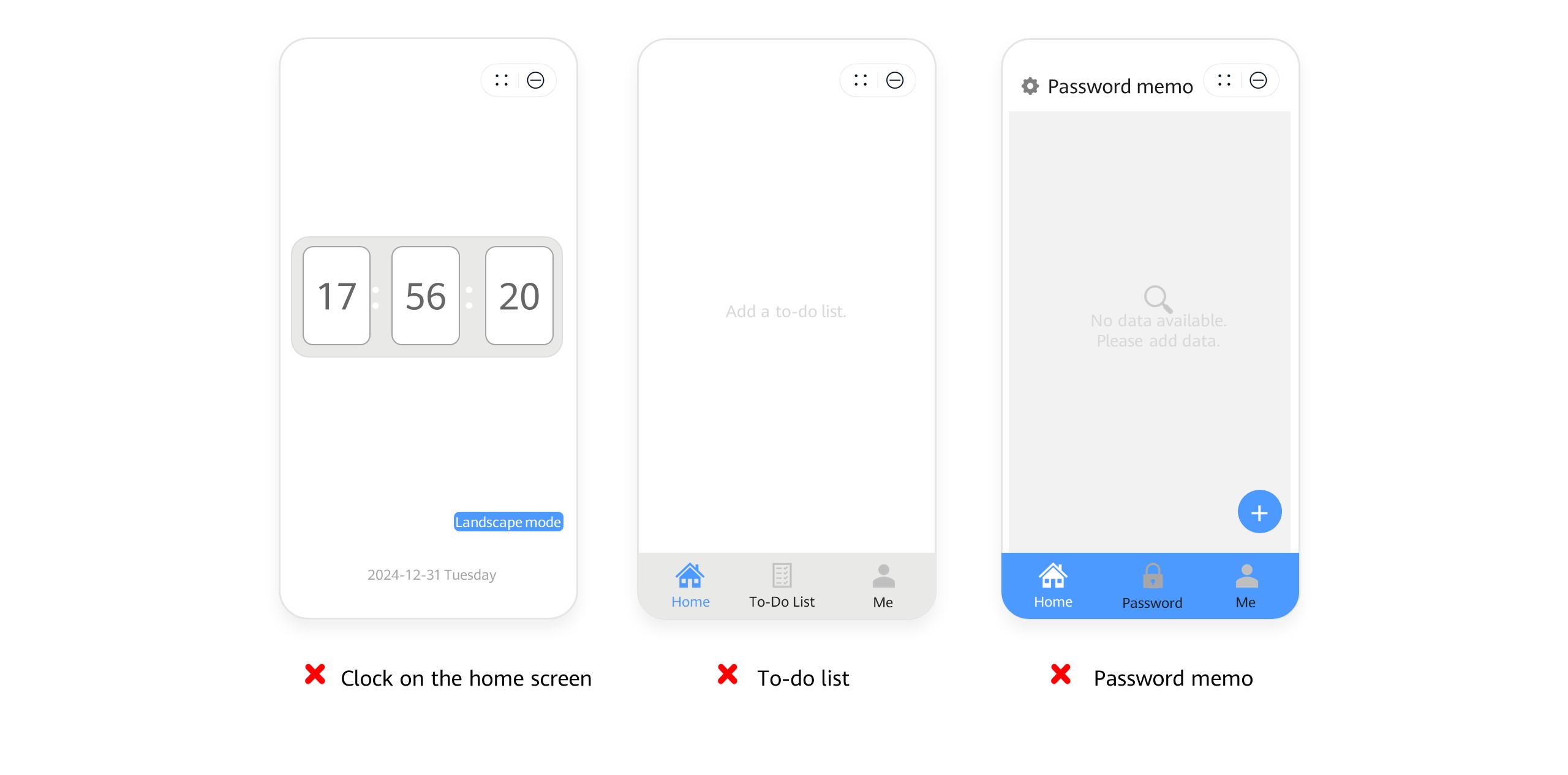
2. Your atomic service duplicates features already available in the phone system, lacking distinctive value.
Examples:
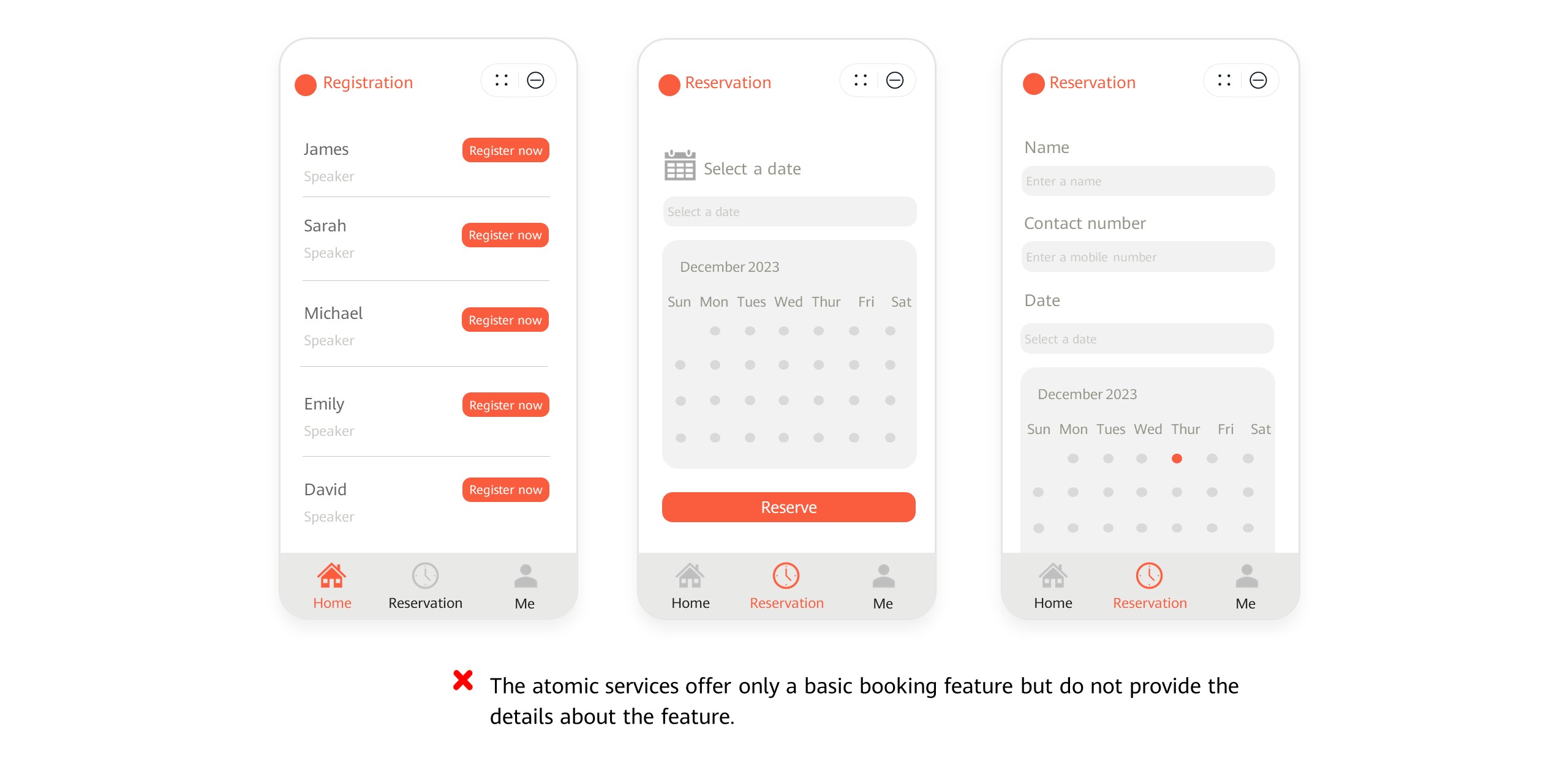
3. The feature design of your atomic service does not clearly demonstrate its core features and value to users.
Examples: The atomic service offers only a basic reservation feature without providing detailed descriptions of the reserved service. It fails to showcase the actual value of the feature and prevents users from forming clear and accurate service expectations.
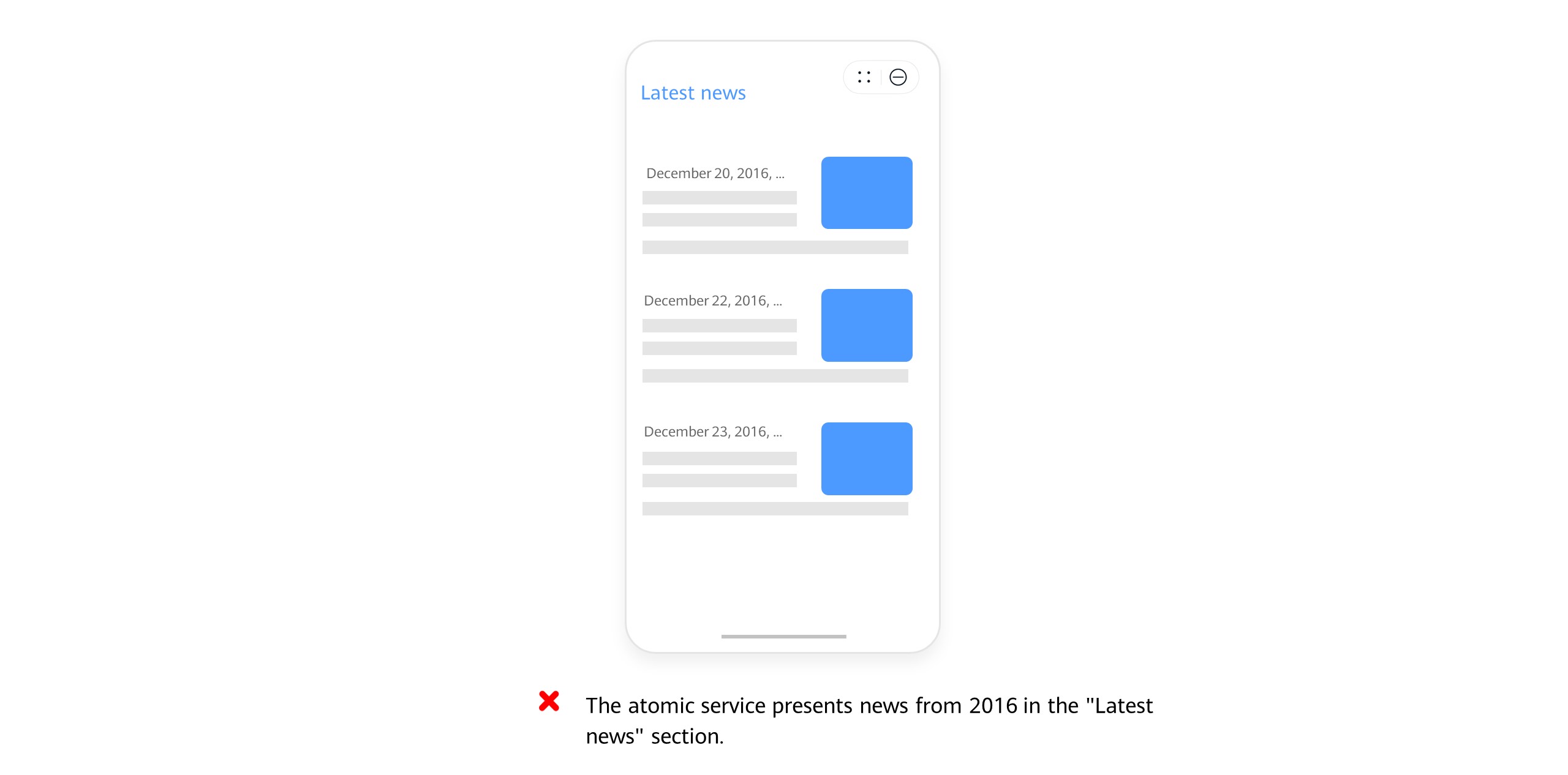
4. The content of your atomic service, which focuses on news and information, is outdated.
Example: The "Latest news" module of the atomic service presents news from 2016.
[Q11] Under what circumstances will my atomic service be considered as lacking differentiation?
The circumstances include but are not limited to:
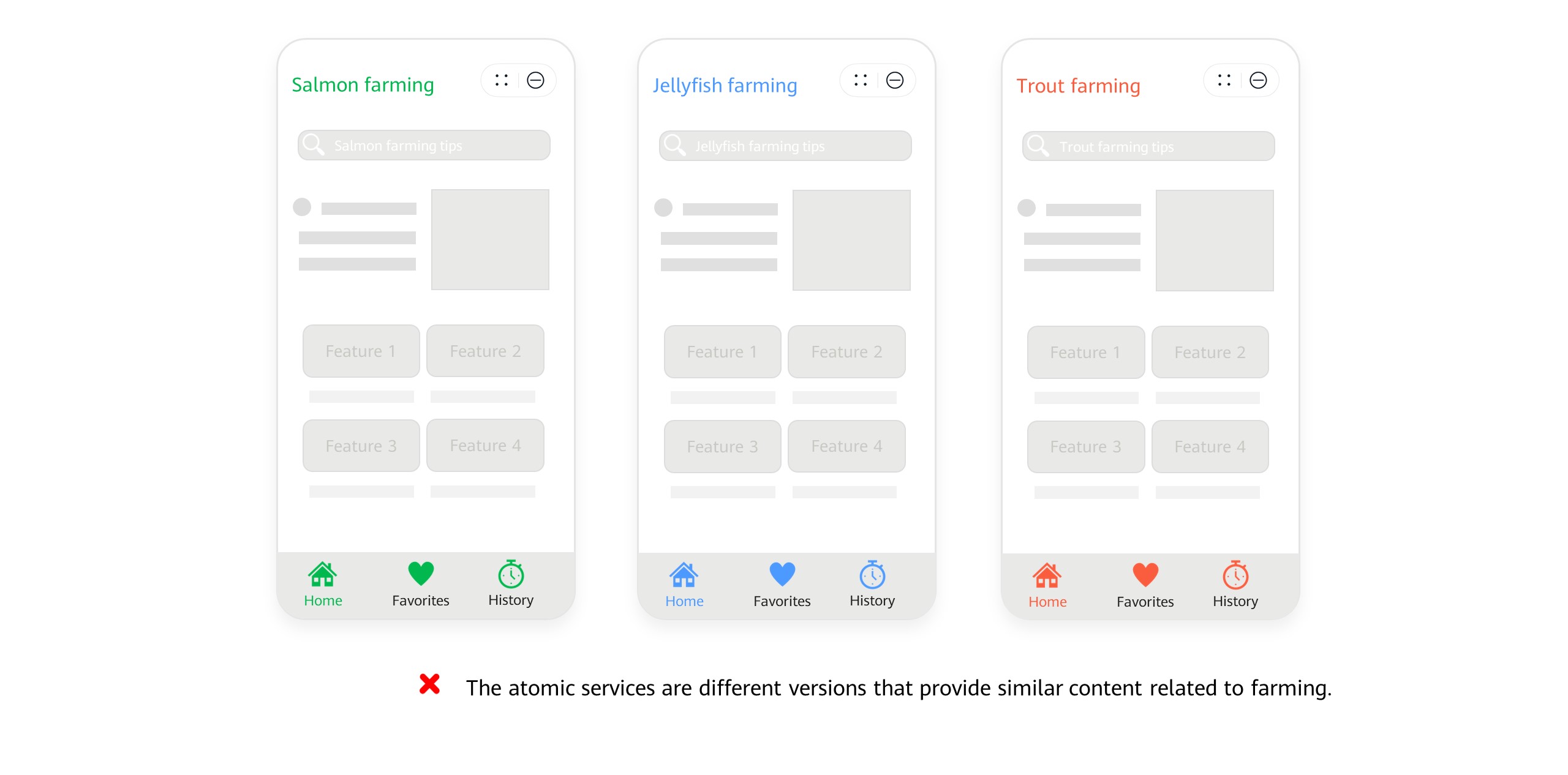
1. Feature: providing highly similar features, with no distinguishing standout features
2. UI/UX: using icons, UI layouts, interaction patterns, and other elements that are almost identical to those of other atomic services
3. Content: featuring highly similar information sources, content categorization, typography, and other elements
Atomic services containing similar elements will confuse users, so please ensure your atomic service is distinguishable in terms of its name, UI, content, and features to avoid affecting user experience.
Common cases:
Example 1:
Example 2:
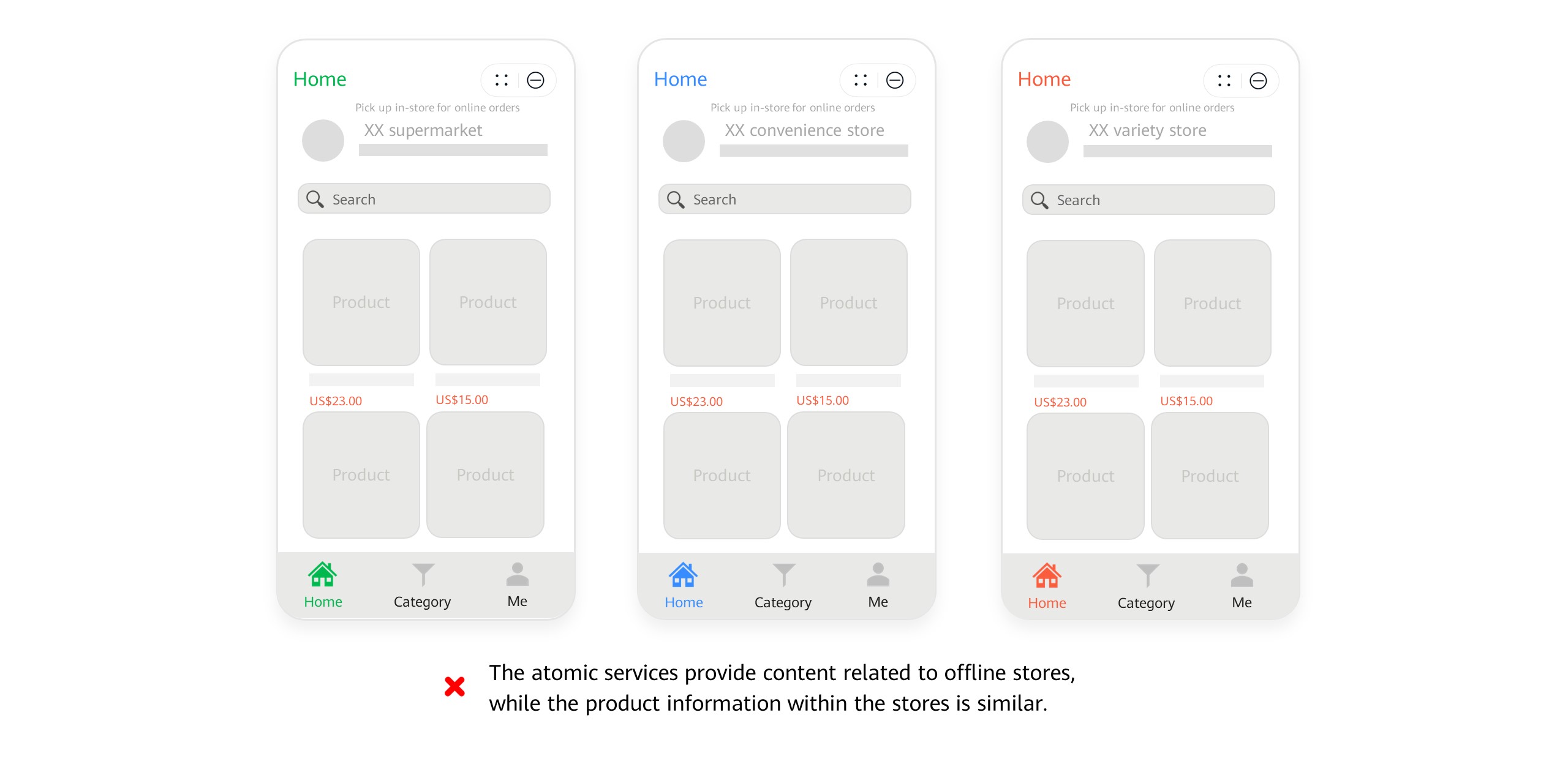
[Q12] Can my atomic service have an identical or nearly identical name, icon, appearance, or content to another developer's atomic service?
No, it cannot. Uploading an atomic service that closely resembles another developer's atomic service could mislead users into believing that your atomic service or its content originates from or is affiliated with that developer, potentially exposing you to the risk of intellectual property infringement claims. Ensure that your atomic service has a unique name, icon, appearance, and content, or provide proof of relevant authorization or trademark ownership. If you have obtained valid authorization, ensure that the authorizing party does not have any atomic services with similar names, icons, appearances, or content.
If you find that any atomic service or content on AppGallery infringes upon your legitimate rights and interests, you can file a complaint. For details, please refer to Guidelines for Handling HUAWEI AppGallery Infringement Complaints.
[Q13] What actions will AppGallery take if my atomic service violates the Atomic Service Review Guidelines?
For atomic services that violate the review guidelines, AppGallery reserves the right to unilaterally adjust the handling measures based on the severity of the issue, including actions against the developer or the atomic service.
For details, please refer to the penalties on apps or developer accounts.
[Q14] Does my atomic service need to provide an account deletion function if it supports sign-in with a HUAWEI ID?
Yes. If your atomic service involves an account system but does not use its own account system, or if it uses its own account system but users have not linked their HUAWEI IDs with their atomic service accounts, provide an option on the UI that allows users to delete non-account information (that is, user data). This should clear usage data generated based on the OpenIDs, while retaining only the OpenIDs or UnionIDs that identify users, and maintain the HUAWEI IDs in a silent sign-in state.
If your atomic service uses its own account system, provide an option on the UI for users to delete their atomic service accounts if they have linked their HUAWEI IDs with their atomic service accounts. The option's name must avoid ambiguity. Do not use terms like "Delete account" or "Account deletion." Specify that the account being deleted is the atomic service account, not the HUAWEI ID, such as "Delete XX account." If users delete their atomic service accounts, unlink these accounts from their HUAWEI IDs, and maintain the HUAWEI IDs in a silent sign-in state.
For details about the account design specifications and account association design for atomic services, please refer to Best Design Practices - Account and How do I use the user account system in developing atomic services?
[Q15] Why is a reporting feature required in my atomic service?
n accordance with the Provisions on the Administration of Mobile Internet Applications Information Services, app providers are required to proactively accept public oversight by offering a prominent and user-friendly complaint and reporting entry point, disclosing reporting methods, and establishing mechanisms for receiving, handling, and responding to public complaints in a timely manner. Typical scenarios where atomic services must provide a reporting feature include: 1. user-generated content, such as chats, comments, or community posts; 2. services involving deep synthesis or generative AI, such as AI-based conversations; and 3. job search or recruitment functions. Please ensure that a Report button is clearly provided in the relevant modules.
For more details, please refer to the notes on certain app types in the review guidelines.
[Q16] What are the precautions for app filing?
All atomic services are required to complete the filing process. The filing requirements for atomic services are consistent with those for apps. An Internet service provider will help you complete the process. When performing the filing through the Internet service provider's system, ensure that HarmonyOS is selected as the platform type and that the document ID entered in AppGallery Connect is correct, with all letters and digits accurately filled in. For details, please refer to Atomic Service Filing.
[Q17] What are the precautions for atomic service qualifications?
Qualification requirements and template documents for certain industries can be found in Business License and Certificate Review Requirements for Atomic Services. The categories, tags, and qualification documents related to your atomic services may change in accordance with relevant policies, laws, regulations, and platform requirements. If you have any questions, please contact our customer service. Final review decisions shall prevail.
[Q18] Is authorization required when a service provider develops and releases an atomic service on behalf of a brand owner?
If there is an authorization relationship between the brand owner and the service provider, an authorization document must be provided. The authorization document can follow the format outlined in the template: Letter of Authorization on Operations.zip.