A binary program can run on a HarmonyOS PC only after being signed with a binary certificate issued by Huawei.

Binary certificates can be used only by enterprise developers. Each developer account can request a maximum of three binary certificates.
Requesting the Permission
Currently, binary certificates are available with restrictions. If you want to try them, please contact us by submitting a ticket online.
Set Issue category to AppGallery Connect > App management > App infringement/transfer, and provide the following information in Description:
- Enterprise name and developer ID
- App name and app ID
- Business scenarios and purposes of the app
- Desired certificate type: binary certificate
Making Preparations
- Prepare a CSR file.
- Obtain the permission to access release certificates for your account role.
Procedure
- Sign in to AppGallery Connect and choose Certificates, app IDs, and profiles.
- In the navigation tree on the left, choose Certificates and click New certificate.

- Enter the certificate information in the New certificate window, and click Submit.
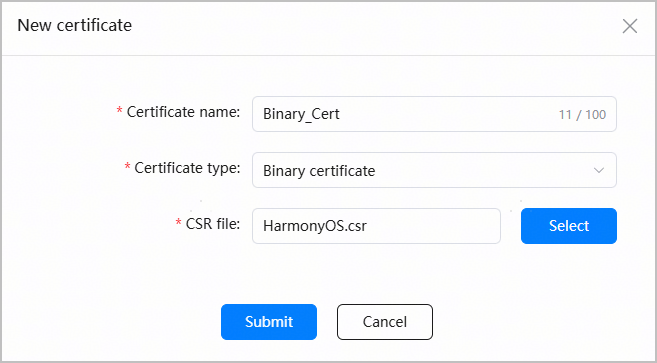
Parameter
Description
Certificate name
Custom certificate name, which contains a maximum of 100 characters.
Certificate type
Select Binary certificate.
CSR file
Upload the CSR file you have prepared.
- After the certificate request is approved, check information like the certificate name on the Certificates page. Click Download to save the generated certificate to the local device for subsequent signing and release.


- A certificate becomes valid once it is successfully requested. If the certificate becomes invalid or revoked, it will no longer be available. In this case, you need to request a new certificate.
- A revoked certificate cannot be restored. Exercise caution when performing this operation.