Overview
Component reuse refers to a mechanism where custom components are cached in a pool after being removed from the component tree. When new instances of the same component type are needed, the system reuses cached component objects instead of creating new ones.
In app development, component reuse is a critical strategy for enhancing UI performance and ensuring a smooth user experience. Proper use of reusable components provides two key advantages: (1) It avoids the frequent creation and destruction of objects, reducing garbage collection frequency. (2) It enables data binding with cached components for display, eliminating the need to create new views and thereby lowering computational costs and improving rendering efficiency.
A common scenario for component reuse is displaying large datasets in scrollable lists. During rapid user scrolling, traditional approaches repeatedly create and destroy list items, potentially causing performance issues like lag. With component reuse, previously created list item views are recycled, significantly improving scroll smoothness.
This topic introduces several component reuse development scenarios to help you better understand the reuse mechanism and effectively apply it to optimize your app's performance.

While this topic primarily illustrates component reuse through list scenarios, the technique applies to any situation involving component destruction and re-creation. Key use cases include:
- Frequent creation and destruction of child components in scrolling scenarios, such as within layout containers like List, Grid, WaterFlow, and Swiper.
- Repeated switching of conditionally rendered control branches in the UI, especially when the component tree structure within those branches is relatively complex.
Component reuse within scrollable lists represents a fundamental optimization pattern in app development. As users scroll through a list, list items exiting the visible area (plus the buffer zone) are detached from the component tree and placed in a cache pool; when new list items come into view, objects are retrieved from the cache pool, data is bound to them, and they are rendered on the screen.
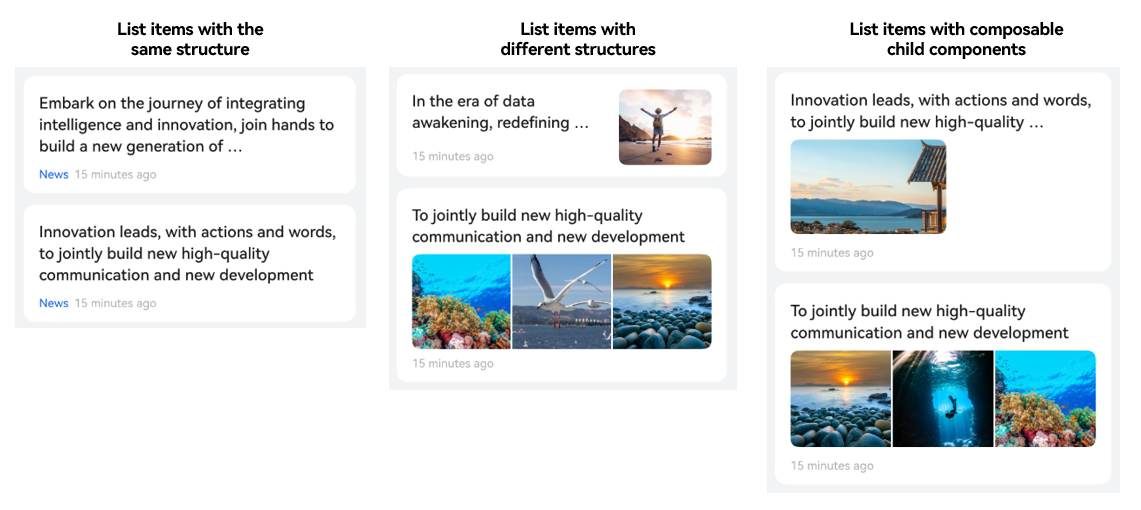
In real-world scenarios, a single list may present one or more types of list item structures. These can be further divided into the following sub-scenarios:
- List Items with the Same Structure
- List Items with Different Structures
- List Items with Composable Child Components
[h2]How to Implement
ArkUI provides the @Reusable decorator to enable custom component reuse. The principle is illustrated as follows.
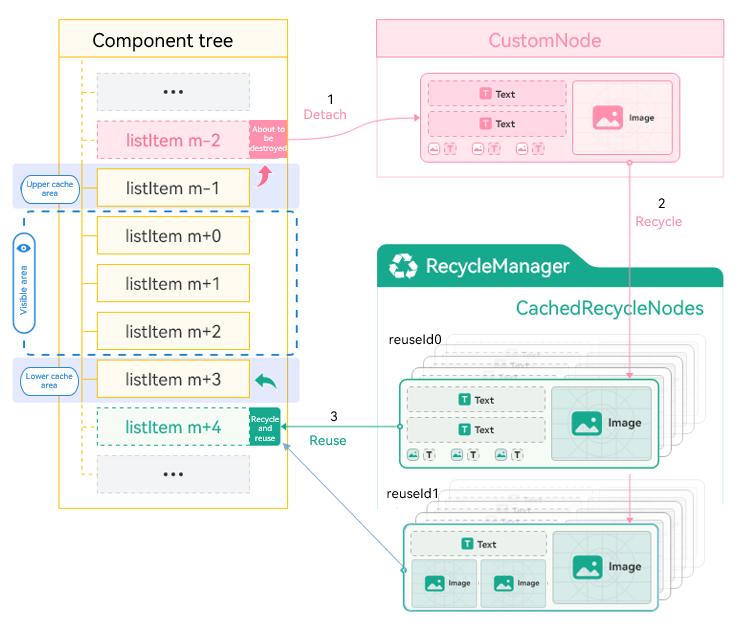
- A custom component (for example, listItem) decorated with @Reusable is removed from the component tree once it scrolls out of the visible area. The component's object instance is then placed into a CustomNode virtual node (which corresponds one-to-one with the custom component).
- During continuous scrolling, the list's RecycleManager recycles these CustomNode virtual nodes. They are grouped according to the reuse ID to form a collection of CachedRecycleNodes, known as the reuse cache pool for view objects.
- When the list continues to scroll and a new listItem needs to be displayed, the RecycleManager first searches the reuse cache pool for the view object corresponding to the reuseId. It then binds the new data to that view, reuses the node, and adds it back to the component tree.
[h2]How to Develop
- Define reusable components: Use the @Reusable decorator to decorate custom components that should be reusable.
- Implement the reuse callback: Implement the aboutToReuse() lifecycle callback for reusable components. When the component is re-added to the component tree from the cache pool, the aboutToReuse() lifecycle callback is triggered. The component's constructor parameters are passed into this callback, where you can handle data update as needed.
- Use reusable components in the layout: Set reuseId to divide the components into different reuse groups to distinguish them in the cache pool. If no reuseId is set, the component's name is used by default as the reuseId.
@Entry
@Component
struct Index {
  // ...

  build() {
    Column() {
      // ...
      if (this.switch) {
        // 3.layout the component and set reuse id
        ReusableComponent({ text: this.typeStr })
          .reuseId(this.typeStr)
      }
    }
    // ...
  }

  // ...
}

// 1.add @Reusable to mark component
@Reusable
@Component
struct ReusableComponent {
  @State text: string = ''

  // 2.update data in aboutToReuse
  aboutToReuse(params: Record<string, Object>): void {
    this.text = params.text as string;
  }

  build() {
    // ...
  }
}

- Components decorated with @Reusable must be placed under the same parent custom component (parent component for short) to enable proper caching and reuse.
- Avoid nesting one @Reusable-decorated component inside another.
For more details, see Constraints.
For lists where all items share identical element types and layout structures, the list item components can be treated as the basic units for reuse logic.
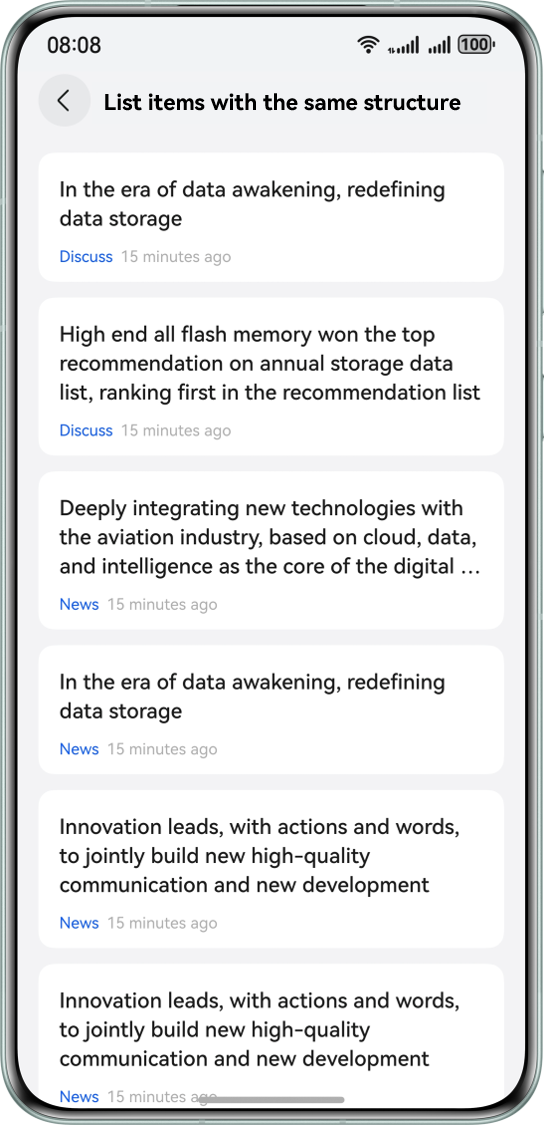
Implementation steps:
- Encapsulate the list item as a custom component named ItemView and decorated with the @Reusable decorator.
- In the aboutToReuse() method of the ItemView component, implement the logic for binding new data.
- Use the ItemView component inside a LazyForEach() loop, and set its reuseId to enable reuse behavior.
In the following example, the @Reusable decorator and the aboutToReuse() method are added to the ItemView component and used in OneTypeItemPage, and reuseId('item_id') is set for the ItemView component, indicating that item_id is used as the reuse group ID.
@Component
export struct OneTypeItemPage {
  // ...
  build() {
    NavDestination() {
      Column() {
        List() {
          LazyForEach(this.dataSource, (item: ItemData) => {
            // layout the component, and set reuse id (or no set with using name as default id)
            ItemView({ title: item.title, from: item.from, tail: item.tail })
              .reuseId('item_id')
          }, (item: ItemData) => item.id.toString())
        }
        // ...
      }
      // ...
    }
    // ...
  }
}

// add @Reusable to mark component
@Reusable
@Component
struct ItemView {
  @State title: string | Resource = '';
  @State from: string | Resource = '';
  @State tail: string | Resource = '';

  // update data in aboutToReuse method
  aboutToReuse(params: Record<string, Object>): void {
    this.title = params.title as string;
    this.from = params.from as string;
    this.tail = params.tail as string;
  }

  build() {
    // ...
  }
} When a list contains multiple types of list items—such as text-only list item, list item with a single image, and list item with multiple images, as shown below—each type of list item can be treated as a separate unit for reuse.

During scrolling, different types of list items are recycled into their respective cache pools. When reuse is required, the system will search for the appropriate view cache based on the item type and display the corresponding view.
Implementation steps:
- Encapsulate each type of list item into separate custom components and decorate each with the @Reusable decorator.
- In the aboutToReuse() method of each component, implement the logic for binding new data.
- In the LazyForEach() loop, use the if logic to select and lay out the appropriate list item components. Set a unique reuseId for each type of list item to distinguish their reuse groups.
@Component
export struct MultiTypeItemPage {
  // ...

  build() {
    NavDestination() {
      Column() {
        List() {
          LazyForEach(this.dataSource, (item: ItemData) => {
            if (item.type === 0) {
              TextTypeItemView({ item: item })
                .reuseId('text_item_id')
            } else if (item.type === 1) {
              ImageTypeItemView({ item: item })
                .reuseId('image_item_id')
            } else if (item.type === 2) {
              ThreeImageTypeItemView({ item: item })
                .reuseId('three_image_item_id')
            }
          }, (item: ItemData) => item.id.toString())
        }
        // ...
      }
      // ...
    }
    // ...
  }
}

@Reusable
@Component
struct TextTypeItemView {
  // ...
}


@Reusable
@Component
struct ImageTypeItemView {
  // ...
}

@Reusable
@Component
struct ThreeImageTypeItemView {
  // ...
} For list items exhibiting partial structural similarities, for example, shared header and footer with variable content regions, a compositional reuse strategy applies. In the list example shown below, child components within each list item are arranged vertically. They share a common top text title and bottom timestamp, but differ in the middle section, which can contain a single image, multiple images, or video content.

Therefore, you can create five reusable child components and, by combining these child components, construct different types of list items.
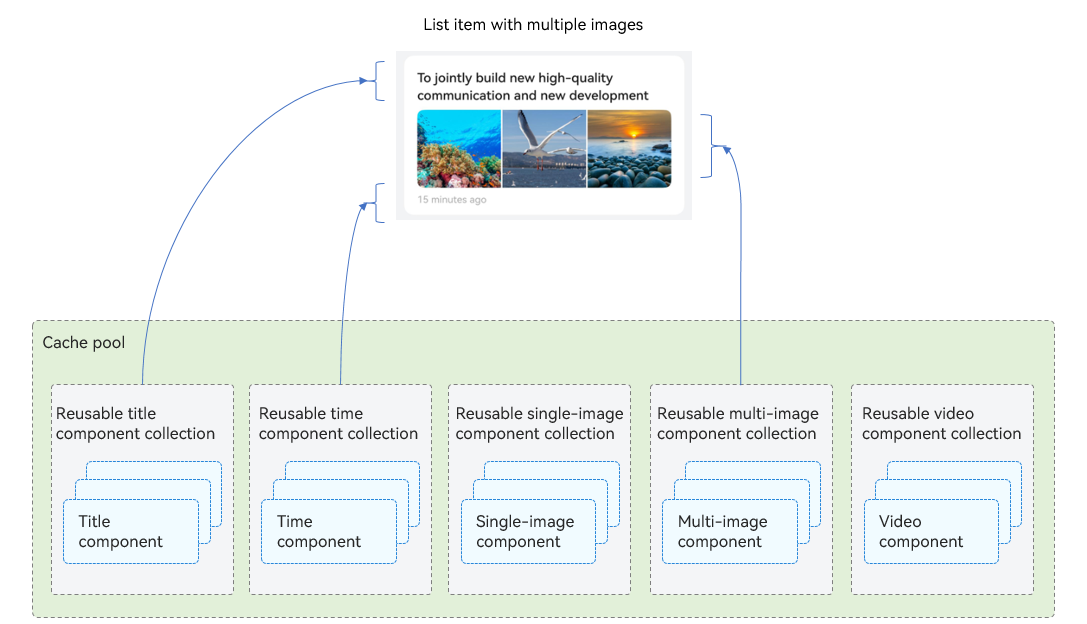
Implementation steps:
- Create separate custom components for each child component type: single image, multiple images, video, top title, bottom timestamp. Decorate each of these child components with the @Reusable decorator.
- In the aboutToReuse() method of each child component, implement the logic for binding new data.
- Use @Builder to create three different builder functions. These functions correspond to three types of list items: list item with a single image, list item with multiple images, list item with a video.
- In LazyForEach(), conditionally invoke the appropriate @Builder function based on the service logic.

Reason for using @Builder instead of directly nesting child components in custom components:
Because the reuse cache pool is maintained at the level of the custom component itself, nesting child components within it can lead to fragmentation of the cache pool, causing reuse to fail. In contrast, using @Builder allows internal custom components to remain grouped within the same cache pool, thereby enabling effective and mutual reuse.
Positive example:
The itemBuilderSingleImage() function is implemented using the @Builder decorator. When this.itemBuilderSingleImage(item) is called in ComposableItemPage, the custom components in itemBuilderSingleImage() are grouped in the cache pool corresponding to ComposableItemPage. That is, the reusable components such as TopView, MiddleSingleImageView, and BottomView are grouped in the same cache pool. When other @Builder-decorated functions are called in ComposableItemPage, the components decorated with @Reusable can also be reused.
@Component
export struct ComposableItemPage {
  // ...

  @Builder
  itemBuilderSingleImage(item: ItemData) {
    TopView({ item: item }).reuseId('top_id')
    MiddleSingleImageView({ item: item }).reuseId('middle_image_id')
    BottomView({ item: item }).reuseId('bottom_id')
  }

  @Builder
  itemBuilderThreeImage(item: ItemData) {
    TopView({ item: item }).reuseId('top_id')
    MiddleThreeImageView({ item: item }).reuseId('middle_three_image_id')
    BottomView({ item: item }).reuseId('bottom_id')
  }

  @Builder
  itemBuilderVideoImage(item: ItemData) {
    TopView({ item: item }).reuseId('top_id')
    MiddleVideoView({ item: item }).reuseId('middle_video_id')
    BottomView({ item: item }).reuseId('bottom_id')
  }

  build() {
    NavDestination() {
      Column() {
        List() {
          LazyForEach(this.dataSource, (item: ItemData) => {
            ListItem() {
              Column() {
                if (item.type === 0) {
                  this.itemBuilderSingleImage(item)
                } else if (item.type === 1) {
                  this.itemBuilderThreeImage(item)
                } else if (item.type === 2) {
                  this.itemBuilderVideoImage(item)
                }
              }
              // ...
            }
          }, (item: ItemData) => item.id.toString())
        }
        // ...
      }
      // ...
    }
    // ...
  }
}

@Reusable
@Component
struct TopView {
  // ...
}

@Reusable
@Component
struct BottomView {
  // ...
}

@Reusable
@Component
struct MiddleSingleImageView {
  // ...
}

@Reusable
@Component
struct MiddleThreeImageView {
  // ...
}

@Reusable
@Component
struct MiddleVideoView {
  // ...
}
Negative example:
If you change the @Builder-decorated functions such as itemBuilderSingleImage() and itemBuilderThreeImage() to the @Component-decorated functions, for example, SingleImageComponent and ThreeImageComponent, the components in SingleImageComponent, such as TopView, MiddleSingleImageView, and BottomView will be grouped only in the cache pool corresponding to SingleImageComponent. The same rule applies to ThreeImageComponent. These @Reusable-decorated components are in different @Component-decorated cache pools. Therefore, the reuse does not take effect when ComposableItemPage is drawn in the last layout.
@Component
export struct ComposableItemPage {
  // ...
  build() {
    NavDestination() {
      Column() {
        List() {
          LazyForEach(this.dataSource, (item: ItemData) => {
            ListItem() {
              Column() {
                if (item.type === 0) {
                  SingleImageComponent({ item: item })
                } else if (item.type === 1) {
                  ThreeImageComponent({ item: item })
                } else if (item.type === 2) {
                  VideoComponent({ item: item })
                }
              }
              // ...
            }
          }, (item: ItemData) => item.id.toString())
        }
        // ...
      }
      // ...
    }
    // ...
  }
}

@Component
struct SingleImageComponent{
  // ...
   build() {
    Column() {
      TopView({ item: item }).reuseId('top_id')
      MiddleSingleImageView({ item: item }).reuseId('middle_image_id')
      BottomView({ item: item }).reuseId('bottom_id')
    }
  }
}

@Component
struct ThreeImageComponent{
  // ...
   build() {
    Column() {
      TopView({ item: item }).reuseId('top_id')
      MiddleThreeImageView({ item: item }).reuseId('middle_three_image_id')
      BottomView({ item: item }).reuseId('bottom_id')
    }
  }
}

@Component
struct VideoComponent{
  // ...
   build() {
    Column() {
      TopView({ item: item }).reuseId('top_id')
      MiddleVideoView({ item: item }).reuseId('middle_video_id')
      BottomView({ item: item }).reuseId('bottom_id')
    }
  }
}

@Reusable
@Component
struct TopView {
  // ...
}

@Reusable
@Component
struct BottomView {
  // ...
}

@Reusable
@Component
struct MiddleSingleImageView {
  // ...
}

@Reusable
@Component
struct MiddleThreeImageView {
  // ...
}

@Reusable
@Component
struct MiddleVideoView {
  // ...
} In app development, there are often cases where data is displayed under different tabs, each containing its own list. If the list items across tabs share the same structure, component reuse can be applied for optimization. For example, as shown below, the News and Hot tabs display list items of the same type.
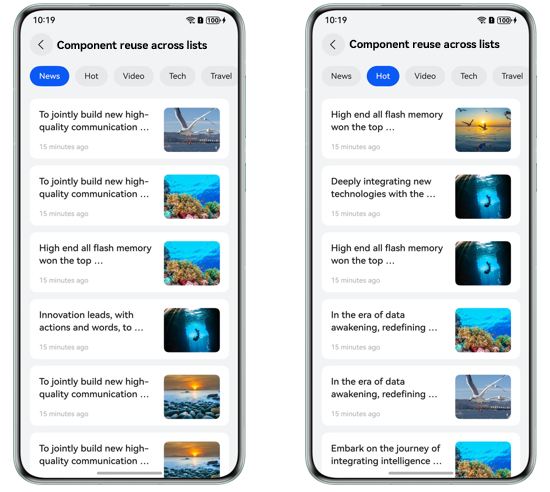
In ArkUI, this tab-based UI can be implemented a Swiper+List layout, where each page within the Swiper contains a List to display content. According to the reuse mechanism of @Reusable, the reuse cache pool is maintained within the same parent component. However, in this case, the parent of each list item is the List component of the current page. When users switch pages within the Swiper, list items from the previous page cannot be directly reused.
To address this, you can define a global reuse cache pool (NodePool). By leveraging the node reuse capabilities of BuilderNode, components can be created, recycled, and reused across pages based on the page state. This enables component reuse across multiple lists from different pages.

Reason for using the Swiper+List layout instead of the Tabs+List layout:
Currently, the content pages within the Tabs component do not support LazyForEach(), requiring use of ForEach with TabContent instead. This implementation approach forces immediate creation of all TabContent instances during initial rendering, regardless of their active state. In addition, switching between TabContent pages does not trigger the aboutToDisappear() lifecycle callback, meaning components cannot be properly reused.

In scenarios where a custom component needs to be laid out, use a NodeContainer as a placeholder, then inherit from NodeController to implement the NodeItem node class. Inside NodeItem, you need to hold an instance of BuilderNode to manage the creation and reuse of the node. In addition, the corresponding data object for the view must be stored in NodeItem to update the UI display.
- When the NodeItem is about to be destroyed as the view component is about to disappear, the aboutToDisappear() method should be used to recycle the NodeItem into the NodePool cache, storing it in the collection corresponding to the type of the node.
- Each time a custom component needs to be created, the system first attempts to find the corresponding NodeItem by type. If no matching NodeItem ist found, a new NodeItem is created.
- As the view component follows the lifecycle of the NodeContainer, the data is updated and the component reuse process is completed.
This approach requires you to manually maintain the reuse pool. You can also consider using third-party libraries like nodepool, which implement the same principles for global component reuse pools.
- Implement a list item placeholder node class, NodeItem, that inherits from NodeController, and implement the makeNode() method. This method determines whether to create a node or refresh the existing data based on whether the node is available. Implement the aboutToDisappear() lifecycle callback to properly recycle the component node when it becomes inactive.
export class NodeItem extends NodeController { public builder: WrappedBuilder<ESObject> | null = null; public node: BuilderNode<ESObject> | null = null; public data: ESObject = {}; public type: string = ''; public id: number = 0; aboutToDisappear(): void { // recycle node into cache pool when UI disappear NodePool.getInstance().recycleNode(this.type, this); } update(data: ESObject) { this.data = data; this.node?.reuse(data); } makeNode(uiContext: UIContext): FrameNode | null { // build new node or update node in the cache if (!this.node) { this.node = new BuilderNode(uiContext); this.node.build(this.builder, this.data); } else { this.update(this.data); } return this.node.getFrameNode(); } // ... } - Use the singleton pattern to implement a reuse cache pool utility class, NodePool, which centrally manages component reuse across the app. Implement two methods for NodePool:
- getNode(): obtains a cached NodeItem based on the provided type. If no matching NodeItem is found, it creates a new one and binds the data.
- recycleNode(): stores the node in the appropriate collection based on its type.
export class NodePool {
  private static instance: NodePool;
  private idGen: number;
  private nodePool: HashMap<string, LinkedList<NodeItem>>;

  private constructor() {
    this.nodePool = new HashMap();
    this.idGen = 0;
  }

  // single instance mode, managing the cache pool
  public static getInstance() {
    if (!NodePool.instance) {
      NodePool.instance = new NodePool();
    }
    return NodePool.instance;
  }

  public getNextId(): number {
    this.idGen += 1;
    return this.idGen;
  }

  public getNode(type: string, item: ESObject,
    builder: WrappedBuilder<ESObject>): NodeItem | undefined {
    let nodeItem: NodeItem | undefined = undefined;
    try {
      // get the cached node based on type
      if (this.nodePool.get(type)) {
        for (let i = 0; i < this.nodePool.get(type)?.length; i++) {
          let tmpItem: NodeItem | undefined = this.nodePool.get(type)?.get(i);
          // if the parent node is null, it means the node is reusable, so get it out
          if (!tmpItem.node?.getFrameNode()?.getParent()) {
            nodeItem = tmpItem;
            this.nodePool.get(type)?.removeByIndex(i);
            break;
          }
        }
      }
    } catch (e) {
      let err = e as BusinessError;
      hilog.error(DOMAIN, 'testTag', `failed code=${err.code}, message=${err.message}`);
    }

    if (!nodeItem) {
      // No valid reusable node found, so create new one
      nodeItem = new NodeItem();
      nodeItem.builder = builder;
      nodeItem.type = type;
      nodeItem.data.item = item;
    } else {
      // update cached node
      nodeItem.data.item = item;
    }
    return nodeItem;
  }

  // cache the node based on type
  public recycleNode(type: string, node: NodeItem) {
    try {
      let nodeArray: LinkedList<NodeItem> = this.nodePool.get(type);
      if (!nodeArray) {
        nodeArray = new LinkedList();
        this.nodePool.set(type, nodeArray);
      }
      // reset data
      node.data.item = {};
      nodeArray.add(node);
    } catch (e) {
      let err = e as BusinessError;
      hilog.error(DOMAIN, 'testTag', `failed code=${err.code}, message=${err.message}`);
    }
  }

  // ...
}
- The getNode() method must verify that the obtained NodeItem has no parent node (indicating it is fully detached from the tree) before returning it. If a parent exists, the method should continue searching for a valid node.
- The recycleNode() method must reset all NodeItem properties to their default state. This prevents display errors caused by residual state.
- Encapsulate the placeholder node from Step 1 as a reusable component. In its lifecycle methods, implement the cache retrieval, recycling, and reuse logic.
// The list item placeholder component with NodeContainer @Component export struct DiffListItemNode { @State type: string = ''; @State item: ItemData = new ItemData('', 0); @State itemHeight: number = 0; @State builder: WrappedBuilder<ESObject> | null = null; private nodeItem: NodeItem = new NodeItem(); aboutToAppear(): void { this.nodeItem = NodePool.getInstance().getNode(this.type, this.item, this.builder!)!; } aboutToRecycle(): void { this.nodeItem?.node?.recycle(); } aboutToReuse(params: ESObject): void { this.nodeItem?.node?.reuse(params); } build() { NodeContainer(this.nodeItem) } } - Encapsulate the list item view component and export it using the listItemBuilder function.
// export the list item component @Builder export function listItemBuilder(data: ESObject) { DiffListItemView({ item: data.item }) } // The list item view component @Component export struct DiffListItemView { // ... aboutToReuse(params: ESObject): void { this.item = params.item; } build() { Row() { // ... } // ... } } - In LazyForEach() of the list, wrap the actual list item view component from Step 4 with wrapBuilder, and pass it as a parameter to the placeholder component created in Step 3. This completes the layout with reusable components.
// wrapBuilder the list item view component
export const listItemWrapper: WrappedBuilder<ESObject> = wrapBuilder<ESObject>(listItemBuilder);

// The list component in the swiper
@Component
export struct TabContentView {
  // ...

  build() {
    List() {
      LazyForEach(this.dataSource, (item: ItemData) => {
        DiffListItemNode({
          type: REUSE_VIEW_TYPE_ITEM,
          item: item,
          builder: listItemWrapper
        })
      }, (item: ItemData) => item.id.toString())
    }
    // ...
  }
}
The current implementation faces potential performance issues during initial page loading because the component reuse pool contains no cached elements at this stage, requiring all list items to be created from scratch. To address this bottleneck, you can implement component pre-creation to populate the reuse cache pool in advance.
However, when there are numerous components, pre-creating them all at once can be time-consuming, which could block the main thread. ArkUI provides the onIdle() API specifically designed to mitigate this issue by leveraging idle periods at the end of each frame render cycle. This allows the system to distribute component pre-creation tasks across multiple frame intervals, effectively smoothing out the initialization workload and preventing UI jank.


1. You must accurately estimate the component pre-creation duration and break down the service logic into smaller tasks. This allows these tasks to be distributed across multiple onIdle() calls. For example, if a single component requires 2 ms for pre-creation but the current frame's idle period offers only 1 ms of available time, pre-creation cannot happen in the current frame and should be delayed to the next frame.
2. The number of pre-created components in the custom component reuse pool must be properly controlled. Excessive pre-creation may lead to high memory usage that could degrade the overall app performance.
- Implement the pre-creation method preBuild() in the NodePool utility class: Create a NodeItem instance, set its properties such as builder, and call recycleNode() to pre-store it in the cache pool.
export class NodeItem extends NodeController { // ... prebuild(uiContext: UIContext) { this.node = new BuilderNode(uiContext); this.node.build(this.builder, this.data); } } export class NodePool { // ... public preBuild(type: string, item: ESObject, builder: WrappedBuilder<ESObject>, uiContext: UIContext) { if (type) { let nodeItem: NodeItem | undefined = new NodeItem(); nodeItem.builder = builder; nodeItem.data.item = item; nodeItem.type = type; nodeItem.prebuild(uiContext); this.recycleNode(type, nodeItem); } } } - Inherit from FrameCallback to implement a frame callback class. Pass the pre-creation data into the constructor and implement the onIdle() API.
- The system call onIdle(), passing the idle time at the end of the frame through the idleTimeInNano parameter. You can set the maximum remaining idle time for pre-creation based on the time required to pre-create a single component (the example code assumes a single component pre-creation takes a maximum of 1 ms = 1000000 ns).
- When the remaining idle time is sufficient to create a component, the component is pre-created in the current frame, and the remaining idle time of the current frame is continuously updated.
- If the remaining idle time of the current frame is insufficient for creating a component, the postFrameCallback method is used to pass the frame callback to the next frame and continue to pre-create the remaining components.
export class IdleCallback extends FrameCallback {
  private uiContext: UIContext;
  // Pre build component index, start from 0
  private todoCount: number = 0;
  private dataArray: ItemData[] = [];

  constructor(context: UIContext, preBuildData: ItemData[]) {
    super();
    this.uiContext = context;
    this.dataArray = preBuildData;
  }

  onIdle(idleTimeInNano: number): void {
    if (this.todoCount >= this.dataArray.length) {
      // All pre-builds completed
      return;
    }
    let cur: number = systemDateTime.getTime(true);
    let timeLeft = idleTimeInNano;
    // if the build time for a single component is 1000000 ns
    while (timeLeft >= 1000000) {
      hiTraceMeter.startTrace('onIdle_prebuild', 1);
      // prebuild the component
      NodePool.getInstance().preBuild('reuse_type_', this.dataArray[this.todoCount], listItemWrapper, this.uiContext);
      hiTraceMeter.finishTrace('onIdle_prebuild', 1);
      // update the idle time
      let now = systemDateTime.getTime(true);
      timeLeft = timeLeft - (now - cur);
      cur = now;
      this.todoCount++;
      if (this.todoCount >= this.dataArray.length) {
      // All pre-builds completed
        return;
      }
      if (this.todoCount < this.dataArray.length) {
        // Pre build not completed, proceed to the next frame
        this.uiContext.postFrameCallback(this);
      }
    }
  }
}
- Before accessing the Swiper+List page, choose an appropriate timing to call context.postFrameCallback() to trigger the IdleCallback frame callback logic.
@Entry
@Component
struct Index {
  // ...

  aboutToAppear(): void {
    let dataArray: ItemData[] = [];
    dataArray.push(...genMockItemData(100))
    let context = this.getUIContext();
    context.postFrameCallback(new IdleCallback(context, dataArray));
  }

  // ...
}
The attributeUpdater mechanism enables targeted property updates in reusable components, eliminating unnecessary re-rendering and reducing rendering overhead to enhance app performance.
By default, directly assigning state variables in aboutToReuse() triggers a full refresh of the component's attributes. However, real-world scenarios often require refreshing only specific attributes. For example, when reusing a component, you may only need to modify the text color without affecting other attributes. In this case, you can use attributeUpdater to modify the fontColor attribute in aboutToReuse().
Negative example:
In this example, updating the fontColor state variable in aboutToReuse() causes all the component's attributes to be refreshed, resulting in unnecessary time consumption.
@Component
export struct LessEmbeddedComponent {
  aboutToAppear(): void {
    momentData.getFriendMomentFromRawfile();
  }

  build() {
    Column() {
      Text('use nothing')
      List({ space: ListConstants.LIST_SPACE }) {
        LazyForEach(momentData, (moment: FriendMoment) => {
          ListItem() {
            OneMomentNoModifier({ color: moment.color })
              .onClick(() => {
                console.log(`my id is ${moment.id}`)
              })
          }
        }, (moment: FriendMoment) => moment.id)
      }
      .width("100%")
      .height("100%")
      .cachedCount(5)
    }
  }
}

@Reusable
@Component
export struct OneMomentNoModifier {
  @State color: string | number | Resource = "";

  aboutToReuse(params: Record<string, Object>): void {
    this.color = params.color as number;
  }

  build() {
    Column() {
      Text('This is title')
      Text('This is desc text')
        .fontColor(this.color)
        .textAlign(TextAlign.Center)
        .fontStyle(FontStyle.Normal)
        .fontSize(13)
        .lineHeight(30)
        .opacity(0.6)
        .margin({ top: 10 })
        .fontWeight(30)
        .clip(false)
        .backgroundBlurStyle(BlurStyle.NONE)
        .foregroundBlurStyle(BlurStyle.NONE)
        .borderWidth(1)
        .borderColor(Color.Pink)
        .borderStyle(BorderStyle.Solid)
        .alignRules({
          'top': { 'anchor': '__container__', 'align': VerticalAlign.Top },
          'left': { 'anchor': 'image', 'align': HorizontalAlign.End }
        })
    }
  }
}
Positive example:
Use attributeUpdater to precisely refresh the fontColor attribute in the Text component, avoiding re-rendering of unchanged attributes.
export class MyTextUpdater extends AttributeUpdater<TextAttribute> {
  private color: string | number | Resource | Color = '';

  constructor(color: string | number | Resource | Color) {
    super();
    this.color = color;
  }

  initializeModifier(instance: TextAttribute): void {
    instance.fontColor(this.color) // Differentiated update
  }
}

// ...

@Reusable
@Component
export struct OneMomentNoModifier {
  @State text: string = '';
  color: string | number | Resource | Color = '';
  textUpdater: MyTextUpdater | null = null;

  aboutToAppear(): void {
    this.textUpdater = new MyTextUpdater(this.color);
  }

  aboutToReuse(params: Record<string, Object>): void {
    this.color = params.color as string;
    this.text = params.text as string;
    this.textUpdater?.attribute?.fontColor(this.color);
  }

  build() {
    Column() {
      Text(this.text)
        .fontSize(18)
        .textAlign(TextAlign.Center)
        .fontWeight(500)
        .lineHeight(24)
        .fontColor(Color.Black)
        .opacity(0.6)
      Column() {
        Text('AAAAAAAAAAAAAAAAAAAAAAAAAAAAAAAAAAAAAAAAAAAAAAAAAAAAAAAAAAAAAAAAA')
          .attributeModifier(this.textUpdater) // Precise refresh
          .textAlign(TextAlign.Start)
          .fontSize(16)
          .fontWeight(400)
          .lineHeight(21)
      }
      // ...
    }
    // ...
  }
} For reusable components, use @Link or @ObjectLink instead of @Prop to eliminate unnecessary deep copying. When @Prop is used to decorate a variable, it triggers a deep copy, which increases both the creation time and memory consumption. On the other hand, by using @Link or @ObjectLink, the variable will share the same memory address.
Negative example:
@Entry
@Component
struct lessEmbeddedComponent {
  aboutToAppear(): void {
    getFriendMomentFromRawfile();
  }

  build() {
    Column() {
      TopBar()
      List({ space: ListConstants.LIST_SPACE }) {
        LazyForEach(momentData, (moment: FriendMoment) => {
          ListItem() {
            OneMoment({moment: moment})
          }
        }, (moment: FriendMoment) => moment.id)
      }
      .cachedCount(Constants.CACHED_COUNT)
    }
  }
}

@Reusable
@Component
export struct OneMoment {
  @Prop moment: FriendMoment;

  build() {
    Column() {
      ...
      Text(`${this.moment.userName}`)
      ...
    }
  }
}

export class FriendMoment {
  id: string;
  userName: string;
  avatar: string;
  text: string;
  size: number;
  image?: string;
}
Positive example:
Change the @Prop decorated moment variable in the child component to be @ObjectLink decorated.
Data synchronization between the parent and child components can be handled using @ObjectLink. The @ObjectLink wrapper in the child component registers the current this pointer with the parent component, which will directly synchronize the parent's data to the child, achieving two-way data synchronization between the parent and child components. This reduces both the creation time and memory consumption for the child component.
If reusable components use state variables decorated with @Link, @ObjectLink, or @Prop, which automatically synchronize data between parent and child components, there is no need for explicit value assignment in aboutToReuse(). Reassigning values to these variables will cause the component's content to trigger a state update, resulting in additional computation and update delays.
Negative example:
@Reusable
@Component
export struct OneMoment {
  @ObjectLink moment: FriendMoment;

  aboutToReuse(params: Record<string, Object>): void {
    this.moment.id = (params.moment as FriendMoment).id
    this.moment.userName = (params.moment as FriendMoment).userName
    this.moment.avatar = (params.moment as FriendMoment).avatar
    this.moment.text = (params.moment as FriendMoment).text
    this.moment.image = (params.moment as FriendMoment).image
  }

  build() {
    Column() {
      ...
      Text(`${this.moment.userName}`)
      ...
    }
  }
}
Positive example:
Remove the assignment statement for the @ObjectLink decorated moment variable in aboutToReuse().
[h2]Using reuseId to Mark Components with Layout Changes
In the same custom component code, using if/else conditional statements to control the layout structure can lead to the creation of different components in different logical branches. This results in variations in the component tree structure. In such cases, you can use reuseId to distinguish between the changed branches. This ensures that the system can cache components with different layouts based on their reuseId, thereby improving reuse performance.
Negative example:
A component is created with a Flex container that includes an Image element based on an if condition. Without using reuseId, after reuse, the Flex component might be deleted or re-created based on the if condition, leading to performance overhead.
@Entry
@Component
struct AboutReuseId {

  build() {
    Column() {
      TopBar()
      List({ space: ListConstants.LIST_SPACE }) {
        LazyForEach(momentData, (moment: FriendMoment) => {
          ListItem() {
            OneMoment({
              moment: moment,
              fontSize: moment.size
            })
          }
        }, (moment: FriendMoment) => moment.id)
      }
      .cachedCount(Constants.CACHED_COUNT)
    }
  }
}

@Reusable
@Component
export struct OneMoment {
  @Prop moment: FriendMoment;

  build() {
    Column() {
      ...
      Text(this.moment.text)

      if (this.moment.image !== '') {
        Flex({ wrap: FlexWrap.Wrap }) {
          Image($r(this.moment.image))
          Image($r(this.moment.image))
          Image($r(this.moment.image))
        }
      }
      ...
    }
  }
}
Positive example:
Set different reuseId values based on the branching logic to cache components for different layout structures, eliminating the repetitive execution of conditional deletion or creation operations.
@Entry
@Component
struct WithReuseId {
  // ...

  build() {
    Column() {
      List({ space: this.LIST_SPACE }) {
        LazyForEach(this.momentData, (moment: FriendMoment) => {
          ListItem() {
            OneMoment({ moment: moment })// reuseId is used to control component reuse.
              .reuseId((moment.image !== '') ? 'withImage_id' : 'noImage_id')
          }
        }, (moment: FriendMoment) => moment.id)
      }
      // ...
    }
  }
}

@Reusable
@Component
export struct OneMoment {
  @ObjectLink moment: FriendMoment;

  build() {
    Column() {
      // ...

      if (this.moment.image !== '') {
        Flex({ wrap: FlexWrap.Wrap }) {
          Image($r(this.moment.image))
            .width(Constants.LAYOUT_MAX)
            .height('27.5%')
            .borderRadius(16)
          Image($r(this.moment.image))
            .width(Constants.LAYOUT_MAX)
            .height('27.5%')
            .borderRadius(16)
            .margin({ top: 10 })
        }
        .width(Constants.LAYOUT_MAX)
        .margin({ top: 14 })
      }
    }
    // ...
  }
} If a reusable component takes a function as a parameter, the associated data object for the component needs to be re-created each time the component is reused. As a result, the function is executed during each reuse, which can lead to performance issues. To reduce the performance overhead caused by repeatedly executing the function parameter, pass parameters through state variables.
Negative example:
The sum parameter for a reused child component is generated by a time-consuming function countAndReturn(). This function is executed every time the component is reused, causing performance issues and even frame drops during the list scrolling process.
@Entry
@Component
struct withFuncParam {
  aboutToAppear(): void {
    getFriendMomentFromRawfile();
  }

  countAndReturn(): number {
    let temp: number = 0;
    for (let index = 0; index < 100000; index++) {
      temp += index;
    }
    return temp;
  }

  build() {
    Column() {
      TopBar()
      List({ space: ListConstants.LIST_SPACE }) {
        LazyForEach(momentData, (moment: FriendMoment) => {
          ListItem() {
            OneMoment({
              moment: moment,
              sum: this.countAndReturn()
            })
          }
        }, (moment: FriendMoment) => moment.id)
      }
      .cachedCount(Constants.CACHED_COUNT)
    }
  }
}

@Reusable
@Component
export struct OneMoment {
  @Prop moment: FriendMoment;
  @State sum: number = 0;

  aboutToReuse(params: Record<string, Object>): void {
    this.sum = params.sum as number;
  }

  build() {
    Column() {
      ...
      Text(`${this.moment.userName} (${this.moment.id} / ${this.sum})`)
      ...
    }
  }
}
Positive example:
You can calculate countAndReturn() once during the initial page load and assign the result to the this.sum variable. Then, when passing parameters to the reusable component, use this.sum.
@Entry
@Component
struct WithFuncParam {
  @State sum: number = 0;
  // ...
  private readonly MOCK_ASYNC_DEFAULT_NUM: number = 1000000;
  private readonly MOCK_ASYNC_TIME_OUT_NUM: number = 2000;

  aboutToAppear(): void {
    this.momentData.getFriendMomentFromRawFile();
    // Execute the asynchronous function
    this.countAndReturn();
  }

  async countAndReturn(): Promise<void> {
    await this.sleep();
    this.sum = this.MOCK_ASYNC_DEFAULT_NUM;
  }

  sleep(): Promise<string> {
    return new Promise<string>((resolve) => {
      setTimeout(() => {
        resolve('ok');
      }, this.MOCK_ASYNC_TIME_OUT_NUM)
    });
  }

  build() {
    Column() {
      List({ space: this.LIST_SPACE }) {
        LazyForEach(this.momentData, (moment: FriendMoment) => {
          ListItem() {
            // Parameters of subcomponents are transferred through status variables
            OneMoment({
              moment: moment,
              sum: this.sum
            })
          }
        }, (moment: FriendMoment) => moment.id)
      }
      // ...
    }
  }
}

@Reusable
@Component
export struct OneMoment {
  @ObjectLink moment: FriendMoment;
  @State sum: number = 0;
  // ...

  aboutToReuse(params: Record<string, Object>): void {
    this.sum = params.sum as number;
  }

  // ...
} [h2]How do I check whether component reuse is effective?
- Use the Code Linter to perform a code check, focusing on the @performance/hp-arkui-use-reusable-component rule.
- Use the Profiler tool to capture traces, and search for the component's name in the traces. Check the BuildRecycle field to identify whether reuse rendering has been triggered. For details, see Identifying Lazy Loading Rendering Processes Using Traces.
- With the Profiler tool, capture traces and check whether any frame drops have occurred. For details, see Optimizing Long List Loading: Performance Analysis.