As the service scale expands, many apps statically import a large number of modules during cold start. This static import loads all dependent modules synchronously during app initialization, which increases the cold start time. ArkTS provides the lazy import and dynamic import capabilities to load modules only when they are needed, improving the app startup speed and reducing resource consumption.
- Dynamic Import is an asynchronous module loading mechanism that allows an app to load a related module as required during running. For example, when a condition such as user interaction is triggered, a specific module is dynamically loaded. This reduces the loading time and resource consumption of the import initialization, improving the memory performance and response speed of the app.
- Lazy import is a mechanism that delays module loading. It allows the file not to be loaded in the cold start phase, and synchronously loads the execution file when the exported variable is used, saving resources and improving the cold start performance of the app. For details about the cases and experiment data, see Usage of Lazy Import.
For details about the differences between the two lazy loading solutions, see Differences Between Lazy Import and Dynamic Loading.

Lazy import changes the module execution sequence, which may cause undefined global variables. For details, see side effects of lazy import.
Delaying module import until close to services
Some apps load too many unused modules during cold start, which slows down the startup. To solve this problem, you can use lazy import to delay the import of unused modules until close to services, effectively shortening the cold start time and improving user experience. For details, see delaying module import until close to services.
Using lazy import for non-critical path modules
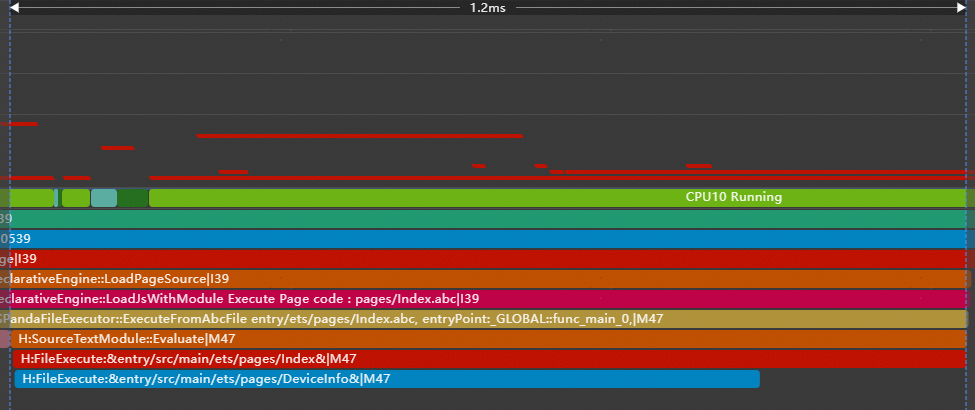
In the following example, all variables are exported from the DeviceInfo module. In addition to the name module used for cold start, some non-critical path modules (such as screen and storage) are also exported.
// entry\src\main\ets\pages\Index.ets
// Before optimization: All variables are exported from the user info
import { hilog } from '@kit.PerformanceAnalysisKit';
import { name, screen, storage } from './DeviceInfo';

@Entry
@Component
struct Index {
  build() {
    RelativeContainer() {
      Text(name)
        .id('HelloWorld')
        .fontSize($r('app.float.page_text_font_size'))
        .fontWeight(FontWeight.Bold)
        .alignRules({
          center: { anchor: '__container__', align: VerticalAlign.Center },
          middle: { anchor: '__container__', align: HorizontalAlign.Center }
        })
        .onClick(() => {
          hilog.info(0x0000, 'testTag', 'screen: %{public}s', screen);
          hilog.info(0x0000, 'testTag', 'storage: %{public}s', storage);
        })
    }
    .height('100%')
    .width('100%')
  }
}
// entry\src\main\ets\pages\DeviceInfo.ets
import { hilog } from '@kit.PerformanceAnalysisKit';
const name = 'Mate 70';
hilog.info(0x0000, 'testTag', 'export %{public}s', name);
const screen = 'OLED';
hilog.info(0x0000, 'testTag', 'export %{public}s', screen);
const storage = '512GB';
hilog.info(0x0000, 'testTag', 'export %{public}s', storage);
export { name, screen, storage }; You can use the health check tool to view the modules that are not used during the cold start and the time required for loading these modules. Remove the unused modules (storage and screen) from the critical path and add the lazy tag for lazy loading. As shown in the following trace diagram, only the DeviceName module is loaded during the cold start after the modification. The OtherDeviceInfo module is executed only when the user taps the text for the first time. The trace diagrams before and after the modification show that the cold start time is reduced.

// entry\src\main\ets\pages\Index.ets
// After optimization: split variables are exported from different modules
import { hilog } from '@kit.PerformanceAnalysisKit';
import { name } from './DeviceName';
import lazy { screen, storage } from './OtherDeviceInfo';

@Entry
@Component
struct Index {
  build() {
    RelativeContainer() {
      Text(name)
        .id('HelloWorld')
        .fontSize($r('app.float.page_text_font_size'))
        .fontWeight(FontWeight.Bold)
        .alignRules({
          center: { anchor: '__container__', align: VerticalAlign.Center },
          middle: { anchor: '__container__', align: HorizontalAlign.Center }
        })
        .onClick(() => {
          hilog.info(0x0000, 'testTag', 'screen: %{public}s', screen);
          hilog.info(0x0000, 'testTag', 'storage: %{public}s', storage);
        })
    }
    .height('100%')
    .width('100%')
  }
}
// entry\src\main\ets\pages\DeviceName.ets
import { hilog } from '@kit.PerformanceAnalysisKit';
const name = 'Mate 70';
hilog.info(0x0000, 'testTag', 'export %{public}s', name);
export { name }; // entry\src\main\ets\pages\OtherDeviceInfo.ets
import { hilog } from '@kit.PerformanceAnalysisKit';
const screen = 'OLED';
hilog.info(0x0000, 'testTag', 'export %{public}s', screen);
const storage = '512GB';
hilog.info(0x0000, 'testTag', 'export %{public}s', storage);
export { screen, storage }; In the following example, only basic text information needs to be displayed on the UI when the app starts. However, a local .so library (libentry.so) is imported synchronously, as shown in the following trace diagram. The .so library contains the mathematical operation feature and does not need to be loaded and initialized before the user taps the UI.
// entry\src\main\ets\pages\Index.ets
// Before optimization: statically import the so that is not used in cold start
import { hilog } from '@kit.PerformanceAnalysisKit';
import testNapi from 'libentry.so';
import { title } from './name';

@Entry
@Component
struct Index {
  build() {
    Row() {
      Column() {
        Text(title)
          .fontSize($r('app.float.page_text_font_size'))
          .fontWeight(FontWeight.Bold)
          .onClick(() => {
            hilog.info(0x0000, 'testTag', 'Test NAPI 2 + 3 = %{public}d', testNapi.add(2, 3));
          })
      }
      .width('100%')
    }
    .height('100%')
  }
}
// entry\src\main\ets\pages\name.ets export const title = 'HarmonyOS';
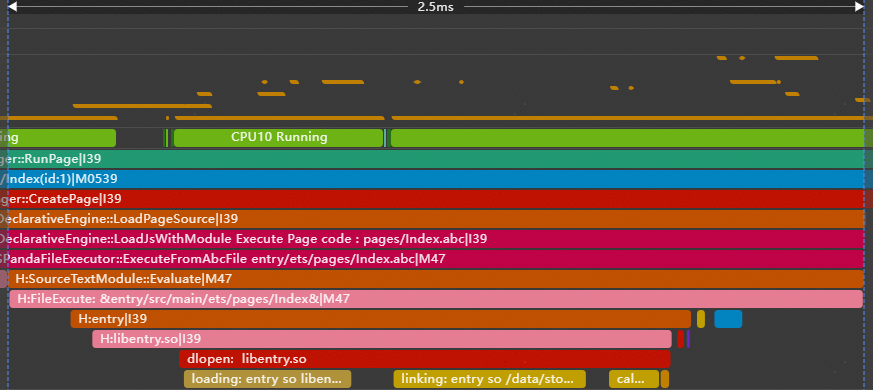
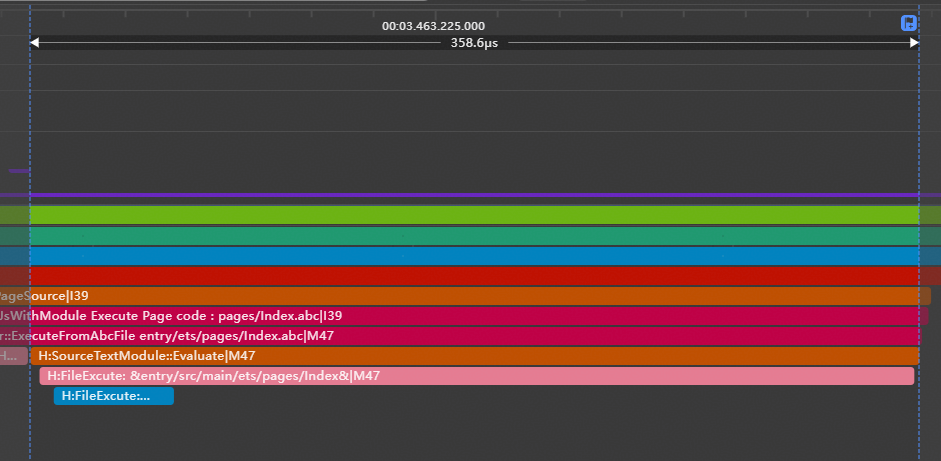
Use the health check tool to record the cold start trace and identify the modules that are not used during the cold start and the time required for loading these modules. In this example, the libentry.so module does not need to be loaded before the user tap event. You are advised to delete the import testNapi from 'libentry.so' statement and dynamically load the module using the import() function only when necessary. As shown in the following trace diagram, libentry.so is not loaded during the cold start after the modification. The trace diagrams before and after the modification show that the cold start time is reduced.
// entry\src\main\ets\pages\Index.ets
import { hilog } from '@kit.PerformanceAnalysisKit';
import { title } from './name';

@Entry
@Component
struct Index {
  build() {
    Row() {
      Column() {
        Text(title)
          .fontSize($r('app.float.page_text_font_size'))
          .fontWeight(FontWeight.Bold)
          .onClick(async () => {
            // After optimization: The SO file is dynamically loaded at the point of use.
            let ns: ESObject | null = null;
            try {
              ns = await import('libentry.so');
              hilog.info(0x0000, 'testTag', 'Test NAPI 2 + 3 = %{public}d', ns.default.add(2, 3));
            } catch (error) {
              hilog.error(0x0000, 'testTag', `Load so failed, code is ${error.code}, message is ${error.message}`);
            }
          })
      }
      .width('100%')
    }
    .height('100%')
  }
} 
Delaying Resource Release
Execute the resource closing and release operations in the setTimeout function so that the operations are performed when the system is idle. This prevents key resources from being occupied when the program is busy, improving the overall performance and response capability. For example, after the camera is used normally, postpone the camera resource release.