Overview
With the development of the functions, apps become increasingly complex and occupy more memory. However, memory is limited as a scarce resource of the system. When an app occupies too much memory, the system may frequently reclaim and reallocate the memory. As a result, the performance of the app deteriorates, and even the app crashes or freezes. Therefore, it is critical to reduce memory occupied by an app for the entire system. By reducing the memory usage, you can effectively improve app performance and response speed, save system resources, improve the running efficiency and prolong the battery life of the device. During app development, you should focus on memory management and take measures to reduce memory usage to optimize app performance and user experience.
HarmonyOS provides memory management tools and APIs to help you effectively manage memory resources:
- onMemoryLevel(): You can use this API to monitor system memory changes and dynamically adjust the app memory usage based on the real-time system memory status to avoid performance issues caused by excessive memory usage.
- LRUCache API: This API is used to discard the least recently used data when the cache is full.
- Lifecycle management: System resources that are no longer used can be released, including app memory, listening events, and network handles.
- Purgeable Memory management: You can create PurgeableMemory objects to manage purgeable memory.
- Image loading and rendering: You can adjust the image size to be the same as that of the component, avoiding display problems and improving user experience.
This topic describes how to reduce app memory usage from the five aspects.
Using onMemoryLevel() to Listen for Memory Changes
HarmonyOS provides the onMemoryLevel() API for you to listen for the system memory changes and adjust the app memory usage. The onMemoryLevel() API can be called back in AbilityStage, UIAbility, and EnvironmentCallback.
- AbilityStage: When the code in HAP is loaded to the process for the first time, the system creates an AbilityStage instance. When the system needs to adjust the memory, the onMemoryLevel() method of the AbilityStage instance is called back.
- UIAbility: Ability is the base class of UIAbility, which provides the callback method for system memory changes.
- EnvironmentCallback: This module provides the capability of listening to and calling back system environment changes.
MemoryLevel can be set to MEMORY_LEVEL_MODERATE, MEMORY_LEVEL_LOW, or MEMORY_LEVEL_CRITICAL. MEMORY_LEVEL_MODERATE indicates that the current memory capacity is moderate, and the app can run properly without being compromised. MEMORY_LEVEL_LOW indicates that the system memory usage is low, and the app should release unnecessary memory resources to avoid the slow system response. MEMORY_LEVEL_CRITICAL indicates that the system usage is critically high, and the app should release resources as many as possible to ensure system stability and performance. You should take measures based on different memory levels, such as releasing resources and optimizing memory usage, to ensure that apps can run properly in different memory usage states. The following table defines MemoryLevel.
Level | Value | Description |
|---|---|---|
MEMORY_LEVEL_MODERATE | 0 | The system memory usage is moderate, and processes may be killed according to the LRU cache rule. |
MEMORY_LEVEL_LOW | 1 | The system memory is insufficient. You need to release some unnecessary resources to improve the system performance. |
MEMORY_LEVEL_CRITICAL | 2 | The system memory is insufficient. You need to release all unnecessary resources because the system may terminate all processes in the cache and start to terminate the processes that should be running, such as the background services. |

If an app has been frozen in the background, onMemoryLevel() of AbilityStage, UIAbility, and EnvironmentCallback cannot be called back.
Using LRUCache to Optimize ArkTS Memory
The Least Recently Used (LRU) algorithm derives from the principle of time locality. That is, if a data record has been accessed recently, it is more likely to be accessed in the future.
LRUCache is a common cache tool in ArkTS and implemented based on LRU. It is mainly used to cache frequently accessed data, such as images and network request results. It maintains a cache space to store data. When the cache space is insufficient, the least recently used data is replaced in line with the LRU algorithm to ensure effective use of the cache space.
[h2]Principles
LRUCache uses LinkedHashMap, which is used to record the sequence of data, to implement the LRU algorithm. LinkedHashMap is inherited from HashMap, which is used to quickly search for data. Therefore, for operations such as get(), put(), and remove(), LinkedHashMap needs to adjust the entry sequence linked list in addition to the HashMap function. The following figure shows the data structure.

In LRUCache, the sequence of LinkedHashMap is set to LRU, and the objects at the head of the linked list are the least recently used objects. The common methods are described as follows:
- Calling the get() method: query the target key. If no key is found, return undefined. After finding a target object, move it to the end of the linked list, and return the object.
- Calling the put() method: add the key-value pair to the cache, and store the new object at the end of the linked list. When the memory cache reaches the maximum value, remove the objects at the head of the linked list. If the key already exists, update the corresponding value.
- Calling the remove() method: delete the cached value corresponding to the key. If the corresponding value does not exist, return undefined. Otherwise, return the deleted key-value pair.
- Calling the updateCapacity() method: set the cache capacity. If the new capacity is smaller than the original capacity, save only the data of the new capacity.
[h2]Reference Cases
Design a cache utility class, containing the LRUCache singleton and methods for operating LRUCache, such as adding data, obtaining data, and deleting data. Create a static method to obtain an LRUCache instance to ensure that it is only one globally. The cache utility class enables components to share cached data, to avoid repeated creation of cache instances and data redundancy, improve system performance and efficiency, reduce memory usage, and accelerate data access.
import { util } from '@kit.ArkTS';

export class LRUCacheUtil {
  private static instance: LRUCacheUtil;
  private lruCache: util.LRUCache<string, Object>;

  private constructor() {
    this.lruCache = new util.LRUCache(64);
  }

  // Get the singleton of LRUCacheUtil
  public static getInstance(): LRUCacheUtil {
    if (!LRUCacheUtil.instance) {
      LRUCacheUtil.instance = new LRUCacheUtil();
    }
    return LRUCacheUtil.instance;
  }

  // Determine whether the lruCache cache is empty
  public isEmpty(): boolean {
    return this.lruCache.isEmpty();
  }

  // Get the capacity of lruCache
  public getCapacity(): number {
    return this.lruCache.getCapacity();
  }

  // Reset the capacity of lruCache
  public updateCapacity(newCapacity: number): void {
    this.lruCache.updateCapacity(newCapacity);
  }

  // Add cache to lruCache
  public putCache(key: string, value: Object): void {
    this.lruCache.put(key, value);
  }

  // Delete the cache corresponding to the key
  public remove(key: string): void {
    this.lruCache.remove(key);
  }

  // Get the cache corresponding to the key
  public getCache(key: string): Object | undefined {
    return this.lruCache.get(key);
  }

  // Determine whether the cache corresponding to the key is included.
  public contains(key: string): boolean {
    return this.lruCache.contains(key);
  }

  // Clear the cached data and reset the size of lruCache
  public clearCache(): void {
    this.lruCache.clear();
    this.lruCache.updateCapacity(64);
  }
}
Set the cache in the corresponding component. The sample code is as follows:
import { LRUCacheUtil } from '../utils/LRUCacheUtil';

@Entry
@Component
struct Index {
  @State message: string = 'Hello World';

  aboutToAppear(): void {
    const lruCache: LRUCacheUtil = LRUCacheUtil.getInstance();
    // Add a <key, value> to lrucache
    lruCache.putCache('nation',10);
    // Add another <key, value> to lrucache
    lruCache.putCache('menu',8);
    // Query value through key
    const result0: number = lruCache.getCache('2') as number;
    console.log('result0:' + result0);
    // Delete the specified key and its associated values from the current buffer
    lruCache.remove('2');
    // Check whether the current buffer contains the specified object
    const result2: boolean = lruCache.contains('1');
    console.log('result2:' + result2);
    // Set a new capacity size
    lruCache.updateCapacity(110);
  }


  build() {
    Row() {
      Column() {
        Text(this.message)
          .fontSize(50)
          .fontWeight(FontWeight.Bold)
        Column() {
          Image($r('app.media.image'))
            .width("500px")
            .height("500px")
        }
      }
      .width('100%')
    }
    .height('100%')
  }
}
You can use onMemoryLevel() to listen for memory changes and set the cache clearing mechanism. The sample code is as follows:
import { AbilityConstant, UIAbility, Want } from '@kit.AbilityKit';
import { hilog } from '@kit.PerformanceAnalysisKit';
import { window } from '@kit.ArkUI';
import { LRUCacheUtil } from '../utils/LRUCacheUtil';

export default class EntryAbility extends UIAbility {
  // Monitor the changes in memory
  onMemoryLevel(level: AbilityConstant.MemoryLevel): void {
    // Execute memory management policies according to changes in memory
    if (level === AbilityConstant.MemoryLevel.MEMORY_LEVEL_CRITICAL) {
      console.log('The memory of device is critical, release memory.');
      if (!LRUCacheUtil.getInstance().isEmpty()) {
        LRUCacheUtil.getInstance().clearCache();
      }
    }
  }

  onCreate(want: Want, launchParam: AbilityConstant.LaunchParam): void {
    hilog.info(0x0000, 'testTag', '%{public}s', 'Ability onCreate');
  }

  onDestroy(): void {
    hilog.info(0x0000, 'testTag', '%{public}s', 'Ability onDestroy');
  }
};
Optimizing ArkTS Memory with Lifecycle Management
The lifecycle of a component refers to self-executable methods of the component. These methods are automatically executed at special time points or when the system has encountered some special page behaviors.
[h2]Principles
During development, you can manage the lifecycle of objects to release resources, destroy objects, and optimize ArkTS memory.
- In the UIAbility lifecycle, call the appropriate lifecycle method to create or destroy resources. For example, create a resource in the Create or Foreground method, and destroy the resources in the Background or Destroy method.
- In the page lifecycle, call the appropriate lifecycle method to create or destroy resources. For example, create a resource in the onPageShow() method, and destroy the corresponding resource in the onPageHide() method.
- In the component lifecycle, call the appropriate lifecycle method to create or destroy resources. For example, create resources in the aboutToAppear() method, destroy objects that are no longer used in the aboutToDisappear() method, and deregister subscription events that are no longer used.
- Call the built-in methods of a component to create and destroy the component. For example, call the onDestroy() method of XComponent.
[h2]Destroying the Subscription Event in aboutToDisappear()
The aboutToDisappear function is executed before a component is destroyed. As shown in the following example, unsubscribe from the notification of the default network state change after using the network connection module of network management.
import { connection } from '@kit.NetworkKit';
import { BusinessError } from '@kit.BasicServicesKit';
import { Logger } from '../utils/Logger';
import { hilog } from '@kit.PerformanceAnalysisKit';

@Entry
@Component
struct Index {
  @State networkId: string = '123';
  @State netMessage: string = 'Network initialized';
  @State connectionMessage: string = 'Connected';
  @State netStateMessage: string = '';
  @State hostName: string = '';
  @State ip: string = '';
  private netCon: connection.NetConnection | null = null;
  scroller: Scroller = new Scroller();

  aboutToDisappear(): void {
    // unregister NetConnection
    this.unUseNetworkRegister();
  }

  build() {
    Column() {
      Text('Hello Word')
        .fontSize(20)
        .fontWeight(FontWeight.Bold)
        .textAlign(TextAlign.Start)
        .margin({ left: 10 })
        .width(100)

      Column() {
        Row() {
          Text('Title')
            .fontSize(16)
            .margin(20)
            .fontWeight(FontWeight.Medium)
          Blank()
          Toggle({ type: ToggleType.Switch, isOn: false })
            .selectedColor(Color.Blue)
            .margin({ right: 20 })
            .width(20)
            .height(100)
            .onChange((isOn) => {
              if (isOn) {
                this.useNetworkRegister();
              } else {
                this.unUseNetworkRegister();
              }
            })
        }
        .height(100)
        .borderRadius(10)
        .margin({ left: 10, right: 10 })
        .width(200)
        .backgroundColor(Color.Black)

        TextArea({ text: this.netStateMessage })
          .fontSize(16)
          .width(200)
          .height(100)
          .margin(10)
          .borderRadius(10)
          .textAlign(TextAlign.Start)
          .focusOnTouch(false)

        Button('Clear')
          .fontSize(18)
          .width(200)
          .height(40)
          .margin({
            left: 10,
            right: 10,
            bottom: 10
          })
          .onClick(() => {
            this.netStateMessage = '';
          })
        Blank()
      }
      .height(100)
      .justifyContent(FlexAlign.Start)
    }
    .width(200)
  }

  getConnectionProperties(): void {
    connection.getDefaultNet().then((netHandle: connection.NetHandle) => {
      connection.getConnectionProperties(netHandle, (error: BusinessError, connectionProperties: connection.ConnectionProperties) => {
        if (error) {
          this.connectionMessage = 'Connection error';
          Logger.error('getConnectionProperties error:' + error.code + error.message);
          return;
        }
        this.connectionMessage = 'Connect' + connectionProperties.interfaceName
          + 'developer.huawei.com' + connectionProperties.domains
          + '/cn' + JSON.stringify(connectionProperties.linkAddresses)
          + '/doc' + JSON.stringify(connectionProperties.routes)
          + '/best-practices' + JSON.stringify(connectionProperties.dnses)
          + 'btpa-memory-optimization' + connectionProperties.mtu + '\n';
      })
    }).catch((error: BusinessError) => {
      hilog.info(0xFF00, 'testTag', '%{public}s', 'getConnectionProperties fail');
    });
  }

  useNetworkRegister(): void {
    this.netCon = connection.createNetConnection();
    this.netStateMessage += 'Connect';
    this.netCon.register((error) => {
      if (error) {
        Logger.error('register error:' + error.message);
        return;
      }
      this.getUIContext().getPromptAction().showToast({
        message: 'Connected',
        duration: 1000
      });
    })
    this.netCon.on('netAvailable', (netHandle) => {
      this.netStateMessage += 'Connect' + netHandle.netId + '\n';
    })
    this.netCon.on('netBlockStatusChange', (data) => {
      this.netStateMessage += 'Replace' + data.netHandle.netId + '\n';
    })
    this.netCon.on('netCapabilitiesChange', (data) => {
      this.netStateMessage += 'id' + data.netHandle.netId
        + 'cap' + JSON.stringify(data.netCap) + '\n';
    })
    this.netCon.on('netConnectionPropertiesChange', (data) => {
      this.netStateMessage += 'id' + data.netHandle.netId
        + 'propertis' + JSON.stringify(data.connectionProperties) + '\n';
    })
  }

  unUseNetworkRegister(): void {
    if (this.netCon) {
      this.netCon.unregister((error: BusinessError) => {
        if (error) {
          Logger.error('unregister error:' + error.message);
          return;
        }
        this.getUIContext().getPromptAction().showToast({
          message: 'message',
          duration: 1000
        });
        this.netStateMessage += 'listener';
      })
    } else {
      this.netStateMessage += 'listener_fail';
    }
  }
}
Using Purgeable to Optimize the C++ Memory
Purgeable Memory is a memory management mechanism at the native layer of HarmonyOS. It can be used for bitmaps of image processing as well as one-off data and images of streaming media apps. Apps can use the purgeable memory mechanism to store their internal cache data, and the system manages all purgeable memory in a unified manner based on the eviction policy. When the system memory is insufficient, the system can quickly reclaim memory resources by discarding purgeable memory to release more memory resources for other apps, implementing globally efficient cache data management. When using Purgeable Memory, you can call the API to release purgeable memory. However, this should be performed at a proper time to ensure that memory resources can be effectively managed and avoid performance issues and memory leaks caused by high memory usage. By properly using purgeable memory, you can better manage the memory of apps and improve user experience.
[h2]Principles
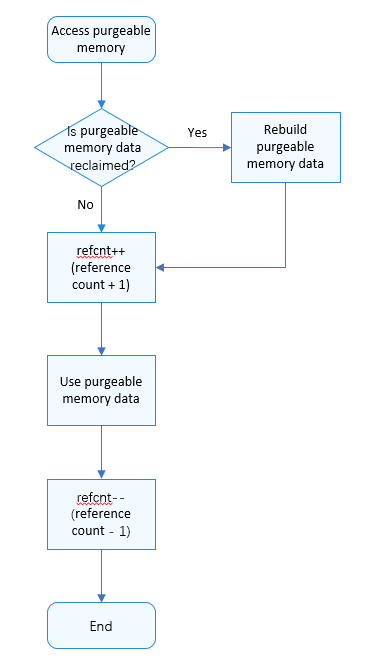
The following figure shows the process of accessing purgeable memory. Check whether the data in the purgeable memory has been reclaimed. If yes, rebuild the data. When data in purgeable memory is accessed, its reference count refcnt is increased by 1. After the access is complete, the reference count refcnt is decreased by 1. When the reference count refcnt is 0, purgeable memory may be reclaimed by the system.
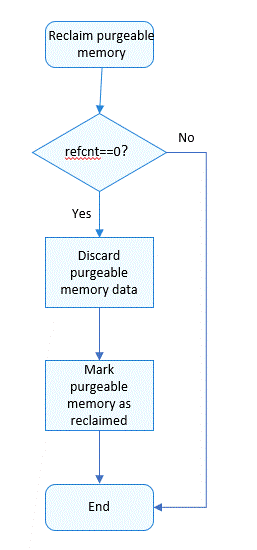
The following figure shows the process of purgeable memory reclamation. When the reference count is 0, the data in purgeable memory is discarded and purgeable memory is marked as reclaimed.
[h2]Reference Cases
Import the dynamic link library libpurgeable_memory_ndk.z.so corresponding to Purgeable to the CMakeLists.txt file. The details are as follows:
# the minimum version of CMake.
cmake_minimum_required(VERSION 3.4.1)
project(MyNativeApplication)
set(NATIVERENDER_ROOT_PATH ${CMAKE_CURRENT_SOURCE_DIR})
if(DEFINED PACKAGE_FIND_FILE)
    include(${PACKAGE_FIND_FILE})
endif()
include_directories(${NATIVERENDER_ROOT_PATH}
                    ${NATIVERENDER_ROOT_PATH}/include)
add_library(entry SHARED napi_init.cpp)
# Introduce libpurgeable_memory_ndk.z.so dynamic link library.
target_link_libraries(entry PUBLIC libace_napi.z.so libpurgeable_memory_ndk.z.so)
Import the purgeable_memory header file, declare the ModifyFunc function, and call OH_PurgeableMemory_Create to create the PurgeableMemory object.
To read the content of the PurgeableMemory object, call OH_PurgeableMemory_BeginRead. After reading the content, call OH_PurgeableMemory_EndRead. OH_PurgeableMemory_GetContent can be used to obtain the memory data of the PurgeableMemory object.
To modify the content of the PurgeableMemory object, call OH_PurgeableMemory_BeginWrite. After modifying the content, call OH_PurgeableMemory_EndWrite. OH_PurgeableMemory_AppendModify can be used to update the rules for rebuilding the PurgeableMemory object.
#include "napi/native_api.h"
#define DATASIZE (4 * 1024 * 1024)
#include "purgeable_memory/purgeable_memory.h"

bool ModifyFunc(void *data, size_t size, void *param) {
    data = param;
    return true;
}
// Business definition object type
class ReqObj;
static napi_value Add(napi_env env, napi_callback_info info)
{
    size_t requireArgc = 2;
    size_t argc = 2;
    napi_value args[2] = {nullptr};
    napi_get_cb_info(env, info, &argc, args , nullptr, nullptr);
    napi_valuetype valuetype0;
    napi_typeof(env, args[0], &valuetype0);
    napi_valuetype valuetype1;
    napi_typeof(env, args[1], &valuetype1);
    double value0;
    napi_get_value_double(env, args[0], &value0);
    double value1;
    napi_get_value_double(env, args[1], &value1);
    double result = value0 + value1;
    // Create a PurgeableMemory object
    OH_PurgeableMemory *pPurgmem = OH_PurgeableMemory_Create(DATASIZE, ModifyFunc, &result);
    // Read the object
    OH_PurgeableMemory_BeginRead(pPurgmem);
    // Get the size of PurgeableMemory object
    size_t size = OH_PurgeableMemory_ContentSize(pPurgmem);
    // Get the content of the PurgeableMemory object
    ReqObj *pReqObj = (ReqObj *)OH_PurgeableMemory_GetContent(pPurgmem);
    // Read the end of the PurgeableMemory object
    OH_PurgeableMemory_EndRead(pPurgmem);

    // Modify the PurgeableMemory object
    OH_PurgeableMemory_BeginWrite(pPurgmem);
    // Declare the parameters of the extended creation function
    double newResult = value0 + value0;
    // Update PurgeableMemory object reconstruction rules
    OH_PurgeableMemory_AppendModify(pPurgmem, ModifyFunc, &newResult);
    // End of modifying the PurgeableMemory object
    OH_PurgeableMemory_EndWrite(pPurgmem);
    // Destroyed object
    OH_PurgeableMemory_Destroy(pPurgmem);
    napi_value sum;
    napi_create_double(env, result, &sum);
    return sum;
}
EXTERN_C_START
static napi_value Init(napi_env env, napi_value exports)
{
    napi_property_descriptor desc[] = {
        { "add", nullptr, Add, nullptr, nullptr, nullptr, napi_default, nullptr }
    };
    napi_define_properties(env, exports, sizeof(desc) / sizeof(desc[0]), desc);
    return exports;
}
EXTERN_C_END

static napi_module demoModule = {
    .nm_version = 1,
    .nm_flags = 0,
    .nm_filename = nullptr,
    .nm_register_func = Init,
    .nm_modname = "entry",
    .nm_priv = ((void*)0),
    .reserved = { 0 },
};
extern "C" __attribute__((constructor)) void RegisterEntryModule(void)
{
    napi_module_register(&demoModule);
} [h2]Principles
When defining a UI, an app needs to draw different content for different types of components. The Image component is used to load and display images, which consumes memory. The ArkTS runtime employs a garbage collection (GC) algorithm based on object tracing (Tracing GC). GC is triggered when the allocated object space reaches a threshold. Since the young-generation GC has a relatively small threshold, using large images may lead to frequent GC.
The memory usage of a full-screen image with different resolutions is as follows.

As shown in the preceding figure, for resource-intensive apps with a large number of pages, images, and effects, the memory usage easily reaches a high level. When the memory usage of an app exceeds a threshold (for example, 4 GB, which varies with different systems), the system may consider that the app has a serious memory issue, and may forcibly terminate the app process, to ensure stability and performance of the device system. To prevent apps from being terminated by the system, you can perform the following operations:
- Optimizing resource usage: You can set the size of the source image file to properly use memory resources and reduce the memory occupied by images.
- Layout optimization: Reduce the number of layout nesting layers to reduce overdrawing, which can improve performance significantly.
This topic describes how to set the size of the source image file to properly use memory and reduce the memory occupied by images.
[h2]Avoiding Loading Images That Exceed the Display Size
Column() {
  Image($r('app.media.image'))
    .width("500px")
    .height("500px")
}
When the Image component with the size of 500 × 500 is used to load a 4032 × 3024 RGBA image, about 46.5 MB memory is allocated for the image. Since the original size of the image is large, the image needs to be scaled to 500 × 500 when being loaded to the Image component. This process occupies certain memory.
Texture image memory size: imageWidth × imageHeight × format (4032 × 3024 × 4 = 48771072 bytes ≈ 46.5 MB).
That is, the required memory is 500 × 500 × 4 ≈ 1 MB.
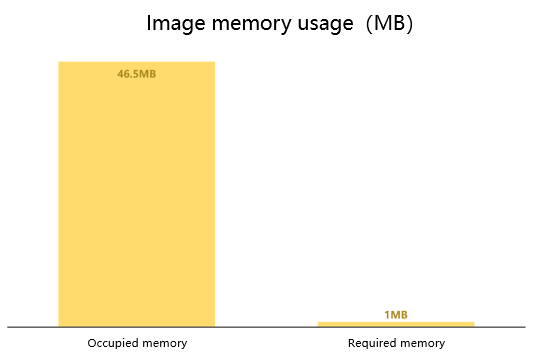
When an image size is larger than the display area allowed by the component, the image will be cropped or scaled. Frequent cropping and scaling not only deteriorates the view effect, but also consumes much memory and power. To save memory, you can adjust the size of the source file to be the same as that of the component. In this way, unnecessary memory usage is avoided, and app performance and efficiency are improved. You can use the image processing tool to adjust the image size to further reduce memory usage.
Other Methods
In routine development, the common memory reduction methods are as follows:
- Weak Reference: In HarmonyOS app development, by using Weak Reference, you can avoid memory leaks caused by circular references and ensure that objects are properly released when they are no longer needed.
- Sendable: transfers data that complies with the Sendable protocol between concurrent ArkTS instances, which reduces the copy overhead and memory usage. For details, see Sendable Object Overview.
- Shareable objects: A shared object of the SharedArrayBuffer type has a fixed length and can store any type of data, including numbers and strings. An object of the SharedArrayBuffer type can be transferred between multiple threads. The objects before and after the transfer point to the same memory block, achieving memory sharing. For details, see SharedArrayBuffer Object.