Overview
With the rapid development of the mobile Internet, watching live streaming has become an important way for users to obtain information and enjoy entertainment. However, in complex network environments, the traditional TCP protocol faces issues such as long connection setup latency, head-of-line blocking, and reconnection upon network switching, severely affecting user experience.
Quick UDP Internet Connections (QUIC) is a UDP-based transport protocol developed by Google to accelerate HTTP-based transmission. It effectively addresses the aforementioned issues caused by TCP, providing faster and more stable network transmission for live streaming scenarios. Intended for HarmonyOS app developers, this section uses the ijkplayer player as an example to describe how to integrate the RCP_QUIC capability provided by Remote Communication Kit to improve the smoothness and user experience of live streaming playback.
When to Use
Video and live streaming apps need to support multiple network transmission protocols to adapt to different network environments and CDN services. The main pain points include:
- Weak network environment: High latency and packet loss rate cause playback freezing.
- Mobile network switching: Signal fluctuation and frequent network switching cause disconnection and reconnection.
- High-concurrency scenario: Congestion occurs when multiple users access the network at the same time.
Traditional TCP has inherent disadvantages in weak network environments, whereas QUIC can provide faster and more stable network experience. By integrating the QUIC protocol, apps can automatically select the optimal transmission protocol based on the network environment.
How to Implement
The QUIC protocol uses core features such as multiplexing and congestion control to achieve more efficient and reliable data transmission in high-concurrency, mobile network, and weak network scenarios. Multiplexing allows multiple data streams to be transmitted concurrently over the same connection, effectively avoiding head-of-line blocking of TCP. The congestion control mechanism can better adapt to weak network environments and maintain stable transmission even on networks with high packet loss and latency.
The following describes the RCP_QUIC adaptation process using ijkplayer. ijkplayer is an FFmpeg-based video player that can be used in the OpenHarmony system. To integrate the QUIC transmission capability provided by Remote Communication Kit, you need to complete two core tasks: implementing QUIC-based transmission at the FFmpeg layer and QUIC-based URL parsing and playback at the ijkplayer layer.
The QUIC-based transmission adaptation at the FFmpeg layer mainly involves core operations such as connection establishment, connection termination, data stream creation, data read/write, and data stream closure. The overall process is as follows.
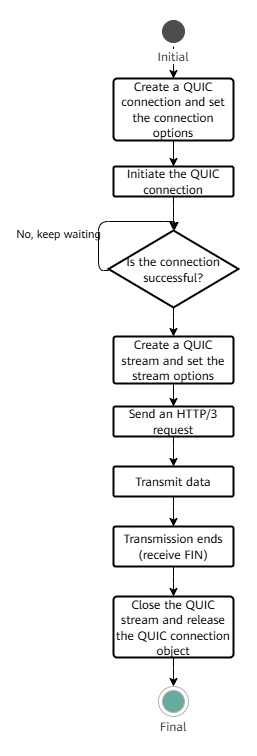
How to Develop
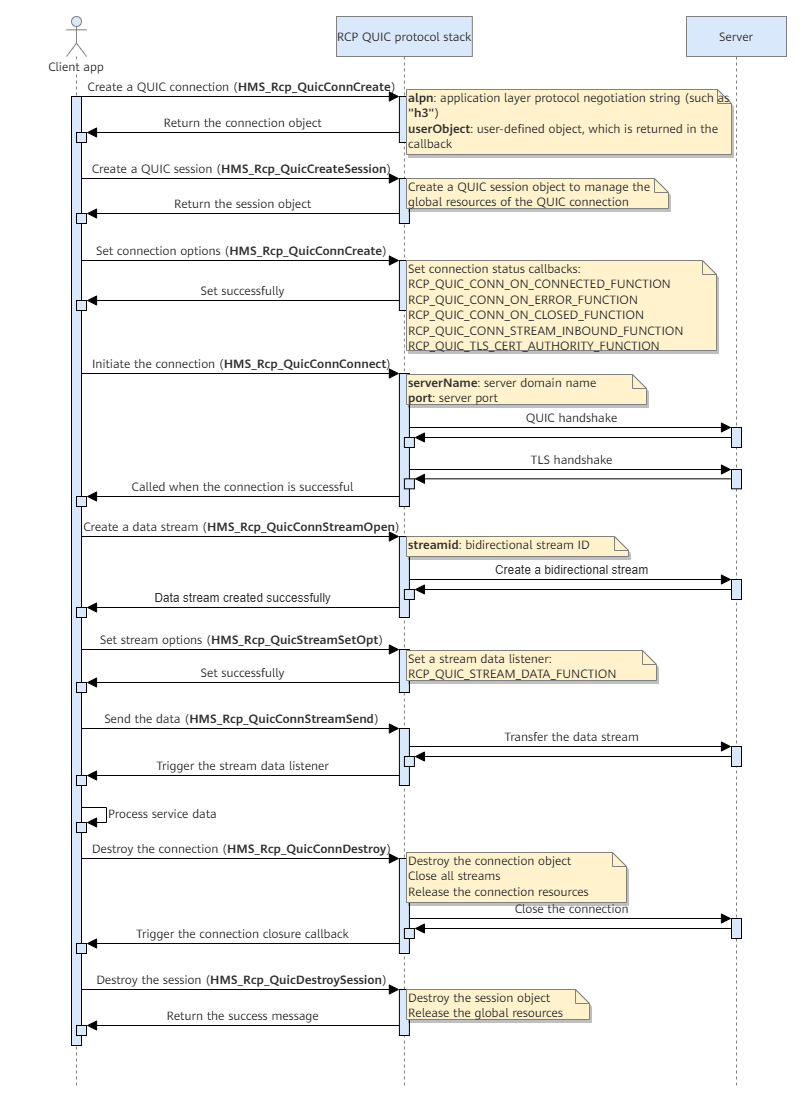
- Create a connection object using HMS_Rcp_QuicConnCreate() by specifying the ALPN protocol and user object. Create a session object using HMS_Rcp_QuicCreateSession() to manage global resources.
- Set connection parameters using HMS_Rcp_QuicConnSetOpt().
- Set RCP_QUIC_CONN_ON_CONNECTED_FUNCTION to trigger a callback when the connection is successfully established.
- Set RCP_QUIC_CONN_ON_ERROR_FUNCTION to trigger a callback when a connection error occurs.
- Set RCP_QUIC_CONN_ON_CLOSED_FUNCTION to trigger a callback when the connection is closed.
- Set RCP_QUIC_CONN_STREAM_INBOUND_FUNCTION to trigger a callback when the server creates a stream.
- Use HMS_Rcp_QuicConnConnect() to initiate a connection and pass the session object, connection object, server domain name, and port number.
- Use HMS_Rcp_QuicConnStreamOpen() to create a new bidirectional data stream on the connection.
- Use HMS_Rcp_QuicStreamSetOpt() to set RCP_QUIC_STREAM_DATA_FUNCTION for stream data listening.
- Use HMS_Rcp_QuicConnStreamSend() to send data through the data stream.
- After the transmission is complete, use HMS_Rcp_QuicConnDestroy() to destroy the connection object, close all streams, and release the connection resources. Use HMS_Rcp_QuicDestroySession() to destroy the session object and release the global resources.
QUIC-based Transmission in FFmpeg
This section describes the core implementation of the QUIC-based transmission layer in FFmpeg. FFmpeg integrates the RCP_QUIC API in Remote Communication Kit to perform underlying operations such as connection management and data transmission.
[h2]How to Develop
1. Establish a QUIC/HTTP3 connection.
Create a QUIC connection object, parse and save the URI, establish a QUIC connection, complete the HTTP/3 handshake, and return the connection result.
static int Http3Open(URLContext *h, const char *uri, int flags, AVDictionary **options)
{
    HTTP3Context *s = h->privData;
    int ret;
    Rcp_QuicConn *conn = HMS_Rcp_QuicConnCreate("h3", h);
    Rcp_QuicSession *session = HMS_Rcp_QuicCreateSession();
    if (conn == NULL || session == NULL) {
        return AVERROR(ENOMEM);
    }

    s->quicConn = conn;
    s->quicSession = session;
    s->appCtx = (AVApplicationContext *)av_dict_strtoptr(s->appCtxIntptr);

    /* Initialize pipe for QUIC async receive - direct forwarding */
    int pipefd[2];
    if (pipe(pipefd) < 0) {
        HMS_Rcp_QuicConnDestroy(s->quicConn);
        s->quicConn = NULL;
        HMS_Rcp_QuicDestroySession(s->quicSession);
        s->quicSession = NULL;
        return AVERROR(ENOMEM);
    }
    // ...
    /* URI Saving and HTTP Headers Normalization */

    if (s->listen) {
        return Http3Listen(h, uri, flags, options);
    }
    av_application_will_http_open(s->appCtx, (void*)h, uri);
    ret = Http3OpenCnx(h, options);
    av_application_did_http_open(s->appCtx, (void*)h, uri, ret, s->http3Code, s->fileSize);
    if (ret < 0) {
        av_dict_free(&s->chainedOptions);
    }
    return ret;
}
Initialize the nghttp3 connection and set the QUIC callback.
static int Http3Connect(URLContext *h, const char *path, const char *localPath, const char *hoststr, const char *auth,
    const char *proxyauth, int *newLocation)
{
    HTTP3Context *s = h->privData;
    int err;
    char *authstr = NULL;
    char *proxyauthstr = NULL;
    uint64_t off = s->off;

    // ...
    /* Initialize HTTP/3 connection */
    int ret = HMS_Rcp_QuicConnSetOpt(s->quicConn, RCP_QUIC_CONN_ON_CONNECTED_FUNCTION,
                                     QuicConnectionOnConnected, sizeof(QuicConnectionOnConnected));
    ret |= HMS_Rcp_QuicConnSetOpt(s->quicConn, RCP_QUIC_CONN_ON_ERROR_FUNCTION,
                                  QuicConnectionOnError, sizeof(QuicConnectionOnError));
    ret |= HMS_Rcp_QuicConnSetOpt(s->quicConn, RCP_QUIC_CONN_ON_CLOSED_FUNCTION,
                                  QuicConnectionOnClosed, sizeof(QuicConnectionOnClosed));
    ret |= HMS_Rcp_QuicConnSetOpt(s->quicConn, RCP_QUIC_CONN_STREAM_INBOUND_FUNCTION,
                                  QuicConnectionOnStreamInbound, sizeof(QuicConnectionOnStreamInbound));
    ret |= HMS_Rcp_QuicConnSetOpt(s->quicConn, RCP_QUIC_TLS_CERT_AUTHORITY_FUNCTION,
                                  QuicConnectionOnCertAuthority, sizeof(QuicConnectionOnCertAuthority));
    s->connected = false;
    ret |= HMS_Rcp_QuicConnConnect(s->quicSession, s->quicConn, hoststr, 443);  /* 443 is the target port number */
    /* Waiting for connection to succeed */
    while (s->connected == false) {
        usleep(0);
    }
    uint64_t streamid = 0;
    ret |= HMS_Rcp_QuicConnStreamOpen(s->quicConn, RCP_QUIC_STREAM_BIDI, &streamid, h);
    ret |= HMS_Rcp_QuicStreamSetOpt(s->quicConn, streamid, RCP_QUIC_STREAM_DATA_FUNCTION,
                                    QuicStreamOnReceiveData, sizeof(QuicStreamOnReceiveData));

    /* Save current stream ID for Http3Read */
    s->currentStreamId = streamid;
    Http3RequestInit(h, path, localPath, hoststr, auth, proxyauth, newLocation, streamid);
    /* Send HTTP Request and read Response Header */
    err = (off == s->off) ? 0 : -1;
done:
    av_freep(&authstr);
    av_freep(&proxyauthstr);
    return err;
}
2. Process the handshake phase.
The QUIC server handshake process is as follows: bottom-layer protocol-based handshake, client request header read, response header sending, and handshake completion.
static int Http3Handshake(URLContext *c)
{
    int ret;
    int err;
    int newLocation;
    HTTP3Context *h3c = c->privData;
    URLContext *uc = h3c->hd;
    switch (h3c->handshakeStep) {
        case LOWER_PROTO:
            if ((ret = ffurl_handshake(uc)) > 0) {
                return 2 + ret;  /* 2 is the return value in the handshake phase */
            }
            if (ret < 0) {
                return ret;
            }
            h3c->handshakeStep = READ_HEADERS;
            h3c->isConnectedServer = 1;
            return 2;  /* 2 is the return value in the handshake phase */
        case READ_HEADERS:
            if ((err = Http3ReadHeader(c, &newLocation)) < 0) {
                HandleHttp3Errors(c, err);
                return err;
            }
            h3c->handshakeStep = WRITE_REPLY_HEADERS;
            return 1;
        case WRITE_REPLY_HEADERS:
            if ((err = Http3WriteReply(c, h3c->replyCode)) < 0) {
                return err;
            }
            h3c->handshakeStep = FINISH;
            return 1;
        case FINISH:
            return 0;
    }
    return AVERROR(EINVAL);
}
3. Read the data.
Forward the QUIC data flow through a pipe.
static int Http3Read(URLContext *h, uint8_t *buf, int size)
{
    HTTP3Context *s = h->privData;
    int srcSize;

    if (s->icyMetaint > 0) {
        srcSize = StoreIcy(h, size);
        if (srcSize < 0) {
            return srcSize;
        }
    }

    /* Check if QUIC mode is active (pipe initialized) */
    if (s->pipeFd >= 0 && s->quicConn != NULL) {
        /* QUIC mode: read from pipe - direct forwarding */
        ssize_t ret = read(s->pipeFd, buf, size);
        if (ret < 0) {
            if (errno == EAGAIN || errno == EWOULDBLOCK) {
                /* No data available, return 0 to indicate retry */
                return 0;
            }
            return AVERROR(errno);
        }

        if (ret == 0) {
            /* EOF - pipe write end closed */
            return AVERROR_EOF();
        }

        s->icyDataRead += ret;
        return (int)ret;
    }

    /* Fallback: use original TCP mode */
    srcSize = Http3ReadStream(h, buf, size);
    if (srcSize > 0) {
        s->icyDataRead += srcSize;
    }
    return srcSize;
}
4. Write data.
Write the request data. For the encoded data that is transferred in chunk, the header in the corresponding format is added:
static int Http3Write(URLContext *h, const uint8_t *buf, int size)
{
    char temp[11] = "";  /* 32-bit hex + CRLF + nul */
    int ret;
    char crlf[] = "\r\n";
    HTTP3Context *h3c = h->privData;

    if (!h3c->chunkedPost) {
        return ffurl_write(h3c->hd, buf, size);
    }

    if (size > 0) {
        if ((ret = snprintf_s(temp, sizeof(temp), "%x\r\n", size)) < 0) {
            return ret;
        }
        if ((ret = ffurl_write(h3c->hd, (const unsigned char*)temp, strlen(temp))) < 0 ||
            (ret = ffurl_write(h3c->hd, buf, size)) < 0          ||
            (ret = ffurl_write(h3c->hd, (const unsigned char*)crlf, sizeof(crlf) - 1)) < 0) {
            return ret;
            }
    }
    return size;
}
5. Close the connection.
Clear the resources and close the connection:
static int Http3Close(URLContext *h)
{
    int ret = 0;
    HTTP3Context *s = h->privData;
    if (!s->endChunkedPost) {
        ret = Http3Shutdown(h, h->flags);
    }

    /* Cleanup pipe */
    if (s->pipeFd >= 0) {
        close(s->pipeFd);
        s->pipeFd = -1;
    }
    if (s->pipeWriteFd >= 0) {
        close(s->pipeWriteFd);
        s->pipeWriteFd = -1;
    }

    /* Cleanup synchronization primitives */
    ret = pthread_mutex_destroy(&s->responseMutex);
    if (ret != 0) {
        return ret;
    }
    ret = pthread_cond_destroy(&s->responseCond);
    if (ret != 0) {
        return ret;
    }

    /* Cleanup nghttp3 connection */
    if (s->h3Req) {
        nghttp3_conn_del(s->h3Req);
        s->h3Req = NULL;
    }
    /* Cleanup QUIC connection */
    if (s->quicConn) {
        HMS_Rcp_QuicConnDestroy(s->quicConn);
        s->quicConn = NULL;
        HMS_Rcp_QuicDestroySession(s->quicSession);
        s->quicSession = NULL;
    }

    if (s->hd) {
        ffurl_closep(&s->hd);
    }
    av_dict_free(&s->chainedOptions);
    return ret;
}
ijkplayer Layer: Support for QUIC URL
This section describes how to configure ijkplayer to support QUIC URLs, including configuring the protocol trustlist and converting the URL protocol.
[h2]How to Develop
1. Configure the protocol trustlist.
Use setOption() to set the protocol_whitelist parameter and add "quic" and "quics" to the list of protocols that can be identified by the player.
this.ijkplayer_napi._setOption(this.id, IjkMediaPlayer.OPT_CATEGORY_FORMAT, "protocol_whitelist",
  "async,cache,crypto,file,http,https,quic,quics,ijkhttphook,ijkinject,ijklivehook,ijklongurl,ijksegment,ijktcphook,pipe,rtp,tcp,tls,udp,ijkurlhook,data");
2. Convert the URL protocol.
In HarmonyOS apps, the URL protocol is dynamically converted based on the live streaming type selected by the user. When QUIC is used, replace the "https://" prefix with "quics://".
@State testLiveUrl: string = "";
@State httpLiveUrl: string = "";
@State quicLiveUrl: string = "";
@State liveType: LiveType = LiveType.Other;

async aboutToAppear(){
  try{
    if (this.liveType === LiveType.Quic) {
      this.httpLiveUrl = this.testLiveUrl.replace('https://', 'quics://');
    } else {
      this.httpLiveUrl = this.testLiveUrl;
    }
    if (this.liveType === LiveType.Quic || this.liveType === LiveType.Both) {
      this.quicLiveUrl = this.testLiveUrl.replace('https://', 'quics://');
    } else {
      this.quicLiveUrl = this.testLiveUrl;
    }
  } catch (e) {
    console.error(`aboutToAppear err: ${e}`);
  }
} [h2]QUIC-based Live Streaming Playback Failure
Symptom
The QUIC protocol has been configured, but the live streaming cannot be played. A message is displayed indicating that the protocol is not supported or the connection fails.
Possible Causes
- The protocol trustlist is not correctly configured.
- The live streaming URL does not support the QUIC protocol.
- The CDN server does not support the QUIC protocol.
Solution
1. Check whether the protocol_whitelist parameter is correctly configured and ensure that it contains "quic" and "quics".
2. Ensure that the CDN server supports the QUIC protocol and check whether the Alt-Svc response header contains h3=":443".
3. Use a live streaming URL that supports QUIC for testing.
Summary
This document describes the best practices for implementing QUIC-based live streaming network acceleration based on ijkplayer. The key points include:
- Integrate the QUIC protocol through FFmpeg.
- Configure the protocol trustlist to support the "quic" and "quics" protocols.
- Implement automatic transmission protocol switching through URL protocol conversion.
These key steps together enable QUIC-based transmission of live streams, significantly improving the stability and smoothness of live streaming playback in complex network environments.