Overview
Video encoding is the process of converting raw video data into compressed formats using compression techniques. HarmonyOS supports parsing and multiplexing of media files, as well as decoding of audio and video. Video encoding in surface mode involves passing input data for encoding via NativeWindow and leveraging the video encoding capabilities of AVCodec. You can use OHNativeWindow to interface with other modules, such as Camera or AVScreenCapture.
[h2]Surface Rotation
In surface mode, video encoding depends on NativeWindow to transfer encoding data. NativeWindow is a local platform-specific window, which represents the producer of the graphics queue and includes a surface object.
Surface is primarily used to manage and transfer shared memory for graphics and media, such as graphics production, consumption, and composition, as well as media playback and recording. Surface transfers graphics/media data through shared memory, avoiding copying of graphics/media data between processes and reducing the overhead of data transfer between processes.
Surfaces are classified into producer surfaces and consumer surfaces. NativeWindow relies on the producer surface, which represents the producer of the graphics queue.

Compared with the buffer mode, the surface mode avoids media data copy between processes and therefore has higher performance.
The figure below shows the surface rotation process. The producer requests a buffer, fills the buffer with data, and returns the buffer to the buffer queue. After the callback function is triggered, the producer notifies the consumer that the buffer has been filled with data. Subsequently, the consumer obtains the buffer filled with data. When the buffer is no longer needed, the consumer releases it.
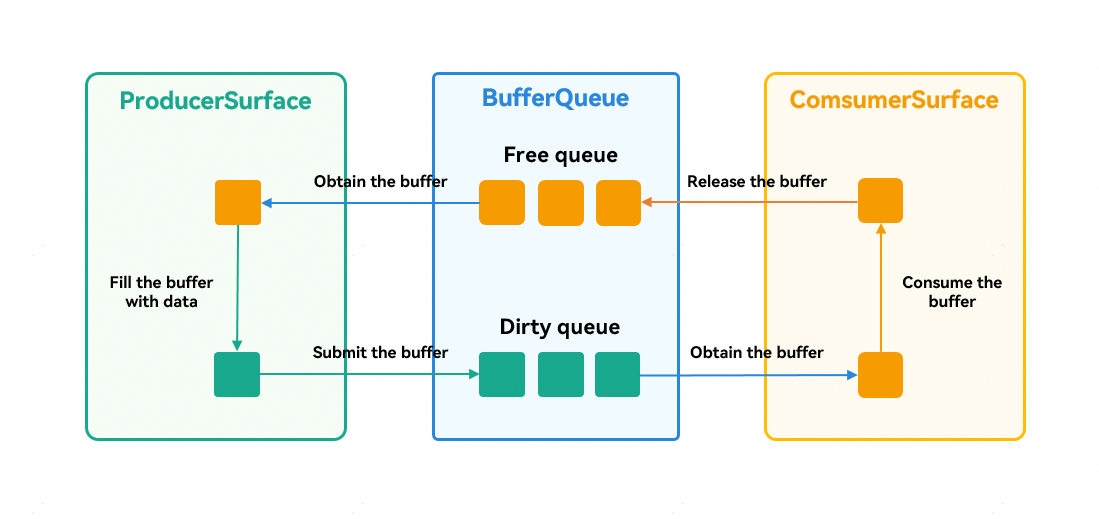
The video encoder provides an API for obtaining NativeWindow, which can connect camera data with the video encoder. The video encoder acts as a consumer, consuming the buffer data and encoding it to achieve video encoding operations. Below we will introduce video encoding in surface mode through camera recording and screen capture.
[h2]When to Use
Use AVScreenCapture for screen capture. AVScreenCapture supports directly saving captured data to a video file or encoding the data via NativeWindow connected to an encoder. In the surface-based screen capture solution, you can save data in the desired format.
[h2]How to Implement
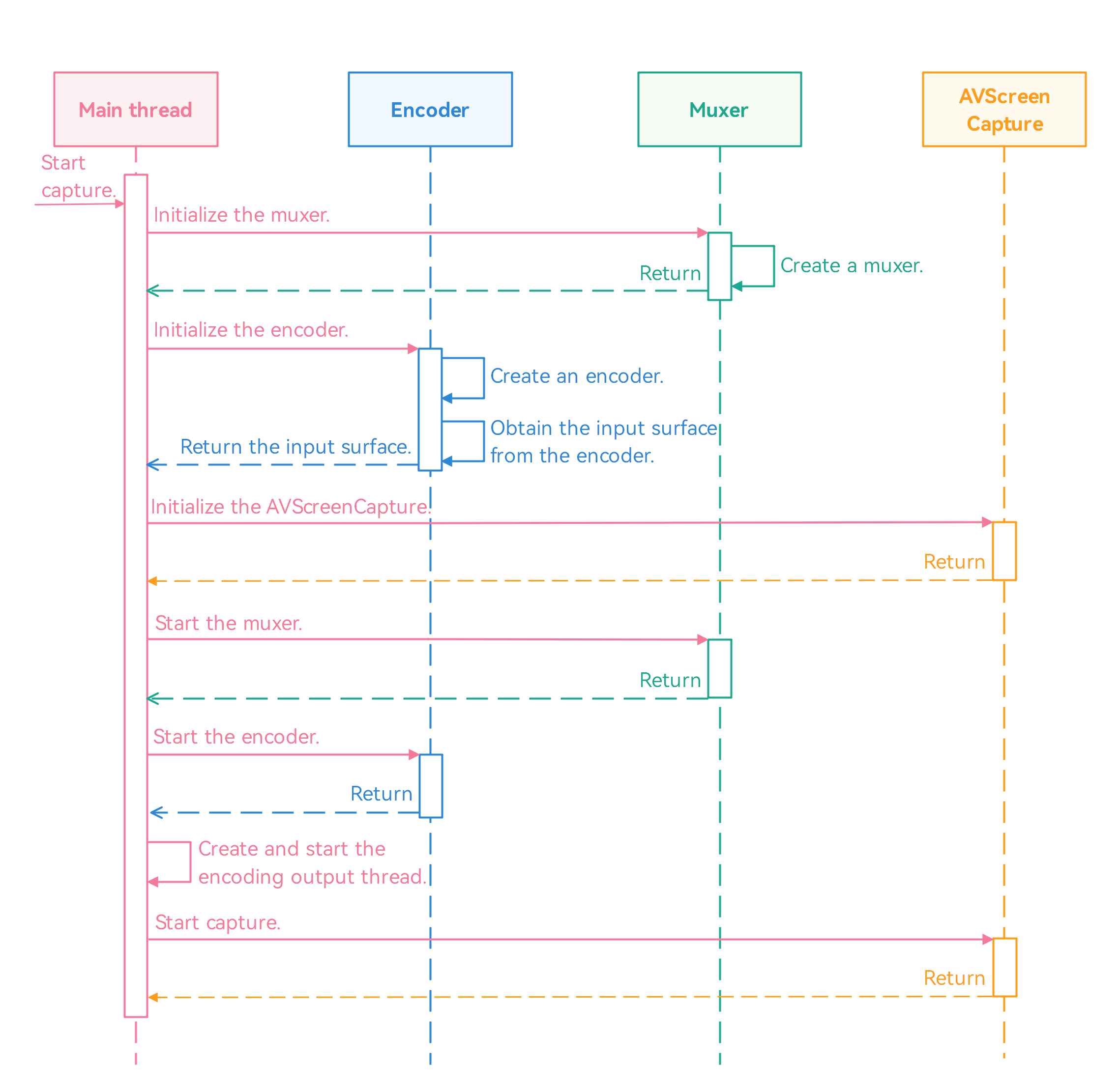
In surface mode, the screen data captured is passed through the surface contained in NativeWindow for video encoding. When AVScreenCapture is used for screen capture, you must first obtain a NativeWindow object from the encoder and then set the object to AVScreenCapture. The specific steps are as follows:
- Initialize the video muxer, and create and configure the video muxer.
- Initialize the video encoder, create and configure the video encoder, and obtain a NativeWindow object from the encoder.
- Initialize the AVScreenCapture, and create and configure the AVScreenCapture.
- Start the video muxer.
- Start the video encoder.
- Create and start the encoding output thread.
- Set the NativeWindow object obtained from the encoder to the AVScreenCapture and start screen capture.
[h2]How to Develop
- Initialize the video muxer, and create and configure the video muxer.
int32_t Muxer::Create(int32_t fd) { muxer_ = OH_AVMuxer_Create(fd, AV_OUTPUT_FORMAT_MPEG_4); if (muxer_ == nullptr) { return -1; } return 0; } int32_t Muxer::Config(SampleInfo &sampleInfo) { OH_AVFormat *formatAudio = OH_AVFormat_CreateAudioFormat(sampleInfo.audioCodecMime.data(), sampleInfo.audioSampleRate, sampleInfo.audioChannelCount); OH_AVFormat_SetIntValue(formatAudio, OH_MD_KEY_PROFILE, AAC_PROFILE_LC); int32_t ret = OH_AVMuxer_AddTrack(muxer_, &audioTrackId_, formatAudio); OH_AVFormat_Destroy(formatAudio); OH_AVFormat *formatVideo = OH_AVFormat_CreateVideoFormat(sampleInfo.videoCodecMime.data(), sampleInfo.videoWidth, sampleInfo.videoHeight); OH_AVFormat_SetDoubleValue(formatVideo, OH_MD_KEY_FRAME_RATE, sampleInfo.frameRate); OH_AVFormat_SetIntValue(formatVideo, OH_MD_KEY_WIDTH, sampleInfo.videoWidth); OH_AVFormat_SetIntValue(formatVideo, OH_MD_KEY_HEIGHT, sampleInfo.videoHeight); OH_AVFormat_SetStringValue(formatVideo, OH_MD_KEY_CODEC_MIME, sampleInfo.videoCodecMime.data()); ret = OH_AVMuxer_AddTrack(muxer_, &videoTrackId_, formatVideo); if (ret != AV_ERR_OK) { OH_LOG_ERROR(LOG_APP, "AddTrack failed"); } OH_AVFormat_Destroy(formatVideo); formatVideo = nullptr; return ret; } - Initialize the video encoder, create and configure the video encoder, and obtain a NativeWindow object from the encoder.
int32_t VideoEncoder::Create(const std::string &videoCodecMime) { encoder_ = OH_VideoEncoder_CreateByMime(videoCodecMime.c_str()); if (encoder_ == nullptr) { return -1; } return 0; } int32_t VideoEncoder::Config(SampleInfo &sampleInfo, CodecUserData *codecUserData) { // Configure video encoder OH_AVFormat *format = OH_AVFormat_Create(); OH_AVFormat_SetIntValue(format, OH_MD_KEY_WIDTH, sampleInfo.videoWidth); OH_AVFormat_SetIntValue(format, OH_MD_KEY_HEIGHT, sampleInfo.videoHeight); OH_AVFormat_SetDoubleValue(format, OH_MD_KEY_FRAME_RATE, sampleInfo.frameRate); OH_AVFormat_SetIntValue(format, OH_MD_KEY_PIXEL_FORMAT, sampleInfo.pixelFormat); OH_AVFormat_SetIntValue(format, OH_MD_KEY_VIDEO_ENCODE_BITRATE_MODE, sampleInfo.bitrateMode); OH_AVFormat_SetLongValue(format, OH_MD_KEY_BITRATE, sampleInfo.bitrate); OH_AVFormat_SetIntValue(format, OH_MD_KEY_PROFILE, sampleInfo.hevcProfile); int ret = OH_VideoEncoder_Configure(encoder_, format); if (ret != AV_ERR_OK) { OH_LOG_ERROR(LOG_APP, "Config failed, ret: %{public}d", ret); } OH_AVFormat_Destroy(format); format = nullptr; // GetSurface from video encoder OH_VideoEncoder_GetSurface(encoder_, &sampleInfo.window); // SetCallback for video encoder OH_VideoEncoder_RegisterCallback(encoder_, {VideoEncoder::OnCodecError, VideoEncoder::OnCodecFormatChange, VideoEncoder::OnNeedInputBuffer, VideoEncoder::OnNewOutputBuffer}, codecUserData); // Prepare video encoder OH_VideoEncoder_Prepare(encoder_); return 0; } - Initialize the AVScreenCapture, and create and configure the AVScreenCapture.
void CAVScreenCaptureToStream::InitAVScreenCapture(int32_t videoWidth, int32_t videoHeight) { if (g_avCapture != nullptr) { StopScreenCaptureRecording(g_avCapture); } g_avCapture = OH_AVScreenCapture_Create(); if (g_avCapture == nullptr) { OH_LOG_ERROR(LOG_APP, "create screen capture failed"); } OH_LOG_INFO(LOG_APP, "ScreenCapture after create sc"); // Set callback OH_AVScreenCapture_SetErrorCallback(g_avCapture, OnErrorToStream, nullptr); OH_AVScreenCapture_SetStateCallback(g_avCapture, OnSurfaceStateChangeToStream, nullptr); OH_AVScreenCapture_SetMicrophoneEnabled(g_avCapture, true); OH_AVScreenCapture_SetCanvasRotation(g_avCapture, true); // Initialize configuration information OH_AVScreenCaptureConfig config; OH_AudioCaptureInfo micCapInfo = {.audioSampleRate = 48000, .audioChannels = 2, .audioSource = OH_SOURCE_DEFAULT}; OH_AudioCaptureInfo innerCapInfo = {.audioSampleRate = 48000, .audioChannels = 2, .audioSource = OH_ALL_PLAYBACK}; OH_AudioEncInfo audioEncInfo = {.audioBitrate = 96000, .audioCodecformat = OH_AudioCodecFormat::OH_AAC_LC}; OH_AudioInfo audioInfo = {.micCapInfo = micCapInfo, .innerCapInfo = innerCapInfo, .audioEncInfo = audioEncInfo}; OH_VideoCaptureInfo videoCapInfo = { .videoFrameWidth = videoWidth, .videoFrameHeight = videoHeight, .videoSource = OH_VIDEO_SOURCE_SURFACE_RGBA}; OH_VideoEncInfo videoEncInfo = { .videoCodec = OH_VideoCodecFormat::OH_H264, .videoBitrate = 10000000, .videoFrameRate = 30}; OH_VideoInfo videoInfo = {.videoCapInfo = videoCapInfo, .videoEncInfo = videoEncInfo}; config = { .captureMode = OH_CAPTURE_HOME_SCREEN, .dataType = OH_ORIGINAL_STREAM, .audioInfo = audioInfo, .videoInfo = videoInfo, }; int result = OH_AVScreenCapture_Init(g_avCapture, config); if (result != AV_SCREEN_CAPTURE_ERR_OK) { OH_LOG_INFO(LOG_APP, "ScreenCapture OH_AVScreenCapture_Init failed %{public}d", result); } OH_LOG_INFO(LOG_APP, "ScreenCapture OH_AVScreenCapture_Init %{public}d", result); } - Start the video muxer.
int32_t Muxer::Start() { int ret = OH_AVMuxer_Start(muxer_); return ret; } - Start the video encoder.
int32_t VideoEncoder::Start() { int ret = OH_VideoEncoder_Start(encoder_); return ret; } - Create and start the encoding output thread.
void CAVScreenCaptureToStream::EncOutputThread() { while (true) { if (!isStarted_) { OH_LOG_ERROR(LOG_APP, "Work done, thread out"); break; } std::unique_lock<std::mutex> lock(videoEncContext_->outputMutex); bool condRet = videoEncContext_->outputCond.wait_for( lock, 5s, [this]() { return !isStarted_ || !videoEncContext_->outputBufferInfoQueue.empty(); }); if (!isStarted_) { OH_LOG_ERROR(LOG_APP, "Work done, thread out"); break; } if (videoEncContext_->outputBufferInfoQueue.empty()) { OH_LOG_ERROR(LOG_APP, "Buffer queue is empty, continue, cond ret: %{public}d", condRet); continue; } CodecBufferInfo bufferInfo = videoEncContext_->outputBufferInfoQueue.front(); videoEncContext_->outputBufferInfoQueue.pop(); if (bufferInfo.attr.flags & AVCODEC_BUFFER_FLAGS_EOS) { OH_LOG_ERROR(LOG_APP, "Catch EOS, thread out"); break; } lock.unlock(); if ((bufferInfo.attr.flags & AVCODEC_BUFFER_FLAGS_SYNC_FRAME) || (bufferInfo.attr.flags == AVCODEC_BUFFER_FLAGS_NONE)) { videoEncContext_->outputFrameCount++; // if first Frame, last frame info not init, Set pts directly to 0 if (lastFrameTimestampPts_ == 0) { lastFrameTimestampPts_ = bufferInfo.attr.pts; bufferInfo.attr.pts = 0; } else { // calc cur frame pts and last pts diff, get cur frame encode pts lastFrameEncodePts_ += (bufferInfo.attr.pts - lastFrameTimestampPts_) / 1000; // record last frame pts info lastFrameTimestampPts_ = bufferInfo.attr.pts; // set cur frame encode pts. bufferInfo.attr.pts = lastFrameEncodePts_; } } else { bufferInfo.attr.pts = 0; } muxer_->WriteSample(muxer_->GetVideoTrackId(), reinterpret_cast<OH_AVBuffer *>(bufferInfo.buffer), bufferInfo.attr); int32_t ret = videoEncoder_->FreeOutputBuffer(bufferInfo.bufferIndex); if (ret) { OH_LOG_ERROR(LOG_APP, "Encoder output thread out"); break; } } StartRelease(); OH_LOG_INFO(LOG_APP, "Exit, frame count: %{public}u", videoEncContext_->outputFrameCount); } - Set the NativeWindow object obtained from the encoder to the AVScreenCapture and start screen capture.
void CAVScreenCaptureToStream::StartScreenCapture(int32_t outputFd, int32_t videoWidth, int32_t videoHeight) {
    InitMuxerAndEncoder(outputFd, videoWidth, videoHeight);

    InitAVScreenCapture(videoWidth, videoHeight);

    m_IsRunning = true;

    StartMuxerAndEncoder();

    int result = OH_AVScreenCapture_StartScreenCaptureWithSurface(g_avCapture, sampleInfo_.window);
    OH_LOG_INFO(LOG_APP, "OH_VideoEncoder_Start Started 2 %{public}d", result);
    if (result != AV_SCREEN_CAPTURE_ERR_OK) {
        OH_LOG_INFO(LOG_APP, "ScreenCapture Started failed %{public}d", result);
        OH_AVScreenCapture_Release(g_avCapture);
    }
}
[h2]When to Use
In camera recording scenarios, you can use the camera with the AVRecorder for recording or connect the camera to a video encoder via the surface for video encoding. This approach allows custom formats, such as HDR video recording.
[h2]How to Implement
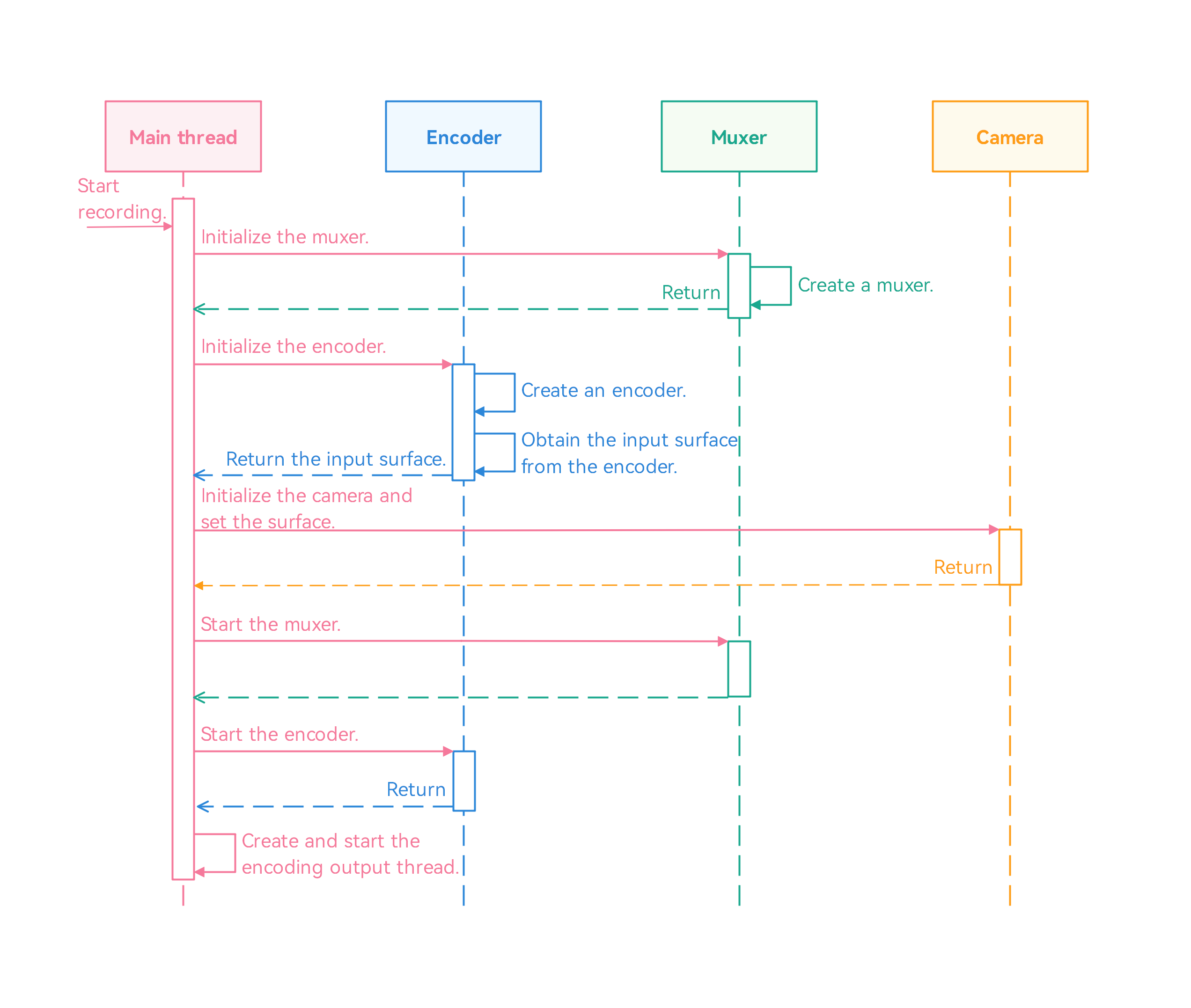
Camera recording requires transferring camera data via NativeWindow. You must first obtain a NativeWindow from the video encoder, obtain the surface ID from the NativeWindow, and then create a camera output stream using the surface ID during camera configuration. The specific steps are as follows:
- Initialize the video muxer, and create and configure the video muxer.
- Initialize the video encoder, create and configure the video encoder, and obtain a NativeWindow object from the encoder. Obtain the surface ID from the NativeWindow object.
- Initialize the camera configuration, and create a camera output stream using the createVideoOutput API.
- Start the video muxer when the camera starts.
- Start the video encoder.
- Create and start the encoding output thread.
- Initialize the video muxer, and create and configure the video muxer. (The code snippet is the same as that for screen capture.)
- Initialize the video encoder, create and configure the video encoder, and obtain a NativeWindow object from the encoder.
int32_t VideoEncoder::GetSurface(SampleInfo &sampleInfo) {
    int32_t ret = OH_VideoEncoder_GetSurface(encoder_, &sampleInfo.window);
    CHECK_AND_RETURN_RET_LOG(ret == AV_ERR_OK && sampleInfo.window, AVCODEC_SAMPLE_ERR_ERROR,
                             "Get surface failed, ret: %{public}d", ret);
    return AVCODEC_SAMPLE_ERR_OK;
}
Obtain the surface ID from the NativeWindow object.
void NativeInit(napi_env env, void *data) { AsyncCallbackInfo *asyncCallbackInfo = static_cast<AsyncCallbackInfo *>(data); int32_t ret = Recorder::GetInstance().Init(asyncCallbackInfo->sampleInfo); if (ret != AVCODEC_SAMPLE_ERR_OK) { SetCallBackResult(asyncCallbackInfo, -1); } uint64_t id = 0; ret = OH_NativeWindow_GetSurfaceId(asyncCallbackInfo->sampleInfo.window, &id); if (ret != AVCODEC_SAMPLE_ERR_OK) { SetCallBackResult(asyncCallbackInfo, -1); } asyncCallbackInfo->surfaceId = std::to_string(id); SurfaceIdCallBack(asyncCallbackInfo, asyncCallbackInfo->surfaceId); } - Initialize the camera configuration, and create a camera output stream using the createVideoOutput API.
// Add the encoder video stream to the session.
try {
  videoSession.addOutput(encoderVideoOutput);
} catch (error) {
  let err = error as BusinessError;
  Logger.error(TAG, `Failed to add encoderVideoOutput. error: ${JSON.stringify(err)}`);
}
Start the camera output stream when the camera starts recording.
// Start the video output stream encoderVideoOutput.start((err: BusinessError) => { if (err) { Logger.error(TAG, `Failed to start the encoder video output. error: ${JSON.stringify(err)}`); return; } Logger.info(TAG, 'Callback invoked to indicate the encoder video output start success.'); }); - Start the video muxer when the camera starts.
int32_t Muxer::Start() { CHECK_AND_RETURN_RET_LOG(muxer_ != nullptr, AVCODEC_SAMPLE_ERR_ERROR, "Muxer is null"); int ret = OH_AVMuxer_Start(muxer_); CHECK_AND_RETURN_RET_LOG(ret == AV_ERR_OK, AVCODEC_SAMPLE_ERR_ERROR, "Start failed, ret: %{public}d", ret); return AVCODEC_SAMPLE_ERR_OK; } - Start the video encoder.
// Start Encoder int32_t VideoEncoder::Start() { CHECK_AND_RETURN_RET_LOG(encoder_ != nullptr, AVCODEC_SAMPLE_ERR_ERROR, "Encoder is null"); int ret = OH_VideoEncoder_Start(encoder_); CHECK_AND_RETURN_RET_LOG(ret == AV_ERR_OK, AVCODEC_SAMPLE_ERR_ERROR, "Start failed, ret: %{public}d", ret); return AVCODEC_SAMPLE_ERR_OK; } - Create and start the encoding output thread.
void Recorder::EncOutputThread() {
    while (true) {
        CHECK_AND_BREAK_LOG(isStarted_, "Work done, thread out");
        std::unique_lock<std::mutex> lock(encContext_->outputMutex);
        bool condRet = encContext_->outputCond.wait_for(
            lock, 5s, [this]() { return !isStarted_ || !encContext_->outputBufferInfoQueue.empty(); });
        CHECK_AND_BREAK_LOG(isStarted_, "Work done, thread out");
        CHECK_AND_CONTINUE_LOG(!encContext_->outputBufferInfoQueue.empty(),
                               "Buffer queue is empty, continue, cond ret: %{public}d", condRet);

        CodecBufferInfo bufferInfo = encContext_->outputBufferInfoQueue.front();
        encContext_->outputBufferInfoQueue.pop();
        CHECK_AND_BREAK_LOG(!(bufferInfo.attr.flags & AVCODEC_BUFFER_FLAGS_EOS), "Catch EOS, thread out");
        lock.unlock();
        if ((bufferInfo.attr.flags & AVCODEC_BUFFER_FLAGS_SYNC_FRAME) ||
            (bufferInfo.attr.flags == AVCODEC_BUFFER_FLAGS_NONE)) {
            encContext_->outputFrameCount++;
            bufferInfo.attr.pts = encContext_->outputFrameCount * MICROSECOND / sampleInfo_.frameRate;
        } else {
            bufferInfo.attr.pts = 0;
        }
        AVCODEC_SAMPLE_LOGW("Out buffer count: %{public}u, size: %{public}d, flag: %{public}u, pts: %{public}" PRId64,
                            encContext_->outputFrameCount, bufferInfo.attr.size, bufferInfo.attr.flags,
                            bufferInfo.attr.pts);

        muxer_->WriteSample(muxer_->GetVideoTrackId(), reinterpret_cast<OH_AVBuffer *>(bufferInfo.buffer),
                            bufferInfo.attr);
        int32_t ret = videoEncoder_->FreeOutputBuffer(bufferInfo.bufferIndex);
        CHECK_AND_BREAK_LOG(ret == AVCODEC_SAMPLE_ERR_OK, "Encoder output thread out");
    }
    AVCODEC_SAMPLE_LOGI("Exit, frame count: %{public}u", encContext_->outputFrameCount);
    StartRelease();
}
Sample Code
- Screen Recording Based on AVScreenCapture for using AVScreenCapture and AVCodec for video encoding
- AVCodec Based Video Codec for using Camera and AVCodec for video encoding