Currently, most apps require performance optimization, and parallelization is an effective measure to optimize performance. Through proper design and reconstruction, parallelization enables tasks that are originally executed in serial in the main thread to be executed in parallel, improving app performance and processing efficiency. Multiple top apps have been reconstructed for parallelization, significantly improving performance.
Currently, there are two main implementation solutions for parallelization: One is to use TaskPool or Worker to create child threads and migrate time-consuming logic to the child threads for execution. The other is to use Sendable to accelerate data transfer and avoid time-consuming data copy between threads.
This topic describes the process and approach of parallelization reconstruction in actual scenarios, helping you optimize app performance.

Usage instructions and precautions:
[h2]When to Use
The following figure shows the service logic of the home page of an app. The app obtains data from the network, parses the data, generates a data class, and combines the data class with the service object to render the page. The preceding service logic is executed in the main thread (taking more than 100 ms). Because the main thread is blocked for a long time, frame loss occurs.

[h2]How to Implement
Migrating the service logic to the child thread: In the preceding service logic, the phases of downloading the JSON string, parsing the JSON string, and generating the Model data class involve data operations and do not need to be executed in the main thread. Therefore, the preceding service logic can be migrated to the child thread. The following figure shows the overall process after the optimization.

Reconstructing inter-thread data sharing: After the service logic is migrated to the child thread, you can reconstruct the communication data into a shared object among multiple threads based on the Sendable idea to avoid data copy caused by cross-thread communication. The UI logic cannot be executed in the child thread. Therefore, you need to decouple the data structure to separate the data from the UI. Specifically, extract data into the Sendable class, strip the UI-related part, and request, parse, and generate data in the child thread.
As shown in the following figure, in the original scenario, the service logic has three main class structures, which hold each other. The LightArtUIComponent component can obtain the context description document and call the methods in the document. LightArtViewModel uses the @Observed decorator, which cannot be executed in the child thread. As a result, parallelization is difficult to implement.
The app service logic is as follows: First, the LightArtDocument object is generated, which is used as the context of the component tree and contains information such as the tree structure and methods. Then, a tree is recursively generated through the nodes and methods recorded in LightArtDocument, that is, data is filled in LightArtUIComponent to form a data model. Finally, LightArtViewModel is recursively generated. Therefore, mutual data holding and coupling between data and UI exist in the data structure.
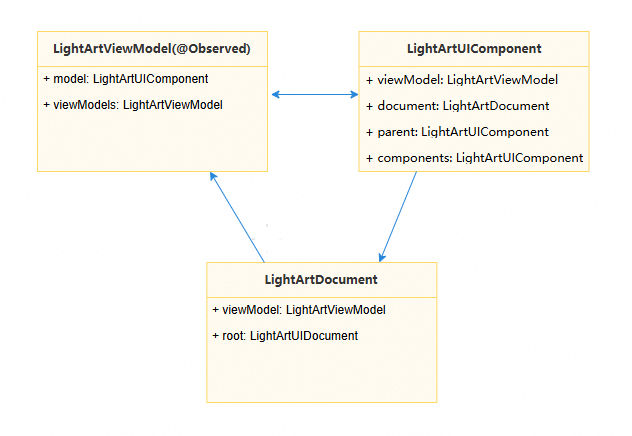
To rectify the preceding three major structures, you need to migrate the data generation part to the child thread (download and parse the data, and encapsulate the data into sendable data in the child thread), and assemble the data to the UI for rendering in the main thread.
The following is the pseudocode for the modification:
// LightArt.ets
import { lang } from '@kit.ArkTS';

/*
 * The data to be shared is encapsulated into four Sendable classes: LightArtDataModel,
 * LightArtDataDocument, LightArtViewModel, and LightArtDataComponent.
 * UI data is encapsulated into the UI class.
 * The data of the Sendable class is generated in a child thread.
 */
@Sendable
class LightArtDataModel {}

@Sendable
class LightArtDataDocument {}

@Sendable
class LightArtViewModel {}

class UI {}

interface ISerializableType<T> extends lang.ISendable {}

@Sendable
class LightArtDataComponent {
  public dataModel?: LightArtDataModel;
  public document?: LightArtDataDocument;
  public parent?: LightArtDataComponent;
  public components?: LightArtDataComponent;
  // ...
  public fromJson(jsonObj: object) {
    // ...
  }

  public mergeFrom(jsonObj: object) {
    // ...
  }
}

/*
 * Assemble the Sendable class and the UI data class into LightArtUIComponent.
 * LightArtUIComponent assembles the data based on the data returned by the child thread.
 */
class LightArtUIComponent {
  public data?: LightArtDataComponent;
  public model?: LightArtViewModel;
  public parent?: LightArtUIComponent;
  public components?: LightArtUIComponent;
  // ...
  public uiData?: UI;
}

// Fill in the data to LightArtDataComponent.
@Sendable
export class LightArtDataComponentType implements ISerializableType<LightArtDataComponent> {
  public fromJson(jsonObj: object): LightArtDataComponent {
    let ans = new LightArtDataComponent();
    ans.mergeFrom(jsonObj);
    return ans;
  }
  public static instance: LightArtDataComponentType = new LightArtDataComponentType();
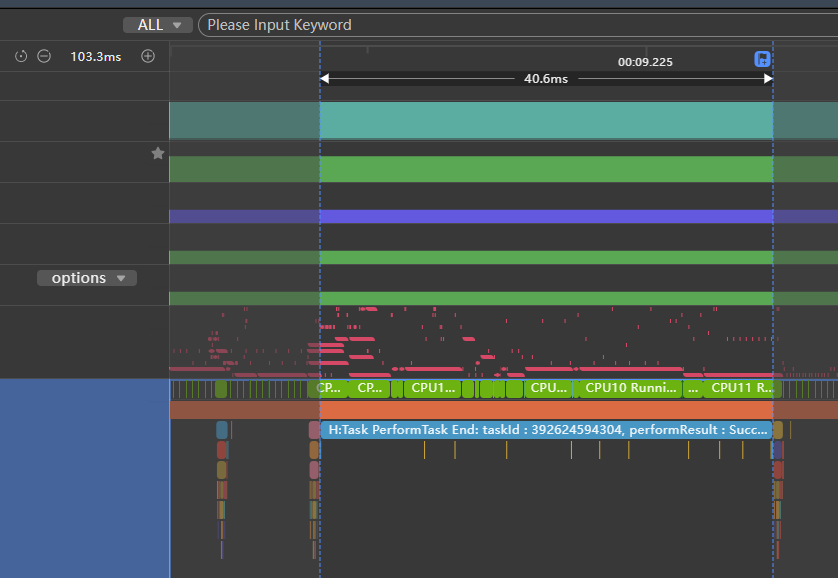
} Before the optimization, it takes more than 130 ms for data downloading and parsing and the Model class data generation.

After the optimization, the data downloading and parsing and Model data class generation are all performed in the child thread. The time consumed by the main thread is reduced to 40 ms, and the total time is reduced by more than 90 ms.

1. The Sendable object and its members must be of the Sendable type.
2. If a class contains non-Sendable attributes, you can split the class, combine the sendable attributes into a Sendable class, mount the Sendable class to the split class, and then serialize the class for transfer.
[h2]When to Use
When an app frequently uses the network library to send network requests and wants to use the same network request globally, you can parallelize the network request. By placing network-related operations in the child thread, you can effectively avoid frame freezing caused by calling time-consuming network requests in the main thread.
[h2]How to Implement
As shown in the following figure, the time consumed by non-UI operations of the main thread is mostly related to the network data driver. Therefore, the parallelization focuses on the request and processing of network data. Before the reconstruction, you need to properly evaluate the time overhead of each step in the figure and determine the reconstruction range based on the return on investment of the reconstruction.
- Reconstruction in child thread range 1: If the data delivered by the network is in JSON format and the network library can return the data in ArrayBuffer format, the reconstruction can be performed in this range. During the reconstruction, you can use ASON.parse to deserialize the string delivered by the network into a shared JSON object. In addition, some Model objects need to be processed as sendable so that they can be converted from JSON objects to Model objects in the child thread.
- Reconstruction in child thread range 2: In this range, network requests must be initiated in the child thread. Therefore, the global object data required by network requests needs to be reconstructed as sendable so that it can be accessed in the child thread.

During the reconstruction, you should try to perform parallelization first, and then consider the sendable reconstruction. The sendable reconstruction is required only when methods or large objects need to be transferred across threads.
The parallelization and sendable reconstruction described in this section are based on ArkTS and therefore are not applicable to some low-level scenarios, such as the mini program framework.

By default, memory is isolated between multiple threads in TS/JS (ArkTS inherits this behavior by default). When information is transferred between multiple threads, constraints on non-sendable common objects are as follows:
- Only data can be transferred between different threads. Functions cannot be transferred between multiple threads.
- Types that contain function member variables cannot be transferred between multiple threads. (Objects that use functions as member variables fail to be transferred across threads.)
- Private properties of JS (member variables starting with #) cannot be transferred across threads.
This case describes how to use global object information to call the network library to request network data in the child thread range 2. The following uses Axios (a promise-based network request library, which needs to be installed before use) as an example to describe how to perform parallelization reconstruction.
- Extract and encapsulate the network library configuration into a Sendable class.
// AxiosConfig.ets
import { collections, lang } from '@kit.ArkTS';
import { AxiosResponse, InternalAxiosRequestConfig } from '@ohos/axios';

// Transforming the Request Interceptor into a Sendable interface
export interface IRequestInterceptor extends lang.ISendable {
  handle(data: InternalAxiosRequestConfig<object>): InternalAxiosRequestConfig<object> |
    Promise<InternalAxiosRequestConfig<object>>;
  handleError(error: object): object;
}

// Transforming the Response Interceptor into a Sendable interface
export interface IResponseInterceptor extends lang.ISendable {
  handle(data: AxiosResponse<object, object>): AxiosResponse<object, object> |
    Promise<AxiosResponse<object, object>>;
  handleError(error: object): object;
}

// Transforming the Auth into a Sendable interface
export interface IAuth extends lang.ISendable {
  username: string;
  password: string;
}

// Transforming the HttpProxy into a Sendable interface
export interface IHttpProxy extends lang.ISendable {
  protocol: string;
  host: string;
  port: number;
  auth: IAuth;
  exclusionList: collections.Array<string>;
}

// Encapsulate Axios configuration, which needs to be initialized on the main thread
@Sendable
export class AxiosGlobalConfig {
  private constructor() {
    this.requestInterceptors = new collections.Array<IRequestInterceptor>();
    this.responseInterceptors = new collections.Array<IResponseInterceptor>();
    this.headers = new collections.Map<string, string>();
  }

  public baseURL?: string;
  public headers: collections.Map<string, string>;
  public timeout?: number;
  public proxy?: IHttpProxy;
  public xsrfCookieName?: string;
  public xsrfHeaderName?: string;
  public maxContentLength?: number;
  public maxBodyLength?: number;
  // ...

  public requestInterceptors: collections.Array<IRequestInterceptor>;
  public responseInterceptors: collections.Array<IResponseInterceptor>;
  public static instance: AxiosGlobalConfig = new AxiosGlobalConfig();
}
- Generates an Axios object based on the configuration class.
// AxiosAdapter.ets
import axios, { Axios, AxiosInstance, AxiosProxyConfig, AxiosResponse, InternalAxiosRequestConfig } from '@ohos/axios';
import { AxiosGlobalConfig } from './AxiosConfig';

// Initialize axios object according to configuration and return the object.
export function getAxios(): Axios {
  let instance: AxiosInstance = axios.create();
  if (AxiosGlobalConfig.instance.baseURL) {
    instance.defaults.url = AxiosGlobalConfig.instance.baseURL;
  }
  for (let entry of AxiosGlobalConfig.instance.headers.entries()) {
    instance.defaults.headers[entry[0]] = entry[1];
  }
  if (AxiosGlobalConfig.instance.timeout) {
    instance.defaults.timeout = AxiosGlobalConfig.instance.timeout;
  }
  if (AxiosGlobalConfig.instance.proxy) {
    let config: AxiosProxyConfig = {
      host: AxiosGlobalConfig.instance.proxy.host,
      port: AxiosGlobalConfig.instance.proxy.port,
      exclusionList: []
    };
    instance.defaults.proxy = config;
  }
  for (let interceptor of AxiosGlobalConfig.instance.requestInterceptors.values()) {
    axios.interceptors.request.use((config: InternalAxiosRequestConfig<object>): InternalAxiosRequestConfig<object> |
      Promise<InternalAxiosRequestConfig<object>> => interceptor.handle(config),
      (error: object) => interceptor.handleError(error));
  }
  for (let interceptor of AxiosGlobalConfig.instance.responseInterceptors.values()) {
    axios.interceptors.response.use((response: AxiosResponse<object, object>): AxiosResponse<object, object> |
      Promise<AxiosResponse<object, object>> => interceptor.handle(response),
      (error: object) => interceptor.handleError(error));
  }
  return axios;
}
- Reconstruct the related classes to be sendable.
// Interceptor.ets
import { AxiosResponse, InternalAxiosRequestConfig } from '@ohos/axios';
import { IRequestInterceptor, IResponseInterceptor } from './AxiosConfig';

// Request interceptor encapsulated as sendable
@Sendable
export class RequestInterceptor implements IRequestInterceptor {
  handle(data: InternalAxiosRequestConfig<object>): InternalAxiosRequestConfig<object> |
    Promise<InternalAxiosRequestConfig<object>> {
    return data;
  }
  handleError(error: object): object {
    return error;
  }
}

// Response interceptor encapsulated as sendable
@Sendable
export class ResponseInterceptor implements IResponseInterceptor {
  handle(data: AxiosResponse<object, object>): AxiosResponse<object, object> |
    Promise<AxiosResponse<object, object>> {
    return data;
  }
  handleError(error: object): object {
    return error;
  }
}
- Execute the related logic in the child thread.
Use TaskPool to initialize Axios in the main thread and execute related logic in child threads.
// Sample7.ets
import { taskpool } from '@kit.ArkTS';
import { AxiosError, AxiosResponse } from '@ohos/axios';
import { getAxios } from './AxiosAdapter';
import { AxiosGlobalConfig, IRequestInterceptor, IResponseInterceptor } from './AxiosConfig';
import { RequestInterceptor, ResponseInterceptor } from './Interceptor';

function initAxios(url: string): void {
  // init axios config
  AxiosGlobalConfig.instance.baseURL = url;
  let requestInterceptors: IRequestInterceptor = new RequestInterceptor();
  let responseInterceptors: IResponseInterceptor = new ResponseInterceptor();
  AxiosGlobalConfig.instance.requestInterceptors.push(requestInterceptors);
  AxiosGlobalConfig.instance.responseInterceptors.push(responseInterceptors);
  AxiosGlobalConfig.instance.timeout = 1000;
}

@Concurrent
function testAxios(config: AxiosGlobalConfig) {
  // taskpool function
  AxiosGlobalConfig.instance = config;
  let adapter = getAxios();
  adapter.get(AxiosGlobalConfig.instance.baseURL).then((res: AxiosResponse) => {
    console.log('testAxios: ' + JSON.stringify(res.data));
  }).catch((error: AxiosError) => {
    console.error('error: ' + error.message);
  });
}

function demo() {
  let url = ''; // internet url
  initAxios(url);
  for (let i = 0; i < 5; i++) {
    // TaskPool thread use Axios
    let task: taskpool.Task = new taskpool.Task(testAxios, AxiosGlobalConfig.instance);
    taskpool.execute(task);
  }
}

@Entry
@Component
struct Sample7 {
  @State message: string = 'Hello World';

  build() {
    Row() {
      Column({ space: 12 }) {
        Button('test')
          .height(40)
          .width('100%')
          .onClick(() => {
            demo();
          })
      }
      .height('100%')
      .width('100%')
      .padding(16)
      .justifyContent(FlexAlign.Center)
    }
    .height('100%')
  }
}