


Intelligent Assistant
Chat with our virtual assistant to get answers promptly.
Documents from this version have been archived, and will not continue to be maintained. Please use the latest version.
The way a user's identity is authenticated is constantly changing. Sometimes passwords are used, at other times it is dynamic tokens, USB keys, SMS verification codes, and increasingly, biometric features such as fingerprints and faces. The method often varies depending on service provider. Factors usually considered include basic security, convenience, privacy, and compliance.
However, there are weaknesses with these popular identity authentication methods.
Traditional static passwords:
Attackers can hack in and steal passwords using methods like dragging, phishing, Trojan viruses, or brute-force cracking.
Most people reuse the same account name and password for all their services, so once an attacker steals one password, they can often sign in to other services using the same credentials.
Dynamic authentication:
Malicious apps can read SMS verification codes without notifying the user.
Dynamic tokens and USB keys vary, so users often need to carry more than one device.
Biometric authentication:
Biometric features are unique, so unlike passwords they cannot be changed once they are stored on a server. If biometric features are leaked, it can be a very serious issue.
Biometric authentication is only widely used for mobile devices, and is generally unavailable for desktop computers.
With FIDO, you do not have to worry about any of these issues.
Fast Identity Online (FIDO) is a set of identity authentication protocols released and maintained by the FIDO Alliance.
FIDO specifications 1.x include two sub-specifications: Universal Authentication Framework (UAF) and Universal 2nd Factor (U2F).
UAF: Provides password-free authentication. When using an online or local app, the user completes FIDO registration locally (such as using a fingerprint or PIN). If they need to be authenticated again (for example, if they sign in to the app again), they just need to use the registered fingerprint or PIN, without entering a password. This prevents security risks (such as phishing and Trojan viruses), and frees the user from memorizing and entering passwords.
U2F: Provides second-factor authentication. When using an online or local app, the user completes FIDO registration using a second-factor device (such as a FIDO key, which has a similar shape to a USB key). If the user signs in to the app later using a password, they will use their second-factor device to complete the authentication process. This enhances the security of basic passwords.
FIDO2 specifications released in 2019 include Client to Authenticator Protocols (CTAP) and W3C WebAuthn, which are backward compatible with the 1.x version.
CTAP: Enables users to use external authenticators (such as FIDO keys and mobile devices) when completing USB, NFC, or Bluetooth authentication for FIDO2-enabled browsers and operating systems.
W3C WebAuthn: Defines standard web APIs built in browsers and platforms to support FIDO authentication.
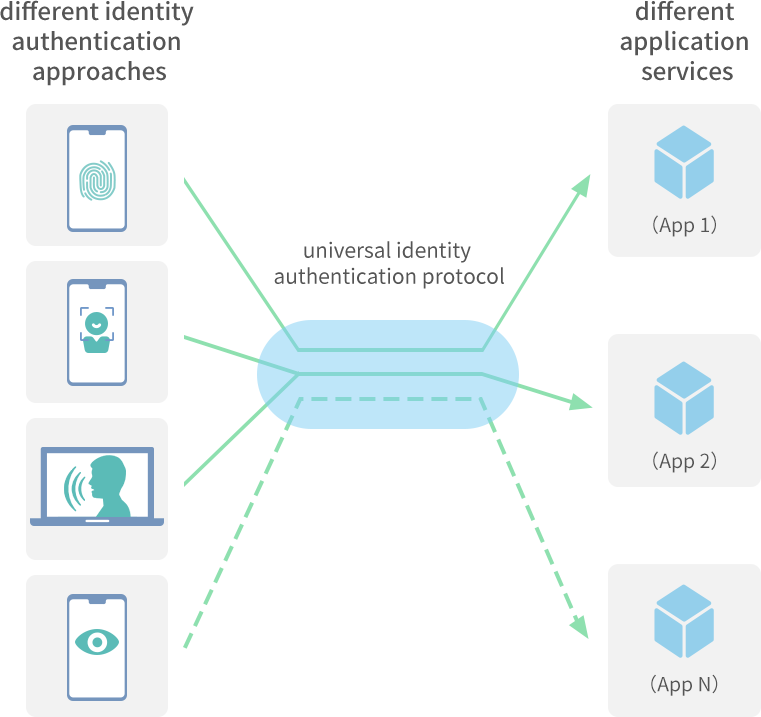
Separates identity authentication methods from identity authentication protocols.
Supports as many authentication methods as possible, and uses the built-in security capabilities which already exist in hardware devices.
Supports different security levels, so network service providers can set authentication policies based on the authentication modes and capabilities of devices.
Protects user privacy so private information is not tracked without authorization or leaked.
Supports diversified authentication methods for any app, device and user.
FIDO uses online and local apps and app servers to authenticate users, but there are three additional components defined in the FIDO Specifications: FIDO authenticator, FIDO client, and FIDO server.
FIDO authenticator: a mechanism or device used for local authentication. FIDO authenticators are classified into platform authenticators and roaming authenticators.
Platform authenticator: an authenticator integrated into a FIDO-enabled device, such as the fingerprint authenticator on a mobile phone or laptop.
Roaming authenticator: an authenticator connected to a FIDO-enabled device which uses Bluetooth, NFC, or a USB cable, such as an authenticator with a similar shape to a USB key, or a dynamic token.
FIDO client: a client which can be integrated into your app to provide FIDO authentication APIs, or integrated into a browser to provide web APIs. It is a bridge for calling the FIDO server and FIDO authenticator to complete authentication.
FIDO server: a server that generates an authentication request which complies with FIDO specifications. The request is sent to your app server when it needs to initiate FIDO authentication. Once the FIDO authenticator has completed local authentication, the FIDO server will receive the authentication response which complies with the FIDO specifications from your app server, and verify the response.
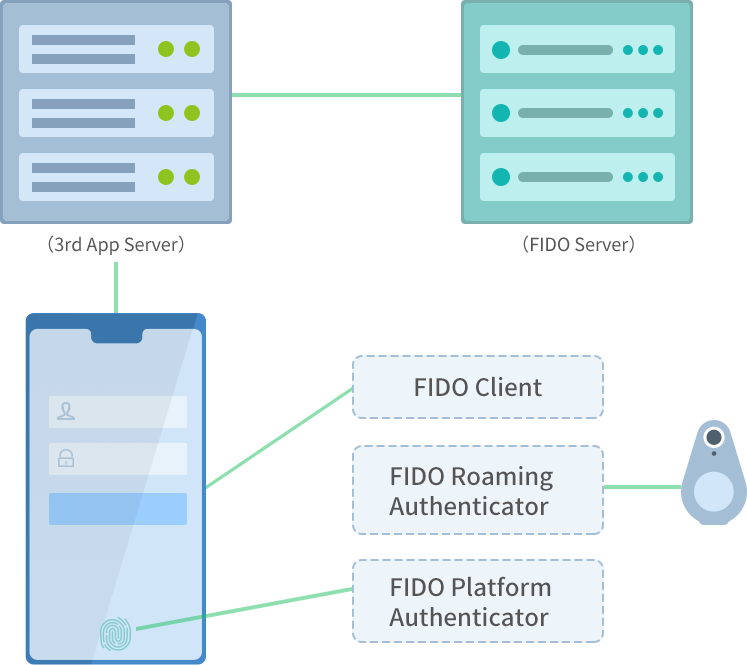
The FIDO authentication process is described as follows:
The user initiates FIDO authentication. The app server sends an authentication request to the FIDO server.
The FIDO server generates a FIDO authentication request (containing a random challenge) which complies with the FIDO specifications, then sends the request to the app server.
The app server forwards the FIDO authentication request to the user's FIDO authenticator in this sequence: app server > app > FIDO client > FIDO authenticator.
Once the user has completed the confirmation on the FIDO authenticator, the FIDO authenticator generates a FIDO authentication response (containing the signature of challenge in the FIDO authentication request) which complies with the FIDO specifications, and then sends it to the FIDO client.
The FIDO client forwards the FIDO authentication response to the FIDO server in this sequence: FIDO client > app > app server > FIDO server.
The FIDO client verifies the signature and notifies the app server of the result.
Using your online app in Huawei Browser: On Huawei phones, the FIDO client is integrated into Huawei Browser. If your app supports FIDO, the user can use FIDO authentication if they open your app in Huawei Browser. They can use a platform authenticator (such as fingerprint), a roaming authenticator (such as a FIDO key), or another Huawei phone for authentication.
Using your local app on a Huawei phone: HUAWEI HMS Core has implemented the FIDO client and platform authenticator. You just need to integrate the HMS Core FIDO SDK into your app, and complete development by following the developer guide. The user can then use FIDO authentication in your app. They can use a platform authenticator (such as fingerprint), a roaming authenticator (such as a FIDO key), or another Huawei phone for authentication.
Using a Huawei phone as a roaming authenticator: If your online or local app supports FIDO authentication, the user can use their Huawei phone as a roaming authenticator to complete authentication when they use your app on another device.
Note: For these scenarios, your app server needs to support FIDO authentication. View the FIDO specifications to see how to deploy an open-source FIDO server or use a charged FIDO server, and connect your app server to the FIDO server.