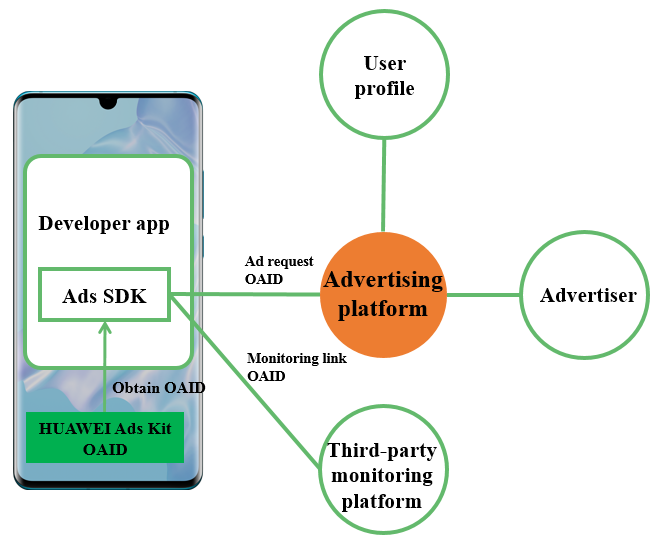
Based on the OAID, an advertising platform can provide personalized marketing campaigns and commercial ads for users, thereby improving conversions.
Ads SDK of the advertising platform can obtain the OAID by using the HUAWEI Ads Kit API. To be specific:
By calling the HUAWEI Ads Kit API, Ads SDK can obtain the OAID and the Disable personalized ads switch value.
When requesting an ad, Ads SDK includes the OAID and the Disable personalized ads switch value in the request.
If the advertiser needs to connect to the third-party monitoring platform, Ads SDK should perform macro substitution for the OAID in the impression and click monitoring events to be reported. Then, the third-party monitoring platform can perform conversion attribution analysis based on the OAID.
Based on the OAID, the advertising platform can push personalized ads for different user segments.
If the Disable personalized ads switch is off, the advertising platform can identify different user segments based on the OAID and recommend personalized marketing campaigns and commercial ads to them.
If the Disable personalized ads switch is on, the advertising platform can neither identify user segments based on the OAID nor recommend personalized ads to them. However, the advertising platform can still push non-personalized ads to the users.
By integrating the Ads SDK of an advertising platform that supports OAID into developer apps, developers can conveniently deliver personalized ads and convert traffic into revenue via Huawei mobile phones.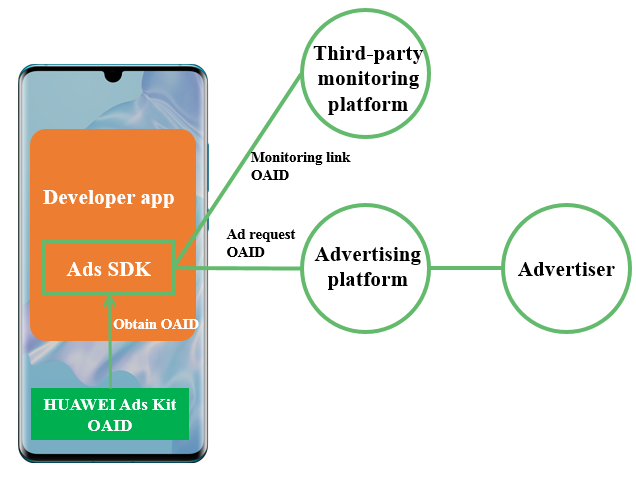
To achieve so, the developers only need to integrate the OAID-enabled Ads SDK provided by the advertising platform, and then connect to the advertising platform in compliance with the required process.
When developers choose to monetize their apps on an in-house advertising platform or through server APIs provided by a third-party advertising platform, they must ensure that their apps collect and report the OAID to the advertising platform, so that the advertising platform can deliver personalized ads.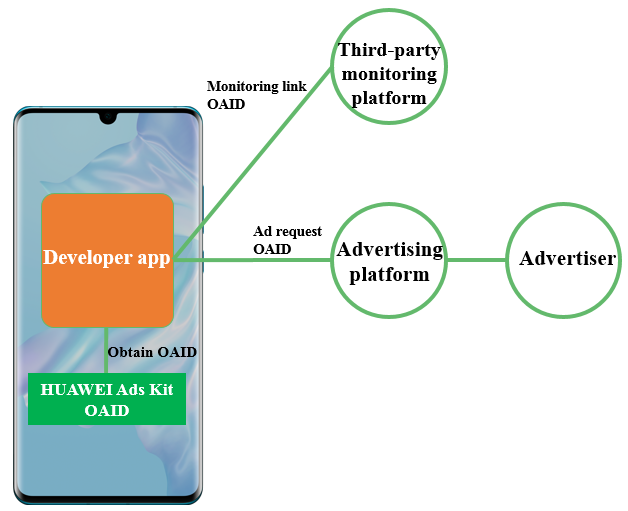
To ensure that the advertising platform delivers personalized ads based on OAID, a developer app needs to carry the OAID in an ad request to the advertising platform.
The app calls the HUAWEI Ads Kit API to obtain the OAID and the Disable personalized ads switch value.
The app includes the OAID and the Disable personalized ads switch value in an ad request.
If the Disable personalized ads switch is off, the advertising platform can recommend personalized marketing campaigns and commercial ads to user segments that are identified based on the OAID. If the Disable personalized ads switch is on, the advertising platform cannot recommend personalized marketing campaigns and commercial ads based on the OAID.
In the monitoring events reported by the third-party monitoring platform, the app needs to perform macro substitution for the OAID, so that the third-party monitoring platform can attribute ad conversions based on the OAID.
To enable conversion tracking and analysis on the third-party monitoring platform, the app needs to replace the OAID macro in the impression and click monitoring events that are to be sent via the monitoring link, with the collected OAID.
The third-party monitoring platform analyzes ad conversions based on the OAID.
Based on the OAID, the third-party monitoring platform can analyze conversion events such as ad impressions and clicks as well as app activations and registrations, thereby providing advertising effect and conversion attribution results.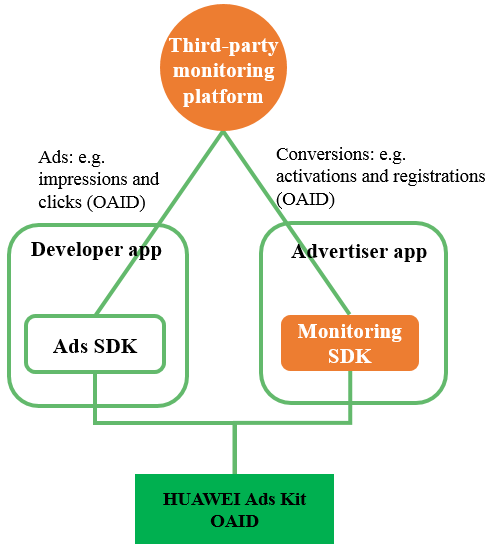
Monitoring SDK should obtain the OAID and report it to the third-party monitoring platform. To be specific:
It should obtain the OAID by calling the OAID API of HUAWEI Ads Kit.
It should include the obtained OAID in the conversion event (such as activation and registration) that is reported by the advertiser app.
The third-party monitoring platform should perform conversion attribution analysis based on the OAID.
The monitoring link should support OAID macro. Ads SDK should include the OAID in the impression and click events to be reported to the third-party monitoring platform.
Based on the OAID in the events, the third-party monitoring platform analyzes ad conversions by task and by channel.
HUAWEI Ads Kit provides the install referrer capability for advertisers to track ad conversion channels during app promotion targeted at Huawei devices.
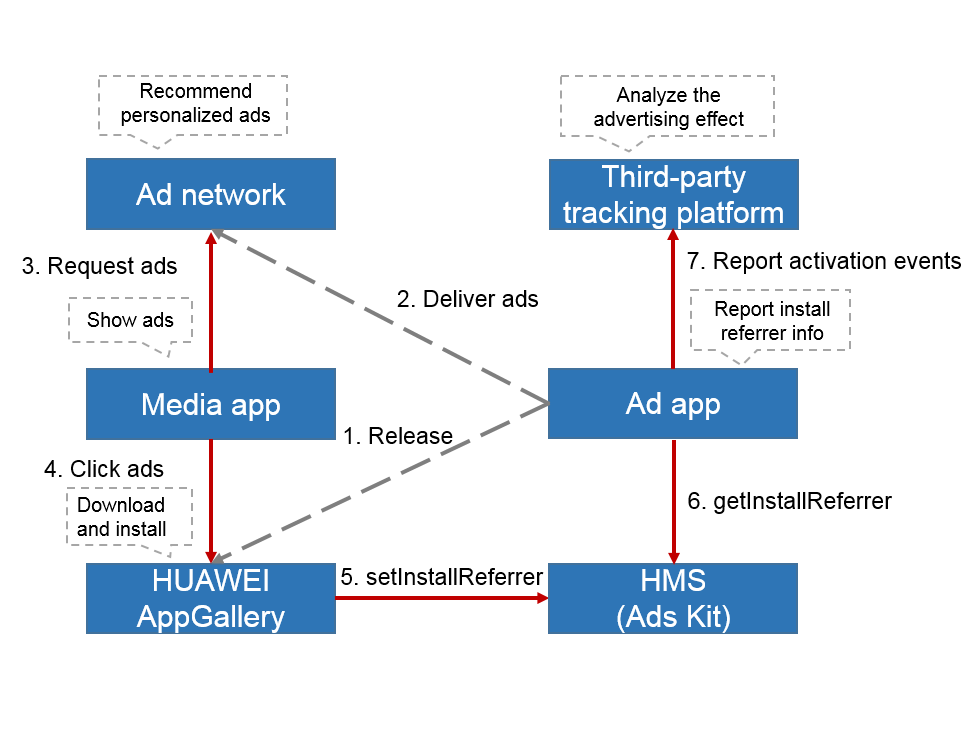
Advertisers can use install referrers to analyze the conversion effect of app download ads on app impressions, clicks, downloads, installs, activations, registrations, and purchases. The process is as follows:
An advertiser integrates HUAWEI Ads Kit into their app to obtain the install referrer capability and then releases the app to HUAWEI AppGallery.
The advertiser delivers an app download ad with an install referrer on HUAWEI Ads.
A media source's app (media app) requests and displays the ad.
A user clicks the ad in the media app and can choose to download and install the advertiser's app.
HUAWEI AppGallery writes the install referrer into HUAWEI Ads Kit.
When the user activates the advertiser's app on their device, the advertiser's app obtains the install referrer from HUAWEI Ads Kit.
The advertiser's app on the user device reports an activation event to a third-party tracking platform, which then uses the install referrer to analyze the ad conversion effect.