
1. Add the AppGallery Connect configuration file of the app to your Android Studio project.
Sign in to AppGallery Connect and select My projects.
Find your app project and click the app that needs to integrate the HMS Core SDK.
Go to Project Setting > Convention. In the App information area, download the agconnect-services.json file.
Copy the agconnect-services.json file to the app's root directory of your Android Studio project.
(1)Before obtaining the agconnect-services.json file, ensure that you have enabled the advanced analytics service. For details, please refer to Enabling Advanced Analytics.
(2)If you have made any changes on the Project setting page, such as setting the data storage location and enabling or managing APIs, you need to download the latest agconnect-services.json file and replace the existing file in the app's root directory.
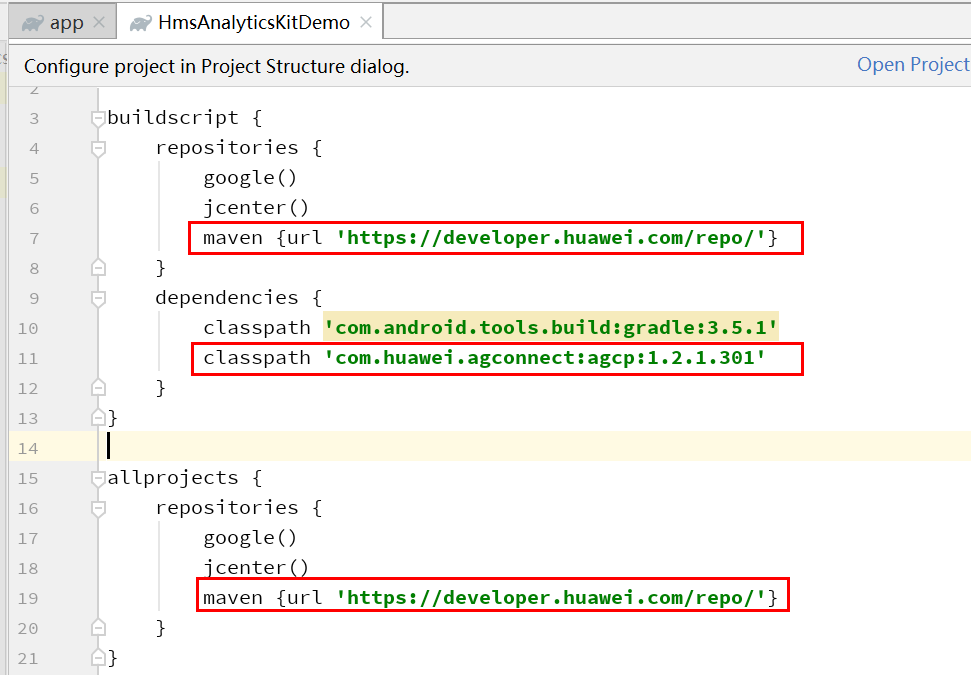
2. Add the Maven repository address and AppGallery Connect service dependencies in the build.gradle file of your project.
- maven {url 'https://developer.huawei.com/repo/'}
- classpath 'com.huawei.agconnect:agcp:1.2.1.301'
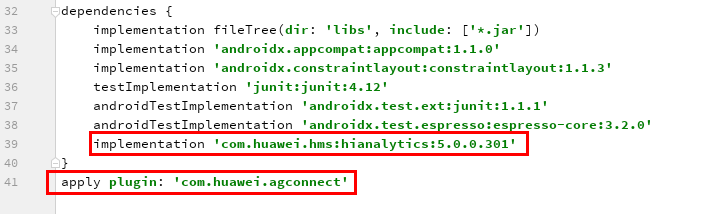
3. Add plug-in configuration and SDK version in the build.gradle file in the app directory.
- apply plugin: 'com.huawei.agconnect'
- implementation 'com.huawei.hms:hianalytics:5.0.0.301'
(1) The Maven repository address cannot be accessed from a browser. It can only be configured in the IDE.
(2) If an app needs to integrate other SDKs such as HMS Core Push SDK and HMS Core Game SDK, HUAWEI Analytics Kit of version 2.3.0.304 or earlier may fail to obtain the Application Associated ID (AAID) because the HMS Core Push SDK, HMS Core Game SDK, and HMS Core Analytics SDK depend on the Huawei base SDK package, and the combined base may not match the opendevice on which HUAWEI Analytics Kit of an earlier version depends. As a result, the APIs are incompatible. The workaround is as follows:
a. Ensure that the versions of com.huawei.hms:opendevice and com.huawei.hms:base are the same.
b. Upgrade the versions of com.huawei.hms:opendevice and com.huawei.hms:base to 3.0.3.x or later. In this case,the versions can be different.
c. Upgrade all SDKs to the latest version.
4. Click Sync Now or Sync Project with Gradle Files to build a project.