The HUAWEI Ads SDK also provides advanced settings related to ad requests.
The HUAWEI Ads SDK allows you to set the RequestOptions object to request ad content for different audiences. The object calls a static method in the HwAds class to obtain the global audience information. To update the request configuration, obtain the builder from the existing configuration and then use the builder to update the configuration.
The sample code is as follows:
- // Add the child-directed setting.
- RequestOptions requestOptions = HwAds.getRequestOptions().toBuilder().setTagForChildProtection(TAG_FOR_CHILD_PROTECTION_TRUE).build();
- HwAds.setRequestOptions(requestOptions);
The RequestOptions class provides the following four methods for setting the audience.
Method | Description |
setTagForChildProtection | Sets the tag for child-directed content, to comply with the Children's Online Privacy Protection Act (COPPA). Value:
|
setTagForUnderAgeOfPromise | Sets the tag for users in the European Economic Area (EEA) under the age of consent, to comply with the General Data Protection Regulation (GDPR). Ad requests with this tag enabled will be unable to obtain personalized ads. Value:
|
setAdContentClassification | Sets the maximum ad content rating for the ad requests of your app. The ads obtained using this method have a content rating at or below the specified one. The rating must be one of the following:
|
setNonPersonalizedAd | Sets the type of ads to be requested. The HUAWEI Ads SDK supports two types of ads: personalized and non-personalized. Value:
|
The sample code is as follows:
- // Child-directed setting, indicating that your ad content needs to be COPPA-compliant
- RequestOptions requestOptions = HwAds.getRequestOptions().toBuilder().setTagForChildProtection(TAG_FOR_CHILD_PROTECTION_TRUE).build();
- HwAds.setRequestOptions(requestOptions);
- // Setting for users under the age of consent, indicating that you want the ad request to meet the ad standard for users in the EEA under the age of consent
- RequestOptions requestOptions = HwAds.getRequestOptions().toBuilder().setTagForUnderAgeOfPromise(PROMISE_TRUE).build();
- HwAds.setRequestOptions(requestOptions);
- // Ad content filtering setting to request ads with the AD_CONTENT_CLASSIFICATION_W or lower rating
- RequestOptions requestOptions = HwAds.getRequestOptions().toBuilder().setAdContentClassification(AD_CONTENT_CLASSIFICATION_W).build();
- HwAds.setRequestOptions(requestOptions);
- // Setting to request personalized and non-personalized ads
- RequestOptions requestOptions = HwAds.getRequestOptions().toBuilder().setNonPersonalizedAd(ALLOW_ALL).build();
- HwAds.setRequestOptions(requestOptions);
The HUAWEI Ads SDK supports personalized and non-personalized ads. The Consent SDK is provided for you to collect consent from users.
This section describes how to use the Consent SDK to request users' consent and how to request ads based on users' consent status.
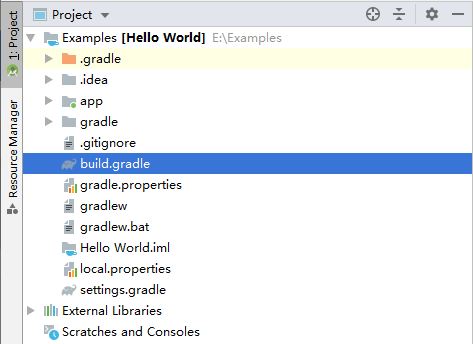
Configure the Maven repository address in the project-level build.gradle file.
- buildscript {
- repositories {
- google()
- jcenter()
- maven { url 'https://developer.huawei.com/repo/' }
- }
- ...
- }
- allprojects {
- repositories {
- google()
- jcenter()
- maven { url 'https://developer.huawei.com/repo/' }
- }
- }
Add build dependencies to the app-level build.gradle file.
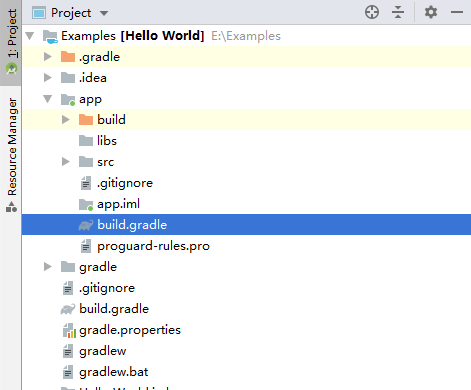
- dependencies {
- implementation 'com.huawei.hms:ads-consent:3.4.30.301'
- }
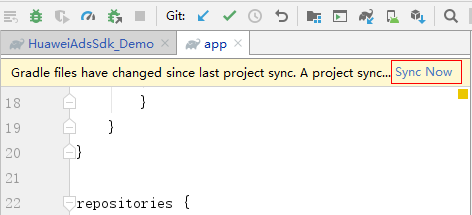
Click Sync Now and wait until synchronization is complete.
When using the Consent SDK, ensure that the Consent SDK obtains the latest information about HUAWEI Ads ad technology providers. If the list of ad technology providers changes after the user's consent is requested, the Consent SDK automatically sets the user consent status to unknown. Therefore, you must call the requestConsentUpdate() method to determine the consent status of a user upon every app launch.
The sample code is as follows:
- ...
- import com.huawei.hms.ads.consent.*;
- ...
- public class ConsentActivity extends AppCompatActivity {
- ...
- @Override
- protected void onCreate(Bundle savedInstanceState) {
- ...
- // Check consent status.
- checkConsentStatus();
- ...
- }
- ...
- private void checkConsentStatus() {
- ...
- Consent consentInfo = Consent.getInstance(this);
- ...
- consentInfo.requestConsentUpdate(new ConsentUpdateListener() {
- @Override
- public void onSuccess(ConsentStatus consentStatus, boolean isNeedConsent, List<AdProvider> adProviders) {
- // User's consent status successfully updated.
- }
- @Override
- public void onFail(String errorDescription){
- // User's consent status failed to update.
- }
- });
- ...
- }
- ...
- }
If the user consent information is updated successfully, the onSuccess() method of ConsentUpdateListener provides the updated consentStatus (specifies the consent status), isNeedConsent (specifies whether consent is required), and adProviders (specifies the list of ad technology providers).
The following table lists the values of consentStatus.
Consent Status | Definition |
ConsentStatus.PERSONALIZED | The user has agreed to receive personalized and non-personalized ads. |
ConsentStatus.NON_PERSONALIZED | The user has agreed to receive only non-personalized ads. |
ConsentStatus.UNKNOWN | The user neither agrees nor declines to receive personalized or non-personalized ads. |
If isNeedConsent is false, you can request personalized ads from the HUAWEI Ads SDK.
If isNeedConsent is true, further confirmation is required.
If ConsentStatus is PERSONALIZED or NON_PERSONALIZED, the user has already provided consent, and consent does not need to be requested again.
If ConsentStatus is UNKNOWN, request user consent (for example, in a dialog box).
If ConsentUpdateListener returns onFail(), request non-personalized ads.
AdProvider specifies the publisher information. The parameters are described as follows.
Parameter | Definition |
id | ID of an ad technology provider. |
name | Name of an ad technology provider. |
serviceArea | Service area of an ad technology provider. |
privacyPolicyUrl | URL of the privacy policy of an ad technology provider. |
You need to collect the consent (for example, in a dialog box) from a user and display the complete list of ad technology providers.
The following example shows how to collect consent in a dialog box:
The sample code is as follows:
- ...
- import com.huawei.hms.ads.consent.*;
- ...
- public class ConsentActivity extends AppCompatActivity {
- ...
- @Override
- protected void onCreate(Bundle savedInstanceState) {
- ...
- // Check consent status.
- checkConsentStatus();
- ...
- }
- ...
- private void checkConsentStatus() {
- ...
- Consent consentInfo = Consent.getInstance(this);
- ...
- consentInfo.requestConsentUpdate(new ConsentUpdateListener() {
- @Override
- public void onSuccess(ConsentStatus consentStatus, boolean isNeedConsent, List<AdProvider> adProviders) {
- ...
- // The parameter indicating whether the consent is required is returned.
- if (isNeedConsent) {
- // If ConsentStatus is set to UNKNOWN, re-collect user consent.
- if (consentStatus == ConsentStatus.UNKNOWN) {
- ...
- showConsentDialog();
- }
- // If ConsentStatus is set to PERSONALIZED or NON_PERSONALIZED, no dialog box is displayed to collect user consent.
- else {
- // TODO
- ...
- }
- } else {
- // TODO
- ...
- }
- }
- @Override
- public void onFail(String errorDescription) {
- // TODO
- ...
- }
- });
- ...
- }
- ...
- private void showConsentDialog() {
- // Start to process the consent dialog box.
- ConsentDialog dialog = new ConsentDialog(this, mAdProviders);
- dialog.setCallback(this);
- dialog.setCanceledOnTouchOutside(false);
- dialog.show();
- }
- }
A sample dialog box is as follows:
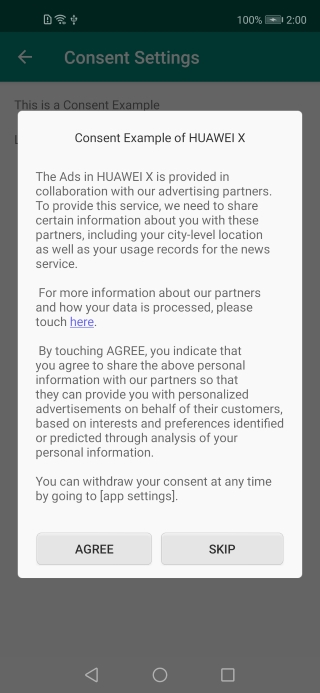
After a user taps here, the screen showing more information should be displayed.
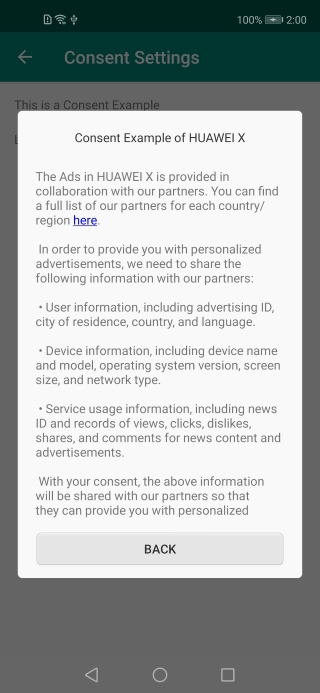
You need to display the names of ad technology providers to the user and allow the user to access the privacy policies of the ad technology providers.
After a user taps here on the screen showing more information, the list of ad technology providers should be displayed in a dialog box, as shown in the following figure.
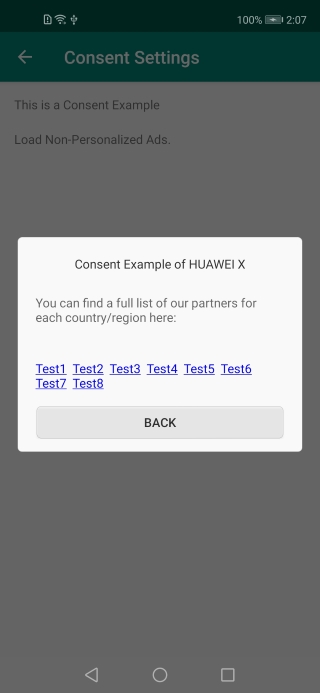
Use the setConsentStatus() method to set the user's choice after collecting the user's consent.
- Consent.getInstance(context).setConsentStatus(ConsentStatus.PERSONALIZED);
Ensure that users can change or revoke their consent at any time. Set the updated consent to the Consent SDK.
If you want to request ads for users under the age of consent, call setUnderAgeOfPromise to set the tag for such users before calling requestConsentUpdate().
- // Set the tag for users under the age of consent.
- Consent.getInstance(context).setUnderAgeOfPromise(true);
If setUnderAgeOfPromise is set to true, the onFail(String errorDescription) method is called back each time requestConsentUpdate() is called, and the errorDescription parameter is provided to the user. In this case, do not display the dialog box for collecting consent. The value false indicates that the user has reached the age of consent.
If you set the tag in the Consent SDK, you must set the parameter in the setTagForUnderAgeOfPromise method described in Audience to the same value when requesting ads.
By default, the setNonPersonalizedAd method is not called for requesting ads. In this case, personalized and non-personalized ads are requested. If a user has not selected a consent option, only non-personalized ads can be requested.
If setNonPersonalizedAd is called, ads are requested based on the input parameter value, which can be:
ALLOW_ALL: personalized and non-personalized ads.
ALLOW_NON_PERSONALIZED: non-personalized ads.
The sample code is as follows:
- // Set the parameter in setNonPersonalizedAd to ALLOW_NON_PERSONALIZED to request only non-personalized ads.
- RequestOptions requestOptions = HwAds.getRequestOptions();
- requestOptions = requestOptions.toBuilder().setNonPersonalizedAd(ALLOW_NON_PERSONALIZED).build();
- HwAds.setRequestOptions(requestOptions);
- AdParam adParam = new AdParam.Builder().build();
- adView.loadAd(adParam);
To make app testing easy, the Consent SDK provides debug options that you can set.
1. Call getTestDeviceId() to obtain the ID of your device.
- String testDeviceId = Consent.getInstance(context).getTestDeviceId();
2. Use the obtained device ID to add your device as a debug device to the allowlist.
- Consent.getInstance(context).addTestDeviceId(testDeviceId);
3. Finally, call setDebugNeedConsent to set whether consent is required.
- // Perform the setting to require consent for debug. In this case, isNeedConsent returned by the ConsentUpdateListener method is true.
- Consent.getInstance(context).setDebugNeedConsent(DebugNeedConsent.DEBUG_NEED_CONSENT);
- // Perform the setting not to require consent for debug. In this case, isNeedConsent returned by the ConsentUpdateListener method is false.
- Consent.getInstance(context).setDebugNeedConsent(DebugNeedConsent.DEBUG_NOT_NEED_CONSENT);
After these steps are complete, the value of isNeedConsent will be returned based on your debug status when calls are made to update the consent status.