The player statistics APIs allow you to obtain various statistics about the current player from Huawei game server so that you can learn about players' playing habits, game progress, and payment capabilities to tailor game experiences for different players accordingly. For example, you can encourage a player who has not signed in for a long time to re-engage with your game by means such as offering an attractive reward.
You can collect the following statistics about players:
Average duration of a session in the statistical period of the past 12 months, in minutes.
Number of days since last played. Only data in the statistical period of the past 12 months is collected.
Total number of in-app purchases in the statistical period of the past 12 months.
Total spending rank, which is an integer ranging from 1 to 6. Only data in the statistical period of the past 12 months is collected.
1: no spending
2: less than US$10
3: US$10 or more and less than US$50
4: US$50 or more and less than US$300
5: US$300 or more and less than US$1000
6: more than US$1000
Total number of sessions in the statistical period of the past 12 months.
You can collect statistics only from online users who sign in with their HUAWEI IDs.
To use the player statistics feature, users need to enable Game Services in HUAWEI AppGallery (10.3 or later). If a user who has not enabled Game Services triggers player statistics API calling, the HMS Core SDK redirects the user to the Game Services switch screen in HUAWEI AppGallery and instructs the user to enable Game Services. If the user does not enable Game Services, result code 7018 is returned. Your game needs to actively instruct users to go to Me > Settings > Game Services in AppGallery, so the player statistics feature will be available.
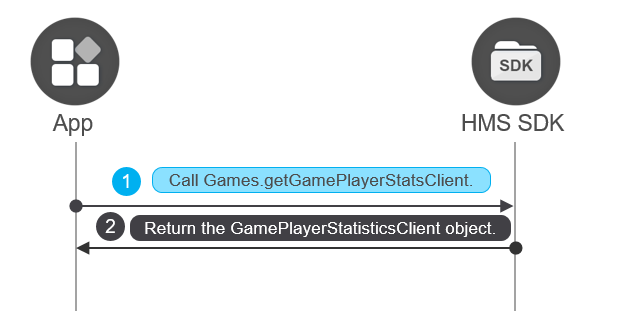
Before using player statistics API capabilities, call Games.getGamePlayerStatsClient to obtain the GamePlayerStatisticsClient instance.
- GamePlayerStatisticsClient playerStatsClient = Games.getGamePlayerStatsClient(this, mAuthHuaweiId);
The value of mAuthHuaweiId passed in the API is the AuthHuaweiId object obtained when a user signs in to the game. If the sign-in session has expired, call the HuaweiIdAuthService.getSignInIntent method to sign the user in to the game again or call the HuaweiIdAuthService.silentSignIn method to implement silent sign-in and obtain AuthHuaweiId.
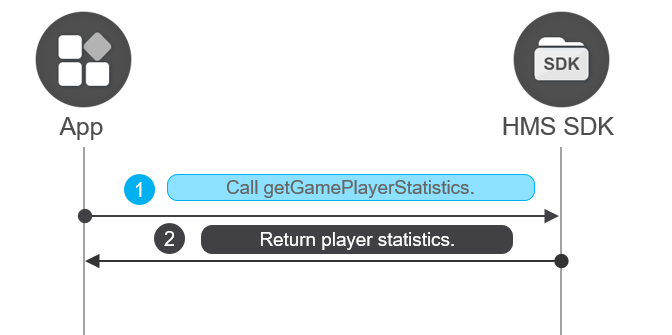
You can call the GamePlayerStatisticsClient.getGamePlayerStatistics method to obtain player statistics. You can make your game interact with players based on obtained player statistics.
- Task<GamePlayerStatistics> task = playerStatsClient.getGamePlayerStatistics(ISREALTIME);
- task.addOnSuccessListener(new OnSuccessListener<GamePlayerStatistics>() {
- @Override
- public void onSuccess(GamePlayerStatistics gamePlayerStatistics) {
- if (gamePlayerStatistics == null) {
- showLog("playerStatsAnnotatedData is null, inner error");
- return;
- }
- StringBuilder sb = new StringBuilder();
- sb.append("IsRealTime:" + ISREALTIME);
- sb.append("\n---AverageSessionLength: " + gamePlayerStatistics.getAverageOnLineMinutes() + "\n---");
- sb.append("DaysSinceLastPlayed: " + gamePlayerStatistics.getDaysFromLastGame() + "\n---");
- sb.append("NumberOfPurchases: " + gamePlayerStatistics.getPaymentTimes() + "\n---");
- sb.append("NumberOfSessions: " + gamePlayerStatistics.getOnlineTimes() + "\n---");
- sb.append("TotalPurchasesAmountRange: " + gamePlayerStatistics.getTotalPurchasesAmountRange());
- showLog(sb.toString());
- }
- }).addOnFailureListener(new OnFailureListener() {
- @Override
- public void onFailure(Exception e) {
- if (e instanceof ApiException) {
- String result = "rtnCode:" + ((ApiException) e).getStatusCode();
- showLog(result);
- }
- }
- });
You can make your game interact with players based on obtained player statistics.