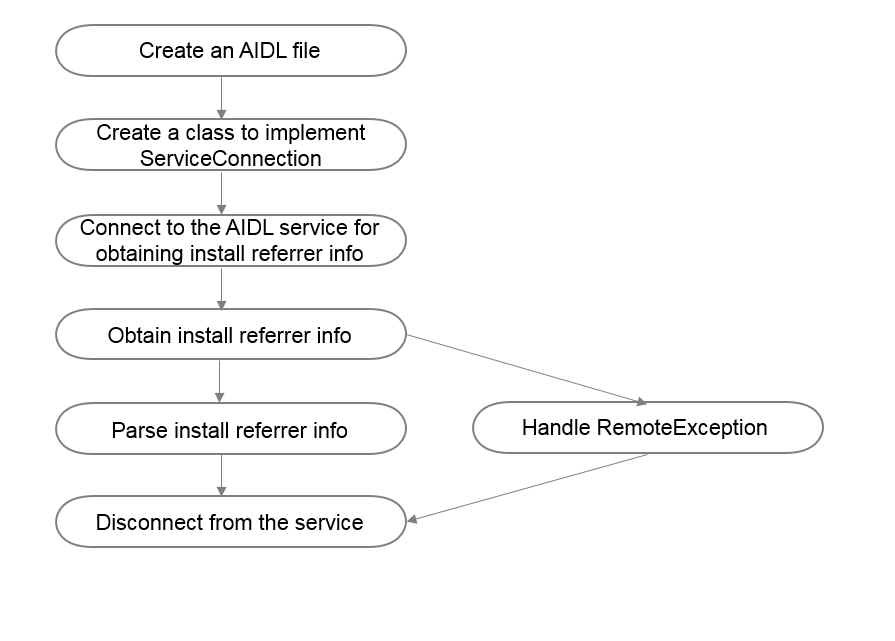
You can also call an AIDL API provided by HUAWEI Ads Kit to obtain install referrer information from Huawei devices, without integrating any Huawei SDK. The install referrer information obtained from a device in either mode (SDK or AIDL) is the same.
1. Create an AIDL file for the IPPSChannelInfoService API and save the file under com.huawei.android.hms.ppskit, as shown in the following figure.

2. Copy the following content to the AIDL file:
- package com.huawei.android.hms.ppskit;
- /** Important: Do not change the method sequence in the AIDL file. */
- interface IPPSChannelInfoService {
- String getChannelInfo();
- }
3. Create a class to implement Android-native ServiceConnection.
Step 1: Implement the onServiceConnected method of ServiceConnection.
Step 2: Call the Android-native IPPSChannelInfoService.Stub.asInterface method to obtain IPPSChannelInfoService.
Step 3: Call the getChannelInfo method to obtain install referrer information.
- private final class InstallReferrerServiceConnection implements ServiceConnection {
- private InstallReferrerServiceConnection() {
- }
- @Override
- public void onServiceConnected(ComponentName componentName, IBinder iBinder) {
- Log.i(TAG, "onServiceConnected");
- IPPSChannelInfoService service = IPPSChannelInfoService.Stub.asInterface(iBinder);
- if (null != service) {
- try {
- String json = service.getChannelInfo();
- parseChannelJson(json);
- } catch (RemoteException e) {
- Log.e(TAG, "getChannelInfo Excepition");
- } finally {
- mContext.unbindService(this);
- }
- }
- }
- @Override
- public void onServiceDisconnected(ComponentName componentName) {
- Log.i(TAG, "onServiceDisconnected");
- }
- }
- }
4. Connect to the AIDL service for obtaining install referrer information.
Step 1: Create an InstallReferrerServiceConnection instance.
Step 2: Create the Intent object with the com.huawei.android.hms.CHANNEL_SERVICE action.
Step 3: Set the package name of Intent to com.huawei.hwid.
Step 4: Call bindService to connect to the AIDL service for obtaining install referrer information.
- private boolean bindService() {
- InstallReferrerServiceConnection serviceConnection = new InstallReferrerServiceConnection();
- Intent intent = new Intent("com.huawei.android.hms.CHANNEL_SERVICE");
- intent.setPackage("com.huawei.hwid");
- boolean result = bindService(intent, serviceConnection, Context.BIND_AUTO_CREATE);
- Log.i(TAG, "bindService result: " + result);
- return result;
- }
5. Parse the returned install referrer information in JSON format.
- private ReferrerDetails parseChannelJson(String channelJson) {
- Log.i(TAG, "parseChannelJson: " + channelJson);
- try {
- JSONObject jsonObject = new JSONObject(channelJson);
- String channelInfo = jsonObject.optString("channelInfo");
- long installTimestamp = jsonObject.optLong("installTimestamp", 0);
- long clickTimestamp = jsonObject.optLong("clickTimestamp", 0);
- ReferrerDetails referrerDetails = new ReferrerDetails(channelInfo, clickTimestamp, installTimestamp);
- updateReferrerDetails(referrerDetails);
- return referrerDetails;
- } catch (JSONException e) {
- Log.e(TAG, "");
- }
- return null;
- }