We use essential cookies for the website to function, as well as analytics cookies for analyzing and creating statistics of the website performance. To agree to the use of analytics cookies, click "Accept All". You can manage your preferences at any time by clicking "Cookie Settings" on the footer. More Information.

Only Essential Cookies
Accept All
GuidesIn-App PurchasesOrder and Subscription ServicesSuggestions on Preventing Against Fraud and Abuse

Suggestions on Preventing Against Fraud and Abuse

There can be malicious users conducting fraud or abuse in your app. This chapter gives suggestions on how to mitigate the impacts of such misconduct.

Storing Sensitive Logic on the Backend Server

Data on frontend devices is more vulnerable to modification or tempering. On top of this, the backend server is a better choice for fixing security problems and vulnerabilities and for releasing versions. Therefore, with the prerequisite that your app has a sound design, it is recommended that you store sensitive data and service logic on your backend server.
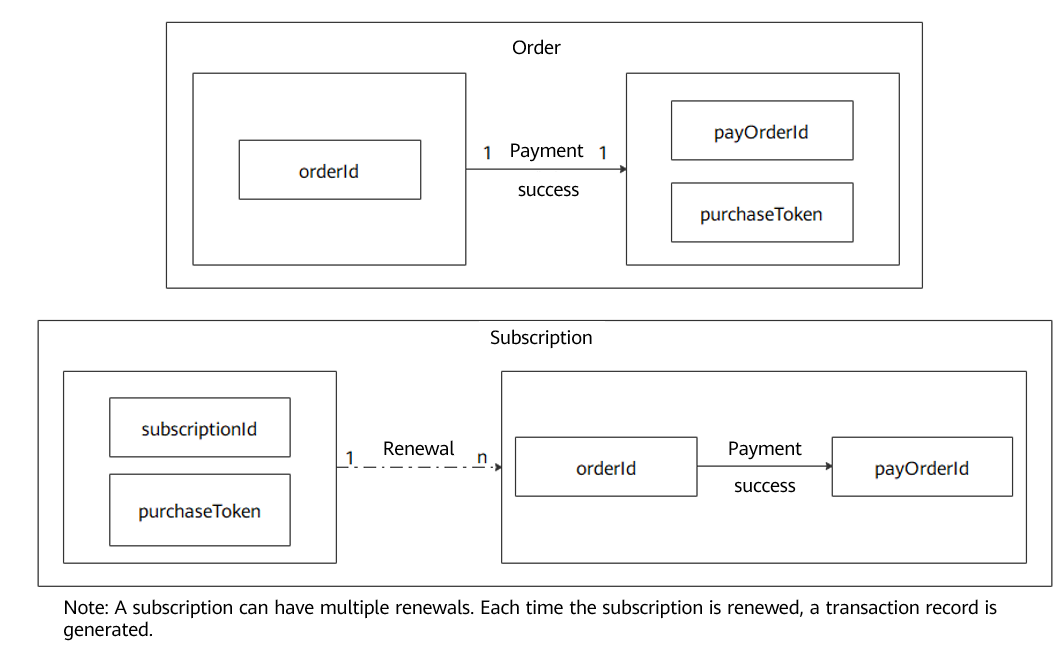
Verifying Purchase Data Before Benefit Delivery

  1. Make sure that sensitive data and service logic are processed on your app server. Then call the server API of IAP (API for Verifying the Purchase Token for the Order Service; API for Verifying the Purchase Token for the Subscription Service) to obtain the purchase data that ought to be verified before delivering a benefit. The server API of IAP improves the protection against issues like poor network connections and malicious attacks.
  2. orderId, payOrderId, purchaseToken, and subscriptionId (unique to the subscription) are four vital fields which indicate that a purchase receipt is unique. You are advised to use payOrderId as the primary key for checking whether a delivery is unique. Each payOrderId corresponds to one single order, which means the benefit purchased by an order can be delivered only once. payOrderId is globally unique and can be used as the primary key in the database.

  3. One payOrderId can only indicate the uniqueness of an order. To deliver the product corresponding to the order, you need to verify that the order has been paid and that key fields (like productId, price, and currency) are as expected. For details, please refer to (Mandatory) Verifying InAppPurchaseData.
  4. In scenarios involving the order service, determine whether to deliver a product according to the purchaseState field value of InAppPurchaseData in the response of the API for Verifying the Purchase Token for the Order Service. If the value is 0, deliver the product.
  5. In scenarios involving the subscription service, determine whether to deliver a product according to the subIsvalid field value of InAppPurchaseData in the API for Verifying the Purchase Token for the Subscription Service. If the value is true, deliver the product.

Precautions for Switching from IAP 2.0 to IAP 4.0

To be compatible with apps that do not have their own servers, the security verification scheme of IAP is changed from signing your private key (IAP 2.0) to verifying your app's public key (IAP 4.0). The verification on order information (especially on these vital fields like productId, price, and currency) in IAP 4.0 is even more important than that in IAP 2.0. For details, please refer to Verifying Purchase Data Before Benefit Delivery.

Also, remember to check DeveloperPayload Processing and Use to make sure that a benefit can be accurately delivered to its user.

Search in Guides
Enter a keyword.