This section describes how an app can use a client ID to access a HUAWEI ID and generate an access token, which is mandatory for calling public APIs provided by Huawei to access resources authorized by the user.
Before generating an access token, you must ensure that: You have applied for a HUAWEI ID, enabled Health Service Kit, and applied for the required data scopes on HUAWEI Developers and the application has been approved.
The following example illustrates a scenario of generating an authorization code:
Principle: The code is obtained when a user is redirected from a browser (or the browser component in the mobile phone or desktop app) to the address https://oauth-login.cloud.huawei.com/oauth2/v3/authorize. If an error occurs, please refer to Errors and Troubleshooting. The parameters required for redirection are as follows.
Parameter | Mandatory | Description |
|---|---|---|
client_id | Yes | App ID obtained when the app is registered on HUAWEI Developers. |
response_type | Yes | The value is always code. |
redirect_uri | Yes | URI to be called back after the authorization, that is, the URI for receiving the authorization code. If a user cancels authorization, the URI is called back and appended with error=access_denied. The value of redirect_uri must be the same as the value of the callback URL set when you register the app. The value must be encoded using URLEncode. You can add one parameter to the end of the redirection URL as needed, for example, https://www.thirdwebdemo.com/redirect_url?somearg=XXXXXX. |
scope | Yes | Character string array separated by spaces. The spaces will be changed to plus signs (+) after URL encoding. The character string openid must be contained. For other information, please refer to OAuth Scope. |
state | No | Random string, which is used to prevent CSRF. The value is returned without any change along with the authorization code. |
display | Yes | The value is page for PCs, and touch for mobile devices. The default value is page. |
access_type | No | When the parameter is set to offline, a refresh token will be returned together with the access token in the second step. |
Relevant parameters are described as follows.
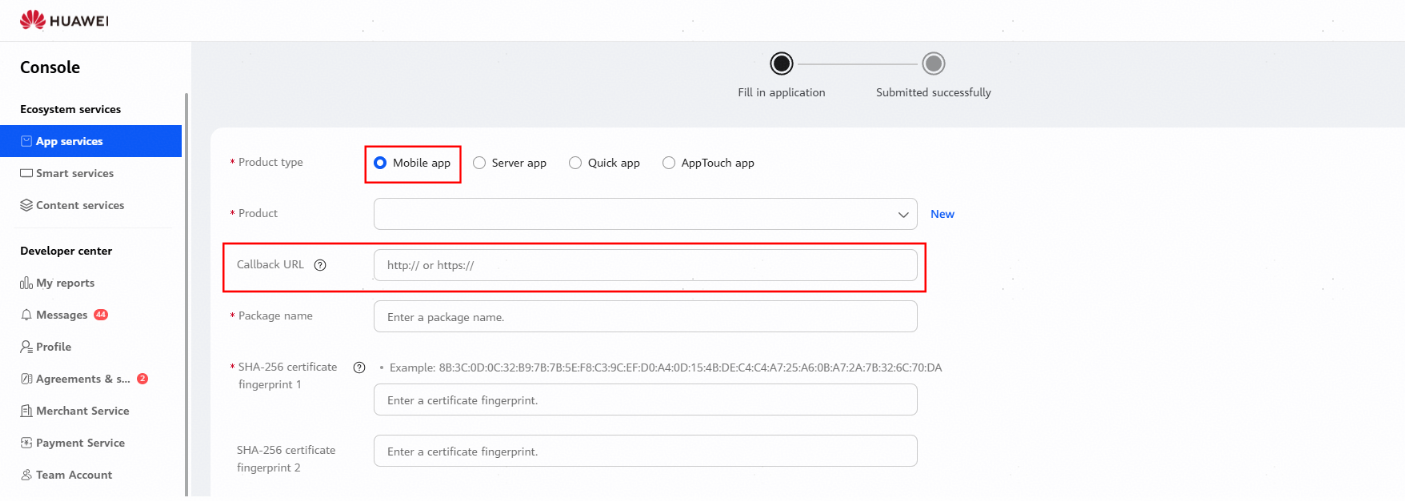
redirect_uri: callback URL set when you apply for the HUAWEI ID service, as shown in the following figure.
scope: one or more scopes that you have applied for on HUAWEI Developers, such as https://www.huawei.com/healthkit/distance.read and https://www.huawei.com/healthkit/distance.write.
If multiple scopes are involved, separate them with spaces. After URL encoding, spaces will be replaced with plus signs (+). For details about the URL encoding result, see the following example.
Example:
https://oauth-login.cloud.huawei.com/oauth2/v3/authorize?response_type=code&state=state_parameter_passthrough_value&client_id=123456789&redirect_uri=https%3A%2F%2Fwww.example.com&scope=openid+https%3A%2F%2Fwww.huawei.com%2Fhealthkit%2Fheightweight.read+https%3A%2F%2Fwww.huawei.com%2Fhealthkit%2Fcalories.read&access_type=offline&display=touch
In the example, clientId is 123456789 and redirect_uri is https%3A%2F%2Fwww.example.com (URL-encoded result of the callback URL https://www.example.com).
scope is openid+https%3A%2F%2Fwww.huawei.com%2Fhealthkit%2Fheightweight.read+https%3A%2F%2Fwww.huawei.com%2Fhealthkit%2Fcalories.read.
access_type is offline, and display is touch.
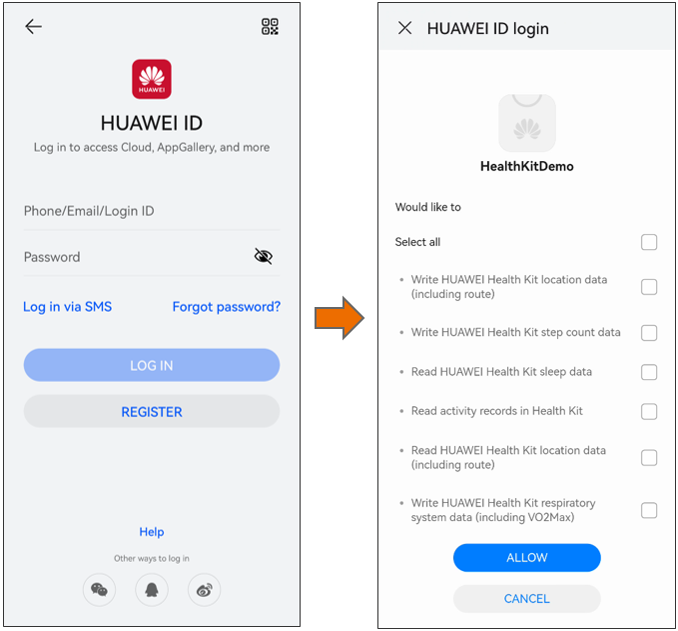
In response to the request, the screen shown on the right will be displayed after the user signs in.
Acronyms and Abbreviations
Acronym/Abbreviation | Full Name |
|---|---|
code | authorization code |
AT | access token |
RT | refresh token |
An app is authorized using the authorization code based on OAuth 2.0, when accessing Health Service Kit. For details, please refer to Example of Using the Authorization Code.
- Generate an authorization code.
- Generate an access token based on the authorization code.
- After the access token expires, use the refresh token to obtain a new access token.
Example of Using the Authorization Code
- Generate an authorization code.
The code is obtained by redirecting the user's browser (or the browser component in the mobile phone or desktop app) to the address https://oauth-login.cloud.huawei.com/oauth2/v3/authorize. If an error occurs, please refer to Errors and Troubleshooting. The following table lists the required parameters.
Parameter
Mandatory
Description
client_id
Yes
App ID obtained when the app is registered.
response_type
Yes
The value is always code.
redirect_uri
Yes
URI to be called back after the authorization, that is, the URI for receiving the authorization code. If a user cancels authorization, the URI is called back and appended with error=access_denied. The value of redirect_uri must be the same as the value of callback URL set when you register the app. The value must be encoded using URLEncode.
You can add one parameter to the end of the redirection URL as needed, for example, https://www.thirdwebdemo.com/redirect_url?somearg=XXXXXX.
scope
Yes
Character string array separated by spaces. The spaces will be changed to plus signs (+) after URL encoding. The character string openid must be contained. For other information, please refer to OAuth Scope.
state
No
Random string, which is used to prevent CSRF. The value is returned without any change along with the authorization code.
display
Yes
The value is page for PCs, and touch for mobile devices. The default value is page.
access_type
No
When the parameter is set to offline, a refresh token will be returned together with the access token in the second step.
For example, an app whose client_id is 123456789 needs to request the access scope of the height and weight data (https://www.huawei.com/healthkit/heightweight.read) and calorie data (https://www.huawei.com/healthkit/calories.read) of a user and then redirect to https://www.example.com after authorization. If the user login and authorization screen needs to be displayed in the pop-up window, the app needs to redirect the user's browser to the following URL:
https://oauth-login.cloud.huawei.com/oauth2/v3/authorize?response_type=code&state=state_parameter_passthrough_value&client_id=123456789&redirect_uri=https%3A%2F%2Fwww.example.com&scope=openid+https%3A%2F%2Fwww.huawei.com%2Fhealthkit%2Fheightweight.read+https%3A%2F%2Fwww.huawei.com%2Fhealthkit%2Fcalories.read&access_type=offline&display=touch
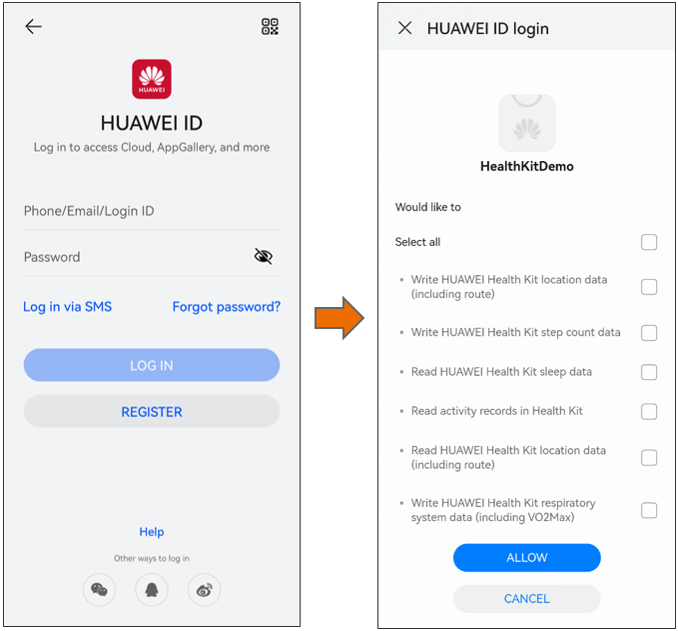
In response to the request, the screen shown on the right will be displayed after the user logs in.
After the user agrees to authorize access, the authorization server redirects the user's browser to redirect_uri with the parameters code and state (if contained in the request for obtaining the access token).
For example, in the preceding example, assume that the authorization code generated by the authorization service after the user agrees to authorize is "DQB6e3x9LAmTy2FrNSkgsWZxnzDsU75X9I93/o7S2GrErASX0nXSEVyGJAduOqH/RqmME9NSMYELXdIJz4YiYvI9w0hVbES7EfeEx2sepUBceh4/bUI1YXkawMUZle1o2NkirHK6aGOt/CRZxfGxu5DCqCRONnoAzMBWsXT6Hk0YnysyTZ1SEu5umDhKvWT+b5Fp2XoLtRr1mPlYmMvIKNnwc8PDv4B8RHRryIvGLCO+p2d+TMTnLwySoOX6sZ3XaQ0fGgZpymwhHAAMZEI74IFB/eGWlyvuPwa2MjRwF9/pzeVyjqg9gvwZ/VotYZzQiXbFBsEs+3DTXg==". The authorization service returns the following response packet to redirect the user's browser to https://www.example.com:
HTTP / 1.1 302 Found
Location:https://www.example.com/?code=DQB6e3x9LAmTy2FrNSkgsWZxnzDsU75X9I93%2Fo7S2GrErASX0nXSEVyGJAduOqH%2FRqmME9NSMYELXdIJz4YiYvI9w0hVbES7EfeEx2sepUBceh4%2FbUI1YXkawMUZle1o2NkirHK6aGOt%2FCRZxfGxu5DCqCRONnoAzMBWsXT6Hk0YnysyTZ1SEu5umDhKvWT%2Bb5Fp2XoLtRr1mPlYmMvIKNnwc8PDv4B8RHRryIvGLCO%2Bp2d%2BTMTnLwySoOX6sZ3XaQ0fGgZpymwhHAAMZEI74IFB%2FeGWlyvuPwa2MjRwF9%2FpzeVyjqg9gvwZ%2FVotYZzQiXbFBsEs%2B3DTXg%3D%3D&state=state_parameter_passthrough_value
- Use the authorization code to obtain the access token.
After obtaining the authorization code in the previous step, it can be used to generate an access token, by sending a request using the POST method from the app's server to the Huawei OAuth 2.0 authorization service address https://oauth-login.cloud.huawei.com/oauth2/v3/token with the following input parameters:
Parameter
Mandatory
Description
grant_type
Yes
The value is always authorization_code.
code
Yes
Authorization code obtained in the first step. The code expires in five minutes and can be used only once.
client_id
Yes
App ID.
client_secret
Yes
Secret key of the app, which can be viewed on HUAWEI Developers.
redirect_uri
Yes
The value must be the same as the value of redirect_uri (callback URL you filled in when registering your app) passed to obtain the authorization code.
Request example
POST /oauth2/v3/token HTTP/1.1
Host: oauth-login.cloud.huawei.com
Content-Type: application/x-www-form-urlencoded
grant_type=authorization_code&code=DQB6e3x9LAmTy2FrNSkgsWZxnzDsU75X9I93%2Fo7S2GrErASX0nXSEVyGJAduOqH%2FRqmME9NSMYELXdIJz4YiYvI9w0hVbES7EfeEx2sepUBceh4%2FbUI1YXkawMUZle1o2NkirHK6aGOt%2FCRZxfGxu5DCqCRONnoAzMBWsXT6Hk0YnysyTZ1SEu5umDhKvWT%2Bb5Fp2XoLtRr1mPlYmMvIKNnwc8PDv4B8RHRryIvGLCO%2Bp2d%2BTMTnLwySoOX6sZ3XaQ0fGgZpymwhHAAMZEI74IFB%2FeGWlyvuPwa2MjRwF9%2FpzeVyjqg9gvwZ%2FVotYZzQiXbFBsEs%2B3DTXg%3D%3D&client_id=123456789&client_secret=0rDdfgyhytRtznPQSzr5pVw2&redirect_uri=http%3A%2F%2Fwww.example.com
If the parameters are correct, the server returns the JSON text. The following table describes the parameters in a response body. If an error occurs, please refer to Errors and Troubleshooting.
Parameter
Mandatory
Description
access_token
Yes
Access token to be obtained.
expires_in
Yes
Validity period of the access token (unit: second).
scope
Yes
Scope contained in the access token generated.
token_type
Yes
This value is always Bearer, indicating the type of the returned access token.
id_token
Yes
ID token in JWT format, including user information such as the account and email address.
refresh_token
No
The value of this parameter is returned if access_type=offline is contained in the input parameter in Step 1. This parameter is used to update an access token.
Response example
HTTP / 1.1 200 OK Content - Type: application / json Cache - Control: no - store { "access_token": "CgB6e3x9JTePMyIg7iCwKkNEvQFEkCYDrPGz7Y69Ddet+xkJgScC7Aay1/dIWmgFhnMCc4PPpa39hPhl0WaqL7pM59VeVWwqdV/1kNeCFR5ZZaZOxBfATd5qmlXXEMnZ3+okNU3YTAvQCshTJnmFfTcAKKJt0OgZoKz92Fd5iUUKheybhg==", "expires_in": 3600, "id_token": "eyJraWQiOiJkMWNhZWIyM2JmNDBhMGFlOWMwOTUzZWI0NjEzNzQ5MjhiYjVjZmNjYTJjODFkOGI3MDQxYzczMTVjNTEyMjBhIiwidHlwIjoiSldUIiwiYWxnIjoiUlMyNTYif", "refresh_token": " CgB6e3x9eIW+2aYelXZuZ361MviOwbbBTzFWglSTPwTzWY8MpWydocoU8bYxM253JQABPrR98G1z6hIT6QsoknGpND1eeJgvXfQzEJJJtRQvqFs9N6rmXSJMHOrRta3iXU1i9abcdygqtwgGOi017x5oITcYHAOx1lV4nDF0gqleySVtbg==", "scope": "https://www.huawei.com/healthkit/heightweight.read https://www.huawei.com/healthkit/calories.read", "token_type": "Bearer" } - Obtain the access token through a refresh token.
A refresh token can be used to obtain a new access token by sending a request using the POST method from the app's server to the Huawei OAuth 2.0 authorization service address https://oauth-login.cloud.huawei.com/oauth2/v3/token with the following input parameters:
Parameter
Mandatory
Description
grant_type
Yes
The value is always refresh_token.
refresh_token
Yes
Refresh token for the access token.
client_id
Yes
App ID.
client_secret
Yes
Secret key of the app, which can be viewed on HUAWEI Developers.
Request example
POST /oauth2/v3/token HTTP/1.1
Host: oauth-login.cloud.huawei.com
Content-Type: application/x-www-form-urlencoded
grant_type=refresh_token&client_id=123456789&client_secret=0rDdfgyhytRtznPQSzr5pVw2&refresh_token=CgB6e3x9eIW+2aYelXZuZ361MviOwbbBTzFWglSTPwTzWY8MpWydocoU8bYxM253JQABPrR98G1z6hIT6QsoknGpND1eeJgvXfQzEJJJtRQvqFs9N6rmXSJMHOrRta3iXU1i9abcdygqtwgGOi017x5oITcYHAOx1lV4nDF0gqleySVtbg==
If the parameters are correct, the server returns the JSON text. The following table describes the parameters in a response body. If an error occurs, please refer to Errors and Troubleshooting.
Parameter
Description
access_token
Access token to be obtained.
expires_in
Validity period of the access token (unit: second).
scope
List of scopes granted by the user.
token_type
Token type. The value is currently Bearer.
Response example
HTTP / 1.1 200 OK
Content - Type: application / json
Cache - Control: no - store
{
    "access_token": "CgB6e3x9bueBVjXcB+bG0idRpaXj7d9wE5GfP3QeRrn8XeDzHXWodCOT2ks7hYtSrz/HcZ6i51jtxK33i+CgC5wAh6Q88MsXldhyDUHNUnmItqUghYYVoc+YNSaZpCAcb1oy3u6cliUmS4F/gka03imZ+CWiGBEHJjO1Nlnu2bsE4EbVgg==",
    "expires_in": 3600,
    "scope": "https://www.huawei.com/healthkit/heightweight.read https://www.huawei.com/healthkit/calories.read",
    "token_type": " Bearer"
}
If the refresh token is invalid, the authorization needs to be performed again. For details, please refer to FAQ: In which cases will the refresh_token expire and how to handle the situation to troubleshoot.
Refresh Token Authorization Management
The user-level access token has a validity period, and will be unavailable once it expires. Calling an expired access token will cause an authentication failure. In authorization code mode, a refresh token and an access token are generated at the same time. (Note: The refresh token and access token cannot be replaced with each other.) The validity period of the refresh token is comparatively long (180 days by default). Within the validity period, the app can directly call the https://oauth-login.cloud.huawei.com/oauth2/v3/token API of the OAuth service through the refresh token to obtain a new access token. In this way, your app does not need to display the authorization page again to ask for sign-in authorization from the user.
The refresh token expires immediately if any of the following situations happens:
- Password change
- Account freeze
- Account change or deletion
- Account deregistration
- Device deletion due to the number limit or by the user
- Exit from the phone client APK (device)
- Exit from the current browser
- Exit from all browsers
If the refresh token expires, when the access token is updated, the result code 1203 is returned. The sub-code is 11205 or 31204. For details, please refer to Errors and Troubleshooting. You must mark the refresh token as expired. When the user logs in next time, authentication and authorization need to be performed again.
API for Querying Authentication Information
For details, please go to Parsing an Access Token.
For more information about OAuth 2.0-based authentication, please go to Open Platform Authentication — Authorization Code