Use Cases
A HUAWEI ID is required for a user to access and manage their files in Drive. Your app needs to prompt the user to sign in with their HUAWEI ID so that they can access their Drive using your app. After the user signs in, your app saves relevant user information for calling Drive SDK APIs later.
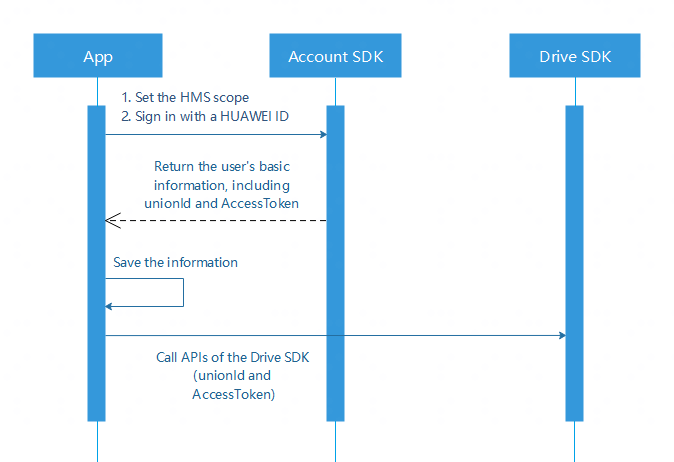
Integrating the HMS Core SDK
To use the Drive SDK, your app needs to obtain user information through the HMS Core SDK first. For details, please refer to Integrating the Drive SDK and Other Required HMS Core SDKs.
Setting the HMS Scope
Set the Drive scope by calling the HuaweiIdAuthParamsHelper.setScopeList API provided by the HMS Core SDK to obtain the permission to access Drive APIs.
To view and manage the Drive files and folders opened or created by the app, set SCOPE_DRIVE_FILE.
List<Scope> scopeList = new ArrayList<>();
// Permissions to view and manage files.
scopeList.add(new Scope(DriveScopes.SCOPE_DRIVE_FILE));
HuaweiIdAuthParams authParams = new HuaweiIdAuthParamsHelper(DEFAULT_AUTH_REQUEST_PARAM)
        .setAccessToken()
        .setIdToken()
        .setScopeList(scopeList)
.createParams(); List<Scope> scopeList = new ArrayList<>();
// Permissions to upload and store app data.
scopeList.add(new Scope(DriveScopes.SCOPE_DRIVE_APPDATA));
HuaweiIdAuthParams authParams = new HuaweiIdAuthParamsHelper(DEFAULT_AUTH_REQUEST_PARAM)
.setAccessToken()
.setIdToken()
.setScopeList(scopeList)
.createParams(); For details about DEFAULT_AUTH_REQUEST_PARAM in the code, please refer to HuaweiIdAuthParams.DEFAULT_AUTH_REQUEST_PARAM.
Different Drive scopes correspond to different permissions.
| Scope | Permission |
|---|---|
| SCOPE_DRIVE_FILE | Permission to allow access to only the files created or opened by the app. |
| SCOPE_DRIVE_APPDATA | Permissions to upload and store app data. |
| SCOPE_DRIVE | Permission to access all files except those in the app data folder of a user. |
| SCOPE_DRIVE_READONLY | Read-only permission on file metadata and content. |
| SCOPE_DRIVE_METADATA | Read and write permission on file metadata, not allowing file content reading, writing, download, or upload, and not supporting file creation or deletion. |
| SCOPE_DRIVE_METADATA_READONLY | Read-only permission on file metadata, not allowing file content reading or download. |
Saving Authentication Information
After obtaining the user information, save the unionId and AccessToken of the user for calling the Drive SDK whenever needed. The following example provides an implementation method. You may use another implementation method if necessary.
Sample code:
Create the credential management class.
/**
  * Credential management class.
  * <p>
  * since 1.0
  */
public class CredentialManager {

    /**
     * Drive authentication information.
     */
    private DriveCredential mCredential;

    private CredentialManager() {
    }

    private static class InnerHolder {
        private static CredentialManager sInstance = new CredentialManager();
     }

    /**
     * Singleton of CredentialManager.
     *
     * @return CredentialManager
     */
    public static CredentialManager getInstance() {
        return InnerHolder.sInstance;
    }

    /**
     * Initialize Drive based on the context and HUAWEI ID information including unionId, countrycode, and accessToken.
     * When the current accessToken expires, register an AccessMethod and obtain a new accessToken. The value of refreshAT cannot be null.
     *
     * @param unionID UnionID in HwID.
     * @param at        accessToken
     * @param refreshAT Update the accessToken callback function, without carrying null values.
     */
    public int init(String unionID, String at, DriveCredential.AccessMethod refreshAT) {
        if (StringUtils.isNullOrEmpty(unionID) || StringUtils.isNullOrEmpty(at)) {
            return DriveCode.ERROR;
        }
        DriveCredential.Builder builder = new DriveCredential.Builder(unionID, refreshAT);
        mCredential = builder.build().setAccessToken(at);
        return DriveCode.SUCCESS;
    }

    /**
     * Obtain DriveCredential.
     *
     * @return DriveCredential
     */
    public DriveCredential getCredential() {
        return mCredential;
    }

    /**
     * Exit Drive and clear all cache information generated during use of Drive.
     */
    public void exit(Context context) {
         // Delete cache files.
        deleteFile(context.getCacheDir());
        deleteFile(context.getFilesDir());
    }

    /**
     * Delete cache files.
     *
      * @param file Designated cache file.
     */
    private static void deleteFile(java.io.File file) {
        if (null == file || !file.exists()) {
            return;
        }

        if (file.isDirectory()) {
            java.io.File[] files = file.listFiles();
            if (files != null) {
                for (java.io.File f : files) {
                    deleteFile(f);
                }
            }
        }
    }
} private static DriveCredential.AccessMethod refreshAT = new DriveCredential.AccessMethod() {
@Override
public String refreshToken() {
// Implement the method of refreshing the access token.
return refreshAccessToken();
}
};
private void initDrive() {
// signInHuaweiId is the HUAWEI ID obtained after sign-in. unionId and accessToken can be obtained based on signInHuaweiId.
final String unionID = signInHuaweiId.getUnionId();
final String accessToken = signInHuaweiId.getAccessToken();
int returnCode = CredentialManager.getInstance().init(unionID, accessToken, refreshAT);
if (DriveCode.SUCCESS == returnCode) {
// Jump to the app home page after successful initialization.
jumpToMainActivity();
}
} 
After obtaining the authentication information, your app must check whether the user's security policy needs to be updated. For details, please refer to Obtaining User Information.