


Intelligent Assistant
Chat with our virtual assistant to get answers promptly.
We use essential cookies for the website to function, as well as analytics cookies for analyzing and creating statistics of the website performance. To agree to the use of analytics cookies, click "Accept All". You can manage your preferences at any time by clicking "Cookie Settings" on the footer. More Information.
HMS Core
Before you get started, you must register as a Huawei developer and complete identity verification on HUAWEI Developers. For details, please refer to Registration and Verification.
Follow instructions in Creating a Project to create a project.
Add an app to your project. For details, please refer to Adding an App to a Project. Set relevant parameters as follows:
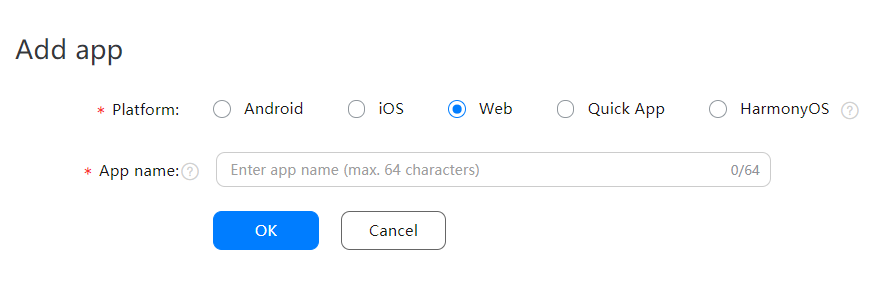
To use the GeoLocation (API) and IPLocation (API) services, you need to subscribe to a pay-as-you-go plan.
From January 1, 2021, Huawei charges for some APIs of Location Kit. For details, please refer to Service Pricing. You need to go to Project settings > Project plan in AppGallery Connect to subscribe to a pay-as-you-go plan.

To use the GeoLocation (API) and IPLocation (API) services, you need to enable Location Kit switch in either of the following ways:
Enabling Location Kit on HUAWEI Developers
Enabling Location Kit in AppGallery Connect
To call a REST API, you need to pass the API key used by the service signature parameter to the request. To obtain the API key, perform the following steps:
 next to API key to copy the API key.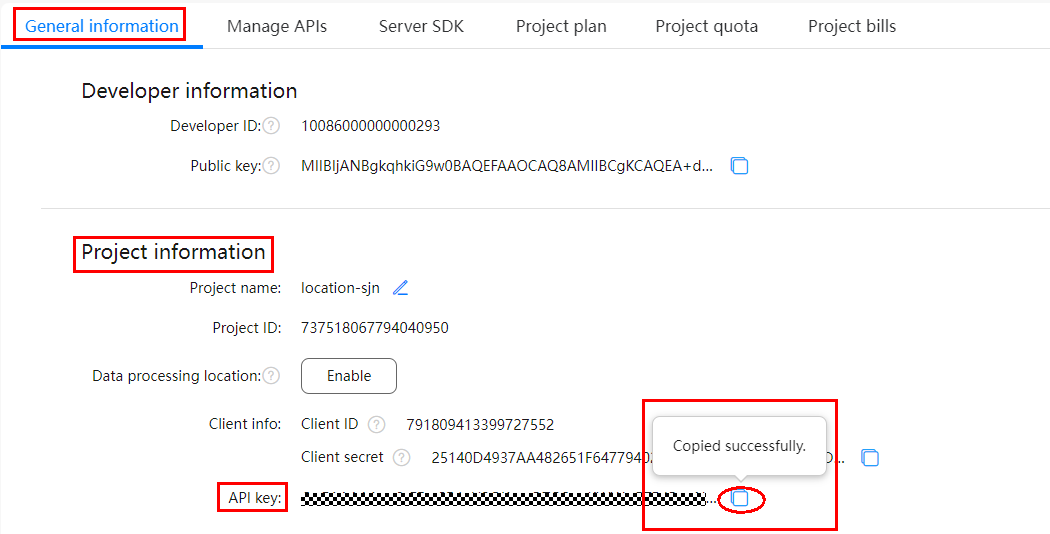
Intelligent Assistant
Chat with our virtual assistant to get answers promptly.
Quick start
Helps you find desired resources with ease.