This API uses capabilities of Scan Kit and collects business intelligence (BI) data for operations purposes. For details, please refer to SDK Data Security. Before calling this API in your app, inform users that some of their personal data will be collected and guide them to read the privacy statement.
API Declaration
Add the following configuration to the features attribute in the manifest.json file:
{"name": "system.barcode"} Module Import
Add the following configuration to the script element on the page where the API will be called:
import barcode from '@system.barcode'
Or
var barcode = require("@system.barcode") Application Scope
Item | Description |
|---|---|
Applicable devices | Mobile phones and tablets |
Applicable regions | Global |
[h2]barcode.scan(OBJECT)
Description
Scans a QR code
OBJECT parameters
Parameter | Type | Mandatory | Description |
|---|---|---|---|
success | function | No | Callback upon success. |
fail | function | No | Callback upon failure. |
cancel | function | No | Callback upon cancellation. |
complete | function | No | Callback upon completion. |
Parameters returned by success
Parameter | Type | Description |
|---|---|---|
result | string | Parsed content. |
Result codes returned by fail
Result Code | Description |
|---|---|
201 | The user has rejected the request for the camera permission. |
Sample code
barcode.scan({
  success:function(data){
    console.log("handling success: " + data.result);
  },
  fail: function(data, code) {
    console.log("handling fail, code=" + code);
  }
})
Demo
<template>
  <!-- Only one root node is allowed in template. -->
  <div class="container">
    <div class="case-title">
      <text class="title">QR code scan data</text>
    </div>
    <div class="item-container">
      <text>{{codeData}}</text>
    </div>
    <div class="mlr-container">
      <input onclick="scanCode" type="button" value="Scans a QR code" class="btn-blue"/>
    </div>
  </div>
</template>

<style lang="sass">
.container {
  flex-direction: column;
  padding-bottom: 50px;
}
.case-title {
  margin-left: 32px;
  margin-right: 32px;
  margin-bottom: 20px;
  flex-direction: column;
  margin-top: 40px;
}
.case-title .title {
  color: rgba(0, 0, 0, 0.6);
  font-size: 28px;
  font-weight: 500;
}
.item-container {
  margin-left: 32px;
  margin-right: 32px;
  padding-top: 20px;
  padding-right: 20px;
  padding-bottom: 20px;
  padding-left: 20px;
  background-color: #fff;
  border-radius: 32px;
  flex-direction: column;
  height: 300px;
}
.mlr-container {
  margin-right:32px;
  margin-left:32px;
  margin-top: 32px;
}
.btn-blue {
    background-color: #0faeff;
    width: 100%;
    height: 80px;
    border-radius: 40px;
    color: #fff;
    font-size: 32px;
    font-weight: 500;
  }
</style>

<script>
  import barcode from '@system.barcode';
  import prompt from '@system.prompt';
  module.exports = {
    public: {
        codeData:""
    },
    onInit: function () {
      this.$page.setTitleBar({ text: 'qr code' });
    },
    scanCode(){
      let that = this;

      barcode.scan({
        success: function (data) {
          that.codeData = data.result;
        },
        fail: function (data, code) {
          console.log("handling fail, code=" + code);
          prompt.showToast({
            message: 'Callback upon failure.',
            duration: 2000,
            gravity: 'bottom'
          })
        },
        complete:function (code) {
          console.log("handling complete code: " + code);
        },
        cancel:function (code) {
           console.log("handling cancel: " + code);
        }
      })
    }
  }
</script>
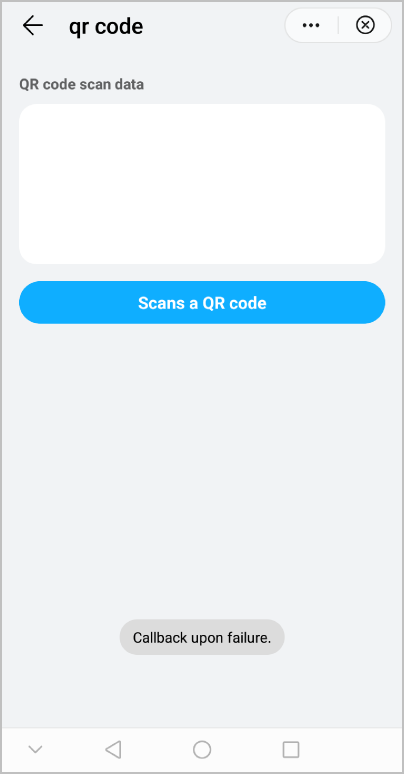
The following figure shows the final effect.