API Declaration
Add the following configuration to the features attribute in the manifest.json file:
{"name": "system.calendar"} Module Import
Add the following configuration to the script element on the page where the API will be called:
import calendar from '@system.calendar'
Or
var calendar = require("@system.calendar") Application Scope
Item | Description |
|---|---|
Applicable devices | Mobile phones, tablets, and telematics devices |
Applicable regions | Global |
[h2]calendar.insert(OBJECT)
Description
Inserts a calendar event.
OBJECT parameters
Parameter | Type | Mandatory | Description |
|---|---|---|---|
title | string | Yes | Title of an event. |
description | string | No | Description about an event. |
startDate | long | Yes | Start time of an event, which is represented by the Coordinated Universal Time (ms) calculated from the beginning of the calendar year. |
endDate | long | Yes | End time of an event, which is represented by the Coordinated Universal Time (ms) calculated from the beginning of the calendar year. |
timezone | string | No | Event time zone. |
allDay | boolean | No |
|
rrule | string | Mandatory for recurring events | Rule format of a recurring event, for example, FREQ=WEEKLY;COUNT=10;WKST=SU. You can find more examples. |
remindMinutes | array | No | Number of minutes in advance to send an event reminder, for example, [5,15,30]. |
organizer | string | No | Email address of an event organizer (owner). |
success | function | No | Callback upon success. The return value is the ID (integer type) recorded when an insertion is successful. |
fail | function | No | Callback upon failure. |
Result codes returned by fail
Result Code | Description |
|---|---|
201 | The user has rejected the request of setting a reminder. |
202 | Invalid parameter. For example, the time format is invalid. |
Sample code
calendar.insert({
    title:"Event A",
    startDate:"1490770543000",
    endDate:"1490880543000",
    remindMinutes:[5,15,30],
    rrule:"FREQ=WEEKLY;COUNT=2",
    success:function(data){console.log("handling success");}
})
Demo
<template>
  <!-- Only one root node is allowed in template. -->
  <div class="container">
    <!-- Title -->
    <div class="case-title mt-item">
      <text class="title">Title of an event</text>
    </div>
    <div class="mlr-container">
      <input onchange="inputChange('title')" class="input-big" placeholder="title"/>
    </div>
    <!-- Description -->
    <div class="case-title mt-item">
      <text class="title">Description about an event</text>
    </div>
    <div class="mlr-container">
      <input onchange="inputChange('des')" class="input-big" placeholder="description"/>
    </div>
    <!-- Start time -->
    <div class="case-title mt-item">
      <text class="title">Start time of an event</text>
    </div>
    <div class="mlr-container">
      <picker value="{{startDate}}" onchange="pickerChange('startDate')" type="date" class="input-big"></picker>
    </div>
    <!-- End time -->
    <div class="case-title mt-item">
      <text class="title">End time of an event</text>
    </div>
    <div class="mlr-container">
      <picker value="{{endDate}}" onchange="pickerChange('endDate')" type="date" class="input-big"></picker>
    </div>
    <div class="mlr-container mt-item">
      <input onclick="insertEvent" type="button" value="Insert Calendar Event" class="btn-blue"/>
    </div>
  </div>
</template>

<style lang="sass">
.container {
  flex-direction: column;
  padding-bottom: 50px;
}
.case-title {
  margin-left: 32px;
  margin-right: 32px;
  margin-bottom: 20px;
  flex-direction: column;
}
.mt-item {
  margin-top: 40px;
}
.input-big {
  width: 100%;
  background-color: #fff;
  height: 100px;
  border-radius: 50px;
  padding-left: 30px;
  font-size: 32px;
}
.mlr-container {
  margin-right:32px;
  margin-left:32px;
}
.btn-blue {
    background-color: #0faeff;
    width: 100%;
    height: 80px;
    border-radius: 40px;
    color: #fff;
    font-size: 32px;
    font-weight: 500;
  }
</style>

<script>

  import calendar from '@system.calendar';
  import prompt from '@system.prompt';

  export const strToDate = function (dateStr) {
    let splitArr = dateStr.split(' ');
    let dateArr = splitArr[0].split('-');
    let timeArr = splitArr[1] ? splitArr[1].split(':') : [];
    let newDate = new Date();
    newDate.setFullYear(dateArr[0]);
    newDate.setMonth(Number(dateArr[1]) - 1);
    newDate.setDate(dateArr[2]);
    newDate.setHours(timeArr[0] || 0, timeArr[1] || 0, timeArr[2] || 0, timeArr[3] || 0);
    return newDate;
}

export const lessTenFormat = function(num){
    if(isNaN(num) || num < 0)
    {
        return '';
    }
    let newNum = Number(num);
    return newNum >= 10 ? newNum : `0${num}`
}
  module.exports = {
    public: {
        title:"",
        des:"",
        startDate:'',
        endDate:'',
    },
    onInit: function () {
      this.$page.setTitleBar({ text: 'Calendar Event' });

      let date = new Date();
      let year = date.getFullYear();
      let month = date.getMonth() + 1;
      let day = date.getDate();
      this.startDate = `${year}-${lessTenFormat(month)}-${lessTenFormat(day)}`;
      this.endDate = `${year}-${lessTenFormat(month)}-${lessTenFormat(day)}`;
    },
    inputChange(key,{value}){
      this[key] = value;
    },
    pickerChange(key,{year,month,day}){
      this[key] = `${year}-${lessTenFormat(Number(month) + 1)}-${lessTenFormat(day)}`;
    },
    insertEvent(){
      if(!this.title || !this.des || !this.startDate || !this.endDate)
      {
        return;
      }
      calendar.insert({
        title: this.title,
        description:this.des,
        startDate: strToDate(this.startDate).getTime(),
        endDate: strToDate(this.endDate).getTime(),
        success: function (data) {
          prompt.showToast({
            message: 'success',
            duration: 2000,
            gravity: 'bottom'
          })
        },
        fail:function(){
          prompt.showToast({
            message: 'fail',
            duration: 2000,
            gravity: 'bottom'
          })
        }
      })
    }
  }
</script>
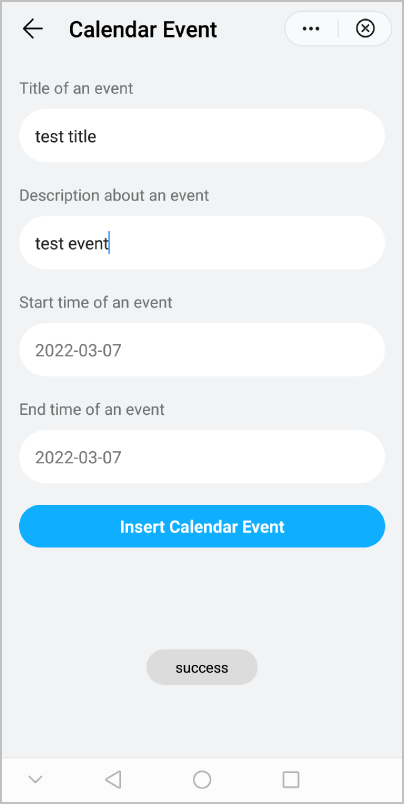
The following figure shows the final effect.