API Declaration
Add the following configuration to the features attribute in the manifest.json file:
{"name": "system.configuration"} Module Import
Add the following configuration to the script element on the page where the API will be called:
import configuration from '@system.configuration'
Or
const configuration = require("@system.configuration") Application Scope
Item | Description |
|---|---|
Applicable devices | Mobile phones and tablets |
Applicable regions | Global |
Definition
API | Description |
|---|---|
Obtains the current language of the app. By default, the system language is used. The language changes with the setting or system language. | |
Sets the language of the app. | |
Obtains the script writing direction of the current system. | |
Sets the screen orientation. | |
Obtains a timestamp (date and time) in a string based on the current system language and format settings. | |
Obtains a timestamp (date) in a string based on the current system language and format settings. | |
Obtains the current theme of the app. | |
Obtains the state of the foldable device. | |
Obtains the current screen orientation. |
[h2]configuration.getLocale() (1060+)
Description
Obtains the current language of the app. By default, the system language is used. The language changes with the setting or system language.
Returns
Parameter | Type | Description |
|---|---|---|
language | string | Language. |
countryOrRegion | string | Country or region. |
Sample code
const locale = configuration.getLocale()
console.log(locale.language)
[h2]configuration.setLocale(OBJECT) (1060+)
Description
Sets the language of the app. After the setting is complete, the app switches to the new language and calls back the onConfigurationChanged lifecycle function. When the system language changes or a user opens the app again, the language is reset to the system language. The request sent by the web element and Fetch API contains the Accept-Language request HTTP header.
OBJECT
Parameter | Type | Mandatory | Description |
|---|---|---|---|
language | string | Yes | Language. |
countryOrRegion | string | Yes | Country or region. |
Sample code
configuration.setLocale({
    "language": "zh",
    "countryOrRegion": "CN"
})
[h2]configuration.getLayoutDirection() (1070+)
Description
Obtains the script writing direction of the current system.
Returns
Parameter | Type | Description |
|---|---|---|
ltr | string | Left-to-right. |
rtl | string | Right-to-left. |
Sample code
const dir = configuration.getLayoutDirection()
console.log("direction="+dir)
[h2]configuration.setScreenOrientation(OBJECT) (1070+)
Description
Sets the screen orientation.

After rotation, the page width changes. As a result, the actual display is inconsistent even if you set the same size. If your app involves changing the screen orientation, you are advised to use the responsive layout for development.
Parameters
Parameter | Type | Mandatory | Description |
|---|---|---|---|
orientation | string | Yes | Screen orientation. The options are portrait, landscape, and auto. |
success | function | No | Callback upon success. |
fail | function | No | Callback upon failure. |
complete | function | No | Callback upon completion, regardless of whether the API call is successful or fails. |
Sample code
configuration.setScreenOrientation({
    orientation:"portrait",
    success:function (data) {
        console.log('result:' + data); // success
    },
    fail:function () {
    }
})
[h2]configuration.formatDateAndTime(OBJECT) (1070+, Not Formulated by the Vendor Alliance)
Description
Obtains a timestamp (date and time) in a string based on the current system language and format settings.
OBJECT
Parameter | Type | Mandatory | Description |
|---|---|---|---|
timeStamp | long | Yes | Timestamp. |
flag | int | Yes | Format options. You can set multiple formats for the information to be displayed. Separate multiple formats with vertical bars (|). For example, to display the weekday, hour, and minute, you can set this parameter to 0x00001 | 0x00002. Common options are as follows:
For more options, see the constant values of DateUtils in Java. The rules for combining these options and their display effect are the same as those of DateUtils in Java. |
success | function | No | Callback upon success. |
fail | function | No | Callback upon failure. |
complete | function | No | Callback upon completion, regardless of whether the API call is successful or fails. |
Parameters returned by success
Parameter | Type | Description |
|---|---|---|
dateStr | string | Timestamp in the string format. |
Sample code
var date = Date.now()
configuration.formatDateAndTime({
    timeStamp: date,
    flag: 0x00001 | 0x00002 ,
    success: function(ret){
        console.log(`dateStr= ${ret.dateStr }`)
    }
})
[h2]configuration.simpleFormatDate(OBJECT) (1070+, Not Formulated by the Vendor Alliance)
Description
Obtains a timestamp in a string based on the current system language and format settings.
OBJECT
Parameter | Type | Mandatory | Description |
|---|---|---|---|
timeStamp | long | Yes | Timestamp. |
format | string | Yes | Time format, in a string. |
success | function | No | Callback upon success. |
fail | function | No | Callback upon failure. |
complete | function | No | Callback upon completion, regardless of whether the API call is successful or fails. |
Parameters returned by success
Parameter | Type | Description |
|---|---|---|
dateStr | string | Timestamp in the string format. |
Sample code
var date = Date.now()
configuration.simpleFormatDate({
    timeStamp: date,
    format:"yyyy-mm-dd hh:mm:ss",
    success: function(ret){
        console.log(`dateStr= ${ret.dateStr }`)
    }
})
[h2]configuration.getThemeMode() (1083+)
Description
Obtains the current theme of the app.
Return value
Returns the value of the current theme. The values are of the number type and listed in the following table.
Value | Description |
|---|---|
0 | Light mode |
1 | Dark mode |

Values are returned in two different cases:
- If the value of themeMode in the display attribute of manifest.json is -1 , the quick app theme mode is the system theme mode that the return value can be 0 (light mode) or 1 (dark mode).
- If the value of themeMode is 0 (light mode), 1 (dark mode), or empty (the default value 0 is used and will be returned in this case), the current quick app theme mode is the default mode and the return value is the same as the value of themeMode.
Sample Code
const themeMode = configuration.getThemeMode()
console.log(`Theme mode is ${themeMode} now~`)
[h2]configuration.getFoldableState() (1083+)
Description
Obtains the state of the foldable device.
Returns
Return Value | Description |
|---|---|
0 | Unknown state or non-foldable device. |
1 | Unfolded state. |
2 | Folded state. |
3 | Half-folded state. |
Sample code
const foldableState = configuration.getFoldableState();
console.log('foldableState ', foldableState);
[h2]configuration.getScreenOrientation() (1083+)
Description
Obtains the current screen orientation.
Returns
Return Value | Description |
|---|---|
portrait | Portrait mode. |
landscape | Landscape mode. |
undefined | Failure to obtain the state caused by internal error. |
Sample code
const orientation = configuration.getScreenOrientation();
console.log('orientation ', orientation);
Demo
<template>
  <div class="doc-page">
    <div class="item-container">
      <text>getlocallanguage: {{ localeObject.language }}</text>
      <text>getlocalcountryOrRegion: {{ localeObject.countryOrRegion }}</text>
       <text>getLayoutDirection: {{ layoutDirection}}</text>
    </div>

    <div class="item-container">
      <text>{{ messageTip }}</text>
    </div>

    <div class="item-container">
      <input class="btn" type="button" value="Chinese/English switch" onclick="changeLocaleConfiguration" />
    </div>
    <div class="item-container">
      <input class="btn" type="button" value="getLayoutDirection" onclick="getLayoutDirection" />
    </div>
    <div class="item-container">
      <input class="btn" type="button" value="setScreenOrientation" onclick="setScreenOrientation" />
    </div>
    <div class="item-container">
      <input class="btn" type="button" value="formatDateAndTime" onclick="formatDateAndTime" />
    </div>
     <div class="item-container">
      <input class="btn" type="button" value="simpleFormatDate" onclick="simpleFormatDate" />
    </div>
  </div>
</template>

<style lang="less">
 .doc-page{
  flex: 1;
  flex-direction: column;
}

.item-container {
  margin-bottom: 50px;
  margin-right: 60px;
  margin-left: 60px;
  flex-direction: column;
}

.btn {
  height: 80px;
  text-align: center;
  border-radius: 5px;
  margin-right: 60px;
  margin-left: 60px;
  margin-bottom: 50px;
  color: #ffffff;
  font-size: 30px;
  background-color: #0faeff;
}

</style>
<script>
  import configuration from '@system.configuration'
  import prompt from '@system.prompt';
  export default {
    private: {
      localeObject: {},
      messageTip: '',
      layoutDirection:''
    },
    onInit () {
      this.$page.setTitleBar({ text: 'app configuration' })
    },
    onReady () {
      this.localeObject = configuration.getLocale()
      this.layoutDirection = configuration.getLayoutDirection()
    },
    onConfigurationChanged (evt) {
      console.info(`onConfigurationChange: ${evt.type}`)

      this.messageTip = `onConfigurationChange: ${(new Date()).toTimeString().split(' ')[0]}`
      this.localeObject = configuration.getLocale()
      this.layoutDirection = configuration.getLayoutDirection()
    },
    changeLocaleConfiguration () {
      if (this.localeObject.language === 'zh') {
        console.info('Updated to English Locale')

        configuration.setLocale({
          language: 'en',
          countryOrRegion: 'US'
        })
      }
      else {
        console.info('Updated to Chinese Locale')

        configuration.setLocale({
          language: 'zh',
          countryOrRegion: 'CN'
        })
      }
    },
    getLocaleConfiguration() {
      const locale = configuration.getLocale()
    },
    getLayoutDirection(){
      this.layoutDirection = configuration.getLayoutDirection()
       prompt.showToast({
            message: this.layoutDirection,
            duration: 2000,
            gravity: 'bottom'
          });
    },
    setScreenOrientation() {
          configuration.setScreenOrientation({
            orientation: "portrait",
            success: function (data) {
              console.log('result:' + data); // success
              prompt.showToast({
                   message: data,
                   duration: 2000,
                   gravity: 'bottom'
          });
            },
            fail: function () {
            }
          })
        },
        formatDateAndTime() {
              var date = Date.now()
              configuration.formatDateAndTime({
                timeStamp: date,
                flag: 0x00001 | 0x00002,
                success: function (ret) {
                  console.log(`dateStr= ${ret.dateStr}`)
                  prompt.showToast({
                   message: ret.dateStr,
                   duration: 2000,
                   gravity: 'bottom'
          });
                }
              })
        },
        simpleFormatDate() {
              var date = Date.now()
              configuration.simpleFormatDate({
                timeStamp: date,
                format:"yyyy-mm-dd hh:mm:ss",
                success: function (ret) {
                  console.log(`dateStr= ${ret.dateStr}`)
                  prompt.showToast({
                   message: ret.dateStr,
                   duration: 2000,
                   gravity: 'bottom'
          });
                }
              })
            }
  }
</script>
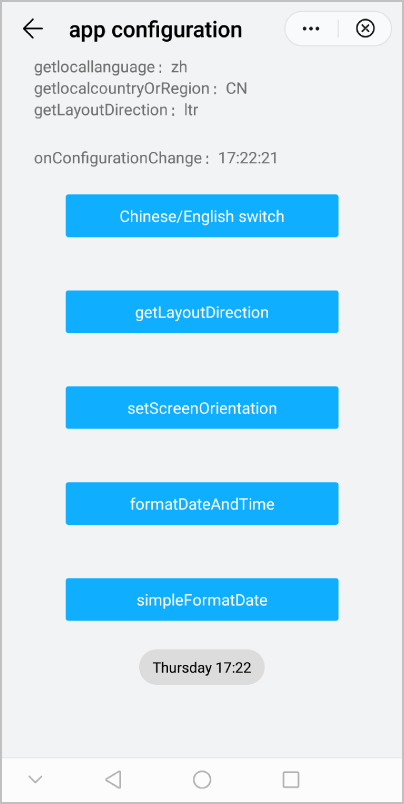
The following figure shows the final effect.
Version Change History
Version | Date | Description |
|---|---|---|
1083 | 2022-03-21 |
|
1070 | 2020-05-19 |
|
1060 | 2019-12-10 | First official release. |