API Declaration
Add the following configuration to the features attribute in the manifest.json file:
{"name": "system.network"} Module Import
Add the following configuration to the script element on the page where the API will be called:
import network from '@system.network'
Or
var network = require("@system.network") Application Scope
Item | Description |
|---|---|
Applicable devices | Mobile phones, tablets, Vision products, and telematics devices |
Applicable regions | Global |
Definition
API | Description |
|---|---|
Obtains the network type. | |
Listens to the network connection status. If this API is called multiple times, only the last call takes effect. | |
Cancels listening to the network connection status. | |
Obtains the carrier information of a SIM card. | |
Obtains the carrier of the network connected by a SIM card. |
[h2]network.getType(OBJECT)
Description
Obtains the network type.
OBJECT
Parameter | Type | Mandatory | Description |
|---|---|---|---|
success | function | No | Callback upon success. |
fail | function | No | Callback upon failure. The possible cause is that your app does not have the required permission. |
complete | function | No | Callback upon completion. |
Parameters returned by success
Parameter | Type | Description |
|---|---|---|
metered | boolean | Indicates whether to charge by traffic. |
type | string | Network type.
|
Sample code
network.getType({
    success:function(data){console.log("handling success: " + data.type);}
})
[h2]network.subscribe(OBJECT)
Description
Listens to the network connection status. If this API is called multiple times, only the last call takes effect.
OBJECT
Parameter | Type | Mandatory | Description |
|---|---|---|---|
callback | function | No | Function called back whenever the network information changes. |
fail | function | No | Callback upon failure. The possible cause is that your app does not have the required permission. |
Returns
Parameter | Type | Description |
|---|---|---|
metered | boolean | Indicates whether to charge by traffic. |
type | string | Network type. The value can be 2g, 3g, 4g, 5g (1070+), wifi, bluetooth (1070+), others (network type cannot be identified), or none (network disconnection). |
Sample code
network.subscribe({
    callback:function(data){console.log("handling callback");}
})
[h2]network.unsubscribe()
Description
Cancels listening to the network connection status.
Sample code
network.unsubscribe()
[h2]network.getSimOperators(OBJECT) (1070+)
Description
Obtains the carrier information of a SIM card. The call permission is required.
OBJECT
Parameter | Type | Mandatory | Description |
|---|---|---|---|
success | function | No | Callback upon success. |
fail | function | No | Callback upon failure. |
complete | function | No | Callback upon completion. |
Parameters returned by success
Parameter | Type | Description |
|---|---|---|
operators | array | SIM card list information. For details, please refer to parameters on the SIM card list. |
size | number | Number of SIM cards. |
Result codes returned by fail
Result Code | Description |
|---|---|
1001 | No SIM card is inserted. |
1002 | Failed to obtain the carrier information. |
Parameter | Type | Description |
|---|---|---|
operator | string | Carrier information of the data network. Carrier information: MCC+MNC, that is, mobile country code + mobile network code. China Mobile: 46000, 46002, 46004, and 46007 China Unicom: 46001, 46006, and 46009 China Telecom: 46003, 46005, and 46011 For details about other MCCs and MNCs, please refer to https://www.mcc-mnc.com/. |
slotIndex | number | Slot number. |
isDefaultDataOperator | boolean | Indicates whether the data card is the default one. |
Sample code
network.getSimOperators({
    success:function (data) {
        console.log(`size: ${data.size}`)
        for (const i in data.operators) {
            console.log(`operator: ${data.operators[i].operator},
                    slotIndex:${data.operators[i].slotIndex},
                    isDefaultDataOperator:${data.operators[i].isDefaultDataOperator},`
            )
        }
    },
    fail:function (erromsg, errocode) {
        console.log('errocode: ' + errocode + ' – erromsg: ' + erromsg)
    }
})
[h2]network.getNetworkOperator(OBJECT) (1078+)
Description
Obtains the carrier of the network connected by a SIM card.

The call permission is required.
Parameters
Parameter | Type | Mandatory | Description |
|---|---|---|---|
success | function | No | Callback upon success. |
fail | function | No | Callback upon failure. |
complete | function | No | Callback upon completion. |
Parameters returned by success
Parameter | Type | Description |
|---|---|---|
operators | array | SIM card list information. For details, please refer to SIM card list parameters. |
size | number | Number of SIM cards. |
Parameters returned by fail
Result Code | Description |
|---|---|
201 | Failed to obtain the call permission. The user rejects authorization. |
1001 | SIM card not found. |
1002 | Failed to obtain the carrier information. |
Sample code
network.getNetworkOperator({
    success:function (data) {
        console.log(`size: ${data.size}`)
        for (const i in data.operators) {
            console.log(`operator: ${data.operators[i].operator},
                    slotIndex:${data.operators[i].slotIndex},
                    isDefaultDataOperator:${data.operators[i].isDefaultDataOperator},`
            )
        }
    },
    fail:function (erromsg, errocode) {
        console.log('errocode: ' + errocode + ' – erromsg: ' + erromsg)
    }
})
Demo
<template>
  <div class="container">

    <div class="item-container">
      <div class="item-content">
        <text class="txt">networkType: {{networkType}}</text>
      </div>
      <input type="button" class="btn" onclick="getNetworkType"  value="Get Network Type" />

      <div class="item-content">
        <text class="txt">currentType: {{currentType}}</text>
      </div>
      <input type="button" class="btn" onclick="listenNetwork"  value="listen Network" />
      <input type="button" class="btn" onclick="cancelNetwork"  value="cancel Network" />
      <div class="item-content">
        <text class="txt">carrierInformation:{{simOperatorsInfo}}</text>
      </div>
      <input type="button" class="btn" onclick="getSimOperators"  value="Get Carrier Information" />
    </div>
  </div>
</template>

<style>
.container{
  flex: 1;
  flex-direction: column;
}
  .item-container {
    margin-bottom: 50px;
    margin-right: 60px;
    margin-left: 60px;
    flex-direction: column;
  }

  .item-content {
    flex-direction: column;
    padding: 30px;
    margin-bottom: 100px;
    align-items: flex-start;
  }
  .btn {
  height: 80px;
  text-align: center;
  border-radius: 5px;
  margin-right: 60px;
  margin-left: 60px;
  margin-bottom: 50px;
  color: #ffffff;
  font-size: 30px;
  background-color: #0faeff;
}
</style>

<script>
  import network from '@system.network'
  import prompt from '@system.prompt'

  export default {
    data: {
      networkType: '',
      currentType: '',
      simOperatorsInfo: '',
    },
    onInit: function () {
      this.$page.setTitleBar({ text: 'network' })
    },
    getNetworkType: function () {
      var that = this
      network.getType({
        success: function (ret) {
          that.networkType = JSON.stringify(ret);

        },
        fail: function (erromsg, errocode) {
          console.log('network.getType----------' + errocode + ': ' + erromsg)
        },
        complete: function () {
          prompt.showToast({
            message: "get network type complete!"
          })
        }
      })
    },
    listenNetwork: function () {
      var that = this
      network.subscribe({
        callback: function (ret) {
          that.currentType = JSON.stringify(ret)
          prompt.showToast({ message:"listenSuccess" + JSON.stringify(ret) })
        },
        fail: function (erromsg, errocode) {
          prompt.showToast({ message: "listenFailed" + errocode + ': ' + erromsg })
          console.log('network.subscribe----------' + errocode + ': ' + erromsg)
        }
      })
    },
    cancelNetwork: function () {
      network.unsubscribe()
    },
    getSimOperators: function () {
      var that = this
      var simOperatorsInfo = ''
      network.getSimOperators({
        success: function (data) {
          console.log(`size: ${data.size}`)
          for (const i in data.operators) {
            simOperatorsInfo += `operator: ${data.operators[i].operator},\tslotIndex:${data.operators[i].slotIndex},\tisDefaultDataOperator:${data.operators[i].isDefaultDataOperator},\n`
          }
          that.simOperatorsInfo = JSON.stringify(data)
          console.log(simOperatorsInfo)
        },
        fail: function (erromsg, errocode) {
          console.log('errocode: ' + errocode + ' - erromsg: ' + erromsg)
        }
      })
    }
  }
</script>
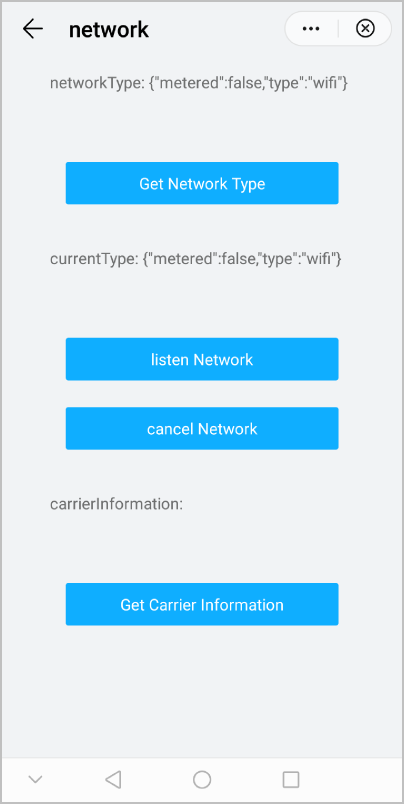
The following figure shows the final effect.
Version Change History
Version | Date | Description |
|---|---|---|
1070 | 2020-05-19 |
|