API Declaration
Add the following configuration to the features attribute in the manifest.json file:
{"name": "system.vibrator"} Module Import
Add the following configuration to the script element on the page where the API will be called:
import vibrator from '@system.vibrator'
Or
var vibrator = require("@system.vibrator") Application Scope
Item | Description |
|---|---|
Applicable devices | Mobile phones and tablets |
Applicable regions | Global |
[h2]vibrator.vibrate(OBJECT)
Description
Triggers vibration, which lasts for up to 1 second.
OBJECT parameters
Parameter | Type | Mandatory | Description |
|---|---|---|---|
mode(1030+) | string | No | Vibration mode. The default value is long.
During implementation, long vibration is defined as lasting for 1000 ms, and short vibration is defined as lasting for 35 ms. |
Sample code
vibrator.vibrate({ mode: "short" }); Demo
<template>
  <!-- Only one root node is allowed in template. -->
  <div class="container">
    <div class="item-container">
      <input onclick="vibratelong" type="button" value="Long vibration" class="btn-blue"/>
    </div>
    <div class="item-container">
      <input onclick="vibrateshort" type="button" value="Short vibration" class="btn-blue"/>
    </div>
    <div class="item-container" if="{{info}}">
      <text class="content">{{info}}</text>
    </div>
  </div>
</template>

<style lang="sass">
.container {
   flex-direction: column;
   justify-content: center;
   align-items: center;
}
.item-container {
    margin-top: 50px;
    margin-right: 30px;
    margin-left: 30px;
    flex-direction: column;
  }
.btn-blue {
    background-color: #0faeff;
    color: #ffffff;
    width:400px;
    height: 100px;
    font-size: 50px;
    border-radius:15px;
  }
.content {
    border: 2px ;
    border-radius: 10px;
    text-align: center;
  }
</style>

<script>
  import vibrator from '@system.vibrator';
  module.exports = {
    data: {
      componentData: {},
      info:'',
      get_success:'',
      get_fail:''
    },
    onInit: function () {
      this.$page.setTitleBar({ text: 'vibrator'});
    },
    vibratelong(){
      var that = this;
      vibrator.vibrate({mode: 'long'});
      that.info = "long vibration is defined as lasting for 1000 ms"
      console.log("long vibration is defined as lasting for 1000 ms");
    },
     vibrateshort(){
       var that = this;
      vibrator.vibrate({mode: 'short'});
      that.info = "short vibration is defined as lasting for 35 ms"
      console.log("short vibration is defined as lasting for 35 ms");
    }
  }
</script>
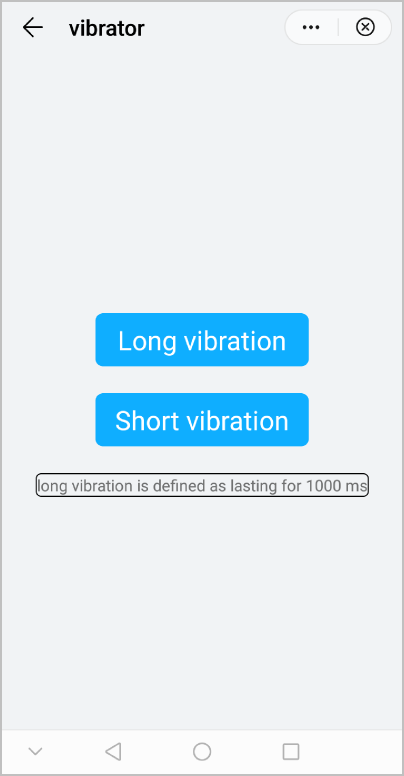
The following figure shows the final effect.