The manifest.json file contains information such as app description, API declaration, and page routes.
Attribute | Type | Default Value | Mandatory | Description |
|---|---|---|---|---|
package | string | - | Yes | App package name, which is different from the native app package name. The com.Company name.Module name format is recommended, for example, com.example.demo. The package name consists of up to 255 characters, including digits, letters, periods (.), and underscores. It must start with a letter, end with a digit, a letter or an underscore, and contain periods (.). |
name | string | - | Yes | App name, which is the same as that on AppGallery. This name is usually displayed on the home screen and in pop-ups. This attribute can be set to a string in multiple languages but does not support the following: |
icon | string | - | Yes | App icon to be displayed on AppGallery or home screen. The icon must be the same as that submitted for review in AppGallery Connect. |
versionName | string | - | No | App version name, for example, 1.0. |
versionCode | integer | - | Yes | App version code, which starts from 1. You must increase it by 1 each time uploading a package. If the version code is incorrect, a version update will fail. For example, if the source version code is 11, the target version code must be 12 in the update. |
minPlatformVersion | integer | 1000 | Yes | Supported earliest platform version. Compatibility check is performed to avoid incompatibility caused by running on a platform earlier than this version after an app is released on AppGallery. NOTE: If the version of Quick App Loader is earlier than minPlatformVersion, a pop-up is displayed when the quick app is started, prompting the user to update the loader to the latest version. If the user refuses to update, the quick app will be closed. |
features | array | - | No | API list. Most APIs must be declared before being called. For details, please refer to the API reference. Sample code: [
{
"name": "system.app"
},
{
"name": "system.network"
}
] |
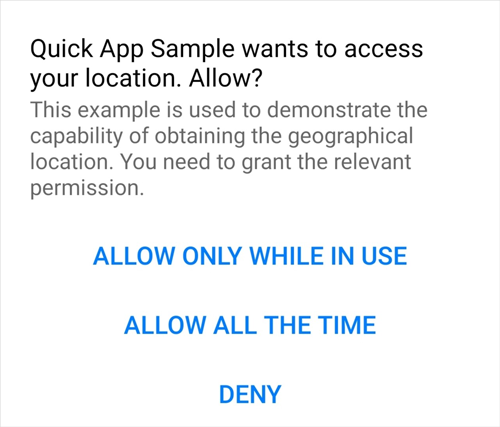
array | - | No | Reason for applying for permissions, that is, the text displayed in the authorization pop-up when user authorization is required for calling an API. The reason should be as clear and reasonable as possible. For details about the definition format, please refer to Format Description for permissionDesc. | |
config | object | - | Yes | System configurations. For details, please refer to config. |
router | object | - | Yes | Route information. For details, please refer to router. |
display | object | - | No | UI-related configurations. For details, please refer to display. |
subpackages | object | - | No | Package splitting information. For details, please refer to subpackages. |
trustedSslDomains(1060+) | array | - | No | List of trusted HTTPS websites, for example, www.huawei.com.
|
The permissionDesc attribute has two sub attributes: name and desc The options of name are WRITE_CALENDAR, ACCESS_FINE_LOCATION, CAMERA, RECORD_AUDIO, WRITE_EXTERNAL_STORAGE (1075+), STORAGE_READ (1078+), READ_PHONE_STATE (1078+), NOTIFYCATION (1078+), SILENT_NOTIFYCATION, and READ_CONTACT (1078+). The desc sub attribute can be set to a string in multiple languages but does not support the following:
- Concatenation of a string and a variable, for example, "desc": "The reason is ${message.permissionDesc}"
- Concatenation of variables, for example, "desc": "${message.permissionDesc}${message.permissionDesc1}"
- Accessing a subnode not by using a dot (.), for example, "desc": "The reason is: ${message['permissionDesc']}"
A configuration example of permissionDesc is as follows:
"permissionDesc":[
    {
        "name": "ACCESS_FINE_LOCATION",
        "desc": "This sample is used to demonstrate the capability of obtaining the geographical location. You need to grant the relevant permission."
    },
    {
        "name": "RECORD_AUDIO",
        "desc": "${message.permissionDesc}"
    }
] 
config
It is used to specify system configurations and global data.
Attribute | Type | Default Value | Description |
|---|---|---|---|
logLevel | string | log | Log level. The options are off (indicating no log is recorded), error, warn, info, log, and debug. |
designWidth | integer/string | 750 | Reference width in page design. The size of an element will be scaled by the ratio of the reference width to the actual phone width. If the value is of the string type, the value must be "device-width"("designWidth":"device-width"), indicating the width of the visual viewport. |
data | object | - | Global data object that can be accessed using this on a page. The value of this parameter cannot start with a dollar sign ($) or an underscore (_). If the global data attribute and the data attribute of a page have the same name, the global data attribute overrides the data attribute of the page during page initialization. |
network(1060+) | object | - | Network timeout interval. For details, please refer to config.network. This attribute applies only to system.fetch, system.request.upload(), and system.websocketfactory. |
background(1070+) | object | - | APIs that can run in the background. These APIs should be defined under features . The following APIs can be configured:
For details, please refer to Background Running. |
recreateOnFolding(1070+) | boolean | true | Indicates whether to reload the page when a user folds or unfolds the foldable screen. The options are as follows:
|
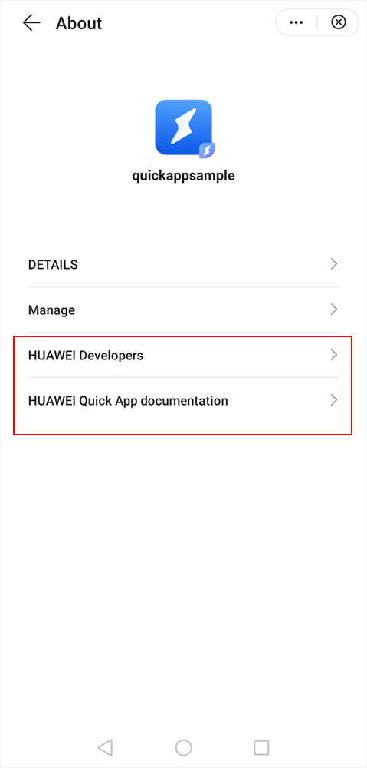
aboutPageConfig(1078+) | array | - | Items to be displayed on the About page that can be opened from the unified menu. Up to 20 items can be displayed. For details, please refer to Description of aboutPageConfig. |
Description of config.network
Attribute | Type | Default Value | Unit | Mandatory | Description |
|---|---|---|---|---|---|
connectTimeout | number | 30000 | ms | No | Network connection timeout interval. |
readTimeout | number | 30000 | ms | No | Timeout interval for reading network streams. |
writeTimeout | number | 30000 | ms | No | Write timeout interval. |
Description of aboutPageConfig
You can set name and url in aboutPageConfig. The name attribute can be set to a string in multiple languages. Sample code:
"aboutPageConfig":[
    {
        "name": "Huawei Developers",
        "url": "https://developer.huawei.com/consumer/en/"
    },
    {
        "name": "Quick App documentation",
        "url": "https://developer.huawei.com/consumer/en/doc/overview/quickApp"
    }
]
The following figure shows the final effect.
router
It is used to specify page composition and route configurations. If routes are not configured on pages, skip it during compilation and packaging.
Attribute | Type | Default Value | Description |
|---|---|---|---|
entry | string | - | Home page name. |
errorPage(1060+) | string | - | Error page. This attribute is optional.
|
pages | object | - | Page configuration list. A key is a page name (corresponding to the page directory name; for example, the Hello page corresponds to the Hello directory.). The corresponding key value is the page details configurations. For details, please refer to router.page. |
[h2]router.pages
It is used to specify the route information about a single page.
Attribute | Type | Default Value | Mandatory | Description |
|---|---|---|---|---|
component | string | - | Yes | Component name corresponding to the page, which must be the same as the UX file name. For example, the hello component corresponds to hello.ux. |
path | string | / | No | Page path, for example, /user. If this attribute is not set, the default value /<Page name> is used. The path must be unique. For example, if the path is not set in "Index": {"component": "index"}, the path will be set to /Index by default. |
filter | object | - | No | Request that can be processed on a page. |
launchMode(1050+) | string | standard | No | Page launch mode. The options are singleTask and standard.
The home page supports only the singleTask mode. |
[h2]router.page.filter
It is used to declare the requests that can be processed on a page. The page can obtain the page access parameters from the $page variable. For details, please refer to Script. The structure of filter is as follows:
"filter": {
  "<action>": {
    "uri": "<pattern>"
  }
}
Attribute | Type | Default Value | Mandatory | Description |
|---|---|---|---|---|
action | string | - | Yes | Requested action. Currently, the attribute can be set only to view. |
uri | pattern | / | No | Matching rule of the requested data. The value must be a regular expression. For example, https?://.* indicates that all HTTP and HTTPS URLs will be matched. |
The filter for processing all HTTP and HTTPS requests is defined as follows:
"filter": {
  "view": {
    "uri": "https?://.*"
  }
}
display
It is used to define UI-related configurations.

Smart display devices support only full-screen and landscape modes. That is, fullScreen must be set to true and orientation must be set to landscape. Title bar–related attributes are not supported.
Attribute | Type | Default Value | Description |
|---|---|---|---|
backgroundColor | string | #ffffff The default value is #121212 for telematics devices. | Window background color. |
fullScreen | boolean | false | Indicates whether the full-screen mode is used. In full-screen mode, the status bar is hidden, but the title bar is not affected by default. Whether the title bar is displayed is specified by the titleBar attribute. |
titleBar | boolean | true | Indicates whether to display the title bar. |
titleBarBackgroundColor | string | Dark theme: #000000 Light theme: #ffffff | Background color of the title bar. |
titleBarTextColor | string | - | Text color on the title bar. |
titleBarText | string | - | Title bar text, which can also be specified by the titleBarText parameter passed during page redirection. |
titleBarBackgroundOpacity(1050+) | float(0 ~ 1.0) | 1.0 | Transparency of the title bar. |
menu | boolean | false | Indicates whether to display the menu icon at the upper right corner. Outside the Chinese mainland: [Versions earlier than 1070] If this attribute is set to true, and the onMenuPress callback function is not customized, the built-in menu list is displayed when the menu icon is tapped. CAUTION: Unless required, do not customize the onMenuPress callback function. If customization is required, you are advised to name the menu item for creating a shortcut on the home screen Add to Home Screen. When the title bar is displayed, the menu icon is displayed to the right of the title bar if this attribute is set to true or is displayed as a floating layer if this attribute is not set to false. [1070 or later] This attribute is deprecated. Menus are fixed and cannot be customized. (1076+) Chinese mainland: Menus are fixed and cannot be customized. |
windowSoftInputMode(1030+) | adjustPan | adjustResize | adjustPan | Mode of adjusting the page to ensure that the text box is visible when the soft keyboard is displayed.
|
pages | object | - | Page display style list. A key is the page name (the same as that in the route), and its value is the display style of that page. If the style is set, this style will override the default style. |
orientation | string | portrait | Indicates whether a page is displayed in landscape or portrait mode. The options are as follows:
After rotation, the page width changes. As a result, the actual display is inconsistent even if you set the same size. If this attribute is set to auto, you are advised to use the responsive layout for development. |
statusBarImmersive (1050+) | boolean | false | Indicates whether to display the translucent status bar. |
statusBarTextStyle (1050+) | auto | auto | Text style of the status bar. If this attribute is set to auto, the text style will be adjusted based on the background color of the status bar. NOTE: Currently, Huawei does not support the options light and dark. |
statusBarBackgroundColor (1050+) | string | - | Background color of the status bar. The default value is the same as the background color of the title bar. |
statusBarBackgroundOpacity (1050+) | float(0 ~ 1.0) | - | Transparency of the status bar. The default value is the same as the transparency of the title bar. |
textSizeAdjust (1060+) | auto | none | - | Indicates whether the font size of the text-type elements changes with the system font size. |
themeMode (1083+) | number | -1 | Theme mode. If its value is not set, the default value -1 is used. Currently, the following values are supported:
|
menuBarData (1070+) | object | - | Object that describes on the page menu. |
[h2]menuBarData
It is used to describe page menu style.
Attribute | Type | Description |
|---|---|---|
menuBar (1083+) | boolean | Indicates whether the menu bar is visible.
CAUTION: Please do not hide the capsule menu on the app home page or level-1 menu. The capsule menu can be hidden on immersive pages only when you want to improve user experience. |
menuBarStyle (1070+) | string |
|
shareTitle (1090+) | string | Title of the content to be shared. The default title is the name of the quick app running in the foreground. |
shareDescription (1090+) | string | Description of the content to be shared. The default description is the description of the quick app running in the foreground. |
shareIcon (1090+) | string | Image of the content to be shared. The default image is the current quick app icon. |
shareCurrentPage (1090+) | boolean | Indicates whether the current page can be shared.
CAUTION: If this attribute is set to true, do not add any sensitive information such as account number, passwords, and other security-relevant fields to the page parameters. |
shareParams (1090+) | object | Key-value pairs, which are in {"key":value} format, transparently passed when the current page is shared. |
shareUrl (1090+) | string | Backup shared URL for quick app redirection on a device (for example, an iOS device) that does not support quick app. This attribute is not supported currently. |
usePageParams (1090+) | boolean | Indicates whether to add the current page parameters to the shared parameters.
|

If shareParams or the page parameter is used, the key-value pair of the corresponding page must be set to public so that the parameters can be received.
The sample code is as follows:
// The name of the page parameter should be declared as the same as that of key in the key-value pair. If the value of usePageParams or usePageParams is true, declare the key-value pairs according to the page parameters.
public: {
    key: null
},

// If the shared page is not the current quick app page, the shared parameters can be received in onInit when the user is being redirected to the shared page after launching the quick app.
onInit() {
    console.log('onInit share param page :  ' + JSON.stringify(this.key))
}

// If the shared page is the current quick app page, the shared parameters can be received in onRefresh when the user is being redirected to the shared page after launching the quick app.
onRefresh(data){
    console.log('onRefresh share param page :  ' + JSON.stringify(data.key))
}
[h2]Quick Adaptation to the Menu Bar
With the implementation of the menu bar, you do not need to develop the functions such as share, shortcut, and associated page creation again, saving your coding time.
To quickly make your quick app adapted to the menu bar, you should:
- Add the menuBarData configuration in the display attribute of the manifest.json file.
- If you add menuBarData manually, the configuration takes effect on all quick app pages.
- If you add menuBarData in pages of display, the configuration takes effect on the corresponding page.
A configuration example of menuBar is as follows:
JSON files cannot contain any comment. The comments in the example serve as further explanation.
{ "display": { "menuBarData": { // Global configuration. "menuBar":true, "menuBarStyle":"dark", "shareTitle":"shared title", "shareDescription":"shared description", "shareIcon":"shared URL" }, "pages": { "Hello": { // menuBarData configuration in a page. This configuration takes effect by default. The global menuBarData configuration takes effect if the page does not have its own menuBarData configuration. "menuBarData": { "menuBar":true, "menuBarStyle":"dark", "shareTitle":"shared title of the subpage", "shareDescription":"description of the shared page", "shareIcon":"URL of the shared page", "shareCurrentPage":true, "shareUrl":"https://developer.huawei.com", "shareParams":"{key:1,id:2})" } } } } - To dynamically set the share parameters of menuBarData, please refer to setMenubarData.
subpackages
It is used to define subpackage configurations. For details about how to load subpackages, please refer to Loading Subpackages.
Attribute | Type | Description |
|---|---|---|
name | string | Name of a subpackage, which is used to differentiate subpackages. The value can only contain letters, digits, and underscores (_). The name base is reserved for the base package. You do not need to define subpackage configurations for the base package. |
resource | string | Root directory of subpackage resources, which is relative to the source code directory src. The value can contain only letters, digits, underscores (_), hyphens (-), and slashes (/), and cannot start with a hyphen (-) or slash (/). During compilation, all resources in the directory are packed into a subpackage. |
Sample Code
{
  "package": "com.company.unit",
  "name": "appName",
  "icon": "/Common/icon.png",
  "versionName": "1.0",
  "versionCode": 1,
  "minPlatformVersion": 1000,
  "features": [
    { "name": "system.network" }
  ],
  "config": {
    "logLevel": "off"
  },
  "router": {
    "entry": "Hello",
    "pages": {
      "Hello": {
        "component": "hello",
        "path": "/",
        "filter": {
          "view": {
            "uri": "https?://.*"
          }
        }
      }
    }
  },
  "display": {
    "backgroundColor": "#ffffff",
    "fullScreen": false,
    "titleBar": true,
    "titleBarBackgroundColor": "#000000",
    "statusBarImmersive": true,
    "statusBarTextStyle": "auto",
    "statusBarBackgroundColor": "#ffffff",
    "pages": {
      "Hello": {
        "backgroundColor": "#eeeeee",
        "fullScreen": true,
        "titleBarBackgroundColor": "#0000ff",
        "titleBarText": "Hello"
      }
    }
  },
  "subpackages": [
      {
          "name": "pkgA",
          "resource": "PackageA"
      },
      {
          "name": "pkgB",
          "resource": "PackageB"
      }
  ],
  "trustedSslDomains": ["https://developer.huawei.com", "www.quickapp.cn"]
}
Sample code of errorPage.ux:
onBackPress() {
  if (router.getLength() === "1") {
    router.replace({
      uri: "/"
    })
  }
} [h2]FAQs
- What can I do when the quick app page is adjusted to adapt to the phone screen after the input method panel is displayed?
- How can I use an internal function to access the data block through this?
- After the input box obtains the focus and the keyboard pops up, a large blank area is displayed on the keyboard, blocking the input box. What can I do?
- How do I configure the title bar for a quick app?
- The back arrow of the built-in title bar in a quick app is sometimes white and sometimes black. How do I control its color?
- Can the background image of the page block the status bar?
- Can I dynamically configure the home page of a quick app?
- How do I define a global object in a quick app?
- What should I do if "Invalid key" is displayed by the IDE when the permission attribute is used in the manifest file?