Application Scope
Item | Description |
|---|---|
Applicable devices | Mobile phones, tablets, and telematics devices |
Applicable regions | Global |
Styles
In addition to common styles, the styles listed in the following table are supported.
Style | Type | Default Value | Mandatory/Optional | Description |
|---|---|---|---|---|
font-family (1030+) | string | - | Optional | Font of strings in the element. Android's default fonts normal, sans-serif, serif, and monospace are supported (only for English strings). To customize fonts, please refer to font-face Style. |
color | color | - | Optional | Font color. |
font-size | number | - | Optional | Font size. |
font-weight | lighter | 100 | 200 | 300 | 400 | 500 | 600 | 700 | 800| 900 | normal | bold | bolder | normal | Optional | Font weight. |
text-decoration | underline | line-through | none | none | Optional | Decoration used on text. |
font-style | normal | italic | normal | Optional | Font style selected from the font family. |
Events
The click, longpress, and swipe events are not supported. In addition to common events, the event listed in the following table is supported.
Event | Parameter | Triggering Condition |
|---|---|---|
change | {newValue:newValue} | A different value is selected from the drop-down list. |
Sample Code
<template>
    <div class="container">
        <div class="page-title-wrap">
            <text class="page-title">{{componentName}}</text>
        </div>
        <div class="item-container">
            <text style="margin-bottom: 50px">Nanjing Attractions</text>
            <select class="select" onchange="changeValue">
<option class="option" value="Confucius Temple">Confucius Temple</option>
                <option class="optionrgb" value="Presidential palace" selected="true">Presidential palace</option>
                <option class="optionrgba" value="Old door east">Old door east</option>
                <option class="optionhsl" value="Da Bao En Temple">Da Bao En Temple</option>
                <option class="optionhsla" value="Zhong Hua Gate">Zhong Hua Gate</option>
            </select>
        </div>
        <div class="item-container">
            <text style="margin-bottom: 50px">font-family</text>
            <select class="select font-family2" onchange="changeValue">
                <option class="option font-family1" value="sans-serif">font-family is sans-serif</option>
                <option class="option font-family2" value="serif" selected="true">font-family is serif</option>
                <option class="option font-family3" value="monospace">font-family is monospace</option>
            </select>
        </div>
    </div>
</template>
<script>
    import prompt from '@system.prompt'
    export default {
        data: {
            componentName: 'select'
        },
        changeValue(e) {
            prompt.showToast({
                message: `[${e.newValue}] selected`,
                duration: 2000,
                gravity: 'center'
            })
        }
    }
</script>
<style>
    .container {
        flex: 1;
        flex-direction: column;
    }
    .page-title-wrap {
        padding-top: 50px;
        padding-bottom: 80px;
        justify-content: center;
    }
    .page-title {
        padding-top: 30px;
        padding-bottom: 30px;
        padding-left: 40px;
        padding-right: 40px;
        border-color: #bbbbbb;
        color: #bbbbbb;
        border-bottom-width: 2px;
    }
    .item-container {
        margin-top: 20px;
        margin-bottom: 30px;
        flex-direction: column;
    }
    .item-title {
        padding-left: 30px;
        padding-bottom: 30px;
        padding-top: 30px;
        border-bottom-width: 1px;
        border-color: #bbbbbb;
        color: #aaaaaa;
    }
    .item-content {
        background-color: #ffffff;
        border-bottom-width: 1px;
        border-color: #bbbbbb;
        padding-left: 30px;
        padding-right: 30px;
    }
    .select {
        margin-left: 30px;
        margin-right: 30px;
        align-items: flex-start;
        border-color: #007DFF;
        border-width: 1px;
    }
    .option {
        color: #007DFF;
        font-size: 30px;
        font-weight: bold;
    }
    .optionrgb {
        color: rgb(207, 18, 49);
        font-size: 30px;
        font-weight: bold;
    }
    .optionrgba {
        color: rgba(86, 206, 38, 0.452);
        font-size: 30px;
        font-weight: bold;
    }
    .optionhsl {
        color: hsl(180, 100%, 80%);
        font-size: 30px;
        font-weight: bold;
    }
    .optionhsla {
        color: hsla(10, 90%, 60%, 0.9);
        font-size: 30px;
        font-weight: bold;
    }
    .font-family1 {
        font-family: sans-serif;
    }
    .font-family2 {
        font-family: serif;
    }
    .font-family3 {
        font-family: monospace;
    }
</style>
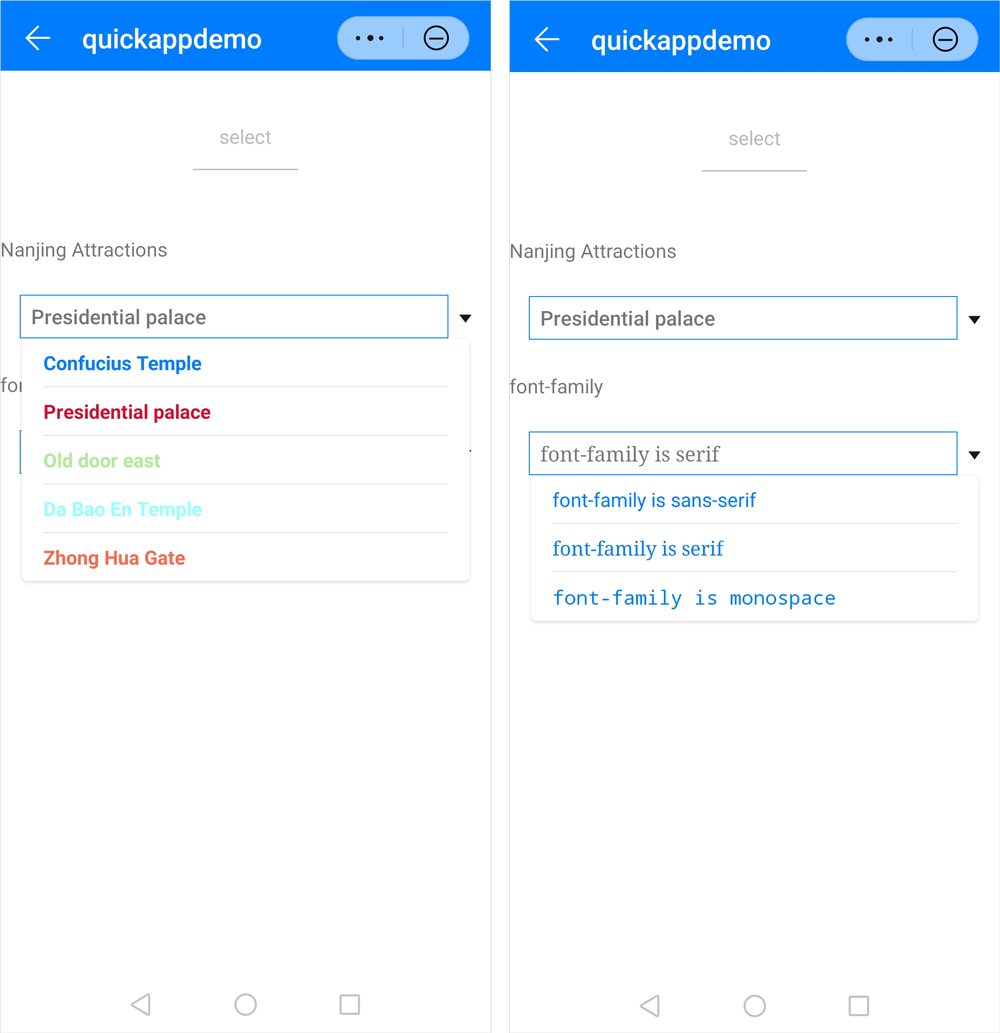
The following figure shows the final effect.