Application Scope
Item | Description |
|---|---|
Applicable devices | Mobile phones and tablets |
Applicable regions | Global |
Attributes
In addition to general attributes, the attributes listed in the following table are supported.
Attribute | Type | Default Value | Mandatory | Description |
|---|---|---|---|---|
deviceposition | string | back | No | Indicates whether a camera is a front-facing camera or rear-facing camera. The options are front and back. |
flash | string | auto | No | Flash status. The options are auto, on, off, and torch (indicating that the flash is steady on). NOTE: When the width or height of the camera element is set to 0, this attribute is invalid. |
framesize(1080+) | string | normal | No | Frame size of the camera. The value can be low, normal, or high. |
autoexposurelock(1080+) | boolean | false | No | Automatic exposure lock. |
autowhitebalancelock(1080+) | boolean | false | No | Automatic white balance lock. |
Events
In addition to common events, the events listed in the following table are supported.
Event | Description | Example |
|---|---|---|
error | This event is triggered when a user rejects the request to use the camera. | <camera onerror="cameraError"> |
cameraframe(1080+) | This event returns ArrayBuffer, a one-dimensional array in the object.data format, which contains pixel data of the image. Every four indexes indicate RGBA of a pixel.
| <camera oncameraframe="cameraFrame"/> |
camerainitdone(1080+) | This event is triggered when the camera initialization is complete. | <camera oncamerainitdone="cameraInitDone"/> |
[h2]takePhoto(OBJECT)
Takes a photo.
OBJECT parameters
Parameter | Type | Mandatory | Description |
|---|---|---|---|
quality | string | No | Image quality. The options are high, normal, and low. The default value is normal. |
cropimage (1076+) | boolean | No | The default value is false. When this parameter is set to true, photos taken by a camera will be cropped based on the element size. |
success | function | No | Callback upon success. |
fail | function | No | Callback upon failure. |
complete | function | No | Callback upon completion. |
Parameters returned by success
Parameter | Type | Description |
|---|---|---|
uri | string | Photo path. |
Result codes returned by fail
Result Code | Description |
|---|---|
201 | A user rejects the request for the camera permission. |
[h2]setPreviewFpsRange(OBJECT)(1080+)
Sets the maximum and minimum preview frame rates. The value range you set must be within the supported preview frame rate range.
OBJECT parameters
Parameter | Type | Mandatory | Description |
|---|---|---|---|
previewfpsrange | object | Yes | Frame rate range. The object must contain the minimum and maximum frame rates. Examples: {'min':10,'max':30} |
success | function | No | Callback upon success. |
fail | function | No | Callback upon failure. |
complete | function | No | Callback upon completion. |
Result codes returned by fail
Result Code | Description |
|---|---|
201 | The user refused to grant the camera permission. |
202 | The maximum and minimum values cannot be set. |
300 | The device does not support the configured frame rate range. |
[h2]getSupportedPreviewFpsRange(OBJECT)(1080+)
Obtains the supported preview frame rate range.
OBJECT parameters
Parameter | Type | Mandatory | Description |
|---|---|---|---|
success | function | No | Callback upon success. |
fail | function | No | Callback upon failure. |
complete | function | No | Callback upon completion. |
Parameters returned by success
Parameter | Type | Description |
|---|---|---|
supportfpsrange | array | If the supported preview frame rate range is successfully obtained, an array similar to [{"min":15000,"max":15000},{"min":7000,"max":30000}] is returned. |
Result codes returned by fail
Result Code | Description |
|---|---|
300 | The supported preview frame rate range cannot be obtained. |
[h2]getPreviewFpsRange(OBJECT)(1080+)
Obtains the configured preview frame rate range.
OBJECT parameters
Parameter | Type | Mandatory | Description |
|---|---|---|---|
success | function | No | Callback upon success. |
fail | function | No | Callback upon failure. |
complete | function | No | Callback upon completion. |
Parameters returned by success
Parameter | Type | Description |
|---|---|---|
max | int | Maximum frame rate for previewing. |
min | int | Minimum frame rate for previewing. |
Result codes returned by fail
Result Code | Description |
|---|---|
300 | The configured preview frame rate range cannot be obtained. |
[h2]setExposureCompensation(OBJECT)(1080+)
Sets the exposure compensation value.
OBJECT parameters
Parameter | Type | Mandatory | Description |
|---|---|---|---|
exposurecompensation | int | Yes | Exposure compensation value. |
success | function | No | Callback upon success. |
fail | function | No | Callback upon failure. |
complete | function | No | Callback upon completion. |
Result codes returned by fail
Result Code | Description |
|---|---|
201 | The user refused to grant the camera permission. |
202 | The maximum and minimum values cannot be set. |
300 | The exposure compensation value cannot be set. |
[h2]getExposureCompensationRange(OBJECT)(1080+)
Obtains the supported exposure compensation value range.
OBJECT parameters
Parameter | Type | Mandatory | Description |
|---|---|---|---|
success | function | No | Callback upon success. |
fail | function | No | Callback upon failure. |
complete | function | No | Callback upon completion. |
Parameters returned by success
Parameter | Type | Description |
|---|---|---|
max | int | Supported maximum exposure compensation value. |
min | int | Supported minimum exposure compensation value. |
Result codes returned by fail
Result Code | Description |
|---|---|
300 | The supported exposure compensation value range cannot be obtained. |
[h2]getExposureCompensation(OBJECT)(1080+)
Obtains the configured exposure compensation value.
OBJECT parameters
Parameter | Type | Mandatory | Description |
|---|---|---|---|
success | function | No | Callback upon success. |
fail | function | No | Callback upon failure. |
complete | function | No | Callback upon completion. |
Parameters returned by success
Parameter | Type | Description |
|---|---|---|
exposurecompensation | int | Exposure compensation value that has been set before. |
Result codes returned by fail
Result Code | Description |
|---|---|
300 | The configured exposure compensation value cannot be obtained. |
[h2]getSupportedSceneModes(OBJECT)(1080+)
Obtains the supported scene modes.
OBJECT parameters
Parameter | Type | Mandatory | Description |
|---|---|---|---|
success | function | No | Callback upon success. |
fail | function | No | Callback upon failure. |
complete | function | No | Callback upon completion. |
Parameters returned by success
Parameter | Type | Description |
|---|---|---|
supportedscenemodes | array |
|
Result codes returned by fail
Result Code | Description |
|---|---|
300 | The supported scene modes cannot be obtained. |
[h2]startRecord(OBJECT)(1090+)
Starts a record.
OBJECT parameters
Parameter | Type | Mandatory | Description |
|---|---|---|---|
quality | string | No | Video quality. The value can be high, low, or normal. The default value is normal. |
success | function | No | Callback upon success. |
fail | function | No | Callback upon failure. |
complete | function | No | Callback upon completion. |
maxduration | int | No | Maximum recording duration, in seconds. The default value is 600. |
compressed | boolean | No | Indicates whether to enable video compression. The default value is false. |
timeoutCallback | function | No | Callback upon timeout recording, which returns URI and thumbPath. |
Parameters returned by success
Parameter | Type | Description |
|---|---|---|
uri | string | Video path. |
thumbPath | string | Path to the first video thumbnail. |
Result codes returned by fail
Result Code | Description |
|---|---|
201 | The user refused to grant the camera permission. |
[h2]stopRecord(OBJECT)(1090+)
Stops recording.
OBJECT parameters
Parameter | Type | Mandatory | Description |
|---|---|---|---|
success | function | No | Callback upon success. |
fail | function | No | Callback upon failure. |
complete | function | No | Callback upon completion. |
Parameters returned by success
Parameter | Type | Description |
|---|---|---|
uri | string | Video path. |
thumbPath | string | Path to the first video thumbnail. |
Result codes returned by fail
Result Code | Description |
|---|---|
201 | The user refused to grant the camera permission. |
Sample Code
<template>
    <!-- There can only be one root node in the template -->
    <div class="container" style=" width: 100%; height:100%">
        <stack class="stack" style=" width: 100%; height:100%">
            <camera
                id="camera"
                style=" width: 600px; height:600px"

                deviceposition="{{devicepositionVal}}"
                flash="{{flashVal}}"
                autoexposurelock="{{autoExposureLockVal}}"
                autowhitebalancelock="{{autoWhiteBalanceLockVal}}"
                framesize="{{frameSizeVal}}"

                onerror="error"
                oncamerainitdone="cameraInitDoneEvent"
                oncameraframe="cameraFrameEvent">
            </camera>
            <div class="item-container">
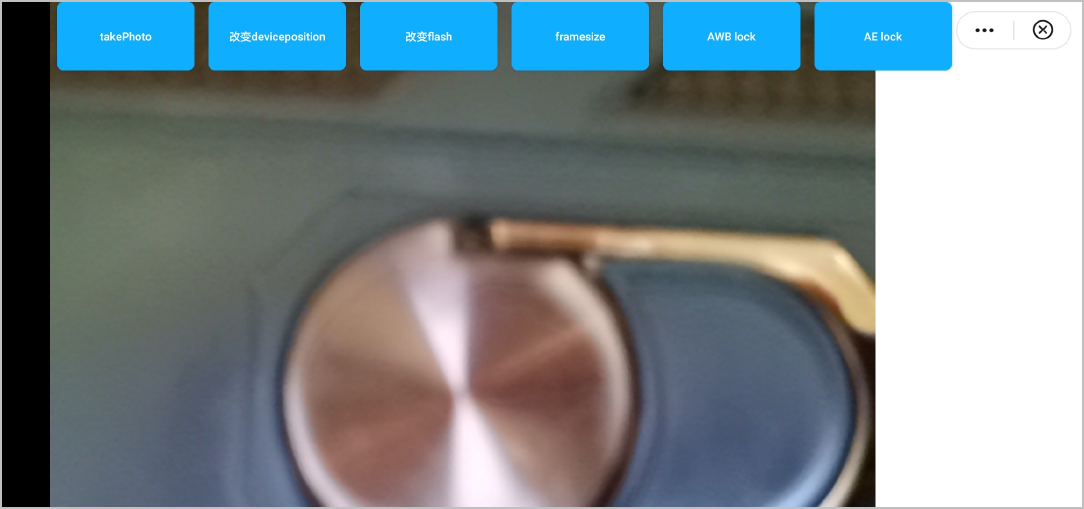
                <input class="btn" type="button" onclick="takePhoto" value="takePhoto"></input>
                <input id="deviceposition-private-css" class="btn" type="button" value="change deviceposition" onclick="devicepositionEvent" />
                <input id="flash-private-css" class="btn" type="button" value="change flash" onclick="flashEvent" />
                <input id="framesize-private-css" class="btn" type="button" onclick="changeFrameSize" value="framesize"></input>
                <input id="autowhitebalancelock-private-css" class="btn" type="button" onclick="changeWhiteBalanceLock" value="AWB lock"></input>
                <input id="autoexposurelock-private-css" class="btn" type="button" onclick="changeExposureLock" value="AE lock"></input>
                <image src="{{photoUri}}"></image>
            </div>
        </stack>
    </div>
</template>

<style>
    @import '../../../common/css/common.css';

    .stack {
      height: 300px;
      align-items: flex-start;
    }

    .title {
      font-size: 100px;
    }

    .btn {
        font-size: 10px;
        margin-left: 5px;
        margin-right: 5px;
        width: 100px;
        height: 50px;
    }
</style>

<script>

    export default {
        data: {
            title: 'camera',
            photoUri: "",
            devicepositionIndex: 0,
            devicepositionVal: "",
            flashIndex: 0,
            flashVal: "",
            autoexposurelockIndex:0,
            autoExposureLockVal:"",
            autoWhiteBalanceLockIndex:0,
            autoWhiteBalanceLockVal:"",
            frameSizeIndex:0,
            frameSizeVal:"",
        },
        onInit() {
            this.$page.setTitleBar({
                text: 'menu',
                textColor: '#ffffff',
                backgroundColor: '#007DFF',
                backgroundOpacity: 0.5
            })
        },
        onReady() {

        },
        devicepositionEvent() {
            if (this.devicepositionIndex === 0) {
                this.devicepositionVal = "front"
            } else if (this.devicepositionIndex === 1) {
                this.devicepositionVal = "back"
            }
            this.devicepositionIndex++
        },
        flashEvent() {
            if (this.flashIndex === 0) {
                this.flashVal = "auto"
            } else if (this.flashIndex === 1) {
                this.flashVal = "on"
            } else if (this.flashIndex === 2) {
                this.flashVal = "off"
            } else if (this.flashIndex === 3) {
                this.flashVal = "torch"
            }
            this.flashIndex++
        },
        takePhoto() {
            var camera = this.$element('camera');
            //camera.flash = "flash_on";
            console.log("take photo =" + camera.flash);
            camera.takePhoto({
                quality: "high",
                success: (res) => {
                    console.log("res =" + res.uri);
                    this.photoUri = res.uri;
                },
                fail: (erromsg, errocode) => {
                    console.log('media.takePhoto----------' + errocode + ': ' + erromsg)
                }
            })
        },
        error(e) {
            console.error(e.detail)
        },
        cameraInitDoneEvent(data){
            console.log(data)
        },
        cameraFrameEvent(data){
            console.log(data)
        },
        changeFrameSize(){
            const camera = this.$element('camera')
            if(this.frameSizeIndex === 0){
                this.frameSizeVal = "low"
                this.frameSizeIndex = 1
            }else if(this.frameSizeIndex === 1){
                this.frameSizeVal ="normal"
                this.frameSizeIndex = 2
            } else if(this.frameSizeIndex === 2){
                this.frameSizeVal = "high"
            }
        },
        changeWhiteBalanceLock(){
            if(this.autoWhiteBalanceLockIndex === 0){
                this.autoWhiteBalanceLockVal = "true"
                this.autoWhiteBalanceLockIndex = 1
            }else if(this.autoWhiteBalanceLockIndex === 1){
                this.autoWhiteBalanceLockVal ="false"
            }
        },
        changeExposureLock(){
            if(this.autoexposurelockIndex === 0){
                this.autoExposureLockVal = "true"
                this.autoexposurelockIndex=1
            }else if(this.autoexposurelockIndex === 1) {
                this.autoExposureLockVal = "false"
            }
        }

    }
</script>
The following figure shows the final effect.
Version Change History
Version | Date | Description |
|---|---|---|
1090 | 2022-05-19 | Added the startRecord and stopRecord methods. |
1080 | 2021-12-28 |
|
1070 | 2020-05-19 | Added the autoorientation attribute to indicate whether to enable the auto-rotate function. |
1040 | 2019-06-24 | First official version. |
Tips
- A phone whose Android version is earlier than 5.0 does not support this element.
- If the camera cannot be opened and the previous page is displayed, go to Settings and authorize Huawei Quick App Loader to access the camera.
- You are advised to set the aspect ratio to 9:16 or 3:4. In this case, the imaging speed is the fastest, and the imaging size is the same as the preview image size. Otherwise, the imaging result will be different from that of the preview image.
- When cropimage is used to crop photos, the time required for photographing will be prolonged.
- Preview images have the same orientation as photos taken with the camera.
- When using HUAWEI Mate X, if you find that the orientation of a preview image is opposite to the actual one, switch between the front-facing and rear-facing cameras.