Data processed by the quick app APIs may be read by other apps when being used on a PC. Therefore, you are advised to eliminate sensitive data from the compressed package and store the extracted data in a fixed directory.
API Declaration
Add the following configuration to the features attribute in the manifest.json file:
{"name": "system.zip"} Module Import
Add the following configuration to the script element on the page where the API will be called:
import zip from '@system.zip'
Or
var zip = require("@system.zip") Application Scope
Item | Description |
|---|---|
Applicable devices | Mobile phones and tablets |
Applicable regions | Global |
[h2]zip.decompress(OBJECT)
Description
Decompresses a file.
OBJECT parameters
Parameter | Type | Mandatory | Description |
|---|---|---|---|
srcUri | string | Yes | URI of the file to be decompressed, which cannot be of the tmp type. CAUTION: The URI cannot contain Chinese characters. |
dstUri | string | Yes | URI of the target directory, which cannot be an app resource path or a URI of the tmp type. CAUTION: The URI cannot contain Chinese characters. |
topSize (Not Formulated by the Vendor Alliance) | number | No | Maximum size after decompression. For example, 100 x 1024 x 1024 indicates that the maximum size after decompression is 100 MB. If the estimated size after decompression exceeds 100 MB, the package will not be decompressed. The default value is 104857600, which is 100 x 1024 x 1024. |
topFileNumbers (Not Formulated by the Vendor Alliance) | number | No | Maximum number of files after decompression. For example, 100 indicates that up to 100 files (including directories) are allowed after decompression. If the estimated number of files (including directories) after decompression exceeds 100, the package will not be decompressed. |
success | function | No | Callback upon success. |
fail | function | No | Callback upon failure. |
complete | function | No | Callback upon completion. |
Result codes returned by fail
Result Code | Description |
|---|---|
202 | Invalid parameter. |
300 | I/O error. |
Sample code
zip.decompress({
    srcUri: 'internal://cache/test.zip',
    dstUri: 'internal://files/unzip/',
    success: function () {
        console.log(`handling success`)
    },
    fail: function (data, code) {
        console.log(`handling fail`)
    }
})
Demo
<template>
  <div class="doc-page">
    <div class="item-container">
      <div class="item-content">
        <text class="txt">src file: {{srcUri}}</text>
      </div>
      <input type="button" class="btn" onclick="decompress" value="decompress file" />
    </div>
  </div>
</template>
<style>
 .doc-page{
  flex: 1;
  flex-direction: column;
}
  .item-container {
    margin-bottom: 50px;
    margin-right: 60px;
    margin-left: 60px;
    flex-direction: column;
  }
  .item-content {
    flex-direction: column;
    background-color: #ffffff;
    padding-left: 30px;
    padding-right: 30px;
    padding-top: 20px;
    padding-bottom: 20px;
    margin-bottom: 30px;
    align-items: flex-start;
  }
  .txt {
    padding-top: 15px;
    padding-bottom: 15px;
  }
  .btn {
    background-color: #0faeff;
    color: #ffffff;
    width:600px;
    height: 100px;
    font-size: 50px;
    border-radius:15px;
  }
</style>

<script>
  import zip from '@system.zip'
  import prompt from '@system.prompt'

  export default {
    private: {
      srcUri:'internal://cache/test.zip'
    },
    onInit() {
      this.$page.setTitleBar({ text: 'zip' })
    },
    decompress(){
          const self = this
          zip.decompress({
                srcUri: self.srcUri,
                dstUri: 'internal://files/unzip/',
                success: function () {
                          prompt.showToast({
                                message: `handling success`
                        })
                },
                fail: function (data, code) {
                        console.log('handling fail')
                        prompt.showToast({
                                message: `handling fail, ${code}: ${data}`
                        })
                }
        })
    }
  }
</script>
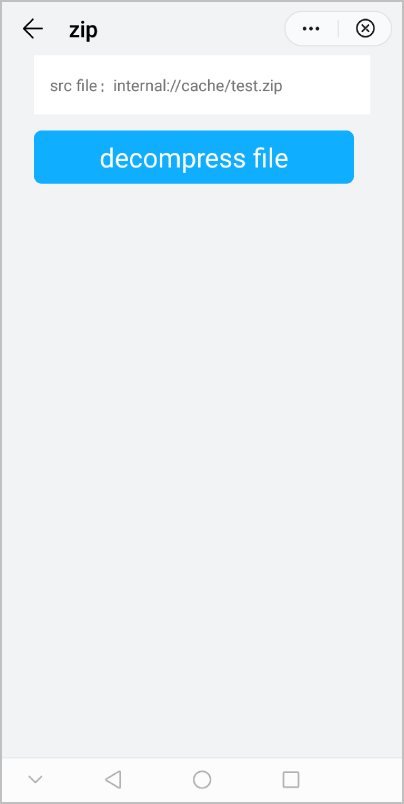
The following figure shows the final effect.