API Declaration
Add the following configuration to the features attribute in the manifest.json file:
{ "name": "service.keyring" } Module Import
Add the following configuration to the script element on the page where the API will be called:
import keyring from '@service.keyring'
Or
var keyring = require('@service.keyring') Application Scope
Item | Description |
|---|---|
Applicable devices | Mobile phones running HarmonyOS 2.0, Android 7.0, or their later versions. |
Applicable region | Global. |
Definition
API | Description |
|---|---|
Obtains the service provider. | |
Saves the information about the user credential. | |
Deletes the information about the user credential saved by the app. | |
Queries user credentials used in app sign-in. | |
Obtains sensitive information about the target credential. |
[h2]keyring.getProvider() (1079+)
Description
Obtains the service provider.
Returns
A character string, which is the service provider code (for example, the English brand name of the vendor), is returned. If the service does not exist, an empty string is returned. If so, do not call other APIs of the service. Otherwise, an exception will occur.
Sample code
functionGetProvider() {
  keyring.getProvider({
    success: function (msg) {
      prompt.showToast({
        message: msg,
        duration: 2000,
        gravity: 'bottom'
      })
    },
    fail: function (msg) {
      prompt.showToast({
        message: msg,
        duration: 2000,
        gravity: 'bottom'
      })
    }
  })
}
[h2]keyring.saveCredential(OBJECT) (1079+)
Description
Saves the information about the user credential. If the call is successful, success is returned. Otherwise, an error message is returned.
OBJECT parameters

If data is updated, you are advised to use the parameters returned by keyring.findCredential to update the modifiable part.
Parameter | Type | Mandatory | Description |
|---|---|---|---|
avatarUrl | string | No | URL of a user's avatar. |
username | string | Yes | User name of a credential, which cannot be modified during the update. |
displayName | string | No | Display name. |
owner |
| Credential owner, that is, the app which saves the credential. CAUTION: To update the existing data, call keyring.findCredential first. Do not modify the returned owner. | |
sharedWith | list<AppIdentity> | No | Apps with which your quick app data can be shared, including HarmonyOS apps, Android apps, and browsers. |
syncable | boolean | Yes | Indicates whether a credential can be synchronized between devices. NOTE: This function is reserved and not supported currently, so set this parameter to false. |
tag | string | No | Tag of a credential. |
type | int | No | Credential type, which cannot be changed during update. If this parameter is not set, the value 0 is used.
|
userAuth | boolean | Yes | Indicates whether to authenticate the user identity. NOTE: In the private key query scenario, user identification can be verified by the lock screen password or fingerprint. Set this attribute to true if there is a lock screen password or fingerprint. Otherwise, set it to false. |
newContent | string/object/int | Yes | Sensitive information about a credential. |
success | function | No | Callback upon success. |
fail | function | No | Callback upon failure. |
AppIdentity description
Parameter | Type | Mandatory | Description |
|---|---|---|---|
name | string | No | App name. |
packageName | string |
| App package name. |
certHash | string |
| SHA-256 fingerprint of the signing certificate. All bytes are presented in HEX format and separated using colons (:). NOTE:
|
domain | string |
| Domain name in the browser. |
type | string | Yes | Owner type.
|
Result codes returned in fail
Result Code | Description |
|---|---|
200 | General error. |
202 | Invalid parameter. |
907300010 | Invalid value of certHash. |
Others | For details, please refer to the Keyring result codes. |
Sample code
To save the new data:
keyring.saveCredential({
  type: 0,
  syncable: "false",
  userAuth: "true",
  username: "Zhang San",
  newContent: "123456",
  success: function (msg) {
    prompt.showToast({
      message: msg,
      duration: 2000,
      gravity: 'bottom'
    })
  },
  fail: function (code,msg) {
    prompt.showToast({
      message: code + msg,
      duration: 2000,
      gravity: 'bottom'
    })
  }
})
To save the updated data:
keyring.saveCredential({
  type: 0,
  syncable: false,
  userAuth: true,
  username: "Zhang San",
  newContent: "12345678",
  sharedWith: [{
    certHash: "${Signing certificate fingerprint}",
    name: "${App name}",
    packageName: "${App package name}",
    type: "android_app"
  },
  {
    name: "${website name}",
    domain: "${website domain name}",
    type: "web"
  }],
  owner: {
    certHash: "3a:25:d7:19:53:9b:39:b9:67:48:c4:85:86:bb:d7:f1:dd:53:e5:e9:29:12:77:0e:f2:5f:4e:7e:9a:b3:7f:cc",
    name: "Keyring_Test",
    packageName: "com.huawei.keyring",
    type: "quick_app"
  },
  success: function (msg) {
    prompt.showToast({
      message: msg,
      duration: 2000,
      gravity: 'bottom'
    })
  },
  fail: function (msg) {
    prompt.showToast({
      message: msg,
      duration: 2000,
      gravity: 'bottom'
    })
  }
})
[h2]keyring.deleteCredential(OBJECT) (1079+)
Description
Deletes the information about the user credential saved by the app. If the call is successful, success is returned. Otherwise, an error message is returned.

This API can only be used to delete the saved data. It cannot be used to delete the shared data.
OBJECT parameters

Parameter | Type | Mandatory | Description |
|---|---|---|---|
username | string | Yes | User name of a credential. |
owner | Yes | Credential owner, that is, the app which saves the credential. | |
type | int | No if the value of type returned by keyring.findCredential is 0 Yes if the value of type returned by keyring.findCredential is not 0 | Credential type.
|
success | function | No | Callback upon success. |
fail | function | No | Callback upon failure. |
AppIdentity description
Parameter | Type | Mandatory | Description |
|---|---|---|---|
name | string | No | App name. |
packageName | string |
| App package name. |
certHash | string |
| SHA-256 fingerprint of the signing certificate. All bytes are presented in HEX format and separated using colons (:). NOTE: The signing fingerprint can be obtained from data returned by keyring.findCredential. |
domain | string |
| Domain name in the browser. |
type | string | Yes | Owner type.
|
Result codes returned in fail
Result Code | Description |
|---|---|
200 | General error. |
202 | Invalid parameter. |
907300010 | Invalid value of certHash. |
Others | For details, please refer to the Keyring result codes. |
Sample code
keyring.deleteCredential({
  owner: {
    certHash: "3a:25:d7:19:53:9b:39:b9:67:48:c4:85:86:bb:d7:f1:dd:53:e5:e9:29:12:77:0e:f2:5f:4e:7e:9a:b3:7f:cc",
    name: "Keyring_Test",
    packageName: "com.huawei.keyring",
    type: "quick_app"
  },
  "type": 0,
  "username": "Zhang San",
  success: function (msg) {
    prompt.showToast({
      message: msg,
      duration: 2000,
      gravity: 'bottom'
    })
  },
  fail: function (code, msg) {
    prompt.showToast({
      message: code + msg,
      duration: 2000,
      gravity: 'bottom'
    })
  }
})
[h2]keyring.findCredential(OBJECT) (1079+)
Description
Queries user credentials used in app sign-in. If the call is successful, the queried credential list is returned. Otherwise, an error message is returned.
OBJECT parameters
Parameter | Type | Mandatory | Description |
|---|---|---|---|
trustedApps | list<AppIdentity> | No | List of trusted apps. If this parameter is not set, the credentials shared by all apps are returned. |
success | function | No | Callback upon success. |
fail | function | No | Callback upon failure. |
AppIdentity description
Parameter | Type | Mandatory | Description |
|---|---|---|---|
name | string | No | App name. |
packageName | string |
| App package name. |
certHash | string |
| SHA-256 fingerprint of the signing certificate. All bytes are presented in HEX format and separated using colons (:). NOTE: You can obtain this fingerprint from the certificate fingerprint configured in AppGallery Connect. |
domain | string |
| Domain name in the browser. |
type | string | Yes | Owner type.
|
Parameters returned in success
Parameter | Type | Description |
|---|---|---|
avatarUrl | string | URL of a user's avatar. |
username | string | User name of a credential. |
displayName | string | Display name. |
owner | Credential owner, that is, the app which saves the credential. | |
sharedWith | list<AppIdentity> | Apps with which a credential is shared. |
syncable | boolean | Indicates whether a credential can be synchronized between devices. |
tag | string | Tag of a credential. |
type | int | Credential type.
|
userAuth | boolean | Indicates whether to authenticate the user identity. NOTE: In the private key query scenario, user identifications can be verified by the lock screen password or fingerprint. |
timeCreated | long | Time when a credential is created. |
timeUpdated | long | Last time when a credential is updated. |
timeUsed | long | Last time when a credential is used. |
Result codes returned in fail
Result Code | Description |
|---|---|
200 | General error. |
202 | Invalid parameter. |
Others | For details, please refer to the Keyring result codes. |
Sample code
keyring.findCredential({
  trustedApps: [{
      type: 'quick_app',
      name: 'AndroidAppIdentity',
      packageName: 'com.huawei.hms.keyring.test',
      certHash: "3C:99:C3:69:27:75:46:FD:E4:14:82:C0:C1:FB:75:54:94:A7:A8:63:CA:9C:A7:BB:4B:9D:48:C4:04:86:9A:93"
    }],
  success: function (data) {
    credential = data // Returned credential list.
    prompt.showToast({
      message: data,
      duration: 2000,
      gravity: 'bottom'
    })
  },
  fail: function (code, msg) {
    prompt.showToast({
      message: code + msg,
      duration: 2000,
      gravity: 'bottom'
    })
  }
})
[h2]keyring.getCredentialContent(OBJECT) (1079+)
Description
Obtains the sensitive information about the target credential according to the credential list returned by keyring.findCredential. If the call is successful, the queried information is returned. Otherwise, an error message is returned.
OBJECT parameters
Parameter | Type | Mandatory | Description |
|---|---|---|---|
username | string | Yes | User name of a credential. |
owner | Yes | Credential owner, that is, the app which saves the credential. | |
type | int | No if the value of type returned by keyring.findCredential is 0 Yes if the value of type returned by keyring.findCredential is not 0 | Credential type.
|
success | function | No | Callback upon success. |
fail | function | No | Callback upon failure. |
AppIdentity description
Parameter | Type | Mandatory | Description |
|---|---|---|---|
name | string | No | App name. |
packageName | string |
| App package name. |
certHash | string |
| SHA-256 fingerprint of the signing certificate. All bytes are presented in HEX format and separated using colons (:). NOTE: The signing fingerprint can be obtained from data returned by keyring.findCredential. |
domain | string |
| Domain name in the browser. |
type | string | Yes | Owner type.
|
Parameters returned in success
Parameter | Type | Description |
|---|---|---|
newContent | string/object/int | Sensitive information about a credential. |
Result codes returned in fail
Result Code | Description |
|---|---|
200 | General error. |
202 | Invalid value of certHash. |
Others | For details, please refer to the Keyring result codes. |
Sample code
keyring.getCredentialContent({
  owner: {
    certHash: "3C:99:C3:69:27:75:46:FD:E4:14:82:C0:C1:FB:75:54:94:A7:A8:63:CA:9C:A7:BB:4B:9D:48:C4:04:86:9A:93",
    name: "AndroidAppIdentity",
    packageName: "com.huawei.hms.keyring.test",
    type: "quick_app"
  },
  type: 0,
  username: "Zhang San",
  success: function (data) {
    prompt.showToast({
      message: data, // Returned sensitive information.
      duration: 2000,
      gravity: 'bottom'
    })
  },
  fail: function (msg, code) {
    prompt.showToast({
      message: code + msg,
      duration: 2000,
      gravity: 'bottom'
    })
  }
})
Demo
<template>
  <!-- Only one root node is allowed in template. -->
  <div class="container">
    <text class="title" onclick="functionGetProvider">getprovider</text>
    <text class="title" onclick="new">newCredential</text>
    <text class="title" onclick="update">updateCredential</text>
    <text class="title" onclick="find">find</text>
    <text class="title" onclick="delete">delete</text>
    <text class="title" onclick="getCredential">getCredential</text>
    <text class="content">{{content}}</text>
  </div>
</template>

<style>
  .container {
    flex-direction: column;
    justify-content: center;
    align-items: center;
  }

  .title {
    font-size: 40px;
    border-radius: 20px;
    margin-top: 10px;
    width: 400px;
    height: 80px;
    text-align: center;
    background-color: #00fa9a;
  }
  .content {
    margin-top: 20px;
    width: 90%;
    height: 600px;
    border: 2px solid #000000;
    border-radius: 10px;
  }
</style>

<script>
  import prompt from '@system.prompt';
  import keyring from '@service.keyring';
  module.exports = {
    data: {
      componentData: {},
      newcertHash: '',
      arr: [],
      content: '',
    },
    functionGetProvider() {
      keyring.getProvider({
        success: function (msg) {
          prompt.showToast({
            message: msg,
            duration: 2000,
            gravity: 'bottom'
          })
        },
        fail: function (msg) {
          prompt.showToast({
            message: msg,
            duration: 2000,
            gravity: 'bottom'
          })
        }
      })
    },
    new() {
      keyring.saveCredential({
        type: 0,
        syncable: "false",
        userAuth: "true",
        username: "newCredential",
        displayName: "newCredential",
        newContent: "123456",
        sharedWith: [
          {
            'type': "quick_app",
            'name': "keyringg",
            'packageName': "com.huawei.keyringg",
            'certHash': "a7:69:69:7d:68:5b:b4:ba:aa:30:8e:07:94:11:3e:8b:64:90:ac:61:f4:d7:e1:ac:58:d5:87:f3:7e:5c:9f:20",
          }],
        success: function (msg) {
          console.log("newCredential " + msg);
          prompt.showToast({
            message: msg,
            duration: 2000,
            gravity: 'bottom'
          })
        },
        fail: function (code, msg) {
          console.log("newCredential " + code + msg);
          prompt.showToast({
            message: 'newCredential' + code + msg,
            duration: 2000,
            gravity: 'bottom'
          })
        }
      })
    },
    update() {
      keyring.saveCredential({
        type: 0,
        syncable: "false",
        userAuth: "true",
        username: "updateCredential",
        displayName: "updateCredential",
        newContent: "123456",
        owner: {
          type: 'quick_app',
          name: 'keyring',
          packageName: 'com.huawei.keyring',
          certHash: "cc:88:3d:9b:99:39:d1:b3:a9:92:e9:bd:a0:49:f6:d4:97:a9:e2:11:19:31:a4:98:1a:8c:77:55:7d:15:3e:43"
        },
        sharedWith: [
          {
            'type': "quick_app",
            'name': "keyringg",
            'packageName': "com.huawei.keyringg",
            'certHash': "a7:69:69:7d:68:5b:b4:ba:aa:30:8e:07:94:11:3e:8b:64:90:ac:61:f4:d7:e1:ac:58:d5:87:f3:7e:5c:9f:20",
          }],
        success: function (msg) {
          console.log("updateCredential " + msg);
          prompt.showToast({
            message: 'updateCredential success',
            duration: 2000,
            gravity: 'bottom'
          })
        },
        fail: function (code, msg) {
          console.log("updateCredential " + code + msg);
          prompt.showToast({
            message: msg + code,
            duration: 2000,
            gravity: 'bottom'
          })
        }
      })
    },
    find() {
      var that = this
      keyring.findCredential({
        trustedApps: [{
          type: 'quick_app',
          name: 'keyring',
          packageName: 'com.huawei.keyring',
          certHash: "cc:88:3d:9b:99:39:d1:b3:a9:92:e9:bd:a0:49:f6:d4:97:a9:e2:11:19:31:a4:98:1a:8c:77:55:7d:15:3e:43"
        }],
        success: function (data) {
          console.log("findCredential success", JSON.stringify(data));
          that.content = data
        },
        fail: function (code, msg) {
          console.log("findCredential fail" + code + msg);
        }
      })
    },
    delete() {
      keyring.deleteCredential({
        owner: {
          type: 'quick_app',
          name: 'keyring',
          packageName: 'com.huawei.keyring',
          certHash: "cc:88:3d:9b:99:39:d1:b3:a9:92:e9:bd:a0:49:f6:d4:97:a9:e2:11:19:31:a4:98:1a:8c:77:55:7d:15:3e:43"
        },
        "type": 0,
        "username": "newCredential",
        success: function (msg) {
          console.log("delete" + msg);
        },
        fail: function (code, msg) {
          console.log("delete" + code + msg);
        }
      })
    },
    getCredential() {
      keyring.getCredentialContent({
        owner: {
          type: 'quick_app',
          name: 'keyring',
          packageName: 'com.huawei.keyring',
          certHash: "cc:88:3d:9b:99:39:d1:b3:a9:92:e9:bd:a0:49:f6:d4:97:a9:e2:11:19:31:a4:98:1a:8c:77:55:7d:15:3e:43"
        },
        type: 0,
        username: "hanjingjing",
        success: function (msg) {
          console.log("get" + msg);
        },
        fail: function (code, msg) {
          console.log("get" + code + msg);
        }
      })
    }
  }
</script>
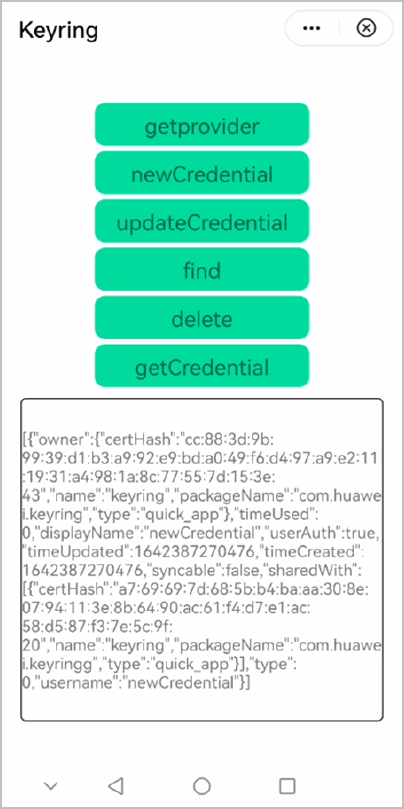
The following figure shows the final effect.