Application Scope
Item | Description |
|---|---|
Applicable devices | Mobile phones, tablets, Vision products, and telematics devices |
Applicable regions | Global |
Attributes
In addition to general attributes, the attributes listed in the following table are supported.
Attribute | Type | Default Value | Mandatory | Description |
|---|---|---|---|---|
src | uri | - | No | Image URI, which can be a local or cloud path. The supported image formats include PNG, JPG, SVG (animated images and filters are not supported currently), and GIF. NOTE:
|
alt | uri | - | No | Placeholder image displayed during loading. Only local image resources are supported. Since the 1060 version, if no placeholder image is set, Huawei Quick App Engine uses a placeholder image whose color is #ccc (gray) by default. If you do not want to use the default placeholder image, set alt to blank. CAUTION: The placeholder image set by alt takes effect only when both the width and height of the image are set. |
autoplay (1080+) | boolean | true | No | Determines whether to automatically play the animation of a GIF or WEBP image.
|
Styles
The image element supports the active pseudo-class. In addition to common styles, the styles listed in the following table are supported.
Style | Type | Default Value | Mandatory | Description |
|---|---|---|---|---|
resize-mode | cover | contain | stretch | center | cover | No | Image scaling type. |
object-fit (1035+) | contain | cover | fill | none | scale-down | cover | No | Image scaling type. (The resize-mode style is to be deprecated. If the two styles coexist, the object-fit style is used.) |
filter(1090+) | blur | 0 | No | Filter mode. Currently, only the blur mode is supported. CAUTION: The blur value must be an integer and the length unit is px or dp, for example, filter:blur(4px). |
alt-object-fit (1090+) | contain | cover | fill | none | scale-down | cover | No | Scale type of a placeholder image. |
Types of the resize-mode style
Type | Description |
|---|---|
cover | Resize an image while keeping its aspect ratio so that both dimensions of the image will be greater than or equal to the dimensions of the view, and place the image to the center. |
contain | Resize an image while keeping its aspect ratio so that both dimensions of the image will be less than or equal to the dimensions of the view, and place the image to the center. |
stretch | Resize an image without keeping its aspect ratio to fill the view. |
center | Center an image in the view without scaling it. |
Types of object-fit (1035+) and alt-object-fit (1090+) styles
Type | Description |
|---|---|
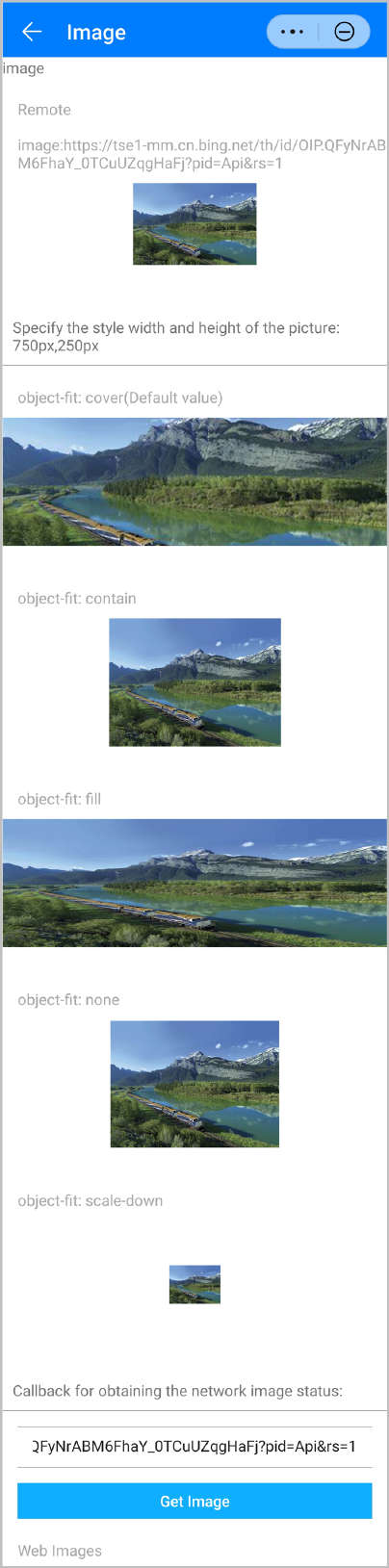
cover | Resize an image while keeping its aspect ratio so that both dimensions of the image will be greater than or equal to the dimensions of the view, and place the image to the center. |
contain | Resize an image while keeping its aspect ratio so that both dimensions of the image will be less than or equal to the dimensions of the view, and place the image to the center. |
fill | Resize an image without keeping its aspect ratio to fill the view. |
none | Resize an image while keeping its original aspect ratio. |
scale-down | The effect of this style is similar to that after you set none and contain in sequence. Finally, the image with a smaller size is displayed. |
Events
In addition to common events, the events listed in the following table are supported.
Event | Parameter | Triggering Condition |
|---|---|---|
complete (1020+) | - | An element is successfully loaded. |
error (1020+) | errorCode | An exception occurs during image loading. CAUTION: If the value of src does not meet requirements, the value will be ignored, and the error event will not be triggered. |
Methods
Method | Parameter | Description |
|---|---|---|
startAnimation (1080+) | - | Plays the animation of a GIF or WEBP image. |
stopAnimation (1080+) | - | Stops the animation of a GIF or WEBP image. |
Sample Code
<template>
  <div class="doc-page">
    <div class="page-title-wrap">
      <text class="page-title">{{componentName}}</text>
    </div>
    <div class="item-container">
      <text class="item-title">Remote
        image:https://tse1-mm.cn.bing.net/th/id/OIP.QFyNrABM6FhaY_0TCuUZqgHaFj?pid=Api&rs=1</text>
      <div class="item-content">
        <image src="https://tse1-mm.cn.bing.net/th/id/OIP.QFyNrABM6FhaY_0TCuUZqgHaFj?pid=Api&rs=1" class="image" style="object-fit: cover"></image>
      </div>
    </div>
    <!-- Specify the height and width of an image style to 750 px and 250 px, respectively. -->
    <div class="img-layout-header">
      <text>Specify the height and width of an image style to 750 px and 250 px, respectively. </text>
    </div>
    <div class="item-container">
      <text class="item-title">object-fit: cover (default value)</text>
      <div class="item-content-with-height">
        <image src="https://tse1-mm.cn.bing.net/th/id/OIP.QFyNrABM6FhaY_0TCuUZqgHaFj?pid=Api&rs=1" class="fixed-size-wh"
          style="object-fit: cover"></image>
      </div>
    </div>
    <div class="item-container">
      <text class="item-title">object-fit: contain</text>
      <div class="item-content-with-height">
        <image src="https://tse1-mm.cn.bing.net/th/id/OIP.QFyNrABM6FhaY_0TCuUZqgHaFj?pid=Api&rs=1" class="fixed-size-wh"
          style="object-fit: contain"></image>
      </div>
    </div>
    <div class="item-container">
      <text class="item-title">object-fit: fill</text>
      <div class="item-content-with-height">
        <image src="https://tse1-mm.cn.bing.net/th/id/OIP.QFyNrABM6FhaY_0TCuUZqgHaFj?pid=Api&rs=1" class="fixed-size-wh"
          style="object-fit: fill"></image>
      </div>
    </div>
    <div class="item-container">
      <text class="item-title">object-fit: none</text>
      <div class="item-content-with-height">
        <image src="https://tse1-mm.cn.bing.net/th/id/OIP.QFyNrABM6FhaY_0TCuUZqgHaFj?pid=Api&rs=1" class="fixed-size-wh"
          style="object-fit: none"></image>
      </div>
    </div>
    <div class="item-container">
      <text class="item-title">object-fit: scale-down</text>
      <div class="item-content-with-height">
        <image src="https://tse1-mm.cn.bing.net/th/id/OIP.QFyNrABM6FhaY_0TCuUZqgHaFj?pid=Api&rs=1" class="fixed-size-wh"
          style="width: 100px;height: 100px;object-fit: scale-down;"></image>
      </div>
    </div>
    <!-- Callback for web image obtaining status -->
    <div class="img-layout-header">
      <text>Callback for web image obtaining status<text>
    </div>
    <input class="input-text" type="text" onchange="onImageUrlChange" value="{{inputImageURL}}"></input>
    <input class="input-button" type="button" onclick="onImageGetClick" value="Obtain an image."></input>
    <div class="item-container">
      <text class="item-title">Internet image</text>
      <div class="item-content-without-height">
        <image src="{{requestImageURL}}" style="object-fit: contain" oncomplete="onImageComplete" onerror="onImageError"></image>
      </div>
    </div>
  </div>
</template>
<style>
  .doc-page {
    flex: 1;
    flex-direction: column;
  }
  .img-layout-header {
    padding: 20px;
    border-bottom: 1px #808080;
  }
  .item-container {
    margin-top: 40px;
    margin-bottom: 40px;
    flex-direction: column;
  }
  .item-title {
    padding-left: 30px;
    padding-bottom: 20px;
    color: #aaaaaa;
  }
  .item-content {
    height: 200px;
    justify-content: center;
  }
  .image {
    width: 240px;
    height: 160px;
    object-fit: contain;
  }
  .item-content-with-height {
    height: 250px;
    justify-content: center;
    align-items: center;
  }
  .item-content-with-height-bk {
    height: 250px;
    justify-content: center;
    align-items: center;
    background-color: #fff;
  }
  .item-content-without-height {
    justify-content: center;
    align-items: center;
  }
  .fixed-size-wh {
    width: 750px;
    height: 250px;
  }
  .fixed-size-wh2 {
    width: 250px;
    height: 750px;
  }
  .fixed-size-h {
    height: 160px;
  }
  .circle {
    border-radius: 80px;
  }
  .input-button {
    flex: 1;
    padding: 10px 30px;
    margin: 0px 30px;
    font-size: 30px;
    color: #ffffff;
    background-color: #0faeff;
  }
  .input-text {
    height: 80px;
    line-height: 80px;
    padding: 0px 30px;
    margin: 30px;
    border-top-width: 1px;
    border-bottom-width: 1px;
    border-color: #999999;
    font-size: 30px;
    background-color: #ffffff;
  }
</style>
<script>
  import prompt from '@system.prompt'
  export default {
    private: {
      componentName: 'image',
      inputImageURL: 'https://tse1-mm.cn.bing.net/th/id/OIP.QFyNrABM6FhaY_0TCuUZqgHaFj?pid=Api&rs=1',
      requestImageURL: ''
    },
    onInit() {
      this.$page.setTitleBar({ text: 'Image' })
    },
    onImageUrlChange(data) {
      this.inputImageURL = data.value
    },
    onImageGetClick() {
      this.requestImageURL = this.inputImageURL
      prompt.showToast({
        message: 'Load' + this.requestImageURL + 'Image'
      })
    },
    onImageComplete(data) {
      prompt.showToast({
        message: 'Image obtained.\n' + 'Height:' + data.height + 'px  ' + 'Width:' + data.width + 'px'
      })
    },
    onImageError() {
      prompt.showToast({
        message: 'Failed to obtain the image.'
      })
    }
  }
</script>
The following figure shows the final effect.
Version Change History
Version | Date | Description |
|---|---|---|
1090 | 2022-05-19 |
|
1080 | 2021-12-28 |
|
1060 | 2019-12-10 | Added the default placeholder image setting. If you do not want to use the default placeholder image, blank is passed. |
1040 | 2019-06-24 | Added object-fit to override the resize-mode style. |
1030 | 2018-10-31 | Added the support for SVG images in the src attribute. (Animated images and filters are not supported currently). |
1020 | 2018-06-20 | Added the complete and error events. |
1010 | 2018-04-20 | Added the support for the active pseudo-class. |