API Declaration
Add the following configuration to the features attribute in the manifest.json file:
{"name": "system.bluetooth"} Module Import
Add the following configuration to the script element on the page where the API will be called:
import bluetooth from '@system.bluetooth'
Or
var bluetooth = require("@system.bluetooth") Application Scope
Item | Description |
|---|---|
Applicable devices | Mobile phones, tablets, and telematics devices |
Applicable regions | Global |
Definition
API | Description |
|---|---|
Initializes the Bluetooth module. | |
Disables the Bluetooth module. | |
Obtains the status of the local Bluetooth adapter. | |
Listens to Bluetooth adapter change events. | |
Scans for nearby Bluetooth devices. | |
Stops scanning for nearby Bluetooth devices. | |
Obtains all the Bluetooth devices found when the Bluetooth module takes effect, including the devices that are connected to the current device. | |
Listens to events of discovering new devices. | |
Obtains the connected devices based on the UUID. | |
Connects to a Bluetooth Low Energy (BLE) device. | |
Disconnects from a BLE device. | |
Obtains all the services provided by a Bluetooth device. | |
Obtains all the characteristic values of a service provided by a Bluetooth device. | |
Obtains characteristic values from a BLE device in binary mode. | |
Writes binary data to the characteristic values of a BLE device. | |
Enables the function of notifying any characteristic value changes to a BLE device change and subscribes to BLE characteristic values. | |
Listens to changes of the characteristic values of a BLE device. | |
Listens to BLE connection status change events. | |
Obtains the battery level of Huawei Bluetooth earphones. |
[h2]bluetooth.openAdapter(OBJECT)
Description
Initializes the Bluetooth module.
OBJECT parameters
Parameter | Type | Mandatory/Optional | Description |
|---|---|---|---|
operateAdapter | boolean | Optional | Indicates whether to enable the Bluetooth function of the device. If the value is set to true, a pop-up will be displayed when the Bluetooth function is disabled, asking the user whether to enable the function. The default value is false. |
success | function | Optional | Callback upon success. |
fail | function | Optional | Callback upon failure. |
complete | function | Optional | Callback upon completion. |
Sample code
bluetooth.openAdapter({
    operateAdapter: true,
    success: function () {
        console.log("success");
    },
    fail: function () {
        console.log("fail");
    },
    complete: function () {
        console.log("complete");
    }
})
[h2]bluetooth.closeAdapter(OBJECT)
Description
Disables the Bluetooth module. Calling this API will disconnect all established connections and release relevant system resources. It is recommended that this API be called in pairs with bluetooth.openAdapter.
OBJECT parameters
Parameter | Type | Mandatory | Description |
|---|---|---|---|
operateAdapter | boolean | No | Indicates whether to disable the Bluetooth function of the device. If the value is set to true, the Bluetooth function will be disabled. The default value is false. |
success | function | No | Callback upon success. |
fail | function | No | Callback upon failure. |
complete | function | No | Callback upon completion. |
Sample code
bluetooth.closeAdapter({
    success:function(){
        console.log("success");
    },
    fail: function() {
        console.log("fail");
    },
    complete: function (){
        console.log("complete");
    }
})
[h2]bluetooth.getAdapterState(OBJECT)
Description
Obtains the status of the local Bluetooth adapter.
OBJECT parameters
Parameter | Type | Mandatory | Description |
|---|---|---|---|
success | function | No | Callback upon success. |
fail | function | No | Callback upon failure. |
complete | function | No | Callback upon completion. |
Parameters returned by success
Parameter | Type | Description |
|---|---|---|
available | boolean | Whether the Bluetooth adapter is available. |
discovering | boolean | The Bluetooth adapter is searching for devices. |
Sample code
bluetooth.getAdapterState({
    success:function(){
        console.log("success");
    },
    fail: function() {
        console.log("fail");
    },
    complete: function (){
        console.log("complete");
    }
})
[h2]bluetooth.onadapterstatechange(OBJECT)
Description
Listens to Bluetooth adapter change events.
Returns
Parameter | Type | Description |
|---|---|---|
available | boolean | Whether the Bluetooth adapter is available. |
discovering | boolean | The Bluetooth adapter is searching for devices. |
Sample code
bluetooth.onadapterstatechange = function (event) {
    console.log('adapterState changed, now is', event.available)
}
[h2]bluetooth.startDevicesDiscovery(OBJECT)
Description
Scans for nearby Bluetooth devices. This operation is resource-consuming. After searching for and connecting to the expected device, use the bluetooth.stopDevicesDiscovery method to stop the search.
OBJECT parameters
Parameter | Type | Mandatory | Description |
|---|---|---|---|
services | array.<string> | No | List of UUIDs of the primary services to be searched for. Some Bluetooth devices broadcast their primary service UUIDs. If this parameter is set, only the Bluetooth devices that broadcast the specified primary service UUIDs are searched for. It is recommended that this parameter be used to filter out Bluetooth devices that do not need to be processed. |
allowDuplicatesKey | boolean | No | Indicates whether the same device's information can be repeatedly reported. The default value is false. If repeated reporting is allowed, the same device's information can be repeatedly reported using the bluetooth.ondevicefound method, but the returned RSSI values are different. |
interval | number | No | Interval for reporting devices. The default value is 0. indicating that a new device is immediately reported once being found. Other values indicate that devices are reported at the specified interval. |
success | function | No | Callback upon success. |
fail | function | No | Callback upon failure. |
complete | function | No | Callback upon completion. |
Sample code
bluetooth.startDevicesDiscovery({
    services: ['FEE7'],
    success: function () {
        console.log("success")
    }
})
[h2]bluetooth.stopDevicesDiscovery(OBJECT)
Description
Stops scanning for nearby Bluetooth devices. If the required Bluetooth device has been found and no further search is necessary, it is recommended that this API be called to stop the Bluetooth search.
OBJECT parameters
Parameter | Type | Mandatory | Description |
|---|---|---|---|
success | function | No | Callback upon success. |
fail | function | No | Callback upon failure. |
complete | function | No | Callback upon completion. |
Sample code
bluetooth.stopDevicesDiscovery({
    success:function(){
        console.log("success");
    },
    fail: function() {
        console.log("fail");
    },
    complete: function (){
        console.log("complete");
    }
})
[h2]bluetooth.getDevices(OBJECT)
Description
Obtains all the Bluetooth devices found when the Bluetooth module takes effect, including the devices that are connected to the current device.
OBJECT parameters
Parameter | Type | Mandatory | Description |
|---|---|---|---|
success | function | No | Callback upon success. |
fail | function | No | Callback upon failure. |
complete | function | No | Callback upon completion. |
Parameters returned by success
Parameter | Type | Description |
|---|---|---|
devices | array.<string> | List of the connected devices mapping the UUIDs. For the structure of devices, please refer to devices parameters. |
devices parameters
Parameter | Type | Description |
|---|---|---|
name | string | Name of a Bluetooth device. Some devices may have no names. |
deviceId | string | Unique ID of a Bluetooth device. |
RSSI | number | Signal strength of the current Bluetooth device. |
advertisData | arraybuffer | The ManufacturerData segment in the broadcast data of the current Bluetooth device. |
advertisServiceUUIDs | array.<string> | The ServiceUUIDs segment in the broadcast data of the current Bluetooth device. |
localName | string | The LocalName segment in the broadcast data of the current Bluetooth device. |
serviceData | string | ServiceData segment in the broadcast data of the current Bluetooth device. The structure returned is as follows: {"service uuid string": ArrayBuffer}. |
Sample code
bluetooth.getDevices({
    success:function(res){
        console.log(res)
        if (res.devices[0]) {
            console.log(res.devices[0].advertisData)
        }
    },
    fail: function() {
        console.log("fail");
    },
    complete: function (){
        console.log("complete");
    }
})
[h2]bluetooth.ondevicefound(OBJECT)
Description
Listens to events of discovering new devices.
Returns
Parameter | Type | Description |
|---|---|---|
devices | array.<object> | List of the newly found devices. For the structure of devices, please refer to devices parameters. |
Sample code
bluetooth.ondevicefound = function (event) {
    console.log('new device list has founded')
}
[h2]bluetooth.getConnectedDevices(OBJECT)
Description
Obtains the connected devices based on the UUID.
OBJECT parameters
Parameter | Type | Mandatory | Description |
|---|---|---|---|
success | function | No | Callback upon success. |
fail | function | No | Callback upon failure. |
complete | function | No | Callback upon completion. |
services | array.<string> | Yes | List of the UUIDs mapping the primary services of Bluetooth devices. |
Parameters returned by success
Parameter | Type | Description |
|---|---|---|
devices | array.<string> | List of the connected devices mapping the UUIDs. For the structure of devices, please refer to devices parameters. |
devices parameters
Parameter | Type | Description |
|---|---|---|
name | string | Name of a Bluetooth device. Some devices may have no names. |
deviceId | string | Unique ID of a Bluetooth device. |
Sample code
bluetooth.getConnectedDevices({
    services:['uuid'],
    success:function(res){
        console.log(res)
        if (res.devices[0]) {
            console.log(res.devices[0].name)
        }
    },
    fail:function() {
        console.log("fail");
    },
    complete:function (){
        console.log("complete");
    }
})
[h2]bluetooth.createBLEConnection(OBJECT)
Description
Connects to a BLE device.
Connects to a previously connected device with the deviceId obtained when the device was discovered last time. No additional device discovery process is required.
OBJECT parameters
Parameter | Type | Mandatory | Description |
|---|---|---|---|
deviceId | string | Yes | Unique ID of a Bluetooth device. |
timeout | number | No | Timeout interval, in milliseconds. If this parameter is left empty, no timeout occurs. |
success | function | No | Callback upon success. |
fail | function | No | Callback upon failure. |
complete | function | No | Callback upon completion. |
Sample code
bluetooth.createBLEConnection({
    deviceId:deviceId,
    success:function(){
        console.log("success");
    },
    fail: function() {
        console.log("fail");
    },
    complete: function (){
        console.log("complete");
    }
})
[h2]bluetooth.closeBLEConnection(OBJECT)
Description
Disconnects from a BLE device.
OBJECT parameters
Parameter | Type | Mandatory | Description |
|---|---|---|---|
deviceId | string | Yes | Bluetooth device ID. |
success | function | No | Callback upon success. |
fail | function | No | Callback upon failure. |
complete | function | No | Callback upon completion. |
Sample code
bluetooth.closeBLEConnection({
    deviceId:deviceId,
    success:function(){
        console.log("success");
    },
    fail: function() {
        console.log("fail");
    },
    complete: function (){
        console.log("complete");
    }
})
[h2]bluetooth.getBLEDeviceServices(OBJECT)
Description
Obtains all the services provided by a Bluetooth device.
OBJECT parameters
Parameter | Type | Mandatory | Description |
|---|---|---|---|
deviceId | string | Yes | Bluetooth device ID. |
success | function | No | Callback upon success. |
fail | function | No | Callback upon failure. |
complete | function | No | Callback upon completion. |
Parameters returned by success
Parameter | Type | Description |
|---|---|---|
services | array.<object> | List of the services provided by the device. For the structure of services, please refer to services parameters. |
services parameters
Parameter | Type | Description |
|---|---|---|
uuid | string | UUIDs mapping the services provided by the Bluetooth device. |
isPrimary | boolean | Indicates whether the service is the primary one. |
Sample code
bluetooth.getBLEDeviceServices({
    deviceId:deviceId,
    success:function(res){
        console.log('device services:', res.services)
    },
    fail: function() {
        console.log("fail");
    },
    complete: function (){
        console.log("complete");
    }
})
[h2]bluetooth.getBLEDeviceCharacteristics(OBJECT)
Description
Obtains all the characteristic values of a service provided by a Bluetooth device.
OBJECT parameters
Parameter | Type | Mandatory | Description |
|---|---|---|---|
deviceId | string | Yes | Bluetooth device ID. |
serviceId | string | Yes | Bluetooth device service UUID, which needs is obtained using the getBLEDeviceServices API. |
success | function | No | Callback upon success. |
fail | function | No | Callback upon failure. |
complete | function | No | Callback upon completion. |
Parameters returned by success
Parameter | Type | Description |
|---|---|---|
characteristics | array.<object> | List of the services provided by the Bluetooth device. For the structure of characteristics, please refer to characteristics parameters. |
characteristics parameters
Parameter | Type | Description |
|---|---|---|
uuid | string | UUID of a Bluetooth device characteristic value. |
properties | object | Operations supported by a Bluetooth device characteristic value. For the structure of properties, please refer to properties parameters. |
properties parameters
Parameter | Type | Description |
|---|---|---|
read | boolean | Indicates whether a characteristic value supports the read operation. |
write | boolean | Indicates whether a characteristic value supports the write operation. |
notify | boolean | Indicates whether a characteristic value supports the notify operation. |
indicate | boolean | Indicates whether a characteristic value supports the indicate operation. |
Sample code
bluetooth.getBLEDeviceCharacteristics({
    deviceId:deviceId,
    serviceId:serviceId,
    success:function(res){
        console.log('device getBLEDeviceCharacteristics:',
        res.characteristics)},
    fail: function() {
        console.log("fail");
    },
    complete: function (){
        console.log("complete");
    }
})
[h2]bluetooth.readBLECharacteristicValue(OBJECT)
Description
Obtains characteristic values from a BLE device in binary mode.

This API can be called only when Bluetooth device characteristic values support the read operation.
OBJECT parameters
Parameter | Type | Mandatory | Description |
|---|---|---|---|
deviceId | string | Yes | Bluetooth device ID. |
serviceId | string | Yes | UUID of the service corresponding to Bluetooth characteristic values. |
characteristicId | string | Yes | UUID of a Bluetooth characteristic value. |
success | function | No | Callback upon success. |
fail | function | No | Callback upon failure. |
complete | function | No | Callback upon completion. |
Sample code
bluetooth.readBLECharacteristicValue(
    // The Bluetooth device specified by this deviceId must have been connected through createBLEConnection.
    deviceId:deviceId,
    // The value of serviceId needs to be obtained through the getBLEDeviceServices API.
    serviceId:serviceId,
    // The value of characteristicId needs to be obtained through the getBLEDeviceCharacteristics API.
    characteristicId,
    success:function() {
        console.log("success")
    })
[h2]bluetooth.writeBLECharacteristicValue(OBJECT)
Description
Writes binary data to the characteristic values of a BLE device.

This API can be called only when the characteristic values of the device support the write operation.
OBJECT parameters
Parameter | Type | Mandatory | Description |
|---|---|---|---|
deviceId | string | Yes | Bluetooth device ID. |
serviceId | string | Yes | UUID of the service corresponding to Bluetooth characteristic values. |
characteristicId | string | Yes | UUID of a Bluetooth characteristic value. NOTE: The UUID can contain only lowercase letters. Otherwise, error code 10008 is displayed. |
value | arraybuffer | Yes | Binary value mapping a characteristic value of a Bluetooth device. |
success | function | No | Callback upon success. |
fail | function | No | Callback upon failure. |
complete | function | No | Callback upon completion. |
Sample code
bluetooth.writeBLECharacteristicValue({
    // The value of deviceId must be obtained through the getBluetoothDevices or onBluetoothDeviceFound.
    // API.
    deviceId:deviceId,
    // The value of serviceId needs to be obtained through the getBLEDeviceServices API.
    serviceId:serviceId,
    // The value of characteristicId needs to be obtained through the getBLEDeviceCharacteristics API.
    characteristicId:characteristicId,
    // The value is of the ArrayBuffer type.
    value: buffer,
    success:function(){
        console.log("success");
    },
    fail: function() {
        console.log("fail");
    },
    complete: function (){
        console.log("complete");
    }
})
[h2]bluetooth.notifyBLECharacteristicValueChange(OBJECT)
Description
Enables the function of notifying any characteristic value changes to a BLE device change and subscribes to BLE characteristic values.

This API can be called only when the characteristic values of the device support the notify or indicate operation.
You must enable notifyBLECharacteristicValueChange to listen to characteristicValueChange events of the device.
OBJECT parameters
Parameter | Type | Mandatory | Description |
|---|---|---|---|
deviceId | string | Yes | Bluetooth device ID. |
serviceId | string | Yes | UUID of the service corresponding to Bluetooth characteristic values. |
characteristicId | string | Yes | UUID of a Bluetooth characteristic value. |
state | boolean | Yes | Indicates whether to enable the notify function. |
success | function | No | Callback upon success. |
fail | function | No | Callback upon failure. |
complete | function | No | Callback upon completion. |
Sample code
bluetooth.notifyBLECharacteristicValueChange({
    state: true, // Enable the notify function.
    // The Bluetooth device specified by this deviceId must have been connected through createBLEConnection.
    deviceId:deviceid,
    // The value of serviceId needs to be obtained through the getBLEDeviceServices API.
    serviceId:serviceId,
    // The value of characteristicId needs to be obtained through the getBLEDeviceCharacteristics API.
    characteristicId:characteristicId,
    success:function(){
        console.log("success")
    },
    fail: function() {
        console.log("fail");
    },
    complete: function (){
        console.log("complete");
    }
})
[h2]bluetooth.onblecharacteristicvaluechange(OBJECT)
Description
Listens to changes of the characteristic values of a BLE device. To receive notifications sent by the connected Bluetooth device, enable the notifyBLECharacteristicValueChange API first.
Returns
Parameter | Type | Description |
|---|---|---|
deviceId | string | Bluetooth device ID. |
serviceId | string | UUID of the service corresponding to Bluetooth characteristic values. |
characteristicId | string | UUID of a Bluetooth characteristic value. |
value | arraybuffer | Latest characteristic value. |
Sample code
bluetooth.onblecharacteristicvaluechange = function (event) {
    console.log(event.value)
}
[h2]bluetooth.onbleconnectionstatechange(OBJECT)
Description
Listens to BLE connection status change events, including proactive connection or disconnection arranged by you, losing a device, and unexpected device disconnection.
Returns
Parameter | Type | Description |
|---|---|---|
deviceId | string | Bluetooth device ID. |
connected | boolean | Whether the Bluetooth device is connected. |
Sample code
bluetooth.onbleconnectionstatechange = function(res){
  console.log('device'+ res.deviceId+'state has changed,connected:'+res.connected)
}
[h2]bluetooth.getDevicesBattery(OBJECT) (1078+, Not Formulated by the Vendor Alliance)
Description
Obtains the battery level of Huawei Bluetooth earphones.
OBJECT parameters
Parameter | Type | Mandatory | Description |
|---|---|---|---|
macle.copyFileToPublicDir | String | Yes | MAC address of the Bluetooth earphones. |
success | Function | No | Callback upon success. |
fail | Function | No | Callback upon failure. |
complete | Function | No | Callback upon completion. |
Parameters returned by success
Parameter | Type | Description |
|---|---|---|
batteryValue | Object | Battery level. -1: unknown; 0 to 100: percentage of the remaining power. |
chargeState | Object | Charging status.
|
infoStr | String | Overall battery level. |
The returned data is in the following format:
{"chargeState":{"1":-1,"2":0,"3":1,"4":0},"batteryValue":{"1":-1,"2":55,"3":100,"4":65},"infoStr":"6,2,55,3,0,4,100,5,1,6,65,7,0"}
The values of chargeState and batteryValue are described as follows:
- 1: normal (reserved)
- 2: left earbud
- 3: right earbud
- 4: charging box
Parameters returned by fail
Parameter | Description |
|---|---|
errCode | Error code. |
errMsg | Error message. |
Result Codes
Result Code | Description |
|---|---|
200 | Other general error. |
Sample code
bluetooth.getDevicesBattery({
  mac: "XX:XX:XX:XX:XX:XX",
  success: function (data) {
    console.log('getDevicesBattery success data = ' + JSON.stringify(data));
  },
  fail: function (errMsg, errCode) {
    console.log('getDevicesBattery fail errMsg = ' + errMsg + '; errCode = ' + errCode);
  },
  complete: function () {
    console.log('getDevicesBattery complete .');
  }
})
Result Codes
Result Code | Message | Description |
|---|---|---|
0 | ok | Normal state. |
10000 | not init | No connection initiated. |
10001 | not available | The Bluetooth adapter is unavailable. |
10002 | no device | The specified device is not found. |
10003 | connection fail | Connection failed. |
10004 | no service | The specified service is not found. |
10005 | no characteristic | The specified characteristics value is not found. |
10006 | no connection | The Bluetooth device is disconnected. |
10007 | property not support | The current characteristic value does not support the operation. |
10008 | system error | Other exceptions reported by the system. |
10009 | system not support | The Android version is earlier than 5.0 and does not support BLE. |
Demo
<template>
  <div class="container">

    <div class="item-content">
      <text class="txt">openBluetooth: {{openBluetoothSuccess}}</text>
    </div>
    <input type="button" class="btn" onclick="openAdapter"  value="open Bluetooth" />

    <div class="item-content">
      <text class="txt">closeBluetooth: {{closeBluetoothSuccess}}</text>
    </div>
    <input type="button" class="btn" onclick="closeAdapter"  value="close Bluetooth" />

    <div class="item-content">
      <text class="txt"> getAdapterState: {{bluetoothstate}}</text>
    </div>
    <input type="button" class="btn" onclick="getAdapterState"  value="get Adapter State" />
    <input type="button" class="btn" onclick="onAdapterState"  value="on Adapter State" />
    <div class="input-item">
      <text class="input-hint">bluetooth.inputUuid</text>
      <input class="input-text" placeholder="please input bluetooth.uuid"    onchange="oninput"></input>
    </div>
    <div class="item-content">
      <text
        class="txt">bluetoothDiscoveryDevices: {{bluetoothdevices}}</text>
    </div>
    <input type="button" class="btn" onclick="startBluetoothDevicesDiscovery"  value="bluetooth discoveryDevices" />

    <div class="item-content">
      <text class="txt">stopDiscovery: {{stopDiscoverSuccess}}</text>
    </div>
    <input type="button" class="btn" onclick="stopBluetoothDevicesDiscovery"  value="bluetooth stopDiscoveryDevices" />

    <div class="item-content">
      <text class="txt">getBluetoothDevices: {{bluetoothdevices}}</text>
    </div>
    <input type="button" class="btn" onclick="getBluetoothDevices"  value="bluetooth getBluetoothDevices" />

    <div class="input-item">
      <text class="input-hint">bluetooth.inputDeviceId</text>
      <input class="input-text" placeholder="deviceId" onchange="oninputdeviceId"></input>
    </div>
    <div class="item-content">
      <text class="txt">connectBluetoothDevice: {{connectionstate}}</text>
    </div>
    <input type="button" class="btn" onclick="createBLEConnection"  value="Connects to a BLE device" />

    <div class="item-content">
      <text class="txt"> disconnectBluetooth : {{closeconnectionstate}}</text>
    </div>
    <input type="button" class="btn" onclick="closeBLEConnection"  value="Disconnects from a BLE device" />

    <div class="item-content">
      <text
        class="txt">getBluetoothDevicesService: {{deviceservices}}</text>
    </div>
    <input type="button" class="btn" onclick="getBLEDeviceServices"  value="getBluetoothAllDevicesService" />

    <div class="item-content">
      <text class="txt">getConnectedDevices: {{connecteddevices}}</text>
    </div>
    <input type="button" class="btn" onclick="getConnectedDevices" value="get ConnectedDevices" />

    <div class="input-item">
      <text class="input-hint">bluetooth.inputServiceId</text>
      <input class="input-text" placeholder="serviceId" onchange="oninputserviceId"></input>
    </div>

    <div class="item-content">
      <text
        class="txt">getBLEDeviceCharacteristics: {{servicecharacters}}</text>
    </div>
    <input type="button" class="btn" onclick="getBLEDeviceCharacteristics"  value="get BLEDeviceCharacteristics" />

    <div class="input-item">
      <text class="input-hint">inputCharacteristicId</text>
      <input class="input-text" placeholder="characteristicId" onchange="oninputcharacteristicId"></input>
    </div>

    <div class="input-item">
      <text class="input-hint">bluetooth.toggleNotify</text>
      <input class="input-text" type="checkbox" onchange="oninputnotifystate"></input>
    </div>

    <div class="item-content">
      <text class="txt">notifyBLECharacteristicValueChange: {{notifyBLECharacteristicValue}}</text>
    </div>
    <input type="button" class="btn" onclick="notifyBLECharacteristicValueChange"  value="notify BLECharacteristicValueChange" />
    <input type="button" class="btn" onclick="onblecharacteristicvaluechange"  value="on blecharacteristicvaluechange" />
    <div class="item-content">
      <text
        class="txt">SpecifyBluetoothServiceFeatureValue: {{characteristicsvalue}}</text>
    </div>
    <input type="button" class="btn" onclick="readBLECharacteristicValue"  value="read BLECharacteristicValue" />

    <div class="input-item">
      <text class="input-hint">inputByteStringValue</text>
      <input class="input-text" placeholder="byteStringValue" onchange="oninputbyteStringValue"></input>
    </div>
    <div class="item-content">
      <text
        class="txt">writeCharacteristicValue: {{writecharacteristicsvalue}}</text>
    </div>
    <input type="button" class="btn" onclick="writeBLECharacteristicValue"  value="write CharacteristicValue" />

    <div class="item-content">
      <text
        class="txt">lowpowerBleconnectionstate: {{bleconnectionstate}}</text>
    </div>
    <input type="button" class="btn" onclick="onbleconnectionstatechange"  value="on bleconnectionstatechange" />
    <div class="input-item">
      <text class="input-hint">inputmac</text>
      <input class="input-text" placeholder="mac" onchange="oninputmac"></input>
    </div>
    <div class="item-content">
      <text class="txt">batteryLevel: {{bluetoothElectricity}}</text>
    </div>
    <input type="button" class="btn" onclick="getBatteryLevel"  value="get Devices Battery" />
  </div>
</template>

<style>
  .container{
  flex: 1;
  flex-direction: column;
}

  .item-container {
    margin-bottom: 50px;
    margin-right: 60px;
    margin-left: 60px;
    flex-direction: column;
  }

  .item-content {
    flex-direction: column;
    background-color: #ffffff;
    padding-left: 30px;
    padding-right: 30px;
    padding-top: 20px;
    padding-bottom: 20px;
    margin-bottom: 30px;
    align-items: flex-start;
  }

  .txt {
    padding-top: 15px;
    padding-bottom: 15px;
  }

  .input-item {
    margin-bottom: 80px;
    flex-direction: column;
  }

  .input-hint {
    margin-left: 30px;
    margin-bottom: 30px;
    margin-right: 30px;
  }

  .input-text {
    height: 80px;
    line-height: 80px;
    padding-left: 30px;
    padding-right: 30px;
    margin-left: 30px;
    margin-right: 30px;
    border-top-width: 1px;
    border-bottom-width: 1px;
    border-color: #999999;
    font-size: 30px;
    background-color: #ffffff;
  }
    .btn {
  height: 80px;
  text-align: center;
  border-radius: 5px;
  margin-right: 60px;
  margin-left: 60px;
  margin-bottom: 50px;
  color: #ffffff;
  font-size: 30px;
  background-color: #0faeff;
}
</style>
<script>
  import bluetooth from '@system.bluetooth'

  export default {
    data: {
      componentName: 'bluetooth',
      componentData: {},
      openBluetoothSuccess: '',
      closeBluetoothSuccess: '',
      bluetoothstate: '',
      bluetoothdevices: '',
      connectStatus: '',
      bluetoothElectricity: '',
      stopDiscoverSuccess: '',
      connectionstate: '',
      closeconnectionstate: '',
      connecteddevices: '',
      notifyBLECharacteristicValue: '',
      scanedresult: '',
      deviceservices: '',
      servicecharacters: '',
      characteristicsvalue: '',
      writecharacteristicsvalue: '',
      bleconnectionstate: '',
      deviceIdInput: '',
      serviceId: '',
      serviceMac: '',
      service_psd: '',
      service_uuid: '',
      service_uuidarray: [],
      characteristics_uuid: '',
      byteStringValue: '',
      byteValue: '',
      deviceId: '',
      notifystate: false,
      ble_isonnectting: false,
      characteristics: []
    },
    onInit: function () {
      this.$page.setTitleBar({ text: 'bluetooth' })
      this.componentData = this.$t('message.interface.system.bluetooth')
    },
    openAdapter() {
      var that = this
      that.openBluetoothSuccess = ''
      bluetooth.openAdapter({
        operateAdapter: true,
        success: function (res) {
          console.log('openBluetoothAdapter success')
          that.openBluetoothSuccess = 'success'
        },
        fail: function (erromsg, errocode) {
          console.log('openBluetoothAdapter fail')
          that.openBluetoothSuccess = 'code ' + errocode + ' errormsg ' + erromsg
        },
        complete: function () {
          console.log('openBluetoothAdapter complete')
        }
      })
    },

    closeAdapter() {
      var that = this
      bluetooth.closeAdapter({
        operateAdapter: true,
        success: function () {
          console.log('closeAdapter success')
          that.closeBluetoothSuccess = 'success'
        },
        fail: function (erromsg, errocode) {
          console.log('closeAdapter fail')
          that.closeBluetoothSuccess = 'code ' + errocode + ' errormsg ' + erromsg
        },
        complete: function () {
          console.log('closeAdapter complete')
        }
      })
    },

    getAdapterState() {
      var that = this
      bluetooth.getAdapterState({
        success: function (res) {
          console.log('getBluetoothAdapterState success', res)
          var available = res.available
          var discovering = res.discovering
          that.bluetoothstate = 'available ' + available + ' discovering ' + discovering
        },
        fail: function (erromsg, errocode) {
          console.log('getAdapterState fail')
          that.bluetoothstate = 'code ' + errocode + ' errormsg ' + erromsg
        },
        complete: function () {
          console.log('getAdapterState complete')
        }
      })
    },

    onAdapterState() {
      var that = this
      console.log("on blooth state");
      bluetooth.onadapterstatechange = function (res) {
        console.log('adapterState changed, now is', res)
        var available = res.available
        var discovering = res.discovering
        that.bluetoothstate = 'available ' + available + ' discovering ' + discovering
      }
    },

    startBluetoothDevicesDiscovery: function () {
      var that = this
      console.log('startBluetoothDevicesDiscovery begin ' + that.service_uuidarray)
      bluetooth.startDevicesDiscovery({
        services: that.service_uuidarray,
        allowDuplicatesKey: false,
        success: function (res) {
          console.log('startBluetoothDevicesDiscovery success', res)
          that.onBluetoothDeviceFound()
        },
        fail: function (erromsg, errocode) {
          console.log('startBluetoothDevicesDiscovery fail ', erromsg)
          that.bluetoothdevices = 'code ' + errocode + ' errormsg ' + erromsg
        }
      })
    },
    stopBluetoothDevicesDiscovery: function () {
      var that = this
      console.log('stopBluetoothDevicesDiscovery begin')
      bluetooth.stopDevicesDiscovery({
        success: function (res) {
          console.log('stopBluetoothDevicesDiscovery success ', res)
          that.stopDiscoverSuccess = 'success'
        },
        fail: function (erromsg, errocode) {
          console.log('stopBluetoothDevicesDiscovery fail ', erromsg)
          that.stopDiscoverSuccess = 'code ' + errocode + ' errormsg ' + erromsg
        }
      })
    },

    onBluetoothDeviceFound: function () {
      var that = this
      var devicefound = false
      console.log('onBluetoothDeviceFound begin')
      // Monitor scan
      bluetooth.ondevicefound = function (res) {
        console.log(that.componentData.monitorSearchNewDevices, res)
        that.bluetoothdevices = JSON.stringify(res)
        if (Array.isArray(res.devices)) {
          for (var i = 0; i < res.devices.length; i++) {
            console.log(res.devices[i].name)
            if (res.devices[i].name === 'HUAWEI Mate 20') {
              that.deviceId = res.devices[i].deviceId
              devicefound = true
              break
            }
          }
        }

        if (devicefound) {
          that.stopBluetoothDevicesDiscovery()
        }
      }
    },

    getBluetoothDevices() {
      var that = this
      console.log('getBluetoothDevices begin')
      bluetooth.getDevices({
        success: function (res) {
          console.log('getBluetoothDevices success', res)
          that.bluetoothdevices = JSON.stringify(res)
          if (res.devices[0]) {
            console.log(res.devices[0].deviceId)
            console.log(res.devices[0].name)
          }
        },
        fail: function (erromsg, errocode) {
          console.log('getBluetoothDevices fail ', erromsg)
          that.bluetoothdevices = 'code ' + errocode + ' errormsg ' + erromsg
        },
        complete: function () {
          console.log('getBluetoothDevices complete')
        }
      })
    },

    createBLEConnection() {
      var that = this
      console.log('createBLEConnection begin deviceId ' + that.deviceId)
      bluetooth.createBLEConnection({
        deviceId: that.deviceId,
        success: function (res) {
          console.log('createBLEConnection success', res)
          that.connectionstate = 'success'
        },
        fail: function (erromsg, errocode) {
          console.log('createBLEConnection fail ', erromsg)
          that.connectionstate = 'code ' + errocode + ' errormsg ' + erromsg
        },
        complete: function () {
          console.log('createBLEConnection complete')
        }
      })
    },
    getBatteryLevel() {
      var that = this
      console.log('getBatteryLevel begin deviceId ' + that.mac)
      bluetooth.getDevicesBattery({
        mac: that.mac,
        success: function (res) {
        //  console.log('getBatteryLevel success', res)
          console.log('getDevicesBattery success data = ' + JSON.stringify(res));
          that.bluetoothElectricity = res.batteryValue
        },
        fail: function (erromsg, errocode) {
          console.log('getBatteryLevel fail ', erromsg,errocode)
          that.bluetoothElectricity = 'code ' + errocode + ' errormsg ' + erromsg
        },
        complete: function () {
          console.log('getBatteryLevel complete')
        }
      })
    },
    closeBLEConnection() {
      var that = this
      console.log('closeBLEConnection  begin deviceId ' + that.deviceId)
      bluetooth.closeBLEConnection({
        deviceId: that.deviceId,
        success: function (res) {
          console.log('closeBLEConnection  success', res)
          that.closeconnectionstate = 'success'
        },
        fail: function (erromsg, errocode) {
          console.log('closeBLEConnection  fail ', erromsg)
          that.closeconnectionstate = 'code ' + errocode + ' errormsg ' + erromsg
        },
        complete: function () {
          console.log('closeBLEConnection  complete')
        }
      })
    },

    getBLEDeviceServices() {
      var that = this
      console.log('getBLEDeviceServices  begin deviceId ' + that.deviceId)
      bluetooth.getBLEDeviceServices({
        deviceId: that.deviceId,
        success: function (res) {
          console.log('getBLEDeviceServices  success', res)
          that.deviceservices = JSON.stringify(res)
          if (Array.isArray(res.services)) {
            for (var i = 0; i < res.services.length; i++) {
              console.log(res.services[i].uuid)
              if (res.services[i].isPrimary) {
                that.service_uuid = res.services[i].uuid
                console.log('getBLEDeviceServices  service_uuid ', that.service_uuid)
                break
              }
            }
          }
        },
        fail: function (erromsg, errocode) {
          console.log('getBLEDeviceServices  fail ', erromsg)
          that.deviceservices = 'code ' + errocode + ' errormsg ' + erromsg
        },
        complete: function () {
          console.log('getBLEDeviceServices  complete')
        }
      })
    },

    getConnectedDevices() {
      var that = this
      // Here you need to get the device first, then connect, then get the services of the device, and then pass in the main uuid of the service.
      console.log('getConnectedDevices begin')
      bluetooth.getConnectedDevices({
        services: that.service_uuidarray,
        success: function (res) {
          console.log('getConnectedDevices success', res)
          that.connecteddevices = JSON.stringify(res)
          if (res.devices[0]) {
            console.log(res.devices[0].deviceId)
            console.log(res.devices[0].name)
          }
        },
        fail: function (erromsg, errocode) {
          console.log('getConnectedDevices fail ', erromsg)
          that.connecteddevices = 'code ' + errocode + ' errormsg ' + erromsg
        },
        complete: function () {
          console.log('getBluetoothDevices complete')
        }
      })
    },

    getBLEDeviceCharacteristics() {
      var that = this
      console.log('getBLEDeviceCharacteristics  begin deviceId ' + that.deviceId)
      bluetooth.getBLEDeviceCharacteristics({
        deviceId: that.deviceId,
        serviceId: that.service_uuid,
        success: function (res) {
          console.log('getBLEDeviceCharacteristics  success', res)
          that.servicecharacters = JSON.stringify(res)
          if (Array.isArray(res.characteristics)) {
            for (var i = 0; i < res.characteristics.length; i++) {
              console.log(res.characteristics[i].uuid)
              if (res.characteristics[i].properties.write) {
                that.characteristics_uuid = res.characteristics[i].uuid
                console.log('getBLEDeviceCharacteristics  characteristics_uuid ', that.characteristics_uuid)
                break
              }
            }
          }
        },
        fail: function (erromsg, errocode) {
          console.log('getBLEDeviceCharacteristics  fail ', erromsg)
          that.servicecharacters = 'code ' + errocode + ' errormsg ' + erromsg
        },
        complete: function () {
          console.log('getBLEDeviceCharacteristics  complete')
        }
      })
    },

    readBLECharacteristicValue() {
      var that = this
      console.log('readBLECharacteristicValue  begin deviceId ' + that.deviceId)
      console.log('readBLECharacteristicValue  begin serviceId ' + that.service_uuid)
      console.log('readBLECharacteristicValue  begin characteristicId ' + that.characteristics_uuid)
      bluetooth.readBLECharacteristicValue({
        deviceId: that.deviceId,
        serviceId: that.service_uuid,
        characteristicId: that.characteristics_uuid,
        success: function (res) {
          console.log('readBLECharacteristicValue  success', res)
        },
        fail: function (erromsg, errocode) {
          console.log('readBLECharacteristicValue  fail ', 'code ' + errocode + ' errormsg ' + erromsg)
          that.characteristicsvalue = 'code ' + errocode + ' errormsg ' + erromsg
        },
        complete: function () {
          console.log('readBLECharacteristicValue  complete')
        }
      })
    },

    writeBLECharacteristicValue() {
      var that = this
      console.log('writeBLECharacteristicValue  begin deviceId ' + that.deviceId)
      console.log('writeBLECharacteristicValue  begin serviceId ' + that.service_uuid)
      console.log('writeBLECharacteristicValue  begin characteristicId ' + that.characteristics_uuid)
      // Send a 0x00 hexadecimal data to the Bluetooth device
      let buffer = new ArrayBuffer(1)
      let dataView = new DataView(buffer)
      dataView.setUint8(0, 0)
      that.byteValue = that.stringToByte(that.byteStringValue)
      bluetooth.writeBLECharacteristicValue({
        deviceId: that.deviceId,
        serviceId: that.service_uuid,
        characteristicId: that.characteristics_uuid,
        value: that.byteStringValue,
        success: function (res) {
          console.log('writeBLECharacteristicValue  success', res)
          that.writecharacteristicsvalue = 'success'
        },
        fail: function (erromsg, errocode) {
          console.log('writeBLECharacteristicValue  fail ', erromsg)
          that.writecharacteristicsvalue = 'code ' + errocode + ' errormsg ' + erromsg
        },
        complete: function () {
          console.log('writeBLECharacteristicValue  complete')
        }
      })
    },

    notifyBLECharacteristicValueChange() {
      var that = this
      console.log('notifyBLECharacteristicValueChange  begin deviceId ' + that.deviceId)
      console.log('notifyBLECharacteristicValueChange  begin serviceId ' + that.service_uuid)
      console.log('notifyBLECharacteristicValueChange  begin characteristicId ' + that.characteristics_uuid)

      bluetooth.notifyBLECharacteristicValueChange({
        state: that.notifystate,
        deviceId: that.deviceId,
        serviceId: that.service_uuid,
        characteristicId: that.characteristics_uuid,
        success: function (res) {
          console.log('notifyBLECharacteristicValueChange  success', res)
          that.notifyBLECharacteristicValue = 'success'
        },
        fail: function (erromsg, errocode) {
          console.log('notifyBLECharacteristicValueChange  fail ', erromsg)
          that.notifyBLECharacteristicValue = 'code ' + errocode + ' errormsg ' + erromsg
        },
        complete: function () {
          console.log('notifyBLECharacteristicValueChange  complete')
        }
      })
    },

    onblecharacteristicvaluechange: function () {
      var that = this
      console.log('onblecharacteristicvaluechange  begin')
      bluetooth.onblecharacteristicvaluechange = function (res) {
        console.log(that.componentData.monitorCharacteristicChange, res)
        that.characteristicsvalue = JSON.stringify(res)
      }
    },

    onbleconnectionstatechange: function () {
      var that = this
      console.log('onbleconnectionstatechange  begin')
      bluetooth.onbleconnectionstatechange = function (res) {
        console.log(that.componentData.monitorConnectChange, res)
        that.bleconnectionstate = JSON.stringify(res)
      }
    },

    stringToByte(str) {
      var bytes = []
      var len, c
      len = str.length
      for (var i = 0; i < len; i++) {
        c = str.charCodeAt(i)
        if (c >= 0x010000 && c <= 0x10FFFF) {
          bytes.push(((c >> 18) & 0x07) | 0xF0)
          bytes.push(((c >> 12) & 0x3F) | 0x80)
          bytes.push(((c >> 6) & 0x3F) | 0x80)
          bytes.push((c & 0x3F) | 0x80)
        } else if (c >= 0x000800 && c <= 0x00FFFF) {
          bytes.push(((c >> 12) & 0x0F) | 0xE0)
          bytes.push(((c >> 6) & 0x3F) | 0x80)
          bytes.push((c & 0x3F) | 0x80)
        } else if (c >= 0x000080 && c <= 0x0007FF) {
          bytes.push(((c >> 6) & 0x1F) | 0xC0)
          bytes.push((c & 0x3F) | 0x80)
        } else {
          bytes.push(c & 0xFF)
        }
      }
      return bytes
    },

    oninput: function (event) {
      var self = this
      var arra = []
      arra.push(event.value)
      self.service_uuidarray = arra
    },

    oninputdeviceId: function (event) {
      var self = this
      self.deviceId = event.value
    },
    oninputmac: function (event) {
      var self = this
      self.mac = event.value
    },
    oninputserviceId: function (event) {
      var self = this
      self.service_uuid = event.value
    },

    oninputcharacteristicId: function (event) {
      var self = this
      self.characteristics_uuid = event.value
    },

    oninputbyteStringValue: function (event) {
      var self = this
      self.byteStringValue = event.value
    },

    oninputnotifystate: function (event) {
      var self = this
      self.notifystate = event.checked
      console.log('notifystate ' + self.notifystate)
    },

  }
</script>
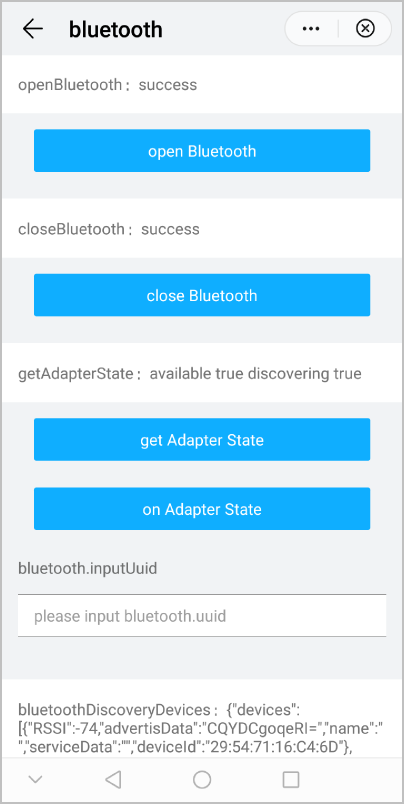
The following figure shows the final effect.