API Declaration
Add the following configuration to the features attribute in the manifest.json file:
{"name": "hap.io.Video"} Module Import
Add the following configuration to the script element on the page where the API will be called:
import Video from '@hap.io.Video'
Application Scope
Item | Description |
|---|---|
Applicable devices | Mobile phones and tablets |
Applicable regions | Global |
Definition
API | Description |
|---|---|
Creates a video compression task instance. A video can be compressed by using the compression API. | |
Compresses a video. | |
Listens to the video compression progress. | |
Interrupts an ongoing compression task and releases resources. | |
Obtains video information. | |
Obtains the video thumbnail. |
[h2]Task Instance Creation (1072+)
Description
Creates a video compression task instance. A video can be compressed by using the compression API.

- Only one compression task can be created for each object at a time. A new compression task can be created only after the current task is complete.
- When multiple compression tasks are created, the tasks are executed one by one.
Parameters
Parameter | Type | Mandatory/Optional | Default Value | Description |
|---|---|---|---|---|
uri | string | Mandatory | - | URI of the original video file. The URI is obtained from media.takeVideo or media.pickVideo. |
height | number | Optional | Height of the original video | Video height after compression, in pixels. After video compression, the actual height of some videos is adjusted upwards to the nearest value that can be exactly divided by 16. For example, the input parameter 300 is adjusted to 304 after compression. If the rotation angle of the original video is 90 or 270 degrees, the rotation angle of the compressed video is adjusted to 0 degrees, that is, the width and height of the compressed video are exchanged with the width and height that are set. |
width | number | Optional | Width of the original video | Video width after compression, in pixels. After video compression, the actual width of some videos is adjusted upwards to the nearest value that can be exactly divided by 16. For example, the input parameter 300 is adjusted to 304 after compression. If the rotation angle of the original video is 90 or 270 degrees, the rotation angle of the compressed video is adjusted to 0 degrees, that is, the width and height of the compressed video are exchanged with the width and height that are set. |
bitrate | number | Optional | 1/2 of the original video bit rate | Bit rate of the compressed video, in bit/s. The default value is half of the original video bit rate. Restricted by the hardware platform, the actual bit rate after compression may not be the same as the configured bit rate. |
framerate | number | Optional | Frame rate of the original video | Frame rate of the compressed video, in fps. The default value is the original video frame rate. If the original video frame rate cannot be obtained, the default value 30 is used. Restricted by the hardware platform, the actual frame rate after compression may not be the same as the configured frame rate. NOTE: To ensure the compression validity, if the input frame rate is greater than the original video frame rate, the original video frame rate is used. |
Returns
Parameter | Description |
|---|---|
Video | Video object. |
Sample code
var mVideoTask = new Video({
  // For details about supported URI types, please refer to https://developer.huawei.com/consumer/en/doc/development/quickApp-References/quickapp-filestructure.
  // The URI is obtained from media.takeVideo or media.pickVideo.
  uri:'internal://xxx'
})
[h2]compressVideo(OBJECT) (1072+)
Description
Compresses a video.
Parameters
Parameter | Type | Mandatory/Optional | Default Value | Description |
|---|---|---|---|---|
success | function | Optional | - | Callback upon success. |
fail | function | Optional | - | Callback upon failure. |
complete | function | Optional | - | Callback upon completion. |
Parameters returned in success
Parameter | Type | Description |
|---|---|---|
uri | string | URI of the compressed video file. |
name | string | Video file name. |
size | number | Video file size, in bytes. |
Result codes returned in fail
Parameter | Description |
|---|---|
200 | API exception. |
202 | Invalid parameter. |
300 | I/O error. |
1001 | Invalid original video. |
205 | The compression task has been created. |
203 | Instance not found. |
Sample code
mVideoTask.compressVideo({
  success: function (res) {
    console.log(`success: ${res.uri}`)
  },
  fail: function (data, code) {
    console.log(`fail code:${code}, msg:${data}`)
  },
})
[h2] onprogressupdate(OBJECT) (1072+)
Description
Listens to the video compression progress.
Parameters
Parameter | Type | Mandatory/Optional | Default Value | Description |
|---|---|---|---|---|
callback | function | Optional | - | Triggered when the playback progress changes. Progress changes are listened once a second. |
Returns
Parameter | Type | Description |
|---|---|---|
progress | int | Compression progress. The value ranges from 0 to 100 and is updated every second. |
Sample code
mVideoTask.onprogressupdate = function(res) {
  console.log(`current progress: ${res.progress}`)
}
[h2]abort(OBJECT) (1072+)
Description
Interrupts an ongoing compression task and releases resources.
Parameter | Type | Mandatory/Optional | Default Value | Description |
|---|---|---|---|---|
success | function | Optional | - | Callback upon success. |
fail | function | Optional | - | Callback upon failure. |
complete | function | Optional | - | Callback upon completion. |
Sample code
mVideoTask.abort()
mVideoTask = null
[h2]Video.getVideoInfo(OBJECT) (1072+)
Description
Obtains video information.
Parameters
Parameter | Type | Mandatory/Optional | Default Value | Description |
|---|---|---|---|---|
uri | string | Mandatory | - | Video file URI. The value is obtained from media.takeVideo or media.pickVideo, or generated by compressVideo(). |
success | function | Optional | - | Callback upon success. |
fail | function | Optional | - | Callback upon failure. |
complete | function | Optional | - | Callback upon completion. |
Parameters returned in success
Parameter | Type | Description |
|---|---|---|
uri | string | Video file URI. |
name | string | Video file name. |
size | number | Video file size, in bytes. |
height | number | Video height, in pixels. |
width | number | Video width, in pixels. |
bitrate | number | Video bit rate, in bit/s. |
framerate | number | Video frame rate, in fps. |
duration | number | Video duration, in seconds. |
Sample code
Video.getVideoInfo({
  success: function (data) {
   console.log(`success: ${data.size}`)
  },
  fail: function() {
  }
})
[h2]Video.getVideoThumbnail(OBJECT) (1072+)
Description
Obtains the video thumbnail.
Parameters
Parameter | Type | Mandatory/Optional | Default Value | Description |
|---|---|---|---|---|
uri | string | Mandatory | - | Video file URI. |
success | function | Optional | - | Callback upon success. |
fail | function | Optional | - | Callback upon failure. |
complete | function | Optional | - | Callback upon completion. |
Parameters returned in success
Parameter | Type | Description |
|---|---|---|
uri | string | Video thumbnail URI. |
Sample code
Video.getVideoThumbnail({
  success: function (data) {
    console.log(`success: ${data.uri}`)
  },
  fail: function() {
  }
})
Demo
<template>
  <!-- Only one root node is allowed in template. -->
  <div class="container">
    <div class="case-title">
      <text class="title">Video</text>
    </div>
    <div class="mlr-container">
      <video src="{{videoUri}}" poster="{{posterUri}}" class="video"></video>
    </div>
    <div class="mlr-container mt-btn">
      <input onclick="takeVideo" type="button" value="takeVideo" class="btn-blue" />
    </div>
    <div class="mlr-container mt-btn">
      <input onclick="pickVideo" type="button" value="pickVideo" class="btn-blue" />
    </div>
    <div class="mlr-container mt-btn">
      <div class="btn-gray" if="{{videoUri && isOriginInfoGetted }}" onclick="compressVideo">
        <text class="color-a">compressVideo</text>
      </div>
    </div>
    <!-- Before compression -->
    <div class="case-title">
      <text class="title">beforeCompress</text>
    </div>
    <div class="info-container">
      <div class="info-item border-bottom-1">
        <text class="title color-primary">size</text>
        <text class="result">{{isOriginInfoGetted ? originInfo.size : noGained}}</text>
      </div>
      <div class="info-item border-bottom-1">
        <text class="title color-primary">width</text>
        <text class="result">{{isOriginInfoGetted ? originInfo.width : noGained}}</text>
      </div>
      <div class="info-item border-bottom-1">
        <text class="title color-primary">height</text>
        <text class="result">{{isOriginInfoGetted ? originInfo.height : noGained}}</text>
      </div>
      <div class="info-item border-bottom-1">
        <text class="title color-primary">bitrate</text>
        <text class="result">{{isOriginInfoGetted ? originInfo.bitrate : noGained}}</text>
      </div>
      <div class="info-item">
        <text class="title color-primary">framerate</text>
        <text class="result">{{isOriginInfoGetted ? originInfo.framerate : noGained}}</text>
      </div>
    </div>
    <!-- After compression -->
    <div class="case-title">
      <text class="title">afterCompress</text>
    </div>
    <div class="info-container">
      <div class="info-item border-bottom-1">
        <text class="title color-primary">size</text>
        <text class="result">{{isCompressInfoGetted ? compressInfo.size : noGained}}</text>
      </div>
      <div class="info-item border-bottom-1">
        <text class="title color-primary">width</text>
        <text class="result">{{isCompressInfoGetted ? compressInfo.width : noGained}}</text>
      </div>
      <div class="info-item border-bottom-1">
        <text class="title color-primary">height</text>
        <text class="result">{{isCompressInfoGetted ? compressInfo.height : noGained}}</text>
      </div>
      <div class="info-item border-bottom-1">
        <text class="title color-primary">bitrate</text>
        <text class="result">{{isCompressInfoGetted ? compressInfo.bitrate : noGained}}</text>
      </div>
      <div class="info-item">
        <text class="title color-primary">framerate</text>
        <text class="result">{{isCompressInfoGetted ? compressInfo.framerate : noGained}}</text>
      </div>
    </div>
  </div>
</template>


<style >
  .btn-blue {
    background-color: #0a59f7;
    width: 100%;
    height: 80px;
    border-radius: 40px;
    color: #fff;
    font-size: 32px;
    font-weight: 500;
  }
  .color-a {
    color: #0a59f7;
  }
  .container {
    flex-direction: column;
    background-color: #F1F3F5;
    padding-bottom: 50px;
  }
  .case-title {
    margin-left: 32px;
    margin-right: 32px;
    margin-bottom: 20px;
    flex-direction: column;
    margin-top: 40px;
  }

  .case-title .title {
    color: rgba(0, 0, 0, 0.6);
    font-size: 28px;
    font-weight: 500;
  }
  .mlr-container {
    margin-right: 32px;
    margin-left: 32px;
  }
  .mt-btn {
    margin-top: 32px;
  }
  .video {
    width: 100%;
    height: 360px;
  }
  .btn-gray {
    background-color: rgba(0, 0, 0, 0.05);
    width: 100%;
    height: 80px;
    border-radius: 40px;
    align-items: center;
    justify-content: center;
  }
  .case-title {
    margin-left: 32px;
    margin-right: 32px;
    margin-bottom: 20px;
    flex-direction: column;
  }
  .case-title .title {
    color: #232325;
    font-size: 28px;
    font-weight: 500;
  }
  .info-container {
    margin-left: 32px;
    margin-right: 32px;
    padding-right: 20px;
    padding-left: 20px;
    background-color: #fff;
    border-radius: 32px;
    flex-direction: column;
  }
  .info-container .info-item {
    height: 120px;
    border-bottom-color: rgba(0, 0, 0, 0.05);
  }
  .info-container .info-item .title {
    flex-shrink: 0;
    font-size: 32px;
    color: rgba(0, 0, 0, 0.9);
  }
  .info-container .info-item .result {
    width: 100%;
    justify-content: flex-end;
    text-align: right;
    color: #999;
  }
  .case-title {
    margin-left: 32px;
    margin-right: 32px;
    margin-bottom: 20px;
    flex-direction: column;
  }
  .case-title .title {
    color: #232325;
    font-size: 28px;
    font-weight: 500;
  }
</style>

<script>

  import media from '@system.media';
  import Video from '@hap.io.Video';
  import prompt from '@system.prompt';
  module.exports = {
    public: {
      videoUri: '',
      posterUri: '',
      originInfo: {
        size: 0,
        width: 0,
        height: 0,
        bitrate: 0,
        framerate: 0,
      },
      compressInfo: {
        size: 0,
        width: 0,
        height: 0,
        bitrate: 0,
        framerate: 0,
      },
      isOriginInfoGetted: false,
      isCompressInfoGetted: false,
      noGained: "noGained"
    },
    onInit: function () {
      this.$page.setTitleBar({ text: this.$t('Video') });
    },
    pickVideo() {
      let that = this;
      media.pickVideo({
        success: function (data) {
          console.log("handling success: " + data.uri);
          that.videoUri = data.uri;
          Video.getVideoThumbnail({
            uri: data.uri,
            success: function ({ uri }) {
              that.posterUri = uri;
            }
          });
          Video.getVideoInfo({
            uri: data.uri,
            success: function (videoInfo) {
              that.isOriginInfoGetted = true;
              that.originInfo = {
                size: videoInfo.size,
                width: videoInfo.width,
                bitrate: videoInfo.bitrate,
                framerate: videoInfo.framerate,
                height: videoInfo.height,
              }
            }
          })
        },
        fail: function (data, code) {
          console.log("handling fail, code=" + code);
        }
      })

    },
    takeVideo() {
      let that = this;
      media.takeVideo({
        success: function (data) {
          console.log("data.uri " + data.uri);
          that.videoUri = data.uri;
          Video.getVideoThumbnail({
            uri: data.uri,
            success: function ({ uri }) {
              that.posterUri = uri;
            }
          });
          Video.getVideoInfo({
            uri: data.uri,
            success: function (videoInfo) {
              that.isOriginInfoGetted = true;
              that.originInfo = {
                size: videoInfo.size,
                width: videoInfo.width,
                bitrate: videoInfo.bitrate,
                framerate: videoInfo.framerate,
                height: videoInfo.height,
              }
            }
          })
        }
      })
    },

    compressVideo() {
      let that = this;
      prompt.showLoading({
        message: this.$t('loading1'),
        loadingColor: '#0faeff',
        mask: true
      })
      console.log(" this.videoUri:" + this.videoUri);
      console.log(" this.originInfo.width / 2:" + this.originInfo.width / 2);
      console.log("  this.originInfo.height / 2:" + this.originInfo.height / 2);

      let videoTask = new Video({
        uri: this.videoUri,
        width: this.originInfo.width / 2,
        height: this.originInfo.height / 2
      });
      console.log("  videoTask.compressVideo ready");
      videoTask.compressVideo({
        success: function ({ uri }) {
          console.log("compressVideo uri" + uri);
          console.log("  videoTask.compressVideo go");
          Video.getVideoInfo({
            uri: uri,
            success: function (videoInfo) {
              that.isCompressInfoGetted = true;
              that.compressInfo = {
                size: videoInfo.size,
                width: videoInfo.width,
                bitrate: videoInfo.bitrate,
                framerate: videoInfo.framerate,
                height: videoInfo.height,
              }
            }
          })
        },
        fail: function (data, code) {
          console.log("handling fail, code=" + code);
           console.log("handling fail, data=" + data);
        },
        complete: function ({ uri }) {
          console.log("complete compressVideo uri" + uri);
        }


      });

      videoTask.onprogressupdate = function ({ progress }) {
        console.log(progress)
        if (progress >= 100) {
          prompt.hideLoading();
        }
      };
    }
  }
</script>
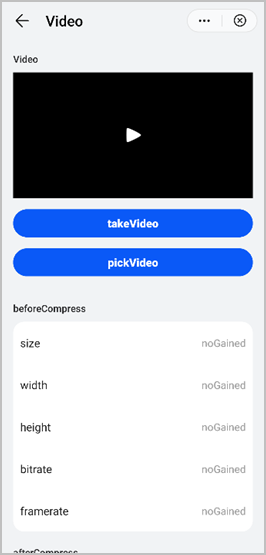
The following figure shows the final effect.