Module Import
Add the following configuration to the script element on the page where the API will be called:
import router from '@system.router'
Or
var router = require("@system.router") Application Scope
Item | Description |
|---|---|
Applicable devices | Mobile phones, tablets, Vision products, and telematics devices |
Applicable regions | Global |
Definition
API | Description |
|---|---|
Redirects to the configured page. | |
Redirects to an in-app page without returning to the current page. | |
Returns to the previous page. | |
Clears all historical pages and retains only the current page, that is, retain the page on the top of the stack. | |
Obtains the number of pages in the current page stack. | |
Returns the current page stack list. | |
Obtains the current page status. |
[h2]router.push(OBJECT)
Description
Redirects to the configured page.

Data passed during page redirection may be obtained by other apps. Therefore, you are advised not to pass highly sensitive data.
OBJECT

The total size of the OBJECT parameters cannot exceed 128 KB.
Parameter | Type | Mandatory | Description |
|---|---|---|---|
uri | string | Yes | Target URI, which supports the following formats:
When the value is a complete URI that contains a schema, the processing flow is as follows:
The processing logic of the default policy is as follows:
|
params | object | No | Data to be passed during redirection. Parameters can be used on a page through this.param1, where param1 is the parameter name in the JSON file. The value of param1 will be converted into the string type. |
params parameters
Parameter | Type | Mandatory | Description |
|---|---|---|---|
___PARAM_LAUNCH_FLAG___ (1050+) | string | No | Quick app launch mode. Currently, only the clearTask option is supported, indicating that all other pages will be closed when the target page is opened. For details, please refer to Page Launch Mode. |
___PARAM_LAUNCH_NATIVE_FLAG___ (1070+) | string | No | Flag used when a native app is launched. The default value is newTask. You can set multiple flags as required. Use vertical bars (|) to separate the flags, for example, newTask|clearTask and newTask|clearTop.
|
___PARAM_PAGE_ANIMATION___ (1070+) | object | No | Animation type for page redirection. NOTE: Currently, Huawei does not support this function. |
Sample code
// launch phone app
router.push({
  uri: 'tel:10086'
});
// open page by path
router.push({
  uri: '/about',
  params: {testId:'1'}
});
// open page by name
router.push({
  uri: 'About',
  params: {testId:'1'}
});
// send sms
router.push({
  uri: 'sms',
  params: {body:'test send message'}
});
The following usage is added:
// open web page
router.push({
  uri: 'https://www.example.com'
});
// install apk
router.push({
  uri: 'internal://cache/example.apk'
});
Sample code for opening Baidu and AutoNavi maps:
import pkg from '@system.package';
// Map navigation
navMap(address){
    console.log("nav map");
    if (address == undefined) {
        return;
    }
    // Address conversion
    var special = "Address 1";
    if (address.indexOf(special)>=0) {
        address = address.substr(0, address.indexOf(special)+ special.length);
    }
    special = "Address 2";
    if (address.indexOf(special)>=0) {
        address = address.substr(0, address.indexOf(special)+ special.length);
    }
    special = "Address 3";
    if (address.indexOf(special)>=0) {
        address = address.substr(0, address.indexOf(special)+ special.length);
    }
    special = "Address 1";
    if (address.indexOf(special)>=0) {
        address = address.substr(0, address.indexOf(special)+ special.length);
    }
    special = "Address 2";
    if (address.indexOf(special)>=0) {
        address = address.substr(0, address.indexOf(special)+ special.length);
    }
    special = "Address 3";
    if (address.indexOf(special)>=0) {
        address = address.substr(0, address.indexOf(special)+ special.length);
    }
    special = "Address 1";
    if (address.indexOf(special)>=0) {
        address = address.substr(0, address.indexOf(special)+ special.length);
    }
    special = "Address 2";
    if (address.indexOf(special)>=0) {
        address = address.substr(0, address.indexOf(special)+ special.length);
    }
    var listNavApp = {baidu:false,gaode:false};
    // Asynchronously detect Baidu Map.
    this.checkBaidu(listNavApp, address);
    },
    // Asynchronously detect Baidu Map.
    checkBaidu(navAppObj, address){
        var that = this;
        pkg.hasInstalled({
            package: 'com.baidu.BaiduMap',
            success: function (data) {
                if (data.result) {
                    navAppObj.baidu = true;
                }
                that.checkGaode(navAppObj, address);
            },
            fail: function (data, code) {
                that.checkGaode(navAppObj, address);
            }
        });
    },
    // Asynchronously detect AutoNavi Map.
    checkGaode(navAppObj, address){
        var that = this;
        pkg.hasInstalled({
            package: 'com.autonavi.minimap',
            success: function (data) {
                if (data.result) {
                    navAppObj.gaode = true;
                }
                that.onCheckEnd(navAppObj, address);
            },
            fail: function (data, code) {
                that.onCheckEnd(navAppObj, address);
            }
        });
    },
    // Display the navigation selection box.
    onCheckEnd(navAppObj, address){
    console.log('listNavApp = ' + JSON.stringify(navAppObj));
    var listNavApp=[];
    if(navAppObj.baidu) {
        listNavApp = listNavApp.concat("Baidu Map");
    }
    if(navAppObj.gaode) {
        listNavApp = listNavApp.concat("AutoNavi Map");
    }
    if (listNavApp.length == 0) {
        return;
    }
    // show nav list
    prompt.showContextMenu({
        itemList: listNavApp,
        success: function (data) {
            // find map url
            var mapUrl;
            if (listNavApp[data.index] == 'Baidu Map') {
                mapUrl = 'baidumap://map/direction?destination='+address+'&coord_type=bd09ll&mode=driving&src=com.huawei.fastapp';
            } else if (listNavApp[data.index] == 'AutoNavi Map') {
                mapUrl = 'amapuri://route/plan?sourceApplication=amap&dname='+address+'&dev=0&style=0';
            } else {
                return;
            }
        // start nav app
        router.push({
            uri: mapUrl
        })
    },
    cancel: function () {
        console.log('user cancel');
    }
})
}
The following usage is added for 1050+:
// `1050+` Open page with 'clearTask' flag
router.push({
  uri: '/about',
params: {___PARAM_LAUNCH_FLAG___: 'clearTask'}
});
The following usage is added for 1070+:
router.push({
  uri: uri,  // Activity deep link of a native app.
  params: {___PARAM_LAUNCH_NATIVE_FLAG___: 'standard'}
});
router.push({
  uri: '/',
  params: {
    ___PARAM_PAGE_ANIMATION___: {
      openEnter: 'slide',
      closeEnter: 'none',
      openExit: 'slide',
      closeExit: 'none'
    }
  }
});
[h2]router.replace(OBJECT)
Description
Redirects to an in-app page without returning to the current page.

Data passed during page redirection may be obtained by other apps. Therefore, you are advised not to pass highly sensitive data.
OBJECT
Parameter | Type | Mandatory | Description |
|---|---|---|---|
uri | string | Yes | Target URI, which supports the following formats:
|
params | object | No | Data to be passed during redirection. Parameters can be used on a page through this.param1, where param1 is the parameter name in the JSON file. The value of param1 will be converted into the string type. |
Sample code
router.replace({
  uri: '/test',
  params: {testId:'1'}
})
[h2]router.back(OBJECT)
Description
Returns to the previous page.
OBJECT (1020+)
If no parameter is specified, return to the previous page (the effect is similar to tapping the back button on a mobile phone).
Parameter | Type | Mandatory | Description |
|---|---|---|---|
path | string | No | Path of a page to be displayed. The options are as follows:
CAUTION: The path parameter cannot specify a page in other apps. |
delta | number | No | Number of pages to return to. The default value is 1. If the value of delta is greater than the number of existing pages, return to the home page. If both path and delta are specified, path will take the precedence. This parameter is an extended parameter required by Huawei. It is not a standard parameter adopted by the vendor alliance. Do not use it on non-Huawei apps. |
Sample code
// A user on page A will be routed to the specified page.
router.push({
    uri: 'B'
})
// A user on page B will be routed to the specified page.
router.push({
    uri: 'C'
})
// A user on page C will be routed to the specified page.
router.push({
    uri: 'D'
})
// A user on page D will be routed to the specified page.
router.push({
    uri: 'E'
})
// No page is passed so a user on page E will go back to page D.
router.back()
// No page is passed so a user on page D will go back to page C.
router.back()
// /A is passed so a user on page C will go back to page A.
router.back({
    path: '/A'
})
[h2]router.clear()
Description
Clears all historical pages and retains only the current page, that is, retain the page on the top of the stack.
Sample code
router.clear()
[h2]router.getLength()
Description
Obtains the number of pages in the current page stack.
Returns
Parameter | Description |
|---|---|
string | Number of pages. |
Sample code
var length= router.getLength()
console.log("pages' length = "length);
[h2]router.getPages() (1070+)
Description
Returns the current page stack list.
Returns
Parameter | Description |
|---|---|
array | Page stack list. Each item in the array is an object. |
OBJECT
Parameter | Type | Description |
|---|---|---|
name | string | Page name. |
path | string | Page path. |
Sample code
// Call the getPages method.
let pages = router.getPages()
// The obtained value is a JSON array. Therefore, the value cannot be displayed directly. You can use the following method to display the value:
console.log("tag", printJSONArray(router.getPages()));
function printJSONArray(array) {
    let result = ""
    const suffix = ", "
    Array.isArray(array) && array.forEach((element, index) => {
        result = result + JSON.stringify(element) + (index === array.length-1 ? "" : ", ")
    })
    return result
}
[h2]router.getState()
Description
Obtains the current page status.
Returns
Parameter | Type | Description |
|---|---|---|
index | string | Position of the current page in the stack. CAUTION: Do not forcibly verify the index type. |
name | string | Name of the current page. |
path | string | Path of the current page. |
Sample code
var page = router.getState()
console.log("page index = "+page.index);
console.log("page name = "+page.name);
console.log("page path = "+page.path);
Demo
<template>
  <div class="container">
    <div class="item-container">
      <input type="button" class="btn"  onclick="routeHome" value="routeHome" />
      <input type="button" class="btn"  onclick="routeBack" value="routeBack" />
      <input type="button" class="btn"  onclick="routeReplace" value="routeReplace" />
      <input type="button" class="btn"  onclick="routeDetail" value="routeDetail" />
      <input type="button" class="btn"  onclick="routeDetailObejct" value="routeDetailObejct" />
      <input type="button" class="btn"  onclick="routeTel" value="route to Tel " />
      <input type="button" class="btn"  onclick="routeMail" value="router to Mail" />
      <input type="button" class="btn"  onclick="routeSms" value="router to Sms" />
      <input type="button" class="btn"  onclick="routeMsg" value="router to Msg" />
      <input type="button" class="btn"  onclick="routeApp" value="router to app" />
      <input type="button" class="btn"  onclick="routeLocation" value="route to Location page"/>
      <input type="button" class="btn"  onclick="routeWlan" value="router to permission_manager"/>
      <input type="button" class="btn"  onclick="route5g" value="route to 5g page"/>
      <input type="button" class="btn"  onclick="routeBluetooth" value="open web page"/>
      <input type="button" class="btn"  onclick="routeAnimate" value="route Animate"/>
      <input type="button" class="btn"  onclick="routeAnimateNone" value="route AnimateNone"/>
      <input type="button" class="btn" onclick="routerclear" value="Clears all historical pages" />
      <input type="button" class="btn" onclick="routerlength" value="Obtains the number of pages" />
      <input type="button" class="btn" onclick="routerpages" value="Page stack list" />
      <text if="{{getpagesinfo}}">{{getpagesinfo}}</text>
      <input type="button" class="btn" onclick="routerstates" value="Current page status" />
      <text if="{{getpagestatus}}">{{getpagestatus}}</text>
    </div>
  </div>
</template>
<style>
    .container {
    flex-direction: column;
    justify-content: center;
    align-items: center;
  }
  .item-container{
    margin-top: 50px;
    margin-right: 30px;
    margin-left: 30px;
    flex-direction: column;
  }
   .btn {
    height: 80px;
    text-align: center;
    border-radius: 5px;
    margin-right: 60px;
    margin-left: 60px;
    margin-bottom: 50px;
    color: #ffffff;
    font-size: 30px;
    background-color: #0faeff;
  }
</style>
<script>
  import router from '@system.router'
  import prompt from '@system.prompt'

  export default {
    private: {
      show: true,
      getpagesinfo:'',
      getpagestatus:''
    },
    onInit () {
      this.$page.setTitleBar({text: ' Page Router'})
    },
    routeHome () {
      router.push({
        uri: '/'
      })
    },
    routeBack () {
      router.back()
    },
    routeReplace () {
      router.replace({
        uri: '/'
      })
    },
    routeDetail () {
      router.push({
        uri: '/',
        params: {pageInfo:'This is the data transferred from the previous page.'}
      })
    },
    routeDetailObejct () {
      // If the data transferred by params is an object, the data is serialized into a string. You can use JSON.parse() to deserialize the data.
      router.push({
        uri: '',
        params: {
          pageInfoObject: {
            msg: 'I am the object transferred from the previous page.'
          }
        }
      })
    },
    // Start the specified quick app.
    routeApp () {
      router.push({
        uri: 'hap://app/com.ahyd.ydhfl/'
      })
    },
    // Display the dial screen.
    routeTel () {
      router.push({
        uri: 'tel:10086'
      })
    },
    // Display the email screen.
    routeMail () {
      router.push({
        uri: 'mailto:xxx@163.com'
      })
    },
    // Display the screen for sending SMS messages with the contact specified.
    routeSms () {
      router.push({
        uri: 'sms:10086'
      })
    },
    // Display the screen for sending SMS messages with the content edited.
    routeMsg () {
      router.push({
        uri: 'sms:',
        params: {
          body:"hello world"
        }
      })
    },
    routeLocation () {
      router.push({
        uri: 'hap://settings/location_source_manager'
      })
    },
    routeWlan () {
      router.push({
        uri: 'hap://settings/permission_manager'
      })
    },
    routeBluetooth () {
      router.push({
        uri: 'https://developer.huawei.com/consumer/cn/doc/development/quickApp-References/quickapp-api-router-0000001073326953#section19418113011289'
      })
    },
    route5g () {
      router.push({
        uri: 'hap://settings/5g'
      })
    },
    routeAnimate () {
      // Currently, this function is not supported by Huawei.
      router.push({
        uri: '/',
        params: {
          ___PARAM_PAGE_ANIMATION___: {
            openEnter:`slide`,
            closeEnter:`slide`,
            openExit:`slide`,
            closeExit:`slide`
          }
        }
      })
    },
    routeAnimateNone () {
      // Currently, this function is not supported by Huawei.
      router.push({
        uri: '/',
        params: {
          ___PARAM_PAGE_ANIMATION___: {
            openEnter: `none`,
            closeEnter:`none`,
            openExit:`none`,
            closeExit:`none`
          }
        }
      })
    },
    routerclear () {
      router.clear()
    },
        routerlength() {
          var length = router.getLength();
          console.log("pages length = "+length);
    },
    routerpages() {
      // Call the getPages method.
    //  let pages = router.getPages();
      this.getpagesinfo = printJSONArray(router.getPages());
      // The obtained value is a JSON array. Therefore, the value cannot be displayed directly. You can use the following method to display the value:
      console.log("tag", printJSONArray(router.getPages()));
      function printJSONArray(array) {
          let result = ""
          const suffix = ", "
          Array.isArray(array) && array.forEach((element, index) => {
          result = result + JSON.stringify(element) + (index === array.length - 1 ? "" : ", ")
            })
          return result
        }
    },
    routerstates () {
      var page = router.getState()
      this.getpagestatus = router.getState()
      console.log("page index = "+page.index);
      console.log("page name = "+page.name);
      console.log("page path = "+page.path);
    }
  }
</script>
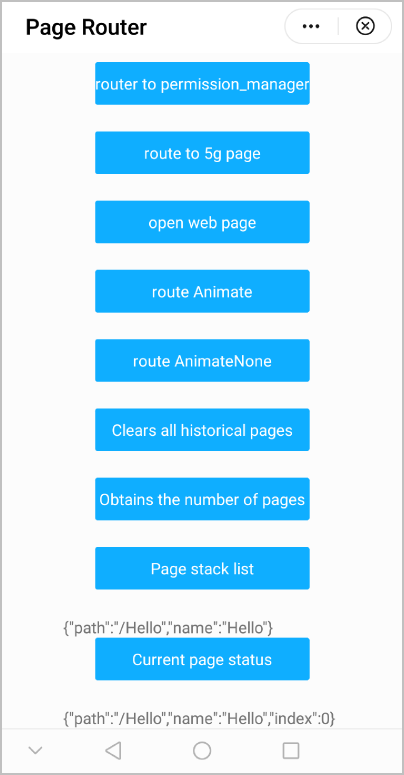
The following figure shows the final effect.
Version Change History
Version | Date | Description |
|---|---|---|
1080 | 2021-12-28 | Added the 5G setting page hap://settings/5g in the router.push API so this page can be opened through router.push. |
1070 | 2020-05-19 |
|
1050 | 2019-09-20 | Added the quick app launch parameter PARAM_LAUNCH_FLAG to router.push. |
1040 | 2019-06-24 | Added the uri parameter to router.push. So users can be redirected to another page, permission management page of a quick app, or the location management page of the mobile phone. |
1020 | 2018-06-20 | Added the path and delta parameters to router.back so that you can return multiple pages by calling the API once. |
[h2]FAQs
- How do I switch from a quick app to a third-party app?
- When I use router.back to return to the previous page, the data on the page is not refreshed. What can I do?
- When I use router.push to jump from A to B, how do I determine whether A is a quick app or card of HUAWEI Assistant·TODAY in B?
- Why is the page not destroyed when router.getLength() is called immediately after router.clear() is called?
- Is there any restriction on the parameters carried when a quick app is opened through a deep link, an app router, or the router.push API?
- When router.push is used for deep link–based redirection, the HAP link directly redirects a user to Quick App Loader. However, when a user is redirected through an hwfastapp link, a pop-up is displayed, asking the user whether to open Quick App Center or Quick App Loader. Why?
- How do I switch from a quick app to the app details page on AppGallery?
- Is there any method to refresh or reload the quick app page?