API Declaration
Add the following configuration to the features attribute in the manifest.json file:
{"name": "system.tts"} Module Import
Add the following configuration to the script element on the page where the API will be called:
import tts from '@system.tts'
Or
var tts = require("@system.tts") Application Scope
Item | Description |
|---|---|
Applicable devices | Telematics devices |
Applicable regions | Chinese mainland |
[h2]tts.speak(OBJECT)
Description
Speaks specified text.
OBJECT parameters
Parameter | Type | Mandatory | Description |
|---|---|---|---|
text | string | Yes | Text to be spoken. |
queueMode | number | No | Queue mode. The default value is 1. 1: add 0: flush |
volume | number | No | Audio volume. The value ranges from 0.0 to 1.0. A larger value indicates a higher volume. The system volume is used by default. |
success | function | No | Callback upon success. |
fail | function | No | Callback upon failure. |
complete | function | No | Callback upon completion, regardless of whether the API call is successful or fails. |
Result codes returned by fail
Result Code | Message | Description |
|---|---|---|
200 | error | General error. |
202 | invalidParam | Invalid parameter. |
1001 | error network | Network connection error. |
1002 | error network timeout | Network connection timed out. |
1003 | error not installed yet | Voice data download is not completed. |
1004 | error output | Failed to play the audio on an audio device. |
1005 | error service | The TTS service failed. |
1006 | error synthesis | Text to speech failed. |
Sample code
tts.speak ({
text: 'Test',
    volume: 1,
    queueMode: 0,
        success: function(data) {
            console.log("handling success");
        },
        fail: function(data, code) {
            console.log("handling fail, code=" + code);
        }
})
Demo
<template>
  <!-- Only one root node is allowed in template. -->
  <div class="container">
    <div  class="item-container">
    <text class="title">cheji Test</text>
    <text class="title">{{ttsspeakinfo}}</text>
    <input class="btn" type="button" value="TTS" onclick="test_tts" />
    </div>
  </div>
</template>

<style>
  .container {
    flex-direction: column;
    justify-content: center;
    align-items: center;
  }

  .title {
    font-size: 40px;
    color: #f0fff0;
  }
  .item-container {
    margin-bottom: 50px;
    margin-right: 60px;
    margin-left: 60px;
    flex-direction: column;
  }

  .btn {
      background-color: #00bfff;
      color: #ffffff;
  }
</style>

<script>
  import tts from '@system.tts'
  module.exports = {
    data: {
      ttsspeakinfo:''
    },
    onInit() {
      this.$page.setTitleBar({
        text: 'tts',
        textColor: '#ffffff',
        backgroundColor: '#007DFF',
        backgroundOpacity: 0.5,
        menu: true
      });
    },
    test_tts() {
      var that = this
      tts.speak({
        text: 'this is the test',

        queueMode: 0,
        success: function () {
          console.log("handling success");
          that.ttsspeakinfo = 'handling success'
        },
        fail: function (data, code) {
          console.log("handling fail, code=" + code);
        }
      })
    }
  }
</script>
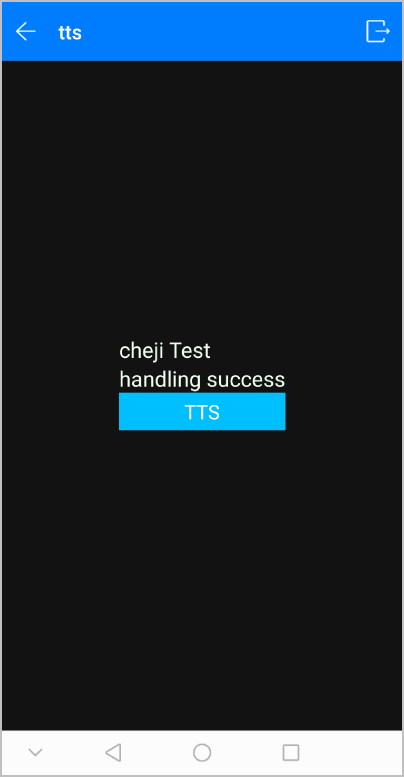
The following figure shows the final effect.