Overview
Audiobook is a comprehensive scenario that integrates content services, audio playback, and system interaction. This document describes how to use the ArkTS and C++ hybrid development mode and the native audio engine OHAudio to implement high-quality audio playback. Apps support complete features such as local playback, casting, background playback, and Media Controller, and perform in-depth optimization for scenarios such as audio focus management and low-power playback.
The app uses a layered architecture design, which consists of three layers: UI layer, service logic layer, and native playback layer, as shown in the following figure.
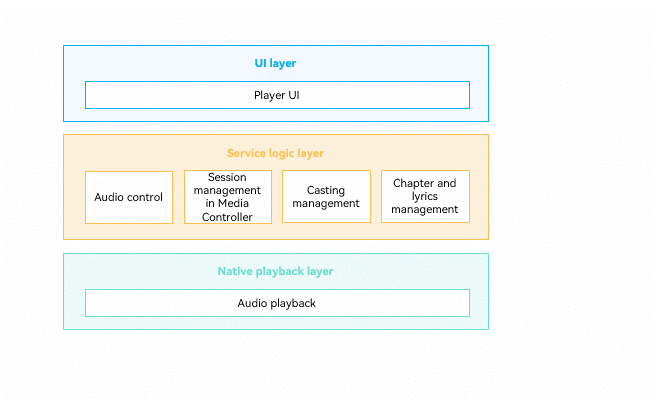
UI layer: responsible for UI display and user interaction, including components such as the player page, chapter list, lyrics display, and control buttons.
Service logic layer: core service management module, including audio control, session management in Media Controller, casting management, chapter management, and lyrics management.
- Audio control: manages playback control, status synchronization, and chapter switching in a unified manner.
- Session management in Media Controller: manages sessions, media metadata, and control commands in Media Controller.
- Casting management: manages casting device connections and casting control commands.
- Chapter and lyrics management: manages the chapter list, chapter construction, and lyric loading and parsing.
Native playback layer: audio playback module implemented in C++, including audio playback control.
- Audio playback: encapsulates the OHAudio renderer to implement audio data filling and playback control.
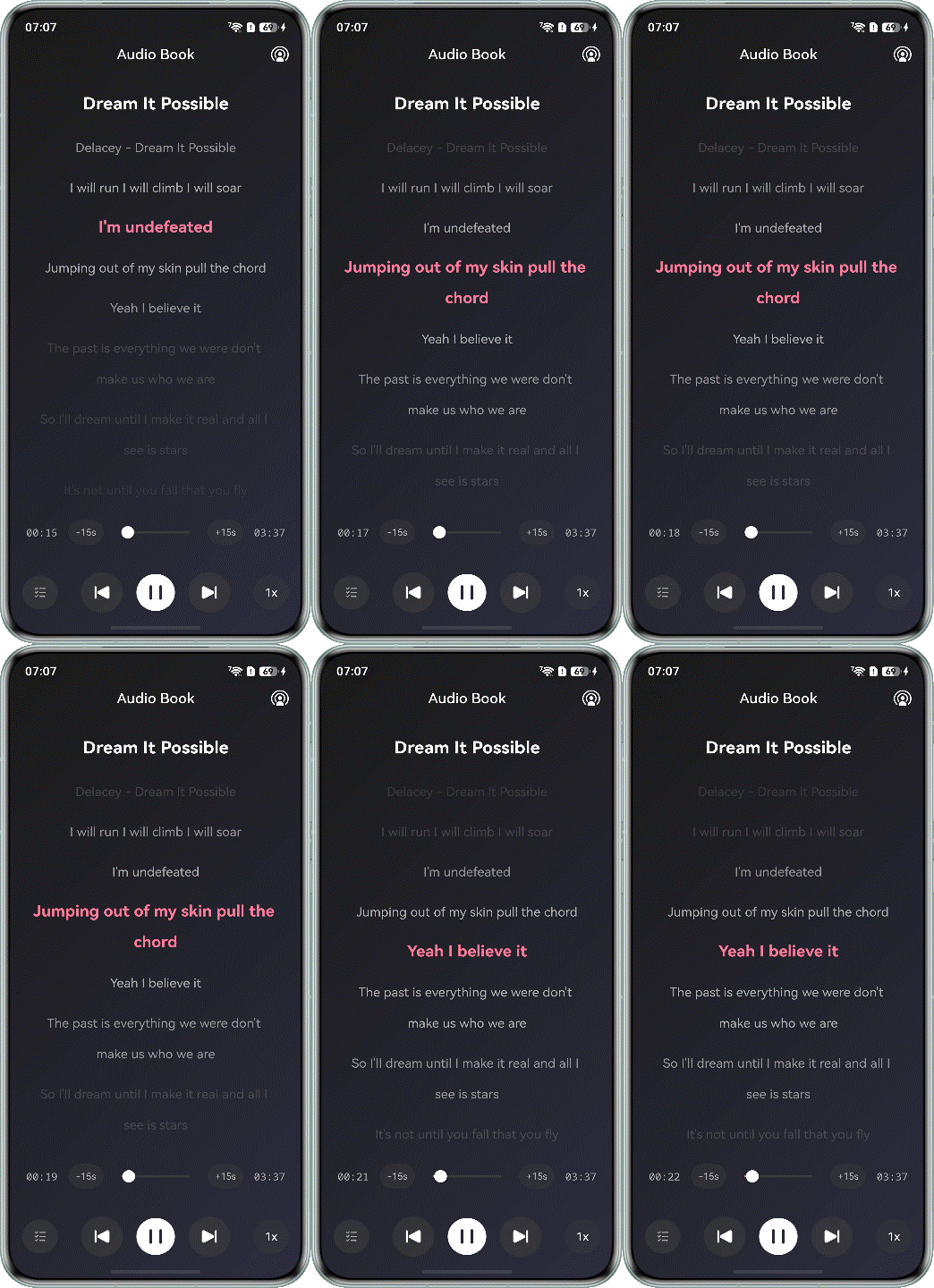
Audio playback is a basic feature in the audiobook scenario. It supports operations such as playback control, progress dragging and seeking, and playback speed setting. The following figure shows the playback effect.
[h2]How to Implement
You can use OH_AudioStreamBuilder_Create() to create an audio stream builder instance, use OH_AudioStreamBuilder_SetRendererWriteDataCallback() to set the callback function for writing audio data, and use OH_AudioStreamBuilder_GenerateRenderer() to create an output audio stream instance. You can use OH_AudioRenderer_Start(), OH_AudioRenderer_Pause(), OH_AudioRenderer_Stop(), and OH_AudioRenderer_Release() to manage the audio playback state, covering audio playing, pausing, stopping, and releasing.
[h2]How to Develop
1. Create an output audio stream instance. Create a rendererBuilder object using OH_AudioStreamBuilder_Create() and set the attributes of the audio stream, such as the sampling rate, number of channels, sampling format, and encoding type. Then, create an output audio stream instance using OH_AudioStreamBuilder_GenerateRenderer().
void OHAudioPlayer::InitPlayer() {
    if ((audioRenderer != nullptr) || (rendererBuilder != nullptr) || (audioBookFileInfo != nullptr)) {
        OH_LOG_INFO(LOG_APP, "Previous audio player or builder or fileInfo remained and release it.");
        ReleasePlayer();
    }

    OH_AudioStream_Type streamType = AUDIOSTREAM_TYPE_RENDERER;
    auto ret = OH_AudioStreamBuilder_Create(&rendererBuilder, streamType);
    if (ret != AUDIOSTREAM_SUCCESS) {
        OH_LOG_ERROR(LOG_APP, "Create stream builder failed, ret: %{public}d", ret);
        return;
    }

    audioBookFileInfo = new AudioBookFileInfo();

    (void)OH_AudioStreamBuilder_SetSamplingRate(rendererBuilder, AudioConstants::SAMPLE_RATE);
    (void)OH_AudioStreamBuilder_SetChannelCount(rendererBuilder, AudioConstants::CHANNEL_COUNT);
    (void)OH_AudioStreamBuilder_SetSampleFormat(rendererBuilder, AUDIOSTREAM_SAMPLE_S16LE);
    (void)OH_AudioStreamBuilder_SetEncodingType(rendererBuilder, AUDIOSTREAM_ENCODING_TYPE_RAW);
    (void)OH_AudioStreamBuilder_SetRendererInfo(rendererBuilder, AUDIOSTREAM_USAGE_AUDIOBOOK);
    (void)OH_AudioStreamBuilder_SetRendererInterruptCallback(rendererBuilder, OnAudioInterruptEvent, nullptr);
    (void)OH_AudioStreamBuilder_SetRendererErrorCallback(rendererBuilder, OnAudioErrorEvent, nullptr);
    (void)OH_AudioStreamBuilder_SetRendererOutputDeviceChangeCallback(rendererBuilder, OnAudioOutputDeviceChangeEvent, nullptr);
    (void)OH_AudioStreamBuilder_SetRendererWriteDataCallback(rendererBuilder, OnAudioRendererWriteDataEvent,
                                                                reinterpret_cast<void *>(audioBookFileInfo));

    ret = OH_AudioStreamBuilder_GenerateRenderer(rendererBuilder, &audioRenderer);
    if (ret != AUDIOSTREAM_SUCCESS) {
        OH_LOG_ERROR(LOG_APP, "Create audio renderer failed, ret: %{public}d", ret);
        ReleasePlayer();
    }
    OH_AudioSession_Strategy strategy = {
        .concurrencyMode = CONCURRENCY_DEFAULT
    };
    // 4 = PAUSE_WHEN_INTERRUPTED, 2 = MUTE_WHEN_INTERRUPTED
    OH_AudioRenderer_SetIndependentAudioSessionStrategy(audioRenderer, &strategy, 4);
    OH_AudioManager_GetAudioResourceManager(&audioResourceManager);
    if (audioResourceManager != nullptr) {
        OH_AudioResourceManager_CreateWorkgroup(audioResourceManager, "AudioBookWorkgroup", &audioWorkgroup);
        OH_LOG_INFO(LOG_APP, "Audio workgroup created");
    }
    bufferQueue = new AudioBufferQueue(prefetchBufferSize);
    OH_LOG_INFO(LOG_APP, "Init player successfully.");
}
2. Set the callback function for writing audio data. In the callback function, read the file data and write it to AudioRenderer.
OH_AudioData_Callback_Result OnAudioRendererWriteDataEvent([[maybe_unused]] OH_AudioRenderer *audioRenderer,
                                                            void *userData, void *audioData, int32_t audioDataSize) {
    auto audioBookFileInfo = reinterpret_cast<AudioBookFileInfo *>(userData);
    auto &player = OHAudioPlayer::GetInstance();
    int64_t remainedSize = audioBookFileInfo->audioBookFileSize - audioBookFileInfo->currentPlayOffset;
    int32_t bytesToRead = std::min(static_cast<int64_t>(audioDataSize), remainedSize);
    size_t actualRead = player.bufferQueue->Read(audioData, bytesToRead);

    if (actualRead < 0) {
        OH_LOG_ERROR(LOG_APP, "Read audio data error.");
        return AUDIO_DATA_CALLBACK_RESULT_INVALID;
    }

    audioBookFileInfo->currentPlayOffset += actualRead;
    int64_t framesProvided = actualRead / AudioConstants::FRAME_SIZE;
    player.totalFramesProvided += framesProvided;

    if (actualRead == audioDataSize) {
        return AUDIO_DATA_CALLBACK_RESULT_VALID;
    }

    if (actualRead < audioDataSize) {
        bool isLastFrame = (audioBookFileInfo->currentPlayOffset >= audioBookFileInfo->audioBookFileSize);
        if (isLastFrame) {
            memset_s(static_cast<char*>(audioData) + actualRead, audioDataSize - actualRead, 0, audioDataSize - actualRead);
            return AUDIO_DATA_CALLBACK_RESULT_VALID;
        } else {
            player.totalFramesProvided -= framesProvided;
            audioBookFileInfo->currentPlayOffset -= actualRead;
            OH_LOG_INFO(LOG_APP, "Incomplete frame, will retry. Read: %{public}ld, Requested: %{public}d", actualRead, audioDataSize);
            return AUDIO_DATA_CALLBACK_RESULT_INVALID;
        }
    }
    return AUDIO_DATA_CALLBACK_RESULT_VALID;
}
3. Play the audio.
void OHAudioPlayer::PlayAudioBook() {
    if (audioRenderer == nullptr) {
        OH_LOG_ERROR(LOG_APP, "The audioRenderer is null.");
        return;
    }
    auto ret = OH_AudioRenderer_Start(audioRenderer);
    if (ret != AUDIOSTREAM_SUCCESS) {
        OH_LOG_ERROR(LOG_APP, "Play audio book failed, ret: %{public}d", ret);
        return;
    }
    OH_LOG_INFO(LOG_APP, "Play audio book successfully.");
}
4. Pause the audio playback.
void OHAudioPlayer::PauseAudioBook() {
    if (audioRenderer == nullptr) {
        OH_LOG_ERROR(LOG_APP, "The audioRenderer is null.");
        return;
    }
    auto ret = OH_AudioRenderer_Pause(audioRenderer);
    if (ret != AUDIOSTREAM_SUCCESS) {
        OH_LOG_ERROR(LOG_APP, "Pause audio book failed, ret: %{public}d", ret);
        return;
    }
    OH_LOG_INFO(LOG_APP, "Pause audio book successfully.");
}
5. Seek to a specified position of the audio.
void OHAudioPlayer::SeekTo(uint32_t position) {
    PreparePosition(position);
    if (audioRenderer != nullptr) {
        OH_AudioRenderer_Start(audioRenderer);
    }
    OH_LOG_INFO(LOG_APP, "Seek to position successfully and started.");
}
6. Release the playback resource.
void OHAudioPlayer::ReleasePlayer() {
    StopPrefetch();

    if (bufferQueue != nullptr) {
        delete bufferQueue;
        bufferQueue = nullptr;
    }
    if (audioWorkgroup != nullptr && audioResourceManager != nullptr) {
        OH_AudioResourceManager_ReleaseWorkgroup(audioResourceManager, audioWorkgroup);
        audioWorkgroup = nullptr;
        OH_LOG_INFO(LOG_APP, "Audio workgroup released");
    }
    if (audioResourceManager != nullptr) {
        audioResourceManager = nullptr;
    }
    if (rendererBuilder != nullptr) {
        OH_AudioStreamBuilder_Destroy(rendererBuilder);
        rendererBuilder = nullptr;
    }
    if (audioRenderer != nullptr) {
        OH_AudioRenderer_Stop(audioRenderer);
        OH_AudioRenderer_Release(audioRenderer);
        audioRenderer = nullptr;
    }
    if (audioBookFileInfo != nullptr) {
        delete audioBookFileInfo;
        audioBookFileInfo = nullptr;
    }
    OH_LOG_INFO(LOG_APP, "Release player successfully.");
} [h2]When to Use
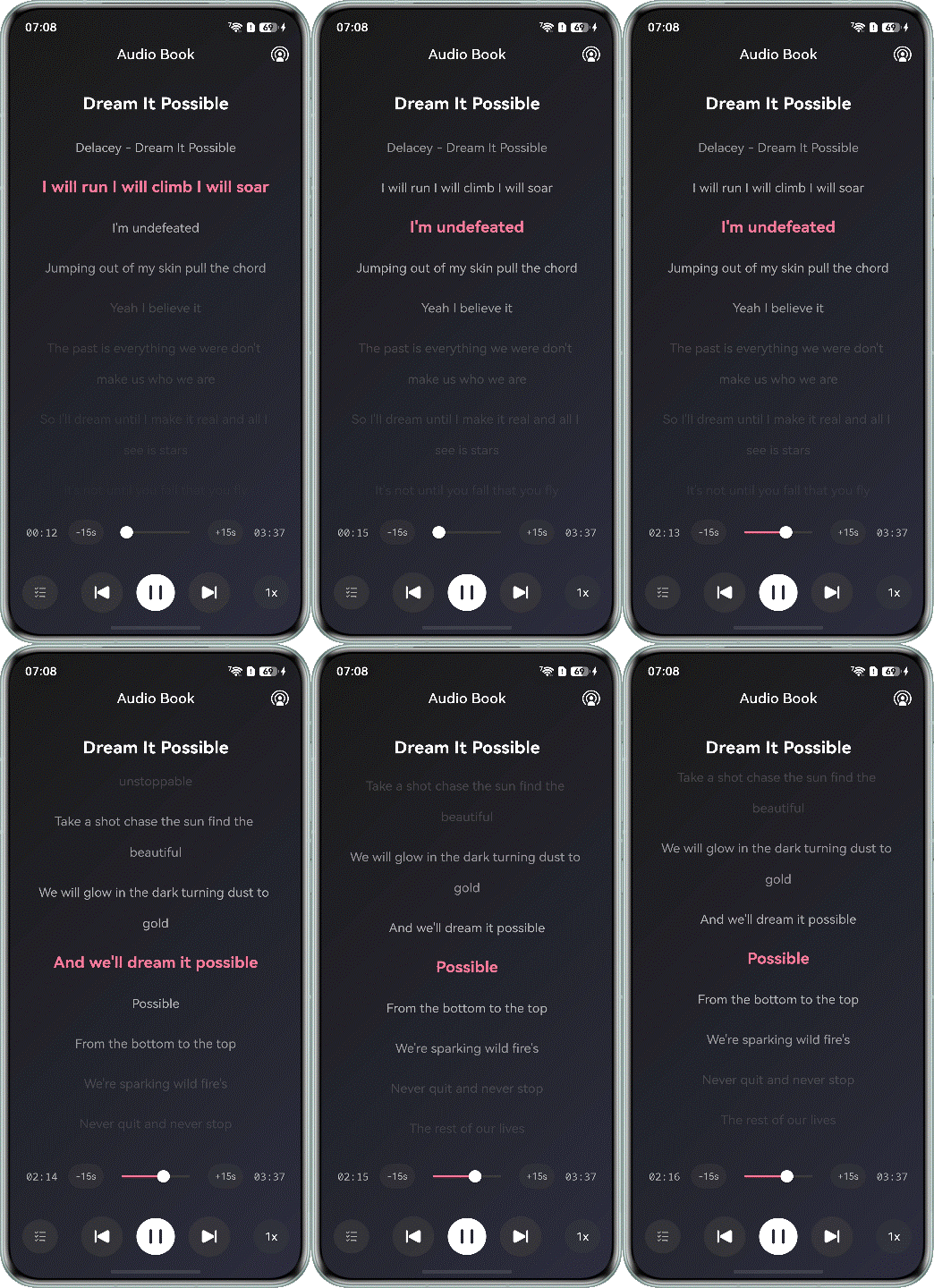
When a user seeks to a specified position of the audio, the content page needs to be refreshed synchronously to ensure that the content on the page is consistent with the audio content being played, as shown in the following figure.
[h2]How to Implement
The chapter text content is stored in an .lrc file (lyric file with timestamps), which contains timestamps and the corresponding text content. After loading the file content, the app displays the text content through the List component.
Register the audio play progress callback function. When the play progress changes, the corresponding text is synchronized to ensure consistency between the audio and text.
[h2]How to Develop
1. Load the text file for the audiobook.
public async loadLrcFile(lyricPath: string): Promise<LrcLine[]> {
  Logger.info(TAG, `loadLrcFile started, path: ${lyricPath}`);
  this.lrcParser.clear();

  if (!lyricPath || lyricPath.length === 0) {
    Logger.info(TAG, 'Lyric file path is empty, skip loading');
    return [];
  }

  try {
    const context: common.UIAbilityContext = AppStorage.get('context') as common.UIAbilityContext;
    const resourceMgr = context.resourceManager;
    const fileContent = await resourceMgr.getRawFileContent(lyricPath);

    const textDecoder = util.TextDecoder.create('utf-8', { ignoreBOM: true });
    const lrcContent = textDecoder.decodeToString(fileContent, { stream: false });

    this.lrcParser.parse(lrcContent);
    const lrcLines: LrcLine[] = this.lrcParser.getLrcLines();

    Logger.info(TAG, `LRC file loaded successfully, total ${lrcLines.length.toString()} lines`);
    return lrcLines;
  } catch (error) {
    Logger.error(TAG, `LRC file loading failed: ${JSON.stringify(error)}`);
    return [];
  }
}
2. Split the content of the parsed file into a text array lrcLines.
parse(lrcContent: string): void {
  Logger.info(TAG, 'Start parsing LRC file');
  this.lrcLines = [];
  if (!lrcContent || lrcContent.length === 0) {
    Logger.error(TAG, 'LRC file content is empty');
    return;
  }

  const lines: string[] = lrcContent.split('\n');
  for (const line of lines) {
    const trimmedLine: string = line.trim();
    if (trimmedLine.length === 0) {
      continue;
    }

    const match = trimmedLine.match(/\[(\d{2}):(\d{2})\.(\d{2,3})\](.*)/);
    if (match) {
      const minutes: number = parseInt(match[1]);
      const seconds: number = parseInt(match[2]);
      const milliseconds: number = parseInt(match[3].padEnd(3, '0'));
      const text: string = match[4].trim();
      const time: number = minutes * 60 * 1000 + seconds * 1000 + milliseconds;

      this.lrcLines.push({ time, text });
    }
  }

  this.lrcLines.sort((a, b) => a.time - b.time);
  Logger.info(TAG, `LRC file parsing completed, total ${this.lrcLines.length} lines`);
}
3. Register a callback function for the audio play progress using registerProgressCallback().
setupProgressCallback(): void {
  this.audioControl.registerProgressCallback((currentTime: number) => {
    if (!this.isDragging) {
      this.currentTime = currentTime;
      Logger.info(TAG, `currentTime: ${this.currentTime}`);
      this.updateCurrentLrc();
      if (this.currentTime >= this.totalTime) {
        this.currentTime = this.totalTime;
      }
    }
  });
}
4. Use the scroller to scroll the chapter text to the corresponding position.
updateCurrentLrc(): void {
  const newIndex = this.lrcManager.getCurrentLineIndex(this.currentTime);
  if (newIndex !== this.currentLrcIndex) {
    this.currentLrcIndex = newIndex;
    if (newIndex >= 0) {
      this.scroller.scrollToIndex(newIndex, true, ScrollAlign.CENTER);
    }
  }
} [h2]When to Use
The app accesses AVSession, and Media Controller performs playback control and status synchronization.
Use AVSession to implement integration with Media Controller.
[h2]How to Develop
1. In the initAVSession() method, create and activate an AVSession.
public async initAVSession() {
  this.context = AppStorage.get('context') as common.UIAbilityContext;
  if (!this.context) {
    Logger.error(TAG, 'Session create failed: context is undefined');
    return;
  }

  this.audioControlCenter = AudioControlCenter.getInstance();
  if (!this.audioControlCenter) {
    Logger.error(TAG, 'Session create failed: audioControlCenter is undefined');
    return;
  }

  try {
    this.avSession = await avSession.createAVSession(this.context, 'PLAY_AUDIO', 'audio');
    await this.avSession.activate().catch(() => {
      Logger.info(TAG, `Session activate error`);
    });
    this.avSession.setExtras({
      requireAbilityList: ['url-cast'],
    }).catch(() => {
      Logger.info(TAG, `Session setExtras error`);
    });
    await this.setAVMetadata();
    this.setLaunchAbility();
    this.setListenerForMesFromController();

    this.avCastManager = AVCastManager.getInstance();
    Logger.info(TAG, 'AVCastManager initialized');
  } catch (error) {
    Logger.error(TAG, 'initAVSession error');
  }
}
2. In the setLaunchAbility() method, set the session startup capability.
private setLaunchAbility() {
  if (!this.context) {
    return;
  }
  let wantAgentInfo: wantAgent.WantAgentInfo = {
    wants: [
      {
        bundleName: this.context.abilityInfo.bundleName,
        abilityName: this.context.abilityInfo.name
      }
    ],
    actionType: wantAgent.OperationType.START_ABILITIES,
    requestCode: 0,
    wantAgentFlags: [wantAgent.WantAgentFlags.UPDATE_PRESENT_FLAG]
  };
  wantAgent.getWantAgent(wantAgentInfo).then((agent) => {
    if (this.avSession) {
      this.avSession.setLaunchAbility(agent).catch(() => {
        Logger.error(TAG, `setLaunchAbility failed.`);
      });
    }
  }).catch((err: BusinessError) => {
    Logger.error(TAG, `getWantAgent failed: code: ${err.code}, message: ${err.message}`);
  });
}
3. In the setListenerForMesFromController() method, register listeners for various control commands such as play and pause.
private setListenerForMesFromController() {
  if (!this.avSession) {
    return;
  }
  try {
    this.avSession.on('play', this.onPlay);
    this.avSession.on('pause', this.onPause);
    this.avSession.on('playNext', this.onPlayNext);
    this.avSession.on('playPrevious', this.onPlayPrevious);
    this.avSession.on('seek', this.onSeek);
  } catch (error) {
    Logger.error(TAG, 'audioControlCenter is undefined in onPlay');
  }
}
4. In the setAVMetadata() method, set the metadata of the media being played.
public async setAVMetadata() {
  try {
    if (!this.context || !this.avSession || !this.audioControlCenter) {
      return;
    }
    const currentChapterIndex = this.audioControlCenter.getCurrentChapterIndex();
    const chapter = this.audioControlCenter.getCurrentChapter();
    if (!chapter) {
      return;
    }

    const duration = this.audioControlCenter.getDuration();
    let metadata: avSession.AVMetadata = {
      assetId: `${currentChapterIndex}`,
      title: chapter.title,
      artist: chapter.author,
      duration: duration,
      avQueueName: 'My Audio Book',
      avQueueId: 'AudioBookQueueId1',
      filter: avSession.ProtocolType.TYPE_CAST_PLUS_STREAM | avSession.ProtocolType.TYPE_DLNA |
        avSession.ProtocolType.TYPE_CAST_PLUS_AUDIO
    };
    try {
      const queuePixelMap = await MediaUtils.getPixelMapFromResource(this.context, $r('app.media.image_cover'));
      metadata.avQueueImage = queuePixelMap;
    } catch (error) {
      Logger.error(TAG, `Failed to load queue image: ${JSON.stringify(error)}`);
    }
    // get lyric
    if (chapter.lyric) {
      const lrc = await MediaUtils.getLrcFromRawFile(this.context, chapter.lyric);
      if (lrc) {
        metadata.lyric = lrc;
      }
    }
    // get PixelMap
    if (chapter.avatar) {
      try {
        const pixelMap = await MediaUtils.getPixelMapFromResource(this.context, chapter.avatar);
        metadata.mediaImage = pixelMap;
      } catch (error) {
        Logger.error(TAG, `Failed to load avatar: ${JSON.stringify(error)}`);
      }
    }
    // set AVMetadata
    this.avSession.setAVMetadata(metadata).then(() => {
      Logger.info(TAG, 'setAVMetadata succeeded');
    }).catch((err: BusinessError) => {
      Logger.error(TAG, `setAVMetadata failed: code: ${err.code}, message: ${err.message}`);
    });
  } catch (error) {
    Logger.error(TAG, `setAVMetadata failed: ${JSON.stringify(error)}`);
  }
}
5. Set the playback state.
public setPlayState(isPlay: boolean) {
  if (!this.avSession) {
    Logger.error(TAG, 'AVSession is undefined');
    return;
  }
  this.avSession.setAVPlaybackState({
    state: isPlay ? avSession.PlaybackState.PLAYBACK_STATE_PLAY : avSession.PlaybackState.PLAYBACK_STATE_PAUSE,
  }, (err: BusinessError) => {
    if (err) {
      Logger.error(TAG, `setPlayState failed: code: ${err.code}, message: ${err.message}`);
    } else {
      Logger.info(TAG, 'setPlayState succeeded');
    }
  });
}
6. Set the playback progress.
public setProgressState(ms: number) {
  if (!this.avSession) {
    return;
  }
  this.avSession.setAVPlaybackState({
    position: {
      elapsedTime: ms,
      updateTime: new Date().getTime()
    }
  }, (err: BusinessError) => {
    if (err) {
      Logger.error(TAG, `setProgressState failed: code: ${err.code}, message: ${err.message}`);
    } else {
      Logger.info(TAG, 'setProgressState succeeded');
    }
  });
}
7. Unregister the session listener.
public async unregisterSessionListener() {
  if (!this.avSession) {
    return;
  }
  try {
    this.avSession.off('play');
    this.avSession.off('pause');
    this.avSession.off('playNext');
    this.avSession.off('playPrevious');
    this.avSession.off('seek');
    this.avSession.destroy().catch(() => {
      Logger.error(TAG, `avSession destroy failed`);
    });
  } catch (error) {
    let err: BusinessError = error;
    Logger.error(TAG, `setProgressState failed: code: ${err.code}, message: ${err.message}`);
  }
} The app supports audio playback in the background. Users can switch to another app, and the audio playback will not be interrupted if the other app does not have focus interruption configured.
You need to access Media Controller, apply for the background running permission, set the background mode, and create a continuous background task for the audio app to continuously play the audio in the background.
[h2]How to Develop
1. Declare the background running permission in entry/src/main/module.json5.
"requestPermissions": [
  {
    "name": "ohos.permission.KEEP_BACKGROUND_RUNNING",
    "reason": "$string:keep_background_running_reason",
    "usedScene": {
      "abilities": [
        "EntryAbility"
      ],
      "when": "always"
    }
  },
],
2. Start the continuous background task in AUDIO_PLAYBACK mode.
public static startContinuousTask(context?: common.UIAbilityContext): void {
  if (!context) {
    Logger.error(TAG, 'startContinuousTask failed, context undefined');
    return;
  }

  if (BackgroundUtil.isBackgroundRunning) {
    Logger.info(TAG, 'Background task is already running');
    return;
  }

  BackgroundUtil.isBackgroundRunning = true;

  let wantAgentInfo: wantAgent.WantAgentInfo = {
    wants: [
      {
        bundleName: context.abilityInfo.bundleName,
        abilityName: context.abilityInfo.name
      }
    ],
    actionType: wantAgent.OperationType.START_ABILITY,
    requestCode: 0,
    wantAgentFlags: [wantAgent.WantAgentFlags.UPDATE_PRESENT_FLAG]
  };

  wantAgent.getWantAgent(wantAgentInfo).then((wantAgentObj: Object) => {
    backgroundTaskManager.startBackgroundRunning(
      context,
      backgroundTaskManager.BackgroundMode.AUDIO_PLAYBACK,
      wantAgentObj
    ).then(() => {
      Logger.info(TAG, 'startBackgroundRunning succeeded');
    }).catch((error: BusinessError) => {
      Logger.error(TAG, `startBackgroundRunning failed code: ${error.code.toString()}`);
      BackgroundUtil.isBackgroundRunning = false;
    });
  }).catch((error: BusinessError) => {
    Logger.error(TAG, `getWantAgent failed code: ${error.code.toString()}`);
    BackgroundUtil.isBackgroundRunning = false;
  });
}
3. Request the background task when playback starts.
private async localPlay(): Promise<void> {
  Logger.info(TAG, 'localPlay started');
  if (this.isPlaying) {
    Logger.info(TAG, 'localPlay skipped, already playing');
    return;
  }
  try {
    audioPlayer.playAudioBook();
    this.isPlaying = true;
    this.startProgressTimer();
    this.notifyPlayStateChange(true);

    if (this.avSessionController) {
      this.avSessionController.setPlayState(true);
    }

    BackgroundUtil.startContinuousTask(this.context);

    Logger.info(TAG, 'localPlay completed');
  } catch (error) {
    Logger.error(TAG, `localPlay failed: ${JSON.stringify(error)}`);
    this.isPlaying = false;
    this.stopProgressTimer();
    this.notifyPlayStateChange(false);
    throw error as Error;
  }
} [h2]When to Use
Your app can seamlessly transfer audio and video from a mobile phone to another device (such as a computer or HUAWEI Vision) for playback, and perform playback control on the remote device.
The casting feature is implemented based on the collaboration between the AVSession and AVCastController. For details, please refer to Audio Casting.
1. Configure the casting feature.
this.avSession.setExtras({
  requireAbilityList: ['url-cast'],
}).catch(() => {
  Logger.info(TAG, `Session setExtras error`);
});
await this.setAVMetadata();
2. Register the callback for device connection changes.
private async registerCastCallbacks(): Promise<void> {
  if (!this.avSession) {
    Logger.error(TAG, 'avSession not initialized');
    return;
  }
  try {
    this.avSession.on('outputDeviceChange', async (connectState: avSession.ConnectionState,
      device: avSession.OutputDeviceInfo) => {
      try {
        Logger.info(TAG, `outputDeviceChange: ${connectState}`);
        const currentDevice: avSession.DeviceInfo = device?.devices?.[0];
        if (currentDevice?.castCategory === avSession.AVCastCategory.CATEGORY_REMOTE) {
          if (connectState === avSession.ConnectionState.STATE_CONNECTED) {
            Logger.info(TAG, 'Device connected successfully');
            this.isConnected = true;
            this.currentDevice = currentDevice;
            if (this.avSession) {
              const controller = await this.avSession.getAVCastController();
              if (controller) {
                this.castController = controller;
                await this.registerCastControllerCallbacks();
              }
            }
            if (this.connectionCallback) {
              this.connectionCallback(true, currentDevice);
            }
          } else if (connectState === avSession.ConnectionState.STATE_DISCONNECTED) {
            Logger.info(TAG, 'Device disconnected');
            this.isConnected = false;
            this.currentDevice = undefined;
            if (this.connectionCallback) {
              this.connectionCallback(false);
            }
          }
        } else if (currentDevice?.castCategory === avSession.AVCastCategory.CATEGORY_LOCAL) {
          Logger.info(TAG, 'Device switched to local');
        }
        Logger.info(TAG, 'registerCastCallbacks completed');
      } catch (error) {
        Logger.error(TAG, `outputDeviceChange error:  ${JSON.stringify(error)}`);
      }
    });
  } catch (error) {
    Logger.error(TAG, `registerCastCallbacks error:  ${JSON.stringify(error)}`);
  }
}
3. Register the casting controller callback.
private async registerCastControllerCallbacks(): Promise<void> {
  if (!this.castController) {
    Logger.error(TAG, 'castController not initialized');
    return;
  }

  try {
    this.castController.on('playPrevious', () => {
      Logger.info(TAG, 'playPrevious event received');
      if (this.playPreviousCallback) {
        this.playPreviousCallback();
      }
    });


    this.castController.on('playNext', () => {
      Logger.info(TAG, 'playNext event received');
      if (this.playNextCallback) {
        this.playNextCallback();
      }
    });

    this.castController.on('playbackStateChange', 'all', (playbackState: avSession.AVPlaybackState) => {
      Logger.info(TAG, `playbackStateChange: ${JSON.stringify(playbackState)}`);
      const state = playbackState?.state;
      const position = playbackState?.position?.elapsedTime;
      const volume = playbackState?.volume;
      const maxVol = playbackState?.maxVolume;
      const speed = playbackState?.speed;

      if (position !== undefined) {
        this.currentCastPosition = position;
      }
      if (volume !== undefined) {
        this.currentCastVolume = volume;
      }
      if (maxVol !== undefined && maxVol > 0) {
        this.maxVolume = maxVol;
        Logger.info(TAG, `Device max volume updated to: ${maxVol}`);
      }

      if (speed !== undefined) {
        this.currentCastSpeed = speed;
        Logger.info(TAG, `Cast speed updated to: ${speed}x`);
      }

      if (state !== undefined || position !== undefined || volume !== undefined || speed !== undefined) {
        if (this.playbackStateCallback) {
          const volToShow = this.currentCastVolume / this.maxVolume;
          this.playbackStateCallback(state, position, volToShow, speed);
        }
      }
    });

    this.castController.on('endOfStream', () => {
      Logger.info(TAG, 'endOfStream event received');
      if (this.endOfStreamCallback) {
        this.endOfStreamCallback();
      }
    });

    this.castController.on('seekDone', (position: number) => {
      Logger.info(TAG, `seekDone event: ${position}ms`);
      this.currentCastPosition = position;
      if (this.seekDoneCallback) {
        this.seekDoneCallback(position);
      }
    });
  } catch (error) {
    Logger.error(TAG, `castController error:  ${JSON.stringify(error)}`);
  }
  Logger.info(TAG, 'registerCastControllerCallbacks completed');
}
4. Prepare and play the content to be cast.
public async prepareAndPlay(chapter: AudioBookChapter, startPosition: number = 0, speed: number): Promise<void> {
  Logger.info(TAG, `prepareAndPlay started, chapter: ${chapter.title}, startPosition: ${startPosition}ms`);
  if (!this.castController) {
    Logger.error(TAG, 'castController not initialized');
    return;
  }

  if (!this.context) {
    Logger.error(TAG, 'context not initialized');
    return;
  }

  this.currentChapter = chapter;
  const lyricContent = await this.loadLyricContent(chapter);
  let playItem: avSession.AVQueueItem;
  await this.audioBookChapterBuilder.build(chapter);
  this.currentRawFileDescriptor = this.audioBookChapterBuilder.getRawFileDescriptor();

  if (!this.currentRawFileDescriptor) {
    Logger.error(TAG, 'Failed to get RawFileDescriptor');
    return;
  }

  const duration = MediaUtils.getMsFromByteLength(this.currentRawFileDescriptor.length);
  try {
    const protocols = this.currentDevice?.supportedProtocols;
    const isSupportCastPlusOrDlna =
      protocols &&
        ((protocols & avSession.ProtocolType.TYPE_CAST_PLUS_STREAM) > 0 ||
          (protocols & avSession.ProtocolType.TYPE_DLNA) > 0);

    if (isSupportCastPlusOrDlna && chapter.src) {
      Logger.info(TAG, 'Using complete audio file for casting');
      const fullPath: string = this.context.filesDir + '/' + chapter.src;
      const file: fileIo.File = await fileIo.open(fullPath);
      const avFileDescriptor: media.AVFileDescriptor = { fd: file.fd };
      playItem = {
        itemId: chapter.id,
        description: {
          assetId: 'AUDIO-' + JSON.stringify(chapter.id),
          title: chapter.title,
          artist: chapter.author,
          subtitle: 'audio',
          mediaType: 'AUDIO',
          fdSrc: avFileDescriptor,
          startPosition: startPosition,
          duration: duration,
          lyricContent: lyricContent,
          albumTitle: 'My Audio Book',
          appName: 'My Audio Book'
        }
      };
    }

    await new Promise<void>((resolve, reject) => {
      this.castController?.prepare(playItem, () => {
        Logger.info(TAG, 'prepare completed');
        resolve();
      });
    });

    await new Promise<void>((resolve, reject) => {
      this.castController?.start(playItem, () => {
        Logger.info(TAG, 'start completed');
        resolve();
      });
    });
    this.sendSpeedCommand(speed);
    Logger.info(TAG, 'prepareAndPlay completed');
  } catch (error) {
    Logger.error(TAG, `prepareAndPlay failed: ${JSON.stringify(error)}`);
    throw new Error(`prepareAndPlay failed: ${JSON.stringify(error)}`);
  }
}
5. Send casting control commands, including the play, pause, seek, and speed-up.
public sendPlayCommand(): void {
  Logger.info(TAG, 'sendPlayCommand started');
  if (!this.castController) {
    Logger.error(TAG, 'castController not initialized');
    return;
  }
  const command: avSession.AVCastControlCommand = { command: 'play' };
  this.castController.sendControlCommand(command).catch(() => {
    Logger.error(TAG, 'sendControlCommand error');
  });
  Logger.info(TAG, 'sendPlayCommand completed');
}

public sendPauseCommand(): void {
  Logger.info(TAG, 'sendPauseCommand started');
  if (!this.castController) {
    Logger.error(TAG, 'castController not initialized');
    return;
  }
  const command: avSession.AVCastControlCommand = { command: 'pause' };
  this.castController.sendControlCommand(command).catch(() => {
    Logger.error(TAG, 'sendControlCommand error');
  });
  Logger.info(TAG, 'sendPauseCommand completed');
}

public sendStopCommand(): void {
  Logger.info(TAG, 'sendStopCommand started');
  if (!this.castController) {
    Logger.error(TAG, 'castController not initialized');
    return;
  }
  const command: avSession.AVCastControlCommand = { command: 'stop' };
  this.castController.sendControlCommand(command).catch(() => {
    Logger.error(TAG, 'sendControlCommand error');
  });
  Logger.info(TAG, 'sendStopCommand completed');
}
6. Stop the casting.
public async stopCasting(): Promise<void> {
  Logger.info(TAG, 'stopCasting started');
  if (!this.avSession) {
    Logger.error(TAG, 'avSession not initialized');
    return;
  }
  try {
    await this.avSession.stopCasting();
    this.isConnected = false;
    this.currentDevice = undefined;
    this.castController = undefined;
    Logger.info(TAG, 'stopCasting completed');
  } catch (error) {
    Logger.error(TAG, `stopCasting failed: ${JSON.stringify(error)}`);
    throw new Error(`stopCasting failed: ${JSON.stringify(error)}`);
  }
} After playing the content within the app, the user ends the app by swiping up, and then touches the play button in Media Controller. The app is started for playback. The cold start effect is as follows.
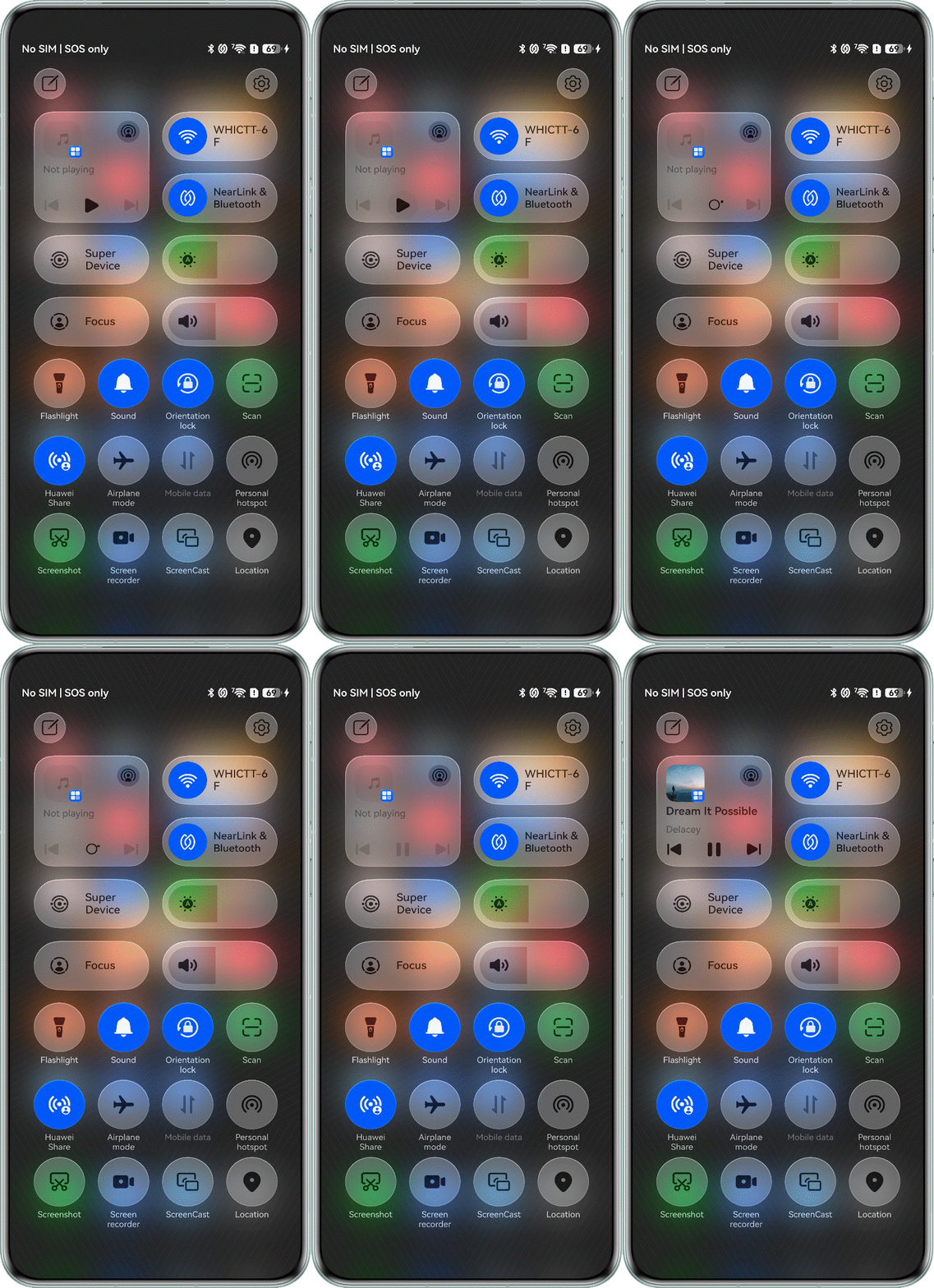
Register and adapt to the device-side intent calling to implement instant cold start playback and historical book list recommendation
1. Register the PlayAudio and PlayMusicList intents. For details, see Registering an Intent.
2. Set the book list name and unique ID.
public async setAVMetadata() {
  try {
    if (!this.context || !this.avSession || !this.audioControlCenter) {
      return;
    }
    const currentChapterIndex = this.audioControlCenter.getCurrentChapterIndex();
    const chapter = this.audioControlCenter.getCurrentChapter();
    if (!chapter) {
      return;
    }

    const duration = this.audioControlCenter.getDuration();
    let metadata: avSession.AVMetadata = {
      assetId: `${currentChapterIndex}`,
      title: chapter.title,
      artist: chapter.author,
      duration: duration,
      avQueueName: 'My Audio Book',
      avQueueId: 'AudioBookQueueId1',
      filter: avSession.ProtocolType.TYPE_CAST_PLUS_STREAM | avSession.ProtocolType.TYPE_DLNA |
        avSession.ProtocolType.TYPE_CAST_PLUS_AUDIO
    };
    try {
      const queuePixelMap = await MediaUtils.getPixelMapFromResource(this.context, $r('app.media.image_cover'));
      metadata.avQueueImage = queuePixelMap;
    } catch (error) {
      Logger.error(TAG, `Failed to load queue image: ${JSON.stringify(error)}`);
    }
    // get lyric
    if (chapter.lyric) {
      const lrc = await MediaUtils.getLrcFromRawFile(this.context, chapter.lyric);
      if (lrc) {
        metadata.lyric = lrc;
      }
    }
    // get PixelMap
    if (chapter.avatar) {
      try {
        const pixelMap = await MediaUtils.getPixelMapFromResource(this.context, chapter.avatar);
        metadata.mediaImage = pixelMap;
      } catch (error) {
        Logger.error(TAG, `Failed to load avatar: ${JSON.stringify(error)}`);
      }
    }
    // set AVMetadata
    this.avSession.setAVMetadata(metadata).then(() => {
      Logger.info(TAG, 'setAVMetadata succeeded');
    }).catch((err: BusinessError) => {
      Logger.error(TAG, `setAVMetadata failed: code: ${err.code}, message: ${err.message}`);
    });
  } catch (error) {
    Logger.error(TAG, `setAVMetadata failed: ${JSON.stringify(error)}`);
  }
}
3. Implement the intent execution logic.
private audioControlCenter: AudioControlCenter = AudioControlCenter.getInstance();

async onExecuteInUIAbilityBackgroundMode(intentName: string, intentParam: Record<string, Object>):
  Promise<insightIntent.ExecuteResult> {
  Logger.info(TAG, `onExecuteInUIAbilityBackgroundMode, intentName: ${intentName}`);

  switch (intentName) {
    case 'PlayMusic':
      let data = intentParam as Record<string, string>;
      return this.playFunc(data.entityId);
    case 'PlayMusicList':
      let entityId: string = (intentParam.items as Array<object>)?.[0]?.['entityId'];
      return this.playFunc(entityId);
    default:
      break;
  }

  return Promise.resolve({
    code: -1,
    result: { message: 'unknown intent' }
  } as insightIntent.ExecuteResult)
} An audiobook app may encounter various audio interruption scenarios. The system's handling methods and the app's response policies vary depending on the scenarios. The following table provides an overview of audio interruption scenarios.
Interruption Type | Example Scenario | Startup Sequence | System Behavior | App Response |
|---|---|---|---|---|
Pause scenario | Call, voice message, alarm, etc. | The audiobook plays first. | The playback is paused and a pause event is sent. | Processes the player status. |
Restoration scenario | After the pause scenario ends | - | A recovery event is sent, but the playback is not resumed. | The playback is resumed. |
Stop scenario | Other media apps are started. | The audiobook plays first. | The playback is stopped and a stop event is sent. | Processes the player status. |
Volume reduction scenario | Navigation voice broadcast | The audiobook plays first. | The volume is reduced, but no event is sent. | No action is required. The playback automatically resumes. |
Volume reduction scenario | Celia AI, alarm, and ringtone | The audiobook plays later. | The volume is reduced, but no event is sent. | No action is required. The playback automatically resumes. |
[h2]How to Implement
When an audio stream requests or releases audio focus, the system manages the audio focus of all audio streams (including playback and recording) based on the audio focus policy. For details, see the audio focus management solution.
1. Define the OnAudioInterruptEvent() callback function. In the case of sharing interruption, play the audio when the prompt audio is resumed. Stop playing the audio when the prompt audio is paused or stopped.
void OnAudioInterruptEvent(OH_AudioRenderer *audioRenderer, [[maybe_unused]] void *userData,
                                   OH_AudioInterrupt_ForceType type, OH_AudioInterrupt_Hint hint) {
    auto &player = OHAudioPlayer::GetInstance();

    if (hint == AUDIOSTREAM_INTERRUPT_HINT_PAUSE) {
        OH_LOG_INFO(LOG_APP, "Audio paused by interrupt.");
        player.isPaused.store(true);
        auto now = std::chrono::system_clock::now().time_since_epoch();
        player.pauseStartTime.store(std::chrono::duration_cast<std::chrono::milliseconds>(now).count());
        player.PlayStatusCallback(AudioConstants::PlayStatus::Pause);
    } else if (hint == AUDIOSTREAM_INTERRUPT_HINT_STOP) {
        OH_LOG_INFO(LOG_APP, "Audio stopped by interrupt.");
        player.PlayStatusCallback(AudioConstants::PlayStatus::Pause);
    } else if ((type == AUDIOSTREAM_INTERRUPT_SHARE) && (hint == AUDIOSTREAM_INTERRUPT_HINT_RESUME)) {
        OH_LOG_INFO(LOG_APP, "Audio resume interrupt received.");
        if (player.isPaused.load()) {
            auto now = std::chrono::system_clock::now().time_since_epoch();
            int64_t resumeTime = std::chrono::duration_cast<std::chrono::milliseconds>(now).count();
            int64_t pauseTime = player.pauseStartTime.load();
            int64_t elapsedMs = resumeTime - pauseTime;
            OH_LOG_INFO(LOG_APP, "Audio resume after %{public}ld ms.", elapsedMs);

            player.isPaused.store(false);

            if (elapsedMs <= player.RESUME_THRESHOLD_MS) {
                OH_LOG_INFO(LOG_APP, "Resume within 15s, resuming playback.");
                player.PlayStatusCallback(AudioConstants::PlayStatus::Play);
            } else {
                OH_LOG_INFO(LOG_APP, "Resume after 15s, not resuming playback.");
            }
        }
    } else if (hint == AUDIOSTREAM_INTERRUPT_HINT_MUTE) {
        OH_LOG_INFO(LOG_APP, "Audio muted, stopping progress update.");
        player.isMuted.store(true);
        player.mutePosition.store(player.GetCurrentPosition());
        auto now = std::chrono::system_clock::now().time_since_epoch();
        player.muteStartTime.store(std::chrono::duration_cast<std::chrono::milliseconds>(now).count());
        player.PlayStatusCallback(AudioConstants::PlayStatus::Muted);
    } else if (hint == AUDIOSTREAM_INTERRUPT_HINT_UNMUTE) {
        if (player.isMuted.load()) {
            auto now = std::chrono::system_clock::now().time_since_epoch();
            int64_t unmuteTime = std::chrono::duration_cast<std::chrono::milliseconds>(now).count();
            int64_t muteTime = player.muteStartTime.load();
            int64_t elapsedMs = unmuteTime - muteTime;
            player.isMuted.store(false);

            if (elapsedMs <= player.RESUME_THRESHOLD_MS) {
                OH_LOG_INFO(LOG_APP, "Unmute within 15s, notifying unmuted state.");
                player.PlayStatusCallback(AudioConstants::PlayStatus::UnMuted);
            } else {
                OH_LOG_INFO(LOG_APP, "Unmute after 15s, preparing position and notifying pause state.");
                uint32_t position = player.mutePosition.load();
                player.PreparePosition(position);
                player.PlayStatusCallback(AudioConstants::PlayStatus::Pause);
            }
        }
    }
}
2. Register the audio interruption callback in the InitPlayer() method.
(void)OH_AudioStreamBuilder_SetRendererInterruptCallback(rendererBuilder, OnAudioInterruptEvent, nullptr);
3. Process the playback state change at the ArkTS layer.
private async initAudioPlayer() {
  audioPlayer.initPlayer();
  audioPlayer.onPlayStatus((state: number) => {
    Logger.info(TAG, `onPlayStateChange is ${state}`);
    if (!this.isCasting) {
      switch (state) {
        case 1:
          this.play();
          break;
        case 2:
          this.pause();
          break;
        case 3:
          this.handleMuted();
          break;
        case 4:
          this.handleUnMuted();
          break;
      }
    }
  });
}